
TACC Inference: Easy Inference on Slurm Clusters
This repository provides an easy-to-use solution to run inference servers on Slurm-managed computing clusters using vLLM. All scripts in this repository runs natively on the TACC cluster environment.
tacc-inf focuses on providing a common API for the following tasks:
- Setup a server for a huggingface model that fits on a single
vistaGH100 compute node. - Setup a server for a huggingface model that needs to be distributed across multiple GH100s (
Meta-Llama-3.1-405B-Instruct) and requires commissioning multiple GH100 compute nodes. - Keeping track of concurrent servers on multiple compute nodes for LLM Agent based workflows.
Installation
Install the package via pip:
# I'm using miniconda; feel free to use your favourite package manager.
$ wget https://repo.anaconda.com/miniconda/Miniconda3-latest-Linux-aarch64.sh -O $WORK/bin/miniconda3/miniconda.sh
$ bash $WORK/bin/miniconda3/miniconda.sh -u -p $WORK/bin/miniconda3
# Install tacc-inf package
(base) $ pip install tacc-inf
(base) $ tacc-inf --help
Alternatively, if you intend to modify the tacc-inf package:
(base) $ git clone <this repo>
(base) $ cd <repo directory>
(base) $ pip install .
(base) $ tacc-inf --help
Install vLLM Singularity Container
Rather than installing vLLM directly on TACC, we run vLLM via a Singularity container. Learn how TACC integrates with Singularity containers here. You have three options to install the container on vista (aarch64 microarchitecture; GH100 GPUs):
Option 1: Use a Precompiled Container
# Option 1: Get atharva's vLLM Docker container.
$ ls /home1/08277/asehgal/work/vista/tacc-inference/static/llm-train-serve_aarch64.sif
# <should echo the path; if it gives an error, I haven't set the permissions correctly and you should open a github issue or browse for solutions on closed issues.>
$ cp /home1/08277/asehgal/work/vista/tacc-inference/static/llm-train-serve_aarch64.sif static/llm-train-serve_aarch64.sif
Option 2: Build the Docker Container Yourself
# Option 2: Make the docker container yourself.
$ cd static/
# Commission a node for 20 minutes.
$ idev -p gh-dev -N 1 -n 1 -t 00:20:00
$ module load tacc-apptainer
# Build the apptainer config from the llm-train-serve github (build for GH200 with an aarch64 microarchitecture but works for vista)
$ apptainer build llm-train-serve_aarch64.sif docker://ghcr.io/abacusai/gh200-llm/llm-train-serve@sha256:4ba3de6b19e8247ce5d351bf7dd41aa41bb3bffe8c790b7a2f4077af74c1b4ab
# Confirm that the SIF file file is in $WORK/static with this exact name.
$ ls $WORK/static
llm-train-serve_aarch64.sif
# Free up the dev compute node.
$ logout
Option 3: Install vLLM from Scratch
This method is not well-tested. You may need to adjust the *.slurm files if you proceed. I cannot guarantee that this will work.
# Option 3: Compile your own version of vLLM
# https://docs.vllm.ai/en/stable/getting_started/installation.html#use-an-existing-pytorch-installation
# Don't use the conda environment.
$ conda deactivate
# Commission a node for 40 minutes as it might take longer.
$ idev -p gh-dev -N 1 -n 1 -t 00:40:00
$ module load gcc/14.2.0 cuda/12.5
$ module load python3
$ python3 -m venv $WORK/vllm_env
$ source activate $WORK/vllm_env
# Install PyTorch for aarch64.
(vllm_env) $ pip3 install --pre torch torchvision torchaudio --index-url https://download.pytorch.org/whl/nightly/cu124
# Download, setup, and build vLLM.
(vllm_env) $ git clone https://github.com/vllm-project/vllm.git
(vllm_env) $ cd vllm
(vllm_env) $ python use_existing_torch.py
(vllm_env) $ pip install -r requirements-build.txt
(vllm_env) $ pip install -e . --no-build-isolation
(vllm_env) $ pip install tacc-inference
# Update `*.slurm` to use source activate $WORK/vllm_env.
Download a Model from Hugging Face
# The vllm.slurm script expects models to be here
$ mkdir -p $WORK/model-weights
# We're going to download the model from huggingface.
$ pip install huggingface-hub
$ huggingface-cli login
# Assume we want to download and use Meta-Llama-3.1-8B-Instruct
# First, verify that models.csv contains this model
$ cat tacc_inf/models/models.csv | grep Meta-Llama-3.1-8B-Instruct
# Make a folder to hold these model weights
$ mkdir -p $WORK/model-weights/Meta-Llama-3.1-8B-Instruct/
# Download from huggingface.
$ huggingface-cli download meta-llama/Llama-3.1-8B-Instruct --local-dir $WORK/model-weights/Meta-Llama-3.1-8B-Instruct/
Launch an Inference Server
We will use the Llama 3.1 model as example, to launch an OpenAI compatible inference server for Meta-Llama-3.1-8B-Instruct, run:
 tacc-inf launch Meta-Llama-3.1-8B-Instruct --time 00:10:00
Ignoring Line `'
Ignoring Line `-----------------------------------------------------------------'
Ignoring Line `          Welcome to the Vista Supercomputer                       '
Ignoring Line `-----------------------------------------------------------------'
Ignoring Line `'
Ignoring Line `No reservation for this job'
Ignoring Line `--> Verifying valid submit host (login1)...OK'
Ignoring Line `--> Verifying valid jobname...OK'
Ignoring Line `--> Verifying valid ssh keys...OK'
Ignoring Line `--> Verifying access to desired queue (gh-dev)...OK'
Ignoring Line `--> Checking available allocation (CGAI24022)...OK'
Ignoring Line `--> Quotas are not currently enabled for filesystem /home1/08277/asehgal...OK'
Ignoring Line `--> Verifying that quota for filesystem /work/08277/asehgal/vista is at 12.85% allocated...OK'
┏━━━━━━━━━━━━━━━┳━━━━━━━━━━━━━━━━━━━━━━━━━━━━┓
┃ Job Config    ┃ Value                      ┃
┡━━━━━━━━━━━━━━━╇━━━━━━━━━━━━━━━━━━━━━━━━━━━━┩
│ Slurm Job ID  │ 52126                      │
│ Job Name      │ Meta-Llama-3.1-8B-Instruct │
│ Partition     │ gh-dev                     │
│ Num Nodes     │ 1                          │
│ GPUs per Node │ 1                          │
│ QOS           │ m2                         │
│ Walltime      │ 00:10:00                   │
│ Data Type     │ auto                       │
└───────────────┴────────────────────────────┘
$ squeue -u asehgal
             JOBID   PARTITION     NAME     USER ST       TIME  NODES NODELIST(REASON)
             52126      gh-dev Meta-Lla  asehgal  R       0:23      1 c609-001
$ tacc-inf status 52126
┏━━━━━━━━━━━━━━┳━━━━━━━━━━━━━━━━━━━━━━━━━━━━┓
┃ Job Status   ┃ Value                      ┃
┡━━━━━━━━━━━━━━╇━━━━━━━━━━━━━━━━━━━━━━━━━━━━┩
│ Model Name   │ Meta-Llama-3.1-8B-Instruct │
│ Model Status │ LAUNCHING                  │
│ Base URL     │ UNAVAILABLE                │
└──────────────┴────────────────────────────┘
$ tacc-inf status 52126
┏━━━━━━━━━━━━━━┳━━━━━━━━━━━━━━━━━━━━━━━━━━━━┓
┃ Job Status   ┃ Value                      ┃
┡━━━━━━━━━━━━━━╇━━━━━━━━━━━━━━━━━━━━━━━━━━━━┩
│ Model Name   │ Meta-Llama-3.1-8B-Instruct │
│ Model Status │ READY                      │
│ Base URL     │ http://c609-001:8080/v1    │
└──────────────┴────────────────────────────┘
$ curl http://c609-001:8080/v1/completions -H "Content-Type: application/json"   -H "Authorization: Bearer token-abc123adfafaf"   -d '{"model": "Meta-Llama-3.1-8B-Instruct", "prompt": "Once upon a time,", "max_tokens": 50, "temperature": 0.7}'
{"id":"cmpl-d8384b7f896c48d991128c74a5712cb1","object":"text_completion","created":1729045295,"model":"Meta-Llama-3.1-8B-Instruct","choices":[{"index":0,"text":" there was a man who lived in a small village nestled in the rolling hills of a far-off land. This man, named Kaito, was a humble and kind soul who spent his days tending to his family's farm. Kaito","logprobs":null,"finish_reason":"length","stop_reason":null,"prompt_logprobs":null}],"usage":{"prompt_tokens":6,"total_tokens":56,"completion_tokens":50}}
$ tail ~/.tacc-inf-logs/Meta-Llama-3.1/Meta-Llama-3.1-8B-Instruct.52126.out
INFO 10-15 21:21:16 metrics.py:351] Avg prompt throughput: 0.0 tokens/s, Avg generation throughput: 0.0 tokens/s, Running: 0 reqs, Swapped: 0 reqs, Pending: 0 reqs, GPU KV cache usage: 0.0%, CPU KV cache usage: 0.0%.
INFO 10-15 21:21:26 metrics.py:351] Avg prompt throughput: 0.0 tokens/s, Avg generation throughput: 0.0 tokens/s, Running: 0 reqs, Swapped: 0 reqs, Pending: 0 reqs, GPU KV cache usage: 0.0%, CPU KV cache usage: 0.0%.
INFO 10-15 21:21:35 logger.py:36] Received request cmpl-d8384b7f896c48d991128c74a5712cb1-0: prompt: 'Once upon a time,', params: SamplingParams(n=1, best_of=1, presence_penalty=0.0, frequency_penalty=0.0, repetition_penalty=1.0, temperature=0.7, top_p=1.0, top_k=-1, min_p=0.0, seed=None, use_beam_search=False, length_penalty=1.0, early_stopping=False, stop=[], stop_token_ids=[], include_stop_str_in_output=False, ignore_eos=False, max_tokens=50, min_tokens=0, logprobs=None, prompt_logprobs=None, skip_special_tokens=True, spaces_between_special_tokens=True, truncate_prompt_tokens=None), prompt_token_ids: [128000, 12805, 5304, 264, 892, 11], lora_request: None, prompt_adapter_request: None.
INFO 10-15 21:21:35 async_llm_engine.py:208] Added request cmpl-d8384b7f896c48d991128c74a5712cb1-0.
INFO 10-15 21:21:35 metrics.py:351] Avg prompt throughput: 0.7 tokens/s, Avg generation throughput: 0.1 tokens/s, Running: 1 reqs, Swapped: 0 reqs, Pending: 0 reqs, GPU KV cache usage: 0.0%, CPU KV cache usage: 0.0%.
INFO 10-15 21:21:35 async_llm_engine.py:176] Finished request cmpl-d8384b7f896c48d991128c74a5712cb1-0.
INFO:     129.114.16.11:52600 - "POST /v1/completions HTTP/1.1" 200 OK
INFO 10-15 21:21:46 metrics.py:351] Avg prompt throughput: 0.0 tokens/s, Avg generation throughput: 4.5 tokens/s, Running: 0 reqs, Swapped: 0 reqs, Pending: 0 reqs, GPU KV cache usage: 0.0%, CPU KV cache usage: 0.0%.
INFO 10-15 21:21:56 metrics.py:351] Avg prompt throughput: 0.0 tokens/s, Avg generation throughput: 0.0 tokens/s, Running: 0 reqs, Swapped: 0 reqs, Pending: 0 reqs, GPU KV cache usage: 0.0%, CPU KV cache usage: 0.0%.
INFO 10-15 21:22:06 metrics.py:351] Avg prompt throughput: 0.0 tokens/s, Avg generation throughput: 0.0 tokens/s, Running: 0 reqs, Swapped: 0 reqs, Pending: 0 reqs, GPU KV cache usage: 0.0%, CPU KV cache usage: 0.0%.
$ tacc-inf shutdown 52126
Shutting down model with Slurm Job ID: 52126
$ squeue -u asehgal
             JOBID   PARTITION     NAME     USER ST       TIME  NODES NODELIST(REASON)
Overall Structure
tacc-inf touches the following files and directories:
$HOME/.tacc-inf-logs/                   # Logging directory for TACC
└── Meta-Llama-3.1
    ├── Meta-Llama-3.1-8B-Instruct.52126.err
    └── Meta-Llama-3.1-8B-Instruct.52126.out

$WORK/
├── models
├── model-weights                        # Consult "Download a Model from Hugging Face" section
│   └── Meta-Llama-3.1-8B-Instruct
├── static                               # Consult "Install vLLM Singularity Container" section
│   └── llm-train-serve_aarch64.sif
└── tacc-inference                       # (Optional) If you're modifying the package locally
    ├── examples
    ├── poetry.lock
    ├── profile
    ├── pyproject.toml
    ├── README.md
    ├── tacc_inf
    └── venv.sh
The model would be launched using the default parameters, you can override these values by providing additional options, use --help to see the full list. You can also launch your own customized model as long as the model architecture is supported by vLLM, you'll need to specify all model launching related options to run a successful run.
You can check the inference server status by providing the Slurm job ID to the status command:
tacc-inf status 13014393
You should see an output like the following:
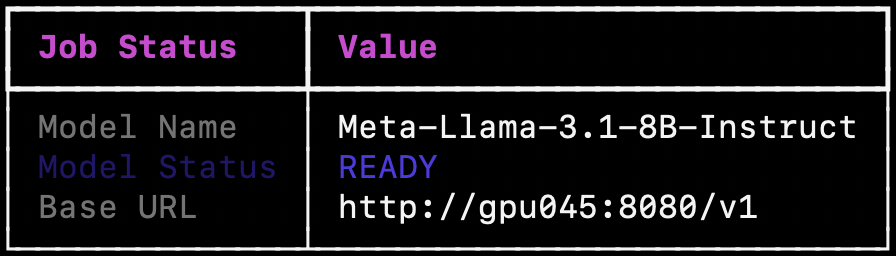
There are 5 possible states:
- PENDING: Job submitted to Slurm, but not executed yet. Job pending reason will be shown.
- LAUNCHING: Job is running but the server is not ready yet.
- READY: Inference server running and ready to take requests.
- FAILED: Inference server in an unhealthy state. Job failed reason will be shown.
- SHUTDOWN: Inference server is shutdown/cancelled.
Note that the base URL is only available when model is in READY state, and if you've changed the Slurm log directory path, you also need to specify it when using the status command.
Finally, when you're finished using a model, you can shut it down by providing the Slurm job ID:
tacc-inf shutdown 13014393

> Shutting down model with Slurm Job ID: 13014393
You call view the full list of available models by running the list command:
tacc-inf list
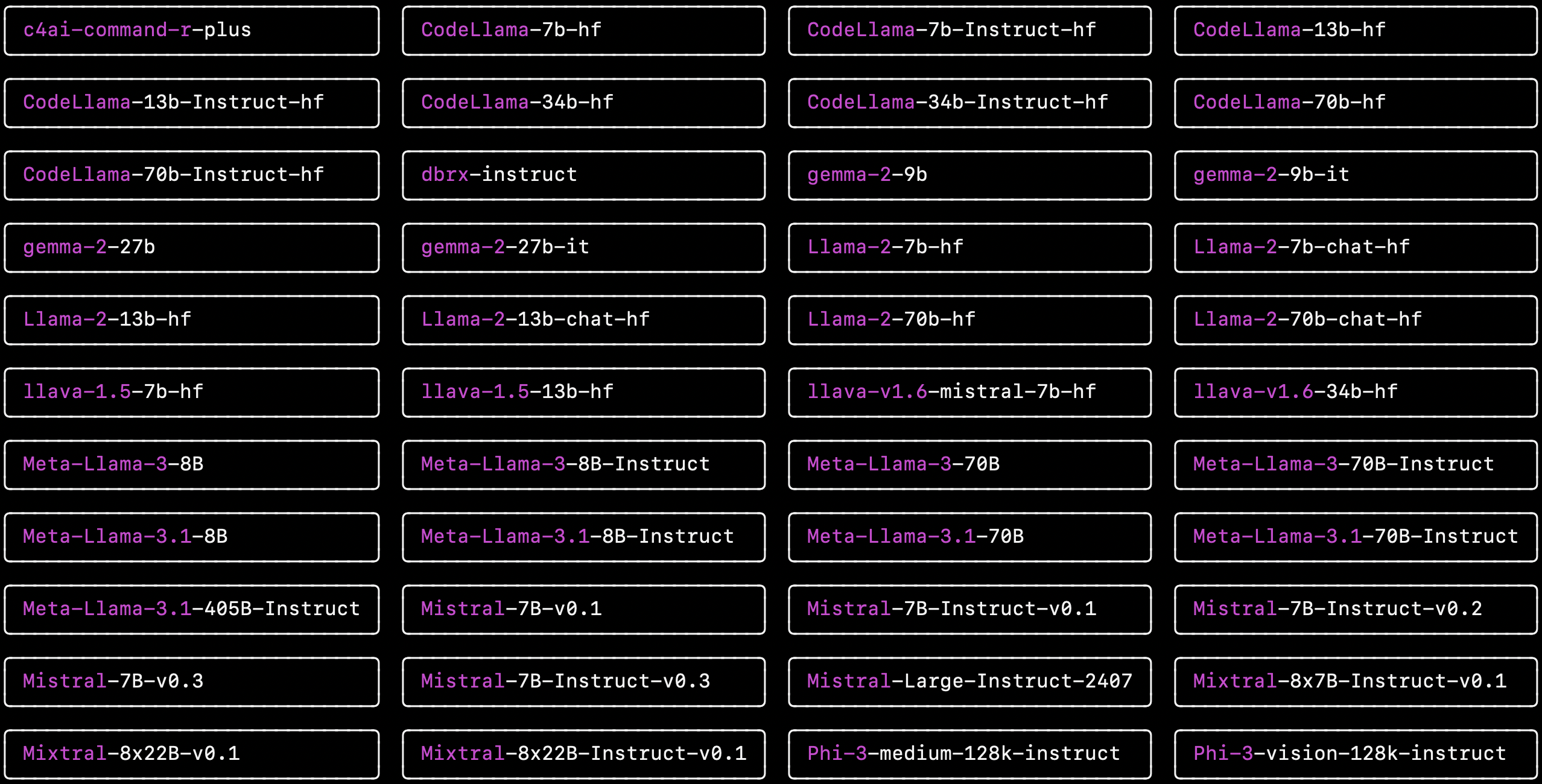
You can also view the default setup for a specific supported model by providing the model name, for example Meta-Llama-3.1-70B-Instruct:
tacc-inf list Meta-Llama-3.1-70B-Instruct
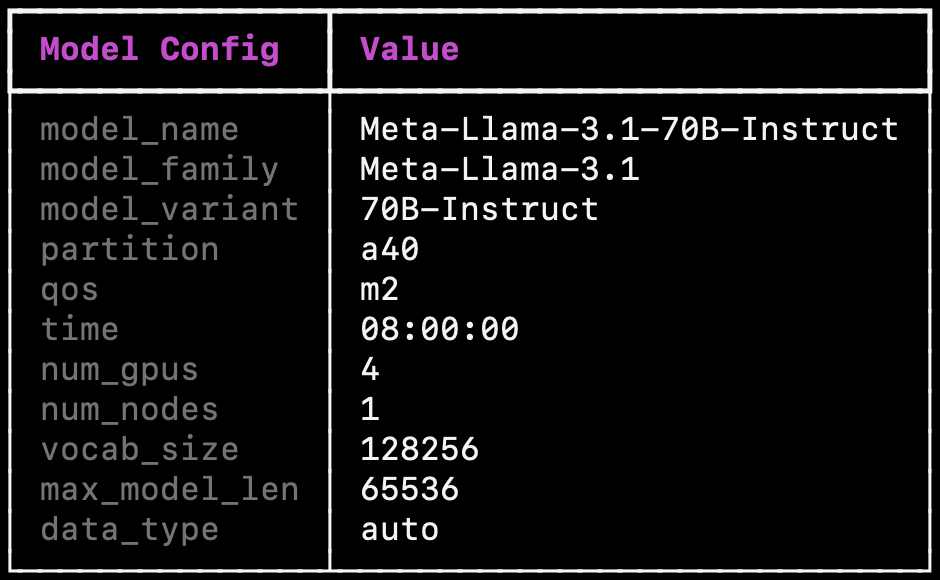
launch, list, and status command supports --json-mode, where the command output would be structured as a JSON string.
Send inference requests
Once the inference server is ready, you can start sending in inference requests. We provide example scripts for sending inference requests in examples folder. Make sure to update the model server URL and the model weights location in the scripts. For example, you can run python examples/inference/llm/completions.py, and you should expect to see an output like the following:
{"id":"cmpl-c08d8946224747af9cce9f4d9f36ceb3","object":"text_completion","created":1725394970,"model":"Meta-Llama-3.1-8B-Instruct","choices":[{"index":0,"text":" is a question that many people may wonder. The answer is, of course, Ottawa. But if","logprobs":null,"finish_reason":"length","stop_reason":null}],"usage":{"prompt_tokens":8,"total_tokens":28,"completion_tokens":20}}
NOTE: For multimodal models, currently only ChatCompletion is available, and only one image can be provided for each prompt.
SSH tunnel from your local device
If you want to run inference from your local device, you can open a SSH tunnel to your cluster environment like the following:
ssh -L 8081:172.17.8.29:8081 username@v.vectorinstitute.ai -N
Where the last number in the URL is the GPU number (gpu029 in this case). The example provided above is for the vector cluster, change the variables accordingly for your environment
1 maintainer

Metadata
1 maintainer
Release files for tacc-inf 0.2.2
For a detailed explanation of source distributions (sdists) and built distributions (wheels), please see the package formats documentation.
Source distribution (sdist)
| File | Size | Uploaded | Provenance | |
|---|---|---|---|---|
| tacc_inf-0.2.2.tar.gz | 21.4 kB | Without provenance | Details |
Built distribution (wheel)
| File | Interpreter | ABI | Platform | Reset |
|---|---|---|---|---|
| tacc_inf-0.2.2-py3-none-any.whl | Python 3 | none | any | Details |
Total release size: 41.3 kB
Release files / tacc_inf-0.2.2.tar.gz
| Download URL | tacc_inf-0.2.2.tar.gz |
|---|---|
| Size | 21.4 kB |
| Tags | Source |
|
SHA-256 checksum How to use checksums |
d053cef0910331f7150c709f69f25eecb4d803ba3f6b7f6e52aa404128959e24
|
|
BLAKE2b-256 checksum How to use checksums |
0f1278567d47856407314537d69c448b52354f7b4ea92dd4e3f448d2f7198fbf
|
| Upload date | |
|
Uploaded using Trusted Publishing? What is trusted publishing? |
No |
| Uploaded via |
twine/5.1.1 CPython/3.9.20
|
Release files / tacc_inf-0.2.2-py3-none-any.whl
| Download URL | tacc_inf-0.2.2-py3-none-any.whl |
|---|---|
| Size | 19.9 kB |
| Tags | Python 3 |
|
SHA-256 checksum How to use checksums |
5a31a041d345d1b46f6f9bcf5a8ef676e810bf48840a389e3ddf4415c115aab6
|
|
BLAKE2b-256 checksum How to use checksums |
e88a558fe00c476c847203a6e32a820de14f2ee9584777246835559bb6a9202f
|
| Upload date | |
|
Uploaded using Trusted Publishing? What is trusted publishing? |
No |
| Uploaded via |
twine/5.1.1 CPython/3.9.20
|
Security for tacc-inf 0.2.2
Provenance
Provenance describes where a file came from. On PyPI, provenance is shared via attestations, which provide a verifiable record of the build or publishing details. View details, limitations and caveats.
No provenance found
None of the files in this release were uploaded with provenance metadata.
A note on package security
PyPI is a repository for distributing packages, not a service for auditing them. While third-party security researchers and our staff do their best to detect and remove malicious packages, PyPI cannot guarantee the quality, security or suitability of any given package.














