

Tacotron with Location Relative Attention
A PyTorch implementation of Location-Relative Attention Mechanisms For Robust Long-Form Speech Synthesis. Audio samples can be found here. Colab demo can be found here.
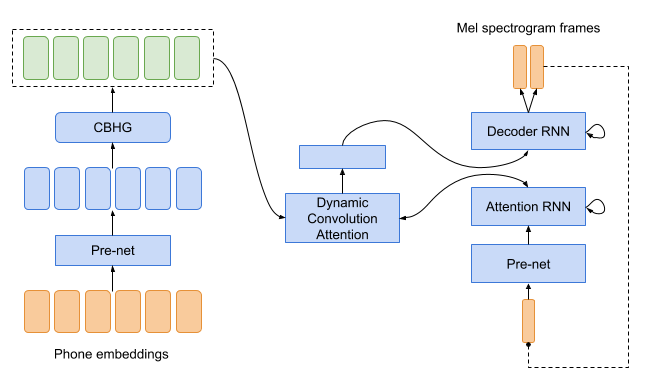
Fig 1:Tacotron (with Dynamic Convolution Attention).

Fig 2:Example Mel-spectrogram and attention plot.
Quick Start
Ensure you have Python 3.6 and PyTorch 1.7 or greater installed. Then install this package (along with the univoc vocoder):
pip install tacotron univoc
Example Usage
import torch
import soundfile as sf
from univoc import Vocoder
from tacotron import load_cmudict, text_to_id, Tacotron

# download pretrained weights for the vocoder (and optionally move to GPU)
vocoder = Vocoder.from_pretrained(
    "https://github.com/bshall/UniversalVocoding/releases/download/v0.2/univoc-ljspeech-7mtpaq.pt"
).cuda()

# download pretrained weights for tacotron (and optionally move to GPU)
tacotron = Tacotron.from_pretrained(
    "https://github.com/bshall/Tacotron/releases/download/v0.1/tacotron-ljspeech-yspjx3.pt"
).cuda()

# load cmudict and add pronunciation of PyTorch
cmudict = load_cmudict()
cmudict["PYTORCH"] = "P AY1 T AO2 R CH"

text = "A PyTorch implementation of Location-Relative Attention Mechanisms For Robust Long-Form Speech Synthesis."

# convert text to phone ids
x = torch.LongTensor(text_to_id(text, cmudict)).unsqueeze(0).cuda()

# synthesize audio
with torch.no_grad():
    mel, _ = tacotron.generate(x)
    wav, sr = vocoder.generate(mel.transpose(1, 2))

# save output
sf.write("location_relative_attention.wav", wav, sr)
Train from Scatch
- Clone the repo:
git clone https://github.com/bshall/Tacotron
cd ./Tacotron
- Install requirements:
pipenv install
- Download and extract the LJ-Speech dataset:
wget https://data.keithito.com/data/speech/LJSpeech-1.1.tar.bz2
tar -xvjf LJSpeech-1.1.tar.bz2
- Download the train split here and extract it in the root directory of the repo.
- Extract Mel spectrograms and preprocess audio:
pipenv run python preprocess.py path/to/LJSpeech-1.1 datasets/LJSpeech-1.1
usage: preprocess.py [-h] in_dir out_dir

Preprocess an audio dataset.

positional arguments:
  in_dir      Path to the dataset directory
  out_dir     Path to the output directory

optional arguments:
  -h, --help  show this help message and exit
- Train the model:
pipenv run python train.py ljspeech datasets/LJSpeech-1.1 path/to/LJSpeech-1.1/metadata.csv
usage: train.py [-h] [--resume RESUME] checkpoint_dir text_path dataset_dir

Train Tacotron with dynamic convolution attention.

positional arguments:
  checkpoint_dir   Path to the directory where model checkpoints will be saved
  text_path        Path to the dataset transcripts
  dataset_dir      Path to the preprocessed data directory

optional arguments:
  -h, --help       show this help message and exit
  --resume RESUME  Path to the checkpoint to resume from
Pretrained Models
Pretrained weights for the LJSpeech model are available here.
Notable Differences from the Paper
- Trained using a batch size of 64 on a single GPU (using automatic mixed precision).
- Used a gradient clipping threshold of 0.05 as it seems to stabilize the alignment with the smaller batch size.
- Used a different learning rate schedule (again to deal with smaller batch size).
- Used 80-bin (instead of 128 bin) log-Mel spectrograms.
Acknowlegements
1 maintainer

Metadata
1 maintainer
Release files for tacotron 0.1.1
For a detailed explanation of source distributions (sdists) and built distributions (wheels), please see the package formats documentation.
Source distribution (sdist)
| File | Size | Uploaded | Provenance | Actions |
|---|---|---|---|---|
| tacotron-0.1.1.tar.gz | 907.9 kB | Without provenance | Details for tacotron-0.1.1.tar.gz |
Built distribution (wheel)
| File | Interpreter | ABI | Platform | Actions Reset |
|---|---|---|---|---|
| tacotron-0.1.1-py3-none-any.whl | Python 3 | none | any | Details for tacotron-0.1.1-py3-none-any.whl |
Total release size: 1.8 MB
Release files / tacotron-0.1.1.tar.gz
| Download URL | tacotron-0.1.1.tar.gz |
|---|---|
| Size | 907.9 kB |
| Tags | Source |
|
SHA-256 checksum How to use checksums |
c3ecdd147b0a0eb330a5af5616471c294b3ee64b7e029d844c58a11249450d29
|
|
BLAKE2b-256 checksum How to use checksums |
0cd8c28e524dc0ee77d0d9933cdffa92066c4692fc5be6c3a6ab40562fa78b18
|
| Upload date | |
|
Uploaded using Trusted Publishing? What is trusted publishing? |
No |
| Uploaded via |
twine/3.2.0 pkginfo/1.6.1 requests/2.25.0 setuptools/50.3.2 requests-toolbelt/0.9.1 tqdm/4.53.0 CPython/3.7.5
|
Release files / tacotron-0.1.1-py3-none-any.whl
| Download URL | tacotron-0.1.1-py3-none-any.whl |
|---|---|
| Size | 910.4 kB |
| Tags | Python 3 |
|
SHA-256 checksum How to use checksums |
f78aeea2215500b48bfd8be1747ac2e371255573fbc264afcefbcfd23aaa0b03
|
|
BLAKE2b-256 checksum How to use checksums |
9a5fa2c8bc063a3a1c232c9ecb2b3356e93428457014d695ea051513159cd088
|
| Upload date | |
|
Uploaded using Trusted Publishing? What is trusted publishing? |
No |
| Uploaded via |
twine/3.2.0 pkginfo/1.6.1 requests/2.25.0 setuptools/50.3.2 requests-toolbelt/0.9.1 tqdm/4.53.0 CPython/3.7.5
|
Security for tacotron 0.1.1
Provenance
Provenance describes where a file came from. On PyPI, provenance is shared via attestations, which provide a verifiable record of the build or publishing details. View details, limitations and caveats.
No provenance found
None of the files in this release were uploaded with provenance metadata.
A note on package security
PyPI is a repository for distributing packages, not a service for auditing them. While third-party security researchers and our staff do their best to detect and remove malicious packages, PyPI cannot guarantee the quality, security or suitability of any given package.
To learn more about protecting yourself from malicious actors, visit our package security documentation.














