
TAgent - Modular AI Agent Framework with Dynamic Tool Discovery

Project description
TAgent - When You're Tired of Unnecessarily Complex Agent Frameworks


A minimalist, Redux-inspired framework for AI agents that actually makes sense
Fed up with bloated frameworks that need 50 dependencies and 200 lines of boilerplate just to make a simple automation? TAgent is a straightforward, less verbose approach to building AI agents that solve specific problems without the unnecessary complexity.
Why TAgent?
TAgent follows a simple philosophy: state-controlled execution with LLM fallbacks. Instead of complex function calling or massive dependency trees, you get:
- Redux-inspired Architecture: Predictable state management with centralized store
- State Machine Control: Prevents infinite loops and unpredictable behavior
- Structured Outputs: Works with any LLM via JSON, not function calling
- Intelligent Fallbacks: When tools don't exist, uses LLM knowledge directly
- Zero Boilerplate: Get started with 3 lines of code
Quick Start
pip install -e .
from tagent import run_agent
from tagent.config import TAgentConfig

# Simple usage with configuration
config = TAgentConfig(
    model="gpt-4o-mini",
    max_iterations=3,
    verbose=True
)

result = run_agent(
    goal="Translate 'Hello world' to Chinese",
    config=config
)

print(result.get("raw_data", {}).get("llm_direct_response"))
# Output: 你好世界
Configuration System
TAgent v0.5.0 introduces a comprehensive configuration system that centralizes all agent settings. You can configure UI style, model settings, execution parameters, and more.
Basic Configuration
from tagent import run_agent
from tagent.config import TAgentConfig
from tagent.ui.factory import UIStyle

# Create configuration
config = TAgentConfig(
    model="gpt-4o-mini",
    max_iterations=10,
    verbose=True,
    ui_style=UIStyle.INSTITUTIONAL,  # or UIStyle.ANIMATED
    api_key="your-api-key"
)

# Use configuration
result = run_agent("Your goal here", config=config)
Environment Variables
Configure TAgent using environment variables:
export TAGENT_MODEL="gpt-4o-mini"
export TAGENT_MAX_ITERATIONS=20
export TAGENT_VERBOSE=true
export TAGENT_UI_STYLE=institutional  # or animated
export TAGENT_API_KEY="your-api-key"
UI Styles
TAgent supports two UI styles:
Animated UI (Matrix-style)
- Retro terminal effects with typing animations
- Blinking cursor and thinking animations
- Colorful output perfect for demonstrations
Institutional UI (Server-focused)
- Clean, structured logging:
timestamp [LEVEL] COMPONENT: message - No animations, optimized for server environments
- Perfect for production and log analysis
# Set UI style programmatically
from tagent.ui import set_ui_style
from tagent.ui.factory import UIStyle

set_ui_style(UIStyle.INSTITUTIONAL)
CLI Tool Configuration
TAgent provides a CLI for running agents with dynamic tool discovery:
# Run without tools (uses LLM knowledge only)
python -m tagent "What is 2+2?" --model gpt-4o-mini

# Run with tools from specific directory
python -m tagent "Analyze recent articles" --search-dir ./examples/tab_news_analyzer

# Run with specific tool files
python -m tagent "Plan a trip" --tools ./travel/tagent.tools.py --tools ./weather/tagent.tools.py
Tool Discovery Options
The CLI supports several ways to configure tool loading:
--tools- Specify exact paths totagent.tools.pyfiles--search-dir- Search directories for tool files (supports multiple directories)--recursive- Search directories recursively (default: True)--no-recursive- Disable recursive search--output- Specify path totagent.output.pyfor structured outputs
Default Behavior
Important: When no tool configuration is provided, TAgent runs without tools and uses LLM knowledge only. This prevents unwanted recursive searches in your entire file system.
# These run without tools:
python -m tagent "Simple question"
python -m tagent "Calculate something" --model gpt-4o-mini

# These search for tools:
python -m tagent "Complex task" --search-dir .
python -m tagent "Use specific tool" --tools ./my_tools/tagent.tools.py
Tool File Structure
Tools must be in files named tagent.tools.py with this signature:
def my_tool(state: Dict[str, Any], args: Dict[str, Any]) -> Optional[Tuple[str, Any]]:
    """
    Tool description here.

    Args:
        state: Current agent state
        args: Tool arguments from LLM

    Returns:
        Tuple of (key, value) for state update
    """
    # Your tool logic here
    return ("result_key", result_value)
Examples
# Run with tools from current directory (recursive search)
python -m tagent "Analyze data" --search-dir . --recursive

# Run with tools from specific directories only
python -m tagent "Multi-step task" --search-dir ./tools --search-dir ./integrations

# Run with exact tool files and custom output format
python -m tagent "Generate report" --tools ./reporting/tagent.tools.py --output ./reporting/tagent.output.py

# Run without any tools (LLM knowledge only)
python -m tagent "Simple calculation" --model gpt-4o-mini
How It Works Under the Hood
Deterministic State Machine
Instead of letting the LLM do whatever it wants, the agent follows a controlled flow:
INITIAL → PLAN → EXECUTE → EVALUATE → (loop until goal achieved)
Each transition is validated, preventing infinite loops and unpredictable behaviors.
Structured Outputs Over Function Calling
No function calling dependency. The LLM returns structured JSON validated with Pydantic:
{
  "action": "execute",
  "params": {"tool": "search", "args": {"query": "python"}},
  "reasoning": "Need to search for Python information"
}
Intelligent Fallback System
If a tool doesn't exist, the agent uses the LLM's own knowledge as fallback. No crashes, no errors - it just works.
# Tool not found? No problem!
# Agent automatically uses LLM knowledge instead
Real-World Example
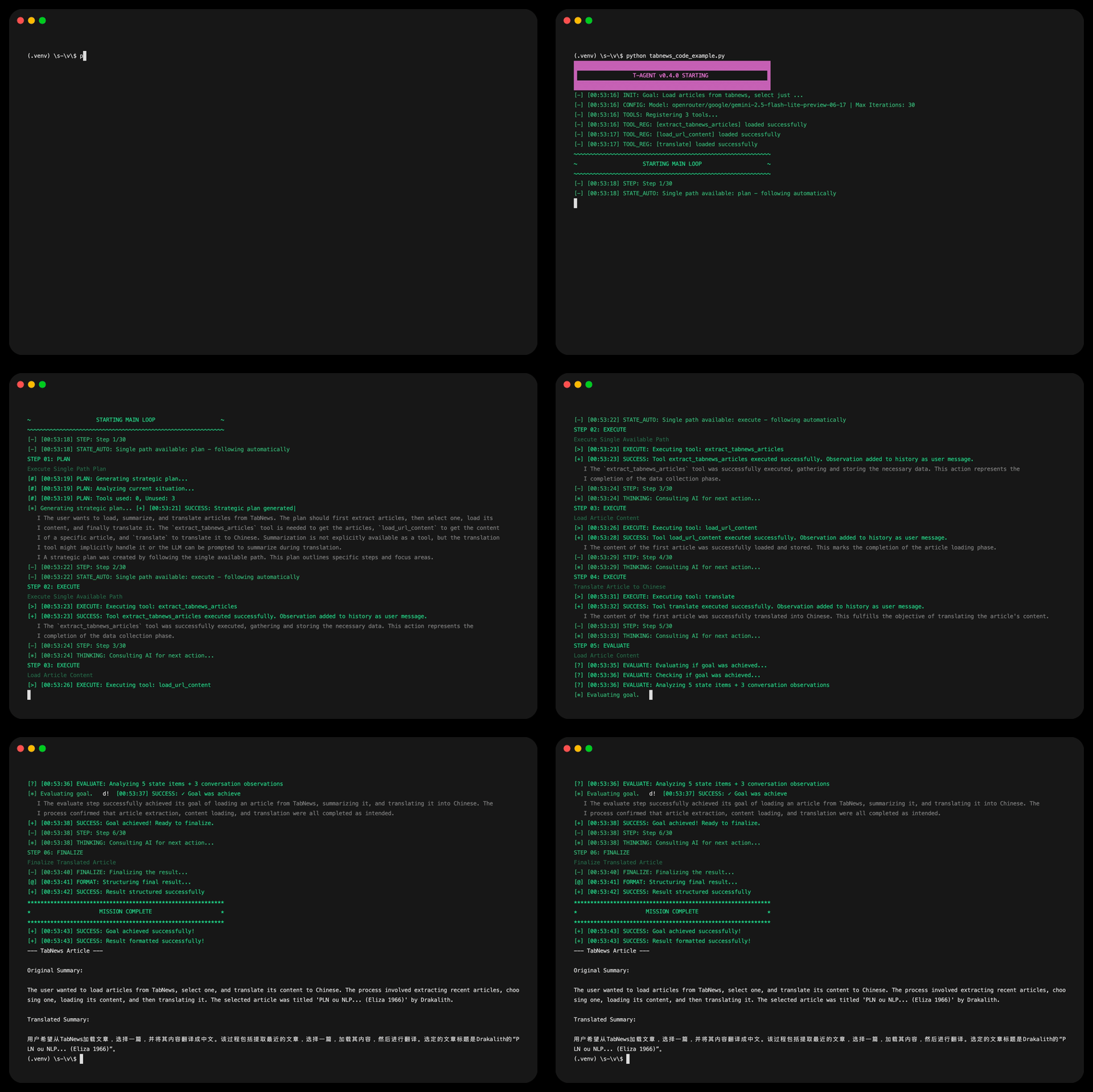
Here's an agent that extracts and translates TabNews articles:
def extract_tabnews_articles(state, args):
    """Extract recent articles from TabNews RSS"""
    response = requests.get("https://www.tabnews.com.br/recentes/rss")
    root = ET.fromstring(response.content)

    articles = []
    for item in root.findall('.//item'):
        articles.append({
            "url": item.find('link').text,
            "title": item.find('title').text,
            "publication_date": item.find('pubDate').text
        })

    return ("articles", articles)

def translate(state, args):
    """Translate text using direct LLM call"""
    text = args.get("text", "")
    target = args.get("target_language", "")

    response = litellm.completion(
        model="gpt-4o-mini",
        messages=[
            {"role": "system", "content": "You are a professional translator."},
            {"role": "user", "content": f"Translate to {target}: {text}"}
        ]
    )

    return ("translation", {"translation": response.choices[0].message.content})

# Run the agent with configuration
config = TAgentConfig(
    model="gpt-4o-mini",
    max_iterations=15,
    tools={
        "extract_tabnews_articles": extract_tabnews_articles,
        "load_url_content": load_url_content,
        "translate": translate
    },
    verbose=True
)

result = run_agent(
    goal="Get 1 TabNews article, load content, summarize and translate to Chinese",
    config=config
)
The agent plans, executes tools in the correct order, and delivers structured results.
Tool Ecosystem & Extensibility
Currently no default tools (keeping it minimal), but adapters are being developed for:
- CrewAI tools
- LangChain tools
- Model Context Protocol (MCP) tools
The idea is to leverage existing ecosystems without being locked into them.
Why Redux for Agents?
- Predictable State: Always know what's happening
- Debug Friendly: Every step is logged and inspectable
- Composition: Tools are pure functions, easy to test
- Extensible: Adding new actions is trivial
- Time Travel: Replay actions for debugging
Performance & Model Support
Works with any model via LiteLLM:
- OpenAI (GPT-4, GPT-3.5)
- Anthropic (Claude)
- Ollama (local models)
- OpenRouter
- Google Gemini
- Azure OpenAI
- And 100+ more...
Each action type can use a different model (planning with GPT-4, execution with cheaper model).
UI Styles in Action
Animated UI (Matrix-style)
Perfect for demonstrations and interactive use:
▓▓▓▓▓▓▓▓▓▓▓▓▓▓▓▓▓▓▓▓▓▓▓▓▓▓▓▓▓▓▓▓▓▓▓▓▓▓▓▓▓▓▓▓▓▓▓▓▓▓▓▓▓▓▓▓▓▓▓▓
▓                 T-AGENT v0.5.0 STARTING                  ▓
▓▓▓▓▓▓▓▓▓▓▓▓▓▓▓▓▓▓▓▓▓▓▓▓▓▓▓▓▓▓▓▓▓▓▓▓▓▓▓▓▓▓▓▓▓▓▓▓▓▓▓▓▓▓▓▓▓▓▓▓
[-] [12:34:56] INIT: Goal: Translate hello world to Chinese
[#] [12:34:57] PLAN: Generating strategic plan...
[>] [12:34:58] EXECUTE: Using LLM fallback for translation
[+] [12:34:59] SUCCESS: Translation completed!
★★★★★★★★★★★★★★★★★★★★★★★★★★★★★★★★★★★★★★★★★★★★★★★★★★★★★★★★★★★★
★                     MISSION COMPLETE                     ★
★★★★★★★★★★★★★★★★★★★★★★★★★★★★★★★★★★★★★★★★★★★★★★★★★★★★★★★★★★★★
Institutional UI (Server-focused)
Clean, structured logging for production environments:
2025-07-14 12:34:56 [INFO ] SYSTEM: Banner: T-AGENT v0.5.0 STARTING
2025-07-14 12:34:56 [INFO ] AGENT: INIT: Goal: Translate hello world to Chinese
2025-07-14 12:34:57 [INFO ] PLANNER: Plan: Generate strategic plan for translation
2025-07-14 12:34:58 [INFO ] EXECUTE: Using LLM fallback for translation
2025-07-14 12:34:59 [INFO ] AGENT: SUCCESS: Translation completed!
Choose the style that fits your environment:
from tagent.config import TAgentConfig
from tagent.ui.factory import UIStyle

# For development/demos
config = TAgentConfig(ui_style=UIStyle.ANIMATED)

# For production/servers
config = TAgentConfig(ui_style=UIStyle.INSTITUTIONAL)
Architecture Overview
TAgent Framework
├── 🎯 State Machine Controller
│   ├── Deterministic action flow
│   ├── Loop prevention
│   └── Transition validation
├── 🤖 Agent Core
│   ├── Redux-inspired store
│   ├── LLM decision making
│   ├── Tool execution
│   └── Intelligent fallbacks
├── 🛠️ Tool System
│   ├── Pure function interface
│   ├── Dynamic discovery
│   └── Type-safe signatures
└── 📊 Structured Outputs
    ├── Pydantic validation
    ├── JSON schema enforcement
    └── Type-safe results
Advanced Configuration
Model Configuration
from tagent.config import TAgentConfig
from tagent.model_config import AgentModelConfig

# Advanced model configuration with step-specific models
model_config = AgentModelConfig(
    tagent_model="gpt-4o",  # Global fallback
    tagent_planner_model="gpt-4o-mini",  # Planning tasks
    tagent_executor_model="gpt-3.5-turbo",  # Tool execution
    api_key="your-api-key"
)

config = TAgentConfig(
    model=model_config,  # Pass advanced model config
    max_iterations=20,
    verbose=True,
    ui_style=UIStyle.INSTITUTIONAL
)

result = run_agent(
    goal="Complex multi-step task",
    config=config
)
Configuration File Support
from tagent.config import load_config

# Load from JSON file
config = load_config("config.json")

# Load from YAML file (requires PyYAML)
config = load_config("config.yaml")

# Load with environment override
config = load_config("config.json", env_override=True)
Configuration Merging
from tagent.config import TAgentConfig

# Base configuration
base_config = TAgentConfig(
    model="gpt-4o-mini",
    max_iterations=10
)

# Override specific settings
prod_config = TAgentConfig(
    ui_style=UIStyle.INSTITUTIONAL,
    verbose=False
)

# Merge configurations
final_config = base_config.merge(prod_config)
Environment Variables
export TAGENT_MODEL="gpt-4o-mini"
export TAGENT_PLANNER_MODEL="gpt-4o"
export TAGENT_MAX_ITERATIONS=20
export TAGENT_VERBOSE=true
export TAGENT_UI_STYLE=institutional
export TAGENT_API_KEY="your-key"
Try It Yourself
# Clone the repository
git clone https://github.com/yourusername/tagent2
cd tagent2

# Install in development mode
pip install -e .

# Try without tools (uses LLM knowledge only)
python -m tagent "What is the capital of France?" --model gpt-4o-mini

# Try with tools from an example
python -m tagent "Get recent TabNews articles" --search-dir ./examples/tab_news_analyzer

# Run the TabNews example programmatically
python examples/tab_news_analyzer/tabnews_code_example.py
Examples Directory
Check out the /examples folder for real implementations:
tab_news_analyzer/- Extract and translate TabNews articlestravel_planning/- Multi-step travel planning agentsimple_qa/- Direct question answering without tools
Each example shows different patterns and use cases.
What's New in v0.5.0
Configuration System
- ✅ Centralized configuration via
TAgentConfig - ✅ Environment variable support
- ✅ Configuration file support (JSON/YAML)
- ✅ Configuration merging and inheritance
UI System Redesign
- ✅ Modular UI architecture with strategy pattern
- ✅ Animated UI: Matrix-style terminal effects
- ✅ Institutional UI: Clean structured logging
- ✅ Runtime UI style switching
Developer Experience
- ✅ Better error handling and diagnostics
- ✅ Improved debugging capabilities
- ✅ Type-safe configuration system
- ✅ Comprehensive documentation
Roadmap
- CrewAI/LangChain/MCP tool adapters
- Persistent memory system
- Default tool library (web search, file ops)
- Optional web interface
- Multi-agent orchestration
- Tool marketplace/registry
Contributing
- Fork the repository
- Create a feature branch:
git checkout -b feature/amazing-feature - Make your changes
- Add tests if applicable
- Commit:
git commit -m "Add amazing feature" - Push:
git push origin feature/amazing-feature - Open a Pull Request
License
MIT License - see LICENSE file for details.
Conclusion
TAgent won't solve all the world's problems, but if you want to create agents without headaches and with code you can understand 6 months later, it might be worth a look.
The framework is small (<2000 lines), focused, and each component has a clear responsibility. Sometimes simple is better.
Repository: https://github.com/yourusername/tagent2
License: MIT
Version: 0.5.0
If you made it this far and found it interesting, leave a star on GitHub. If you didn't like it, open an issue and complain - feedback is always welcome.
Release history Release notifications | RSS feed


Download files
Download the file for your platform. If you're not sure which to choose, learn more about installing packages.
Source Distribution
Built Distribution
Filter files by name, interpreter, ABI, and platform.
If you're not sure about the file name format, learn more about wheel file names.
Copy a direct link to the current filters
File details
Details for the file tagent-0.5.0.tar.gz.
File metadata
- Download URL: tagent-0.5.0.tar.gz
- Upload date:
- Size: 2.6 MB
- Tags: Source
- Uploaded using Trusted Publishing? No
- Uploaded via: twine/6.1.0 CPython/3.13.4
File hashes
| Algorithm | Hash digest | |
|---|---|---|
| SHA256 |
d50f4b78b24b6fbd8e1c22509935d00315c3109933dbb192cfbd085c7a410566
|
|
| MD5 |
ba01bcc941cf748307dad2c875ce06b5
|
|
| BLAKE2b-256 |
a5a5b8183efde500963e44e80123091a1a3db4a8d7e8cb4fc8f0fa5e41255291
|
File details
Details for the file tagent-0.5.0-py3-none-any.whl.
File metadata
- Download URL: tagent-0.5.0-py3-none-any.whl
- Upload date:
- Size: 67.2 kB
- Tags: Python 3
- Uploaded using Trusted Publishing? No
- Uploaded via: twine/6.1.0 CPython/3.13.4
File hashes
| Algorithm | Hash digest | |
|---|---|---|
| SHA256 |
8c7104bcb95caf170f96953c465b08563515cef51e6e8cfa056c6f8e877f15fe
|
|
| MD5 |
19c78b67289ee36cd4efba2cfc96a906
|
|
| BLAKE2b-256 |
fb5a7ab594e81701b8b620b6f850168d531c0964456419a6fde76f06ebbba6ed
|






