
CodeAgent
自主全栈开发 Agent — 用 Markdown 配置人格与行为,开箱即用,DeepSeek 就绪。






界面预览
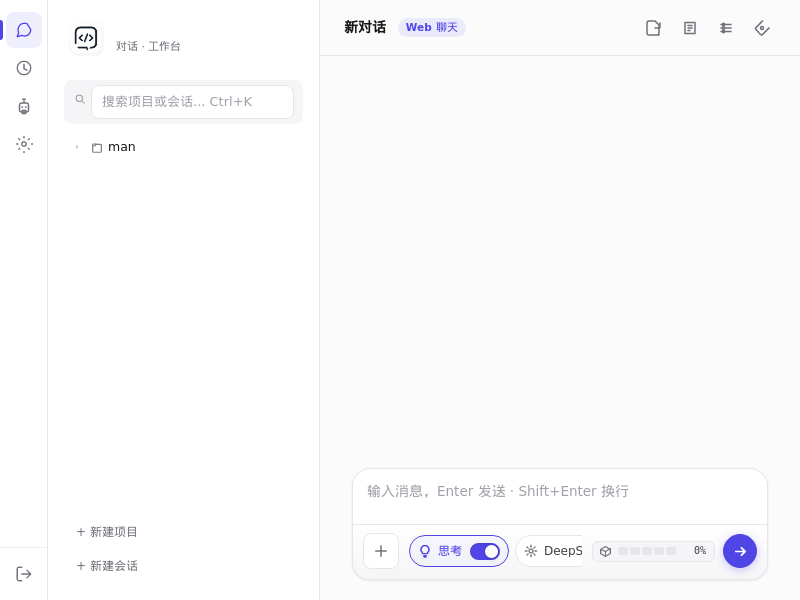
内置 Web UI(单页应用,零构建)—— 项目/会话树、工具调用链、mermaid 图表、思考开关、模型切换,开箱即用。
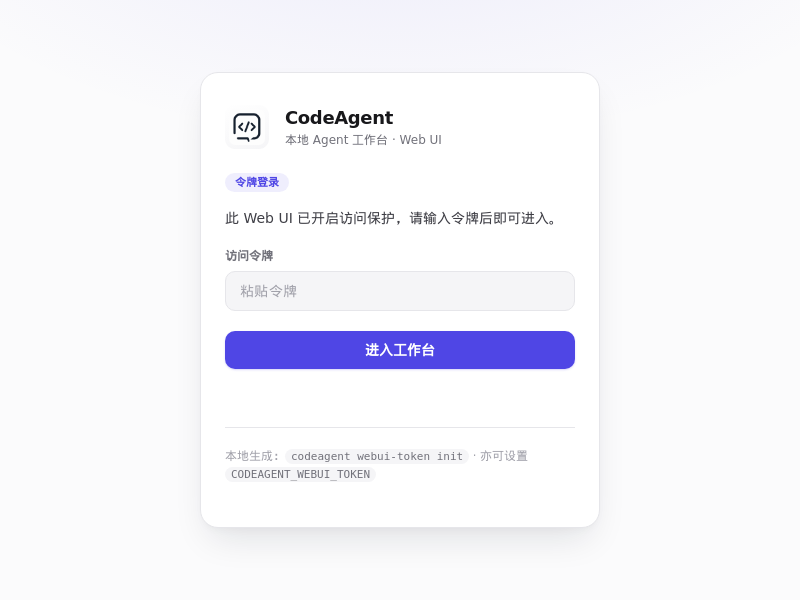
为什么选 CodeAgent
| 痛点 | CodeAgent 的解法 |
|---|---|
| 🤖 通用助手只会聊天,不会干活 | 自主全栈 Agent:独立承接「需求 → 开发 → 测试 → 部署」完整项目周期 |
| 📜 Agent 行为难定制、像黑盒 | 人格即配置:用 Markdown(agent.md / soul.md / skills.md)定义身份、行为准则、技能,改配置即改人格 |
| 💸 商业工具按量收费、数据在云端 | 免费开源 + 自托管:本地运行,数据不出门,无订阅 |
| 🇨🇳 国内网络环境装不上、用不顺 | DeepSeek 就绪 + 国内友好:内置 DeepSeek 适配,自动切换清华 PyPI 镜像 |
核心特性
- 🧠 LLM 驱动 — 支持 DeepSeek、OpenAI、Anthropic、Ollama 本地模型及兼容 API,可切换
- 📜 人格即配置 — 用 Markdown 定义 Agent 的身份、行为准则、技能,无需改代码
- 🛠️ 45+ 内置工具 — 文件操作、Shell 执行、代码分析、Git 管理、数据库、部署、搜索
- 🌐 内置 Web UI — 零构建单页应用:项目/会话树、工具调用链、mermaid 图表、健康面板、深色模式
- 💬 CLI + 交互式聊天 —
codeagent chat --llm、codeagent run "任务",两种姿势随意切 - 📋 项目管控 — 内置待办管理、项目规划(docs/plans 面板)、版本追踪
- 🔌 可扩展 — 自定义工具、Webhook、多 Agent 协作(Multi-Agent Hub)
- 🧩 多步工作流 — 内置 fix-and-commit、new-feature、audit-project 等自动化流水线
- ⏰ 定时任务 — 内置 cron 调度,Web UI 可视化配置,到点自动干活
- 🖥️ 跨平台 — Linux / macOS / Windows 桌面端(DMG / EXE)+ Docker 镜像
- 🌍 国内友好 — 自动检测国内网络,使用 PyPI 镜像(清华源)加速安装
快速开始
📦 通过 PyPI 安装(推荐)
pip install tagword-codeagent
codeagent serve
浏览器打开 http://localhost:8765 即可使用。
💡 包名说明:
codeagent在 PyPI 上已被占用,本项目以tagword-codeagent发布。 核心引擎seed-kernel/seed-model-providers/seed-toolbox均为 PyPI 公开包,随 pip 自动安装,无需额外操作。
🐳 通过 Docker 运行
docker pull ghcr.io/tagword/codeagent:latest

# 运行(挂载数据持久化)
docker run -d --name codeagent \
  -p 8765:8765 \
  -v ~/.codeagent:/root/.codeagent \
  ghcr.io/tagword/codeagent:latest
浏览器打开 http://localhost:8765 即可使用(更多见 ARCHITECTURE.md)。
⭐ 一键运行(GitHub 源码)
git clone https://github.com/tagword/codeagent.git
cd codeagent
bash run.sh
脚本会自动:
- 检测 Python(≥ 3.9)和 Git
- 自动识别国内网络 → 使用清华 PyPI 镜像加速
- 创建虚拟环境
.venv - 安装 CodeAgent 及全部依赖(核心引擎 seed 框架,随 pip 自动拉取)
- 启动 Web 服务 → 浏览器打开
http://localhost:8765
💡 支持自定义参数:
bash run.sh --port 8766 --host 0.0.0.0💡run.sh内置了网络重试和 tarball 降级机制,网络不稳定时比pip install -e .更可靠 💡 Windows 用户可使用install.ps1/run.ps1
🔧 源码手动安装
git clone https://github.com/tagword/codeagent.git
cd codeagent

python -m venv .venv
source .venv/bin/activate  # Windows: .venv\Scripts\activate

# 依赖(seed-kernel 等)自动从 PyPI 拉取
pip install -e .

codeagent serve
命令行速查
codeagent --help                 # 查看帮助
codeagent serve                  # 启动 Web 服务(默认 8765 端口)
codeagent chat --llm             # 启动交互式聊天(LLM + 工具循环)
codeagent run "整理文件结构"      # 运行单次任务
codeagent webui-token init       # 生成 Web UI 访问令牌
codeagent webui-token show       # 查看当前令牌
codeagent config init            # 初始化配置文件
codeagent restart serve --port 8765  # 重启服务
配置
首次运行执行 codeagent config init,生成配置文件到 config/ 目录。
核心环境变量(首次运行 codeagent config init 生成 config/env,含注释模板):
| 配置项 | 说明 |
|---|---|
CODEAGENT_PROVIDER |
LLM 提供商(deepseek / openai / anthropic / ollama 等) |
CODEAGENT_API_KEY |
API 密钥 |
CODEAGENT_MODEL |
模型名称 |
CODEAGENT_BASE_URL |
API 端点地址 |
CODEAGENT_AGENT_ID |
当前 Agent 标识(默认 default) |
CODEAGENT_WEBUI_TOKEN |
Web UI 访问令牌(也可用 codeagent webui-token init 生成) |
项目结构
codeagent/
├── codeagent/              # 核心源码
│   ├── cli/                # 命令行入口
│   ├── core/               # 核心模块(bootstrap / env / attachments 等)
│   ├── memory/             # 长期记忆与经验沉淀
│   ├── persona_defaults/   # 默认 Agent 人格(agent.md / soul.md / skills.md 等)
│   ├── runtime/            # 运行时管理
│   ├── server/             # HTTP / WebSocket 服务
│   ├── skills/             # 内置技能定义
│   ├── tools/              # 工具系统
│   └── web/                # Web 认证与内置 Web UI(单页应用,运行时内联)
├── packaging/              # 桌面端打包(macOS DMG / Windows EXE)
├── tests/                  # 测试
├── assets/                 # 图标与界面截图
├── run.sh / run.ps1        # 一键运行脚本
├── install.sh / install.ps1 # 一键安装脚本
├── Dockerfile              # 容器镜像(ghcr.io/tagword/codeagent)
├── pyproject.toml          # 项目元数据与依赖
└── README.md
技术栈
| 层 | 技术 |
|---|---|
| 核心引擎 | seed-kernel(LLM 调用 / 路由 / 会话 / 工具运行时) |
| 后端服务 | Python 3.9+ / Starlette / WebSocket / Uvicorn |
| 内置 Web UI | 原生 JS 单页应用(运行时内联,零构建;mermaid / marked / DOMPurify) |
| LLM 集成 | DeepSeek / OpenAI / Anthropic / Ollama / 兼容 API |
| 工具系统 | 异步工具调度 + 安全检查 + 沙箱 |
| 数据存储 | SQLite(会话 / 记忆 / 项目状态) |
与同类对比
| CodeAgent | Cursor | Claude Code | Aider | OpenHands | |
|---|---|---|---|---|---|
| 开源 & 自托管 | ✅ | ❌ | ❌ | ✅ | ✅ |
| 人格/行为可配置(Markdown) | ✅ | ❌ | 部分 | ❌ | ❌ |
| 内置 Web UI | ✅ | ✅ | ❌ | ❌ | ✅ |
| 多 LLM 后端(含 DeepSeek/Ollama) | ✅ | 部分 | 仅 Anthropic | ✅ | ✅ |
| 国内网络友好(镜像加速) | ✅ | ❌ | ❌ | ❌ | ❌ |
| 免费 | ✅ | ❌ | ❌ | ✅ | 部分 |
开发
# 安装开发依赖
pip install -e '.[dev]'

# 运行测试
pytest

# 代码检查
ruff check codeagent/

# 安全审计
bandit -r codeagent/
社区
- 🐛 提 Issue / 💡 提建议:https://github.com/tagword/codeagent/issues
- 🤝 贡献指南:CONTRIBUTING.md
- 📜 更新日志:CHANGELOG.md
许可证
MIT © 2025-2026 tagword
1 maintainer

Release files for tagword-codeagent 1.1.33
For a detailed explanation of source distributions (sdists) and built distributions (wheels), please see the package formats documentation.
Source distribution (sdist)
| File | Size | Uploaded | |
|---|---|---|---|
| tagword_codeagent-1.1.33.tar.gz | 1.6 MB | Details |
Built distribution (wheel)
| File | Interpreter | ABI | Platform | Reset |
|---|---|---|---|---|
| tagword_codeagent-1.1.33-py3-none-any.whl | Python 3 | none | any | Details |
Total release size: 3.2 MB
Release files / tagword_codeagent-1.1.33.tar.gz
| Download URL | tagword_codeagent-1.1.33.tar.gz |
|---|---|
| Size | 1.6 MB |
| Tags | Source |
|
SHA-256 checksum How to use checksums |
d50c9f12d9d9fc9c5c47f2d789cbe0d1411408c7954258fcb13bf3fed55d96cc
|
|
BLAKE2b-256 checksum How to use checksums |
4540da27c4db42b7422a536d0e98d1e2e14d7a366c15b80989c2e816eae12ebb
|
| Upload date | |
|
Uploaded using Trusted Publishing? What is trusted publishing? |
No |
| Uploaded via |
twine/6.2.0 CPython/3.13.11
|
Release files / tagword_codeagent-1.1.33-py3-none-any.whl
| Download URL | tagword_codeagent-1.1.33-py3-none-any.whl |
|---|---|
| Size | 1.6 MB |
| Tags | Python 3 |
|
SHA-256 checksum How to use checksums |
15a236f7f8ac2243aa520e7400f6c96edf699630f1587a5814ed993aa8eb70c2
|
|
BLAKE2b-256 checksum How to use checksums |
3cdbe705e2afc5a2fd38b851aaf2571a3f07aacda2b1edbd75c50f2516a892c4
|
| Upload date | |
|
Uploaded using Trusted Publishing? What is trusted publishing? |
No |
| Uploaded via |
twine/6.2.0 CPython/3.13.11
|














