
TailJLogs


Based on Textualize/toolong by Will McGugan
A terminal application to view, tail, merge, and search log files with enhanced JSONL support.
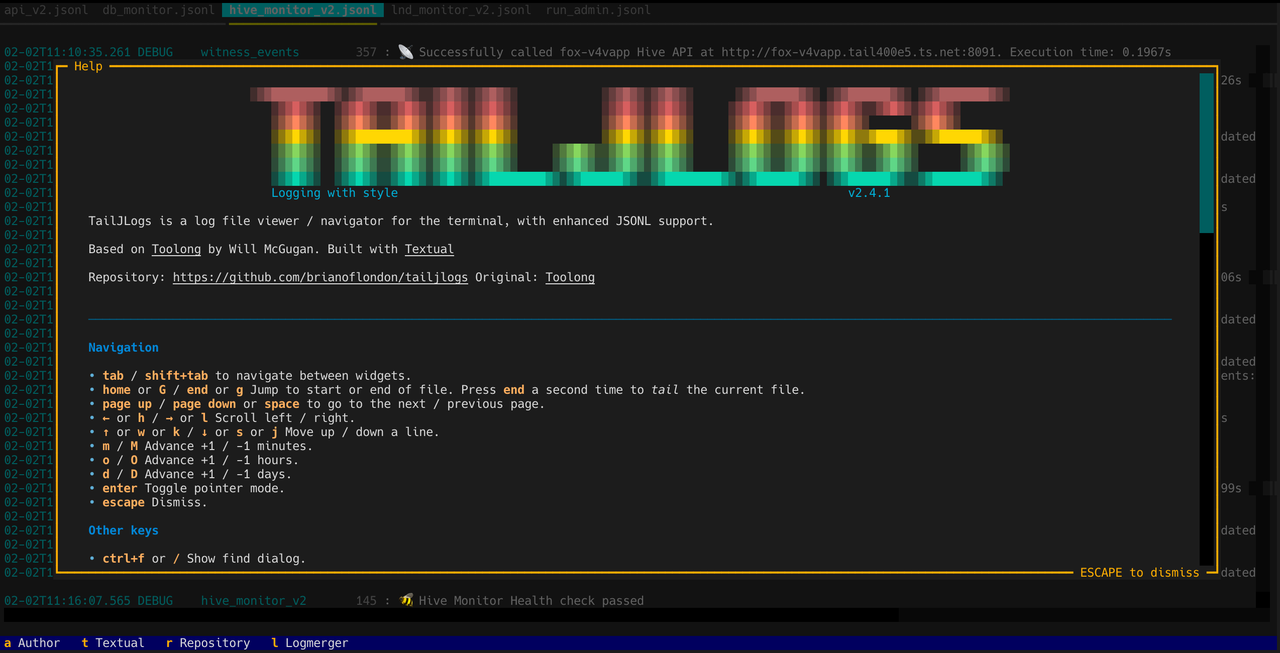
What's New in v2.4.6
- OSC 52 (terminal clipboard) fallback: When a system clipboard is not available (e.g., headless SSH sessions), TailJLogs can use OSC 52 escape sequences to copy directly to the local terminal's clipboard. Configure with
TAILJLOGS_COPY_METHOD(auto|system|osc52|tk) andTAILJLOGS_OSC52_MAX_BYTES(default65536). - Auto-hide KeyDebug overlay: Key debug overlay (
Ctrl+K) now auto-hides after 3 seconds of inactivity (configurable viaKeyDebug.hide_timeout). The timer resets on each key event. - Copy-mode indicator: The footer shows
Copy: PrettyorCopy: Rawwhen the JSON detail panel is open so you can see the active copy format at a glance.
What's New in v2.4
- Log Summary Mode: New
--summaryflag to scan and summarize log files- Groups rotated log files by base name (e.g.,
app.001.jsonl,app.002.jsonl→app) - Reports first/last log timestamps, timespan, and log level counts
- Supports JSON output with
--jsonflag - Recursive/non-recursive directory scanning with
-r/--no-recursive
- Groups rotated log files by base name (e.g.,
What's New in v2.1
- Merged File Tailing: Now you can tail multiple merged files simultaneously (
Ctrl+T) - Filename Prefix in Merged View: Each line shows a colored filename prefix (docker-compose style)
- Glob Pattern Support: Use wildcards like
*.jsonl,logs/**/*.log - Directory Expansion: Pass a directory to automatically find all log files
What's New in v2.0
TailJLogs v2.0 is a complete rewrite based on the excellent Toolong project by Will McGugan. Key enhancements:
- JSONL Compact Format: JSONL logs display in a readable format:
01-15T09:36:38.194 INFO module 39 : message - Separate Filter Dialog (
\key): Hide non-matching lines (vs Find which highlights matches) - Full TUI Experience: Navigate with arrow keys, view detailed JSON with Enter
- Updated for Textual 7.x: Modern async terminal UI
Features
- 📋 Live tailing of log files (single or merged)
- 🎨 Syntax highlights common web server log formats
- ⚡ Fast - opens multi-gigabyte files instantly
- 📝 Enhanced JSONL support: Compact formatted display + pretty-printed detail view
- 📦 Opens
.bzand.bz2files automatically - 🔀 Merge & tail multiple files with colored filename prefixes
- 🔍 Find (
/orCtrl+F): Highlight matching lines - 🔎 Filter (
\): Show only matching lines - 📁 Glob patterns:
*.jsonl,logs/**/*.log, directories - 📊 Summary mode: Scan directories and report log statistics
Installation
# Using pip
pip install tailjlogs

# Using uv (recommended)
uv tool install tailjlogs

# Using pipx
pipx install tailjlogs
Update
# Using pip
pip install --upgrade tailjlogs
# Using uv
uv tool update tailjlogs
# Using pipx
pipx upgrade tailjlogs
After installation, use either tailjlogs or tl command.
Usage
# View a log file
tailjlogs /path/to/logfile.jsonl
tl /path/to/logfile.jsonl

# View multiple files (opens in tabs)
tl access.log error.log app.jsonl

# Merge multiple files by timestamp
tl --merge access.log error.log app.jsonl

# Glob patterns
tl *.jsonl                    # All .jsonl files
tl logs/**/*.log              # Recursive glob
tl /var/log/myapp/            # Directory (finds all log files)

# Merge and tail (docker-compose style output)
tl --merge *.jsonl
# Then press Ctrl+T to start tailing

# Summary mode - scan and report log statistics
tl --summary .                     # Current directory
tl --summary /var/log/myapp/       # Specific directory
tl --summary logs/ --json          # Output as JSON
tl --summary logs/ --no-recursive  # Don't search subdirectories
Summary Mode Output
📁 api_v2
------------------------------------------------------------
   Files: 2
          - api_v2.jsonl
          - rotation/api_v2.001.jsonl
   Total Lines: 2,360

   First Log: 2026-01-31 04:49:56
   Last Log:  2026-02-01 08:01:47
   Timespan:  1d 3h 11m 51s

   Level Range: DEBUG to INFO
   Level Counts:
      DEBUG      :    1,579
      INFO       :      781
Merged View with Filename Prefix
When viewing merged files, each line shows a colored filename prefix:
db_monitor      │ 01-15T09:36:38.194 INFO  cache   15 : Cache hit
error           │ 01-15T09:36:38.200 ERROR api     42 : Connection failed
db_monitor      │ 01-15T09:36:38.210 DEBUG db      89 : Query executed
Keyboard Shortcuts
Navigation
| Key | Action |
|---|---|
↑/↓ or w/s or k/j |
Move up/down a line |
←/→ or h/l |
Scroll left/right |
Page Up/Page Down or Space |
Next/previous page |
Home or G |
Jump to start |
End or g |
Jump to end (press twice to tail) |
m/M |
Advance +1/-1 minutes |
o/O |
Advance +1/-1 hours |
d/D |
Advance +1/-1 days |
Features
| Key | Action |
|---|---|
/ or Ctrl+F |
Find - highlight matching lines |
\ |
Filter - show only matching lines |
Enter |
Toggle pointer mode / View JSON detail |
Ctrl+L |
Toggle line numbers |
Ctrl+T |
Tail current file |
⌘C or Ctrl+Shift+C |
Copy JSON detail (when panel open); press y to toggle Pretty/Raw |
c |
Copy JSON detail (shorthand for ⌘C / Ctrl+Shift+C) |
y |
Toggle copy format between Pretty and Raw |
Ctrl+K |
Toggle key-event debug overlay (shows keys Textual receives) |
? |
Show help |
Ctrl+C or q |
Exit |
JSONL Format
TailJLogs displays JSONL log entries in a compact format:
01-15T09:36:38.194 INFO     auth                  42 : User logged in
01-15T09:36:39.521 WARNING  api                  156 : Rate limit approaching
01-15T09:36:40.003 ERROR    database             89 : Connection timeout
Press Enter on any line to see the full JSON object, pretty-printed.
Expected JSONL fields:
{
  "timestamp": "2025-01-15T09:36:38.194Z",
  "level": "INFO",
  "message": "User logged in",
  "module": "auth",
  "line": 42
}
Development
git clone https://github.com/brianoflondon/tailjlogs.git
cd tailjlogs
uv sync
uv run tailjlogs --help
Credits
This project is based on Toolong by Will McGugan and the Textualize team. Built with Textual.
License
MIT License - see LICENSE for details.
Original Toolong: Copyright (c) 2024 Will McGugan This fork: Copyright (c) 2025 Brian of London
1 maintainer

Metadata
1 maintainer
Release files for tailjlogs 2.4.6
For a detailed explanation of source distributions (sdists) and built distributions (wheels), please see the package formats documentation.
Source distribution (sdist)
| File | Size | Uploaded | Provenance | Actions |
|---|---|---|---|---|
| tailjlogs-2.4.6.tar.gz | 179.2 kB | Without provenance | Details for tailjlogs-2.4.6.tar.gz |
Built distribution (wheel)
| File | Interpreter | ABI | Platform | Actions Reset |
|---|---|---|---|---|
| tailjlogs-2.4.6-py3-none-any.whl | Python 3 | none | any | Details for tailjlogs-2.4.6-py3-none-any.whl |
Total release size: 229.0 kB
Release files / tailjlogs-2.4.6.tar.gz
| Download URL | tailjlogs-2.4.6.tar.gz |
|---|---|
| Size | 179.2 kB |
| Tags | Source |
|
SHA-256 checksum How to use checksums |
9555a6697120f8d1dc33ad5945650a26a1458222768f611677ef66267f09cd7b
|
|
BLAKE2b-256 checksum How to use checksums |
ffc14cad86f78d8042452db42b6de60fd7b8822a1ca9e3068be00162f7e61c12
|
| Upload date | |
|
Uploaded using Trusted Publishing? What is trusted publishing? |
No |
| Uploaded via |
uv/0.9.28 {"installer":{"name":"uv","version":"0.9.28","subcommand":["publish"]},"python":null,"implementation":{"name":null,"version":null},"distro":{"name":"Ubuntu","version":"24.04","id":"noble","libc":null},"system":{"name":null,"release":null},"cpu":null,"openssl_version":null,"setuptools_version":null,"rustc_version":null,"ci":true}
|
Release files / tailjlogs-2.4.6-py3-none-any.whl
| Download URL | tailjlogs-2.4.6-py3-none-any.whl |
|---|---|
| Size | 49.8 kB |
| Tags | Python 3 |
|
SHA-256 checksum How to use checksums |
d9c4aa70d61e4d5ed1655eff2f88a3c21a08c9c70e68dd92a40fcb982eaffa2a
|
|
BLAKE2b-256 checksum How to use checksums |
6ce5e4fd01c48f87bf2e1ea4b1aee27e22753ad61355622208b8ed50138a464e
|
| Upload date | |
|
Uploaded using Trusted Publishing? What is trusted publishing? |
No |
| Uploaded via |
uv/0.9.28 {"installer":{"name":"uv","version":"0.9.28","subcommand":["publish"]},"python":null,"implementation":{"name":null,"version":null},"distro":{"name":"Ubuntu","version":"24.04","id":"noble","libc":null},"system":{"name":null,"release":null},"cpu":null,"openssl_version":null,"setuptools_version":null,"rustc_version":null,"ci":true}
|
Security for tailjlogs 2.4.6
Provenance
Provenance describes where a file came from. On PyPI, provenance is shared via attestations, which provide a verifiable record of the build or publishing details. View details, limitations and caveats.
No provenance found
None of the files in this release were uploaded with provenance metadata.
A note on package security
PyPI is a repository for distributing packages, not a service for auditing them. While third-party security researchers and our staff do their best to detect and remove malicious packages, PyPI cannot guarantee the quality, security or suitability of any given package.
To learn more about protecting yourself from malicious actors, visit our package security documentation.














