

TailorbirdCV
Tailor your resume to each job, without inventing anything.
Give TailorbirdCV your CV once. Then, for each job, paste the posting's link. TailorbirdCV:
- works out what the role cares about;
- asks you about anything the job wants that your CV doesn't show;
- writes a tailored resume from your real experience (and a cover letter, if you want one);
- builds a Word document and a PDF, ready to send.
A built-in fact-check makes sure every line comes from your own CV: no made-up numbers, tools, employers or claims. Your name, employers, job titles, dates and education are copied exactly.
TailorbirdCV runs on your own computer (macOS, Windows or Linux) and opens in your browser. The writing is done by the AI you choose.
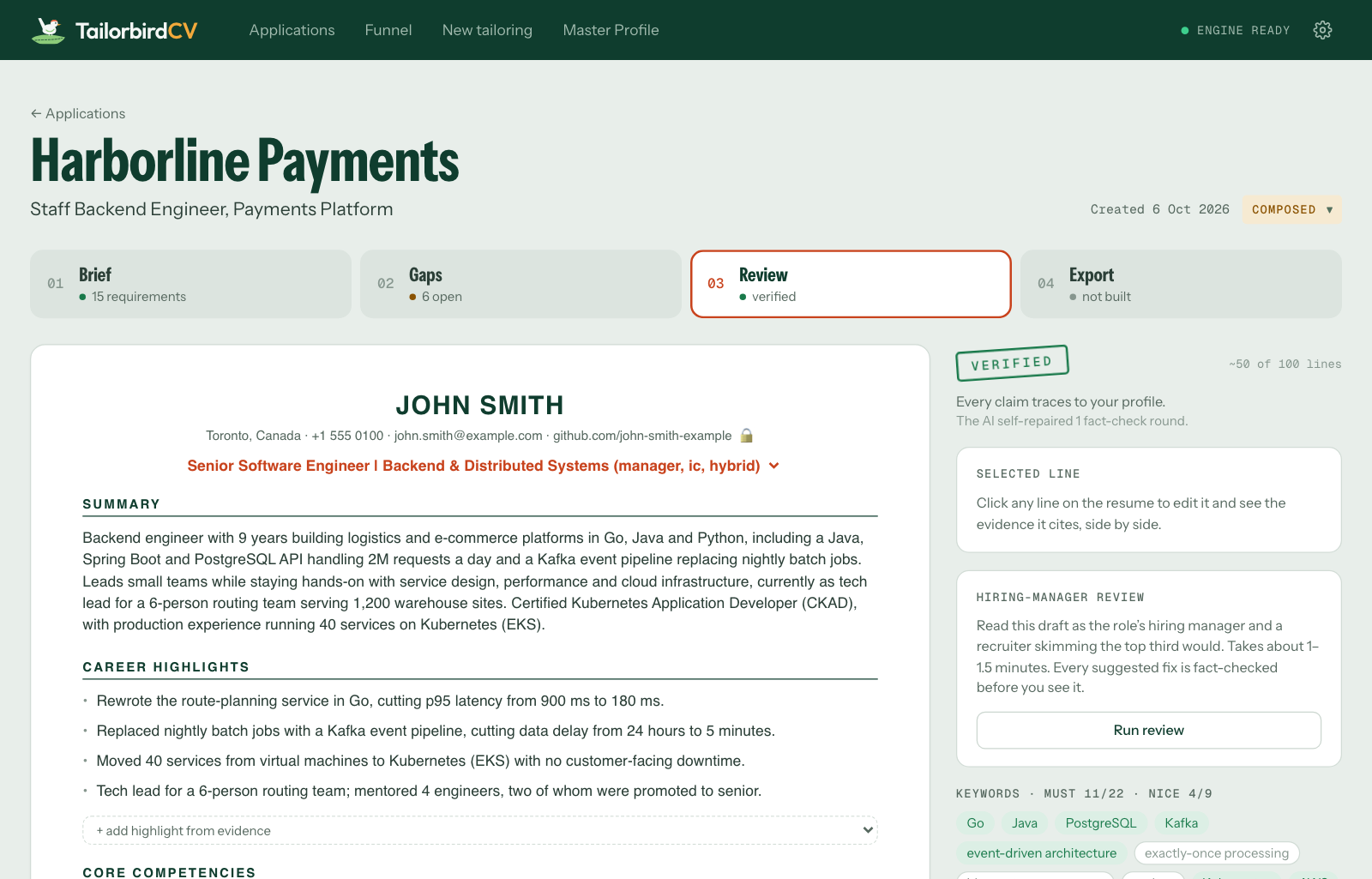
How it works
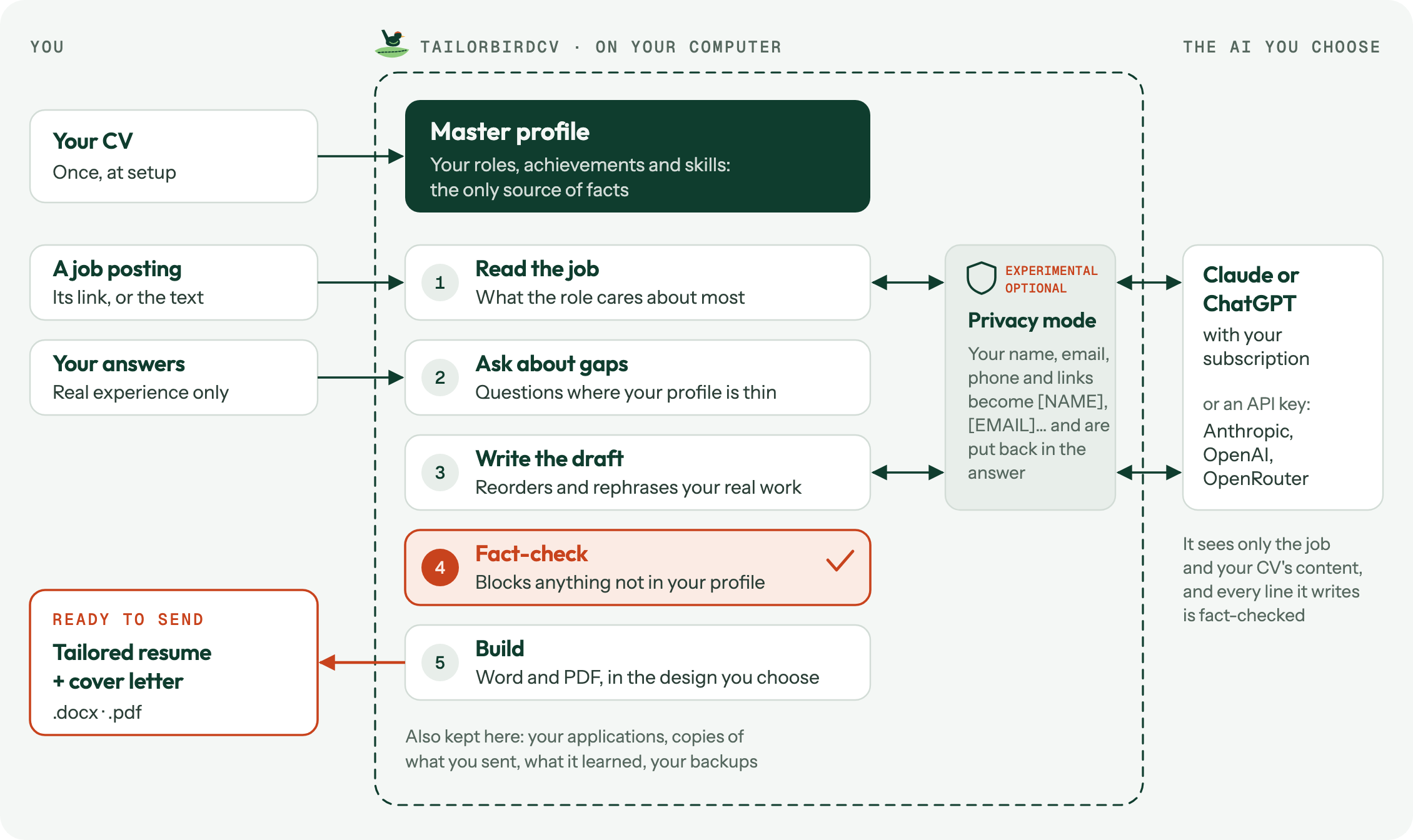
Everything except the AI runs on your computer. Your CV becomes your master profile, the only place facts come from. The AI reads the job and writes the draft; TailorbirdCV checks every line against your profile before you see it.
What you need
- An AI, any one of:
- a Claude subscription, with Claude Code installed and logged in. No extra cost;
- a ChatGPT subscription, with Codex installed and logged in. No extra cost;
- an API key from Anthropic, OpenAI or OpenRouter, paid per use. It's kept in your computer's keychain.
- Something to make PDFs: Microsoft Word, or the free LibreOffice. Without either, you still get the Word document.
Not sure what you have? Install TailorbirdCV first: its setup wizard checks and shows how to add anything missing.
Install
macOS or Linux: open Terminal, paste this line and press Return:
curl -LsSf https://raw.githubusercontent.com/atenreiro/tailorbirdcv/main/install.sh | sh
Windows: open PowerShell (a normal window, not as administrator), paste this line and press Enter:
irm https://raw.githubusercontent.com/atenreiro/tailorbirdcv/main/install.ps1 | iex
After a minute or two, TailorbirdCV opens in your browser. Keep the Terminal or PowerShell window open while you use it.
What the installer does
The scripts are short enough to read first: install.sh and install.ps1. They:
- install uv (Astral's open-source Python installer) if you don't have it;
- install TailorbirdCV from PyPI in its own environment, with its own Python 3.13. Any Python already on your computer is left alone;
- add the
tailorbirdcvcommand and start it.
They need no administrator rights, write only inside your user folder, and use your computer's own certificates, so they also work on company networks that inspect HTTPS.
Prefer to do it yourself? Install uv (brew install uv, winget install astral-sh.uv, or another way), open a new terminal, then run uv tool install --python 3.13 tailorbirdcv and tailorbirdcv serve.
Start, stop and update
- Start: run
tailorbirdcv servein Terminal or PowerShell. Your browser opens TailorbirdCV through a private link (also printed in the terminal) that unlocks it in that browser only. - Stop: press Ctrl+C in that window, or close it.
- Update: when a new version is out, TailorbirdCV says so at the top of the page. Click Upgrade and it restarts by itself. To know, it asks PyPI for the latest version number at most once a day; nothing about you is sent. You can turn this off in Settings → About TailorbirdCV.
- Check your setup:
tailorbirdcv doctor.
Uninstall
Stop TailorbirdCV, then run:
- macOS or Linux:
curl -LsSf https://raw.githubusercontent.com/atenreiro/tailorbirdcv/main/install.sh | sh -s -- --uninstall
- Windows:
$env:TAILORBIRDCV_UNINSTALL = "1"; irm https://raw.githubusercontent.com/atenreiro/tailorbirdcv/main/install.ps1 | iex
uv tool uninstall tailorbirdcv does the same. Your profile and applications stay in your data folder until you delete it. uv stays installed; Astral explains how to remove it.
First run
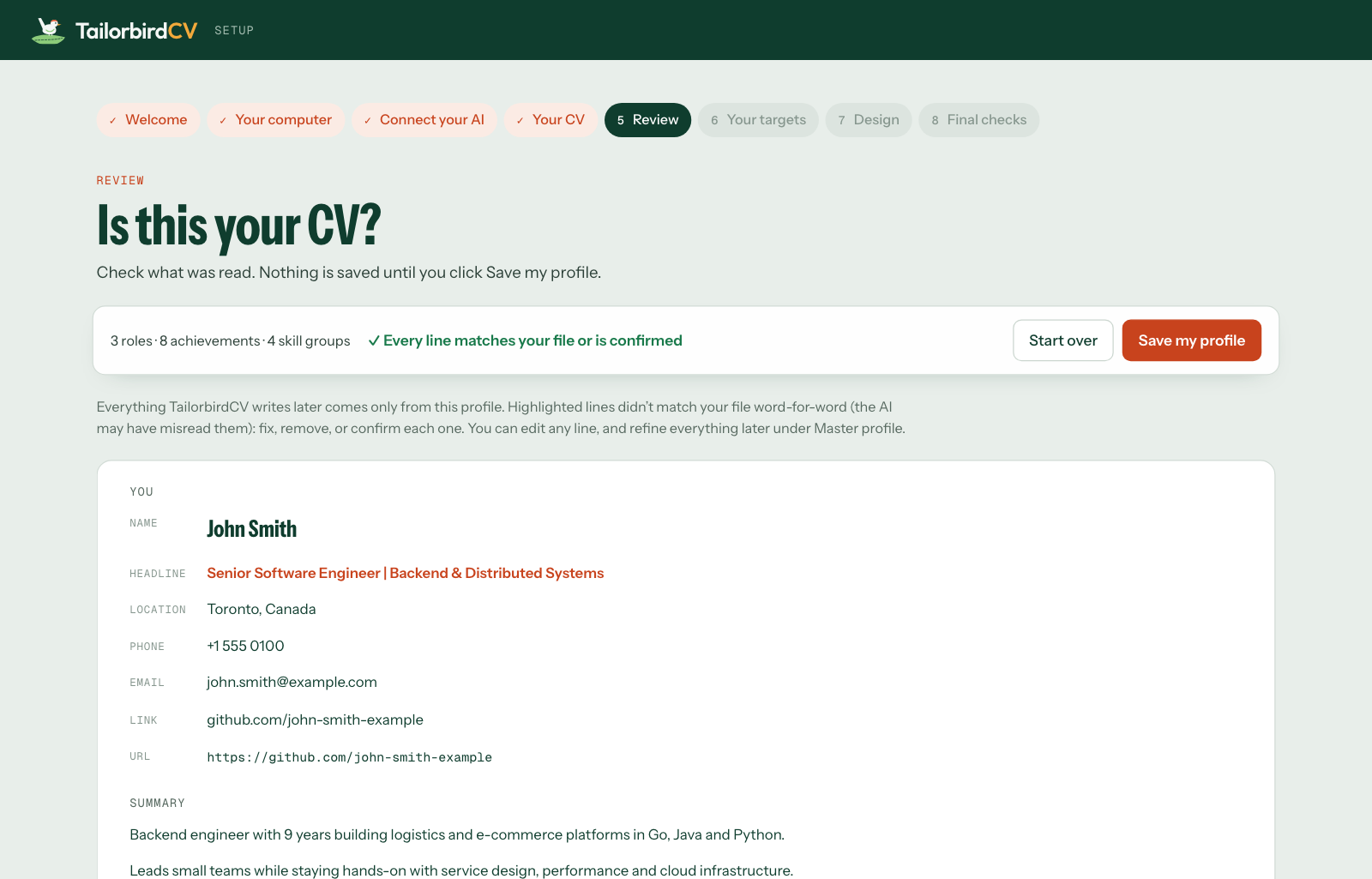
A short setup wizard (about 5 minutes) checks your computer, connects your AI, reads your CV, then asks about your targets (field, seniority, region, spelling, page limit) and a design (Classic, Modern or Compact).
Your CV is copied word for word, never rewritten. Nothing is saved until you've checked it: any line that doesn't match your file exactly is highlighted for you to fix or confirm.
Moving from another computer? Choose Restore from a backup on the wizard's first page.
Tailoring a resume
- Click New tailoring and paste the job posting's link (or its text).
- Brief: see what the role wants and how your experience matches.
- Gaps: answer questions about what the job wants and your profile doesn't show. No experience? Say so: it stays a gap. TailorbirdCV remembers your answers, so it won't ask the same thing on your next application (it checks again after six months).
- Review: read the draft, click any line to edit it, and optionally ask for a hiring-manager review.
- Cover letter (optional): one page in the same design, in a Formal, Warm or Direct tone, checked sentence by sentence like your resume.
- Export: build the Word document and PDF. Too long? Trim with AI. Room to spare? Fill the page with AI. Both show their suggestions in Review before anything changes.
Then track it under Applications. Marking an application applied keeps a read-only copy of exactly what you sent, and TailorbirdCV studies what you changed from its drafts to suggest style preferences for next time (you approve each one; Settings → Applications turns this off). Found one of your resumes and not sure which version it is? Identify a PDF tells you which application it came from.
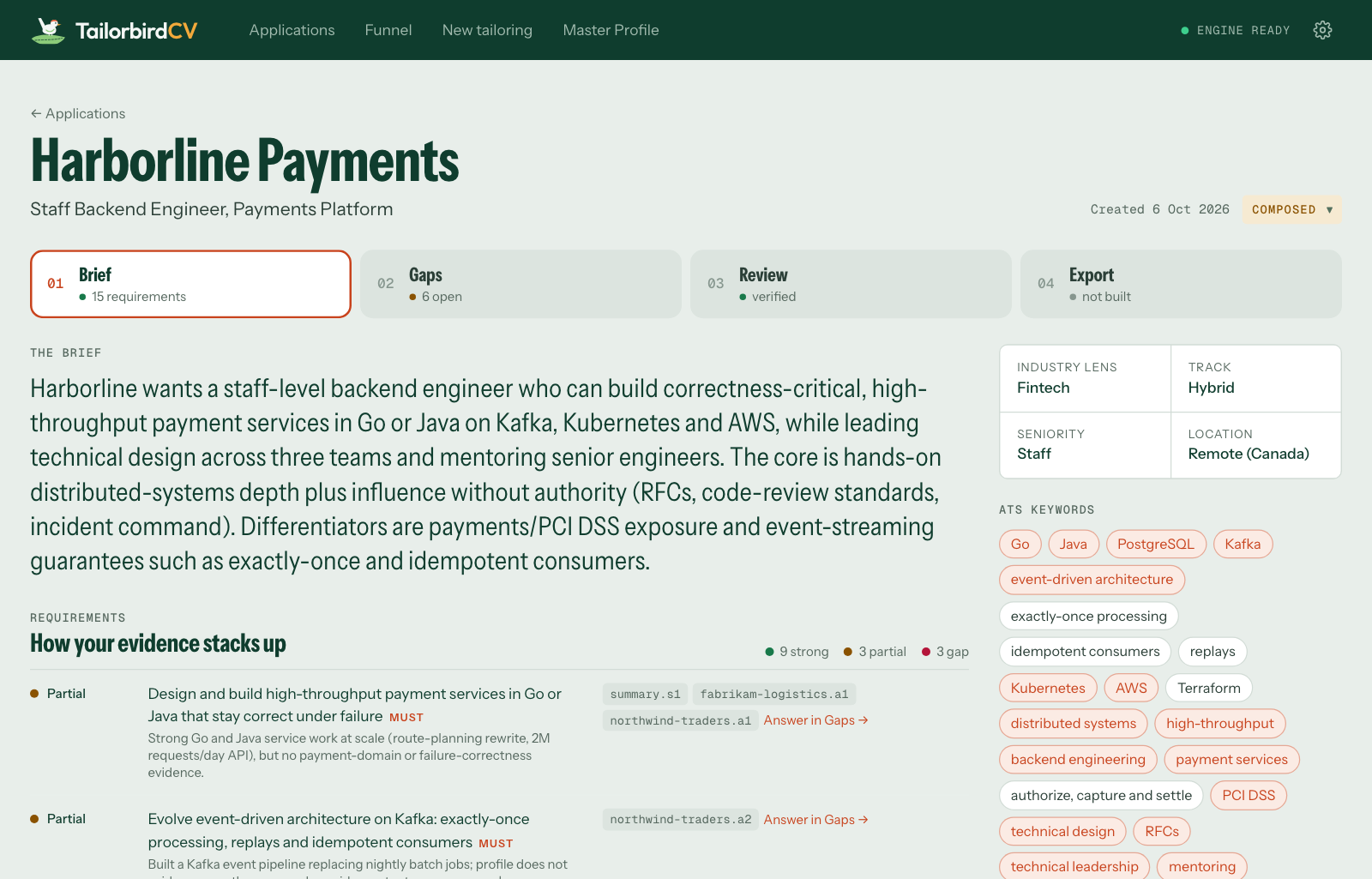
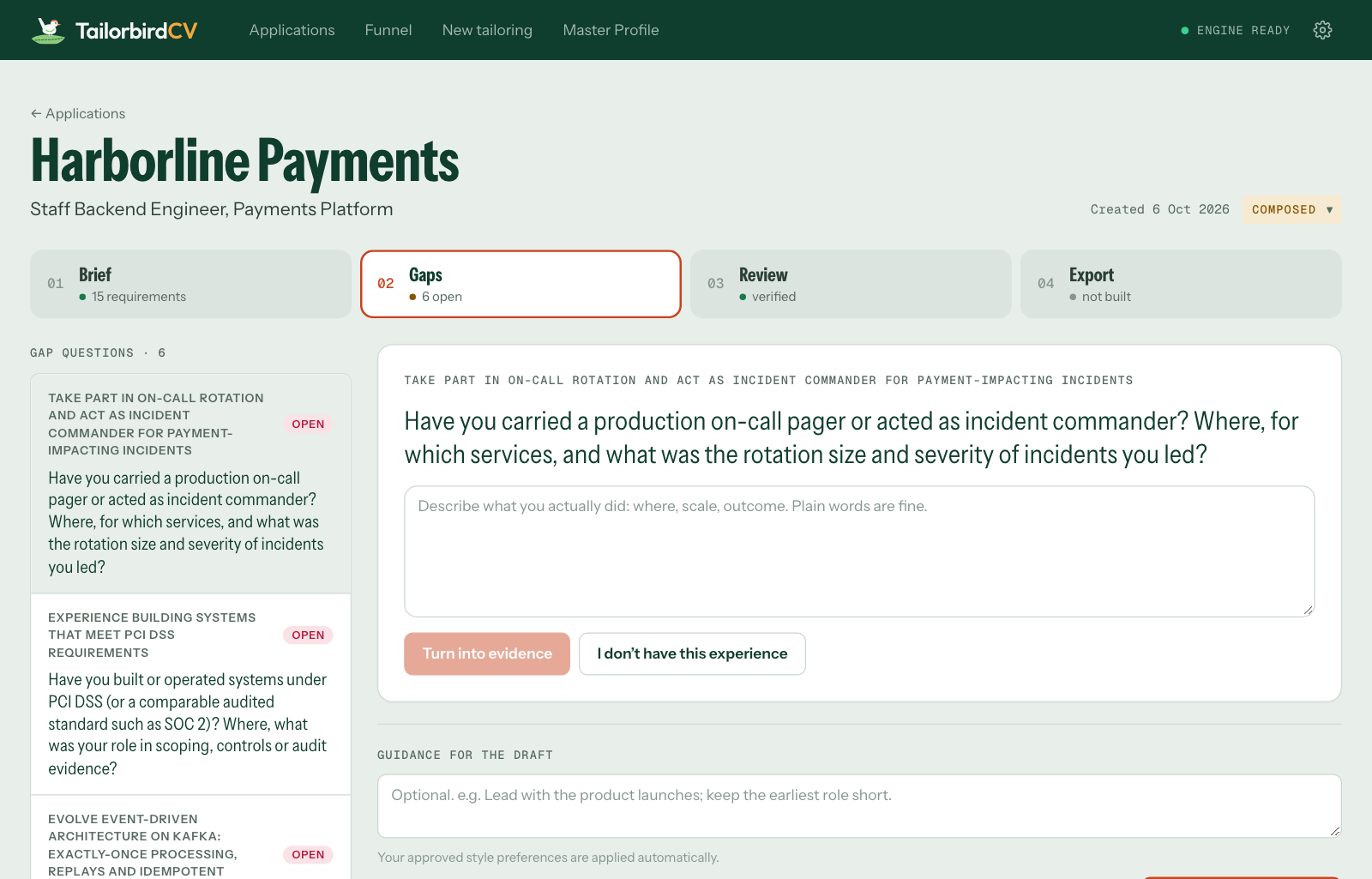
The screenshots use a fictional profile and job posting.
Your data and privacy
There's no account, no server and no tracking. Your profile, applications and settings are kept in:
- macOS:
~/Library/Application Support/TailorbirdCV - Windows:
%LOCALAPPDATA%\TailorbirdCV - Linux:
~/.local/share/TailorbirdCV
Privacy mode (on by default, experimental): your name, email, phone, address and personal links are replaced with placeholders like [NAME] before anything is sent to the AI, and put back afterwards, so your resume still shows them. Your career history is still sent and can identify you, and an unusual spelling can slip through, so use it with care. Settings → Privacy → See what the AI receives shows exactly what is sent.
Company icons: for applications made from a job link, TailorbirdCV fetches the company's icon once, from the company's own website. Turn this off in Settings → Applications.
Backup and restore
Everything lives only on your computer, so keep a backup: Settings → Backup & restore → Download backup saves it all as one .zip. Restore it on any computer from the same page, or from the setup wizard's first page. Restoring never deletes anything: the data it replaces is kept in a before-restore folder. From a terminal: tailorbirdcv backup [file] and tailorbirdcv restore <file>.
If something goes wrong
| What you see | What to do |
|---|---|
command not found: tailorbirdcv, or tailorbirdcv is not recognized |
Open a new Terminal or PowerShell window. Still not found? Run uv tool update-shell, then open another new window. |
| TailorbirdCV is running. Stop it first | Press Ctrl+C in the window where TailorbirdCV runs (or close it), then run the installer again. |
| Port 8000 is already in use | TailorbirdCV is already running: use the link in its window, or start another copy with tailorbirdcv serve --port 8001. |
| Running scripts is disabled on this system (Windows) | Use the irm … | iex line above instead of a downloaded install.ps1 file. |
| Don't run this with sudo (macOS, Linux) | Run the install line again without sudo: TailorbirdCV installs for your user only. |
| Downloads fail or time out | Your network may block astral.sh, GitHub or PyPI. Try another network, or ask your IT team to allow them. |
| Anything else | Run tailorbirdcv doctor: it checks your AI, PDF engine and fonts, and says how to fix what's missing. |
For developers
To run TailorbirdCV from a copy of this repository you'll also need Node.js, to build the interface once:
uv sync
npm --prefix web install && npm --prefix web run build
uv run tailorbirdcv serve
A copy of the repository keeps your data in its private/ folder (never committed). To use any other folder, set TAILORBIRDCV_PRIVATE to its path.
uv run pytest                                        # tests
npm --prefix web run dev                             # interface with live reload (port 5173)
TAILORBIRDCV_ENGINE=fake uv run tailorbirdcv serve --port 8001   # demo mode, no AI calls
To release a new version: change the number in VERSION (and add a CHANGELOG entry), then push to main (automatic releases are on once the repository variable RELEASES_ENABLED is true). Once CI passes, the release workflow publishes that version to PyPI and tags it, and installed copies offer the upgrade within a day.
The rules TailorbirdCV follows and how the code is laid out are described in CLAUDE.md. Changes are listed in CHANGELOG.md.
Licence
Copyright © 2026 Andre Tenreiro.
TailorbirdCV is free software under the GNU Affero General Public License v3.0 or later (AGPL-3.0-or-later). You may use, study, change and share it. If you share a changed version, or run one for other people over a network (as a website, for example), you must make its full source code available to them under the same licence. It comes with no warranty.
The bundled fonts, Carlito and Gelasio, are under the SIL Open Font License 1.1 (see tailorbirdcv/data/fonts).
The licence doesn't cover the TailorbirdCV name or logo. Please don't use them for a changed version or another service without permission.
1 maintainer

Metadata
1 maintainer
Release files for tailorbirdcv 0.2.5
For a detailed explanation of source distributions (sdists) and built distributions (wheels), please see the package formats documentation.
Source distribution (sdist)
| File | Size | Uploaded | |
|---|---|---|---|
| tailorbirdcv-0.2.5.tar.gz | 3.0 MB | Details |
Built distribution (wheel)
| File | Interpreter | ABI | Platform | Reset |
|---|---|---|---|---|
| tailorbirdcv-0.2.5-py3-none-any.whl | Python 3 | none | any | Details |
Total release size: 6.1 MB
Release files / tailorbirdcv-0.2.5.tar.gz
| Download URL | tailorbirdcv-0.2.5.tar.gz |
|---|---|
| Size | 3.0 MB |
| Tags | Source |
|
SHA-256 checksum How to use checksums |
b31670ed8a88cc2e7531c13b33d9feba1b1b46fa9c34304026b52307da9c459a
|
|
BLAKE2b-256 checksum How to use checksums |
c67a2bfb4cae7b1f3ed93296274157bf733215064ea29fc182d4baa81a7514e4
|
| Upload date | |
|
Uploaded using Trusted Publishing? What is trusted publishing? |
Yes |
| Uploaded via |
twine/7.0.0 CPython/3.13.14
|
Provenance
Provenance describes where a file came from. On PyPI, provenance is shared via attestations, which provide a verifiable record of the build or publishing details. View details, limitations and caveats.


PyPI Publish Attestation
PyPI verified that this artifact, at this checksum, originated from the publisher listed below.
Signed by GitHub Actions, verified by PyPI on Oct 7, 2026.
Transparency logRelease files / tailorbirdcv-0.2.5-py3-none-any.whl
| Download URL | tailorbirdcv-0.2.5-py3-none-any.whl |
|---|---|
| Size | 3.1 MB |
| Tags | Python 3 |
|
SHA-256 checksum How to use checksums |
19a97373c445fccd456f26a077ee9a36d6d61986be9c70fcfe063bbdce281b3d
|
|
BLAKE2b-256 checksum How to use checksums |
de61ae8efc11267e3ac3a51a13a15c2c9ada5a6df40477a1005ecc392eed6c92
|
| Upload date | |
|
Uploaded using Trusted Publishing? What is trusted publishing? |
Yes |
| Uploaded via |
twine/7.0.0 CPython/3.13.14
|
Provenance
Provenance describes where a file came from. On PyPI, provenance is shared via attestations, which provide a verifiable record of the build or publishing details. View details, limitations and caveats.
PyPI Publish Attestation
PyPI verified that this artifact, at this checksum, originated from the publisher listed below.
Signed by GitHub Actions, verified by PyPI on Oct 7, 2026.
Transparency log













