
Tailwhip — Tailwind CSS class sorter




Tailwhip is a pure Python Tailwind CSS class sorter that works with any HTML or CSS file — including Django templates and other templating languages.
Why Tailwhip?
The official Prettier plugin for sorting Tailwind classes doesn’t play well with many template languages, such as Django. While there are Prettier plugins that add limited support for Jinja templates, they often require configuration workarounds or restrict what you can do with Prettier.
Tailwhip takes a more pragmatic approach. Instead of trying to parse and understand every possible template syntax, it focuses on sorting Tailwind classes reliably, and ignores class attributes that contain template syntax.
How it works:
- It finds all
class=""attributes and@applydirectives in the given files. - It sorts the contained classes according to the official Tailwind CSS class order.
- If a class attribute contains template syntax (e.g.,
{{ ... }}or{% ... %}), Tailwhip leaves it untouched.
This approach ensures Tailwhip works across diverse environments — Django, Flask, Jinja2, or even custom templating engines — without breaking your templates or requiring complicated setup.
Usage
Tailwhip requires Python 3.11 or later. The default sort order covers the utilities and variants of Tailwind CSS 4.3 and remains compatible with Tailwind CSS 3 class names.
$ uvx tailwhip [options] [filepath...]

# Find all .html and .css files in the templates directory
$ uvx tailwhip templates/

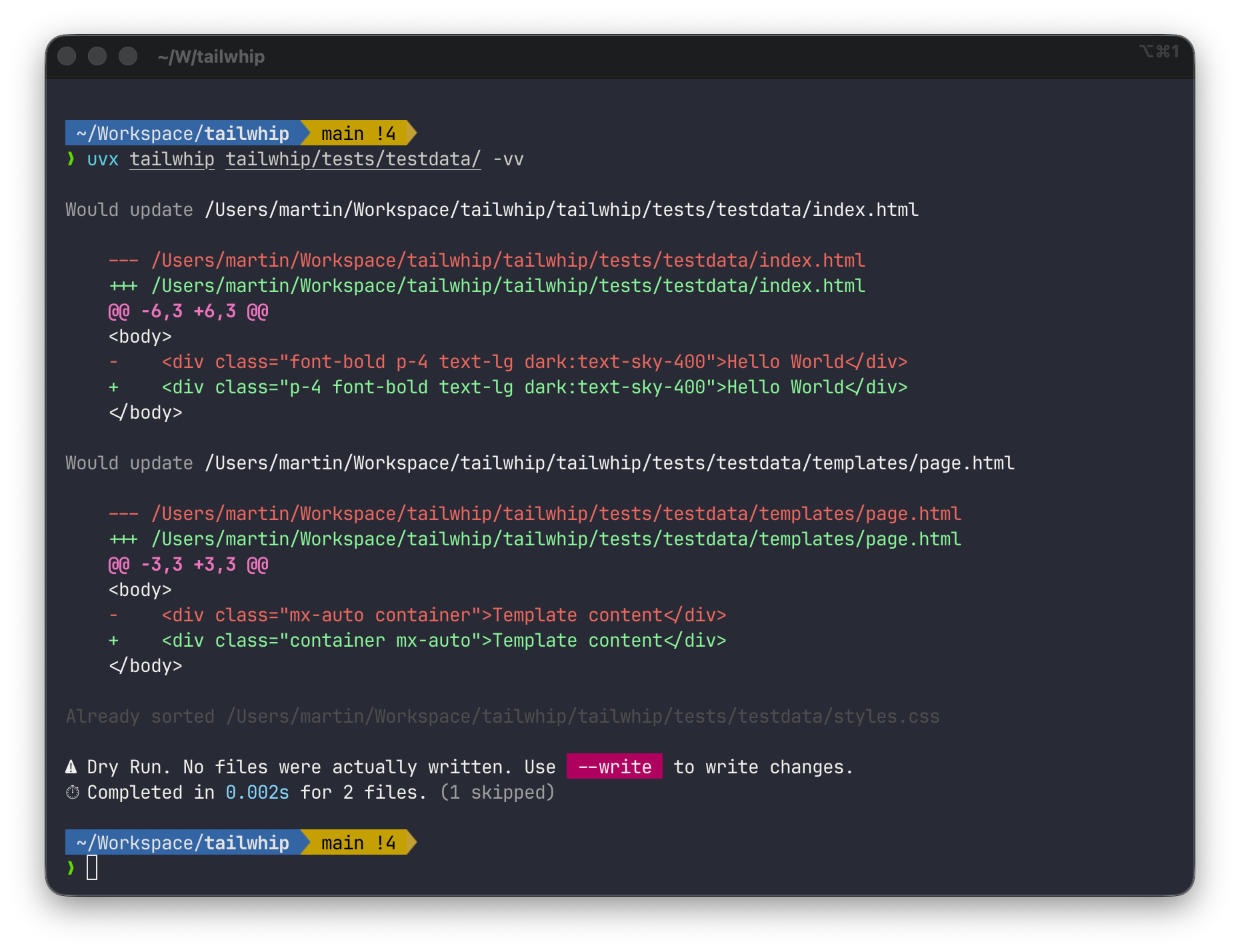
# Preview changes
$ uvx tailwhip templates/ -vv

# Actually apply changes
$ uvx tailwhip templates/ --write

# Sort classes in .scss files
$ uvx tailwhip "templates/**/*.scss"

# Standard glob patterns are supported
$ uvx tailwhip "static/**/*.{css,scss}" "templates/**/*.htm[l]"

# Use as a stdin/stdout filter (great for editor integrations!)
$ echo '<div class="p-4 m-2 bg-white">' | uvx tailwhip
<div class="m-2 p-4 bg-white">

# Pipe file content through tailwhip
$ cat template.html | tailwhip > sorted.html
You can also install it with pip and use it as a Python library:
$ pip install tailwhip

$ tailwhip templates/
$ python -m tailwhip templates/
See --help for all options and features.
Editor Integration
Tailwhip works as a STDIN/STDOUT filter, making it easy to integrate with text editors:
Shell:
$ tailwhip < file.html
$ cat file.html | tailwhip > file.html
Vim/Neovim:
" Sort classes in current file
:%!tailwhip

" Sort classes in visual selection
:'<,'>!tailwhip
Emacs:
;; Sort classes in region
(shell-command-on-region (region-beginning) (region-end) "tailwhip" t t)
VSCode:
Configure as an external formatter or create a task that pipes selected text through tailwhip.
The stdin mode processes text and returns the result immediately, with no file I/O or configuration needed.
Pre-commit Hook
Tailwhip can automatically sort your Tailwind classes before every commit using pre-commit.
Add a .pre-commit-config.yaml file to your project:
repos:
 - repo: https://github.com/bartTC/tailwhip
   rev: v0.11  # Use the latest release tag
   hooks:
     - id: tailwhip
Customizing File Types
To include additional file types (like JSX, TSX, or template files), add a files pattern:
repos:
  - repo: https://github.com/bartTC/tailwhip
    rev: v0.11
    hooks:
      - id: tailwhip
        files: \.(html|htm|css|jsx|tsx|liquid)$
Configuration
Tailwhip works great out of the box with sensible defaults, but you can customize its behavior to match your project's needs. There are two ways to configure Tailwhip:
Option 1: pyproject.toml
Add a [tool.tailwhip] section to your project's pyproject.toml:
[tool.tailwhip]
# Increase verbosity to see detailed changes
verbosity = 2

# Customize file patterns to include JSX/TSX files
default_globs = [
    "**/*.html",
    "**/*.css",
    "**/*.jsx",
    "**/*.tsx",
]

# Add your custom Tailwind colors
custom_colors = ["brand", "accent", "company"]

# Add template syntax for your templating engine
skip_expressions = ["{{", "{%", "<%", "?", "[[", "]]"]
Option 2: Custom Configuration File
Create a tailwhip.toml file anywhere in your project and pass it via the
--configuration flag:
# tailwhip.toml
verbosity = 3

default_globs = [
    "**/*.html",
    "**/*.css",
    "**/*.liquid",  # Shopify Liquid templates
]

custom_colors = ["primary", "secondary", "accent"]

skip_expressions = ["{{", "{%", "<%", "?", "{-"]  # Add Nunjucks syntax
Then use it with:
$ tailwhip templates/ --configuration=tailwhip.toml
Configuration Precedence
Settings are loaded in this order (later sources override earlier ones):
- Default values (built into Tailwhip)
pyproject.toml([tool.tailwhip]section)- Custom config file (via
--configurationflag) - CLI arguments (e.g.,
--write,-v,--quiet)
CLI arguments always take precedence, so you can override any config value on the command line.
Available Configuration Options
For a complete list of all configuration options with detailed explanations, see the default configuration file. It includes:
- Output settings:
verbosity,write_mode - File discovery:
default_globs - Template handling:
skip_expressions - Sorting behavior:
component_order,variants,prefixes,directions,sizes,numerics,shades,alphas - Color recognition:
colors,custom_colors - Pattern matching:
class_patterns(advanced)
Most users only need to customize custom_colors and occasionally default_globs
or skip_expressions. The sorting algorithm is based on Tailwind best practices and
rarely needs modification.
Advanced: Custom Pattern Matching
Tailwhip uses configurable patterns to find and sort class attributes across different syntaxes. By default, it supports:
- HTML
class="..."attributes - CSS
@apply ...;directives
You can add custom patterns for other frameworks (JSX, Vue, Svelte, etc.) by
configuring class_patterns in your pyproject.toml or custom config file.
Important: Custom class_patterns replace (not extend) the defaults, just
like any other configuration setting. You must include the default HTML and CSS
patterns if you want to keep them:
# Example: Add JSX className support while keeping HTML class and CSS @apply
# In pyproject.toml, use [[tool.tailwhip.class_patterns]]
# In custom config file, use [[class_patterns]]

# Keep default: HTML class attribute
[[tool.tailwhip.class_patterns]]
name = "html_class"
regex = '''\bclass\s*=\s*(?P<quote>["'])(?P<classes>.*?)(?P=quote)'''
template = 'class={quote}{classes}{quote}'

# Keep default: CSS @apply directive
[[tool.tailwhip.class_patterns]]
name = "css_apply"
regex = '''@apply\s+(?P<classes>[^;]+);'''
template = '@apply {classes};'

# Add custom: JSX className
[[tool.tailwhip.class_patterns]]
name = "jsx_classname"
regex = '''\bclassName\s*=\s*(?P<quote>["'])(?P<classes>.*?)(?P=quote)'''
template = 'className={quote}{classes}{quote}'
Requirements:
- Each pattern must have a
(?P<classes>...)named group to capture the classes - The
templatefield uses{classes}and any other named groups from the regex - Additional named groups are optional but must match between regex and template
See the configuration file for more examples and detailed documentation.
Changelog
See CHANGELOG.md for a complete list of changes and version history.
1 maintainer

Metadata
1 maintainer
Release files for tailwhip 0.14.0
For a detailed explanation of source distributions (sdists) and built distributions (wheels), please see the package formats documentation.
Source distribution (sdist)
| File | Size | Uploaded | |
|---|---|---|---|
| tailwhip-0.14.0.tar.gz | 36.1 kB | Details |
Built distribution (wheel)
| File | Interpreter | ABI | Platform | Reset |
|---|---|---|---|---|
| tailwhip-0.14.0-py3-none-any.whl | Python 3 | none | any | Details |
Total release size: 78.6 kB
Release files / tailwhip-0.14.0.tar.gz
| Download URL | tailwhip-0.14.0.tar.gz |
|---|---|
| Size | 36.1 kB |
| Tags | Source |
|
SHA-256 checksum How to use checksums |
4791ab7ec820ff2dbd8325258ee5d5c02d62d006d83e7ed9b5b6297e4dae5244
|
|
BLAKE2b-256 checksum How to use checksums |
fb595f8b1422e0f8d89d21146f2fc573f29e1cc6a81178c81ccc3db41119c450
|
| Upload date | |
|
Uploaded using Trusted Publishing? What is trusted publishing? |
Yes |
| Uploaded via |
uv/0.12.20 {"installer":{"name":"uv","version":"0.12.20","subcommand":["publish"]},"python":null,"implementation":{"name":null,"version":null},"distro":{"name":"Ubuntu","version":"24.04","id":"noble","libc":null},"system":{"name":null,"release":null},"cpu":null,"openssl_version":null,"setuptools_version":null,"rustc_version":null,"ci":true}
|
Release files / tailwhip-0.14.0-py3-none-any.whl
| Download URL | tailwhip-0.14.0-py3-none-any.whl |
|---|---|
| Size | 42.5 kB |
| Tags | Python 3 |
|
SHA-256 checksum How to use checksums |
61f106539a7c19af05cb2a5176090fde2afa62c0991cbc279ad94e245fc19438
|
|
BLAKE2b-256 checksum How to use checksums |
d7ac98c558d121e39da4c4d8287132e52cd2576dcde44b6312c0df81bd4b674e
|
| Upload date | |
|
Uploaded using Trusted Publishing? What is trusted publishing? |
Yes |
| Uploaded via |
uv/0.12.20 {"installer":{"name":"uv","version":"0.12.20","subcommand":["publish"]},"python":null,"implementation":{"name":null,"version":null},"distro":{"name":"Ubuntu","version":"24.04","id":"noble","libc":null},"system":{"name":null,"release":null},"cpu":null,"openssl_version":null,"setuptools_version":null,"rustc_version":null,"ci":true}
|














