
TaintMonkey: Dynamic Taint Analysis of Python Web Applications Using Monkey Patching

| Component | Status |
|---|---|
| Tests |  |
| Packages |   |
TaintMonkey is a a dynamic taint analysis library for Python Flask web applications. It leverages monkey patching to instrument Flask applications without modifying source code. TaintMonkey includes a built-in fuzzer that helps developers test endpoints for specific vulnerabilities with randomized inputs. This repository also comes with JungleGym, a datatset of 100+ example Flask applications susceptible to web vulnerabilities from the Common Weakness Enumeration (CWE).
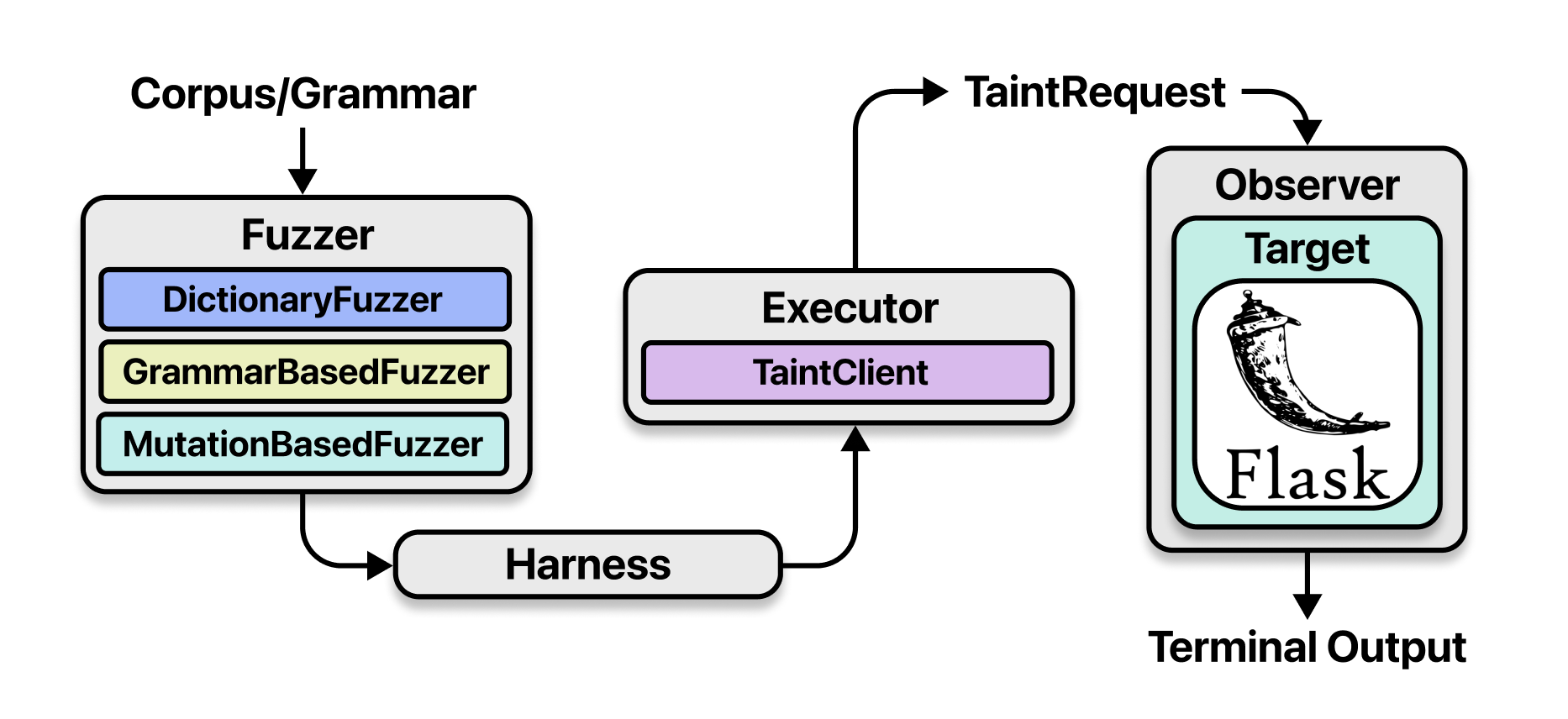
Installation
To install the latest version of TaintMonkey, you can run the following command.
pip install taintmonkey
Usage
In order to test a Flask endpoint for a particular vulnerability with TaintMonkey, you must first create a plugin.
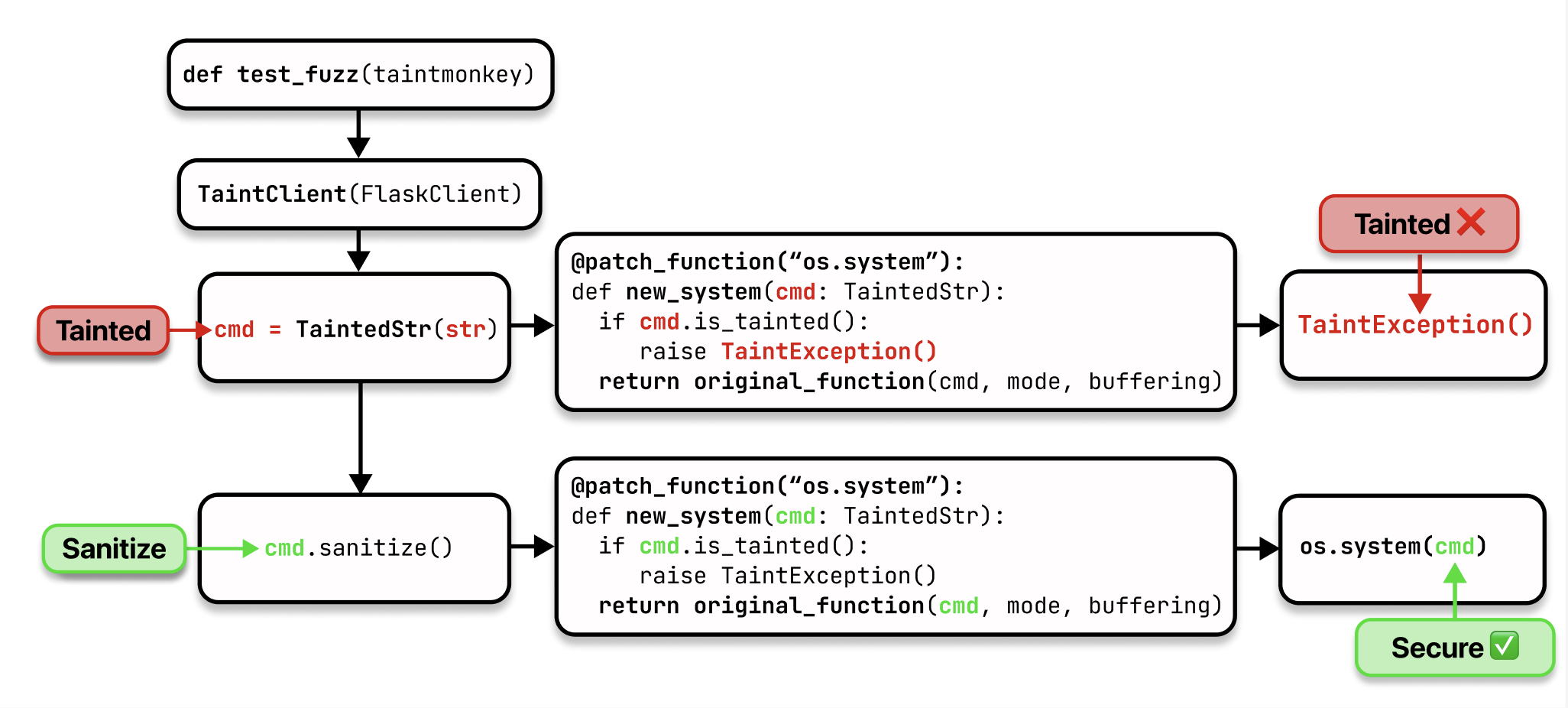
Step 1: Monkey Patch the Source
Monkey patch your endpoint's source to return a tainted string.
Example for OS Command Injection:
@patch_function("dataset.cwe_78_os_command_injection.insecure_novalidation.app.open_file_command")
def new_open_file_command(file: TaintedStr):
    return TaintedStr(original_function(file))
Step 2: Create taintmonkey() Fixture
Write a taintmonkey() fixture that passes your app's verifier, sanitizer, and sink functions to the TaintMonkey class. TaintMonkey automatically monkey patches these functions to add taint analysis instrumentation. Next, initialize and set a fuzzer (dictionary, mutation, or grammar-based) for TaintMonkey to use.
Example:
VERIFIERS = []
SANITIZERS = []
SINKS = ["os.popen"]

@pytest.fixture()
def taintmonkey():
    from dataset.cwe_78_os_command_injection.insecure_novalidation.app import app

    tm = TaintMonkey(app, verifiers=VERIFIERS, sanitizers=SANITIZERS, sinks=SINKS)

    fuzzer = MutationBasedFuzzer(app, "plugins/cwe_78_os_command_injection/corpus.txt")
    tm.set_fuzzer(fuzzer)

    return tm
Step 3: Write The Fuzzing Harness
The fuzzing harness is how a TaintMonkey plugin uses inputs generated by the fuzzer to test an endpoint for vulnerabilities. Use the fuzzer's context manager to get a TaintClient object and input generator. Then iterate through the generated inputs and make requests to the endpoint using those inputs.
Example:
def test_fuzz(taintmonkey):
    fuzzer = taintmonkey.get_fuzzer()
    with fuzzer.get_context() as (client, get_input):
        for inp in get_input():
            client.get(f"/insecure?file={inp}")
Step 4: Run Plugin
Run the plugin to test if your Flask endpoint is vulnerable.
Example:
PYTHONPATH=. pytest -s plugins/cwe_78_os_command_injection/__init__.py
During execution, a TaintException is raised if tainted input reaches a sink without proper verification or sanitization (assuming that verifiers, sanitizers, and sinks have been correctly registered with the TaintMonkey object).
Development
To download the necessary packages for TaintMonkey, run
pip install -r requirements.txt
We use ruff to check the formatting of our code so before submitting a Pull Request, make sure to run the formatter using the following command.
python -m ruff format --no-cache
To run the unit test suite, use the following command.
PYTHONPATH=. pytest tests/
To generate a coverage report of TaintMonkey, run the following commands.
PYTHONPATH=. pytest --cov=taintmonkey --cov-report html tests/
cd htmlcov/
python3 -m http.server
The HTML report generated by coverage-py should be available at http://localhost:8000.
Experiments
In order to run experiments using the JungleGym dataset, make sure to set up the environment by doing the following.
python3 -m venv venv
source venv/bin/activate
bash experiments/setup.sh
Authors
TaintMonkey was developed by Shayan Chatiwala, Aiden Chen, Carter Chew, Sebastian Mercado, and Aarav Parikh for GSET 2025. The project was advised by Benson Liu as their project mentor and Anusha Iyer as their project Residential Teaching Assistant (RTA). For any questions or requests for additional information, please contact the authors.
1 maintainer

Metadata
1 maintainer
Release files for taintmonkey 1.0.2
For a detailed explanation of source distributions (sdists) and built distributions (wheels), please see the package formats documentation.
Source distribution (sdist)
| File | Size | Uploaded | |
|---|---|---|---|
| taintmonkey-1.0.2.tar.gz | 22.9 kB | Details |
Built distribution (wheel)
| File | Interpreter | ABI | Platform | Reset |
|---|---|---|---|---|
| taintmonkey-1.0.2-py3-none-any.whl | Python 3 | none | any | Details |
Total release size: 40.4 kB
Release files / taintmonkey-1.0.2.tar.gz
| Download URL | taintmonkey-1.0.2.tar.gz |
|---|---|
| Size | 22.9 kB |
| Tags | Source |
|
SHA-256 checksum How to use checksums |
f802996da2d8abf41878f7f02266c2af2e293df749482f2c4b5c15be5894323a
|
|
BLAKE2b-256 checksum How to use checksums |
f55f6a949e80118bad33d94ef43f9c957f583e8fb4ff43f8d22ea9fc0918166c
|
| Upload date | |
|
Uploaded using Trusted Publishing? What is trusted publishing? |
No |
| Uploaded via |
twine/6.1.0 CPython/3.12.9
|
Release files / taintmonkey-1.0.2-py3-none-any.whl
| Download URL | taintmonkey-1.0.2-py3-none-any.whl |
|---|---|
| Size | 17.5 kB |
| Tags | Python 3 |
|
SHA-256 checksum How to use checksums |
b6ca12d8204c2de9e3c105ad34e7d34ea386a556db8aea7b21b173923b1c4d3c
|
|
BLAKE2b-256 checksum How to use checksums |
72e5655302000df58a36485beb1dd4e7699e76d4cf5a635b542febc2c21184ae
|
| Upload date | |
|
Uploaded using Trusted Publishing? What is trusted publishing? |
No |
| Uploaded via |
twine/6.1.0 CPython/3.12.9
|














