
MCP server exposing Taiwan FDA (TFDA) drug-license and package-insert data to LLM clients. Independent open-source wrapper; not a TFDA product.
Verified details
These details have been verified by PyPIProject links
GitHub Statistics
Maintainers

Project description
taiwan-fda-mcp


Look up official Taiwan FDA (TFDA) drug information — package inserts (仿單) and drug-license data — directly from your AI assistant.
English below · 前往繁體中文說明 ↓
This is NOT an official Taiwan FDA product. It is an independent, open-source tool that reads the public TFDA APIs (
mcp.fda.gov.twanddata.fda.gov.tw). The goal is a reliable, source-cited way to look up Taiwan drug information: every answer links back to the official TFDA page. Always verify there before any clinical decision. This is not a medical device.
What is it?
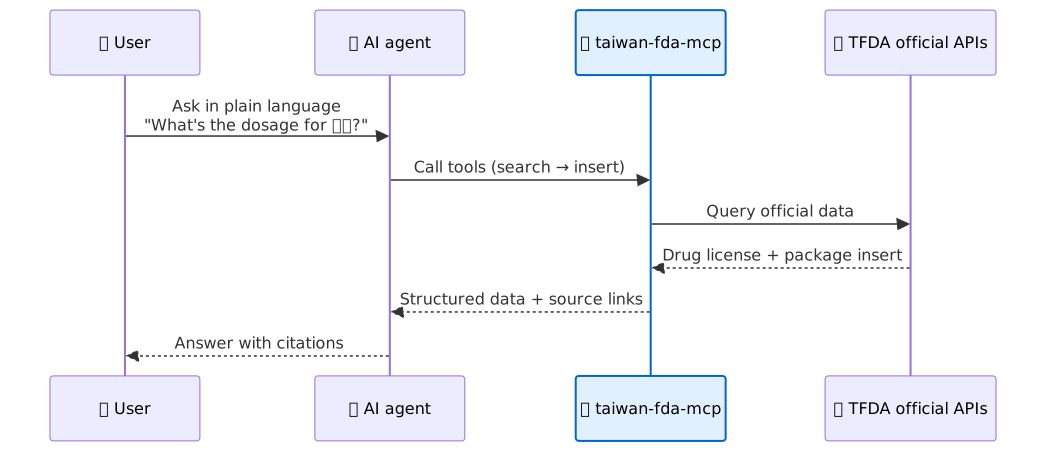
An MCP server. It gives an AI assistant (Claude Desktop, Claude Code, Codex, …) the ability to search Taiwan's official drug database and read package inserts. You ask a question in plain Chinese; the assistant fetches the real TFDA data and answers — with a link to the source.
What can it do?
It adds three tools to your assistant:
search_drugs— find a drug by Chinese/English name, ingredient, indication, maker, and more.get_package_insert— read the official 仿單 of one drug license (indications, dosage, warnings, side effects…), with a source link.check_insert_updates— list inserts updated since a given date.
You don't call these by hand. You just ask your assistant a question, e.g.:
- What's the dosage for 脈優 (amlodipine)?
- Does Herceptin's package insert carry a black box warning?
- What does the package insert for 綠油精 (an OTC liniment) say?
- Which drugs contain valsartan?
- Which package inserts were updated in the last 3 days?
Behind the scenes it searches → picks the right license → quotes the insert → gives you the official TFDA source URL.
How to install
Option A — uvx (easiest, nothing to clone)
Available once the first release is on PyPI. Until then, use Option B.
uv downloads and runs it in a throwaway
environment — no manual install:
uvx taiwan-fda-mcp
Option B — from source
git clone https://github.com/shin13/opentaimed.git
cd opentaimed/taiwan-fda-mcp
uv sync
uv run taiwan-fda-mcp
How to use it (connect your AI client)
Add the server to your client's config, restart it, then just ask a drug question in Chinese. The three tools appear automatically.
Claude Code
claude mcp add taiwan-fda -- uvx taiwan-fda-mcp
# from source:
claude mcp add taiwan-fda -- uv run --directory /absolute/path/to/taiwan-fda-mcp taiwan-fda-mcp
Claude Desktop — edit ~/Library/Application Support/Claude/claude_desktop_config.json (macOS), then restart:
{
  "mcpServers": {
    "taiwan-fda": {
      "command": "uvx",
      "args": ["taiwan-fda-mcp"]
    }
  }
}
From source, use "command": "uv" with
"args": ["run", "--directory", "/absolute/path/to/taiwan-fda-mcp", "taiwan-fda-mcp"].
Codex CLI — add to ~/.codex/config.toml:
[mcp_servers.taiwan-fda]
command = "uvx"
args = ["taiwan-fda-mcp"]
Example
Ask your assistant:
What's the dosage for 脈優 (amlodipine)?
It replies with the dosage section from the official 仿單, plus the TFDA source link so you can check it yourself.
繁體中文
從你的 AI 助理直接查詢**台灣食藥署(TFDA)**的官方藥物資訊——仿單與藥品許可證資料。
這不是台灣食藥署的官方產品。 這是一個獨立的開源工具,只讀取 TFDA 的 公開 API(
mcp.fda.gov.tw與data.fda.gov.tw)。目標是做一個 可靠、且每筆都附上出處的台灣藥物資訊查詢工具:每個回答都會附上 TFDA 官方頁面連結。 臨床決策前請務必到官方頁面再次確認。本工具不是醫療器材。
這是什麼?
一個 MCP server。它讓 AI 助理(Claude Desktop、Claude Code、Codex…)能搜尋台灣官方藥物資料庫、讀取仿單。 你用中文問問題,助理就去抓真實的 TFDA 資料來回答,並附上出處。
可以做什麼?
它幫你的助理加上三個工具:
search_drugs— 用中/英文藥名、成分、適應症、製造商等條件找藥。get_package_insert— 讀某一張藥證的官方仿單(適應症、用法用量、警語、副作用…),附出處連結。check_insert_updates— 列出某日期之後更新過的仿單。
你不用自己呼叫這些工具,直接問助理就好,例如:
- 脈優的用法用量?
- Herceptin 的仿單有沒有加框警語?
- 綠油精的仿單內容?
- 有哪些含 valsartan 的藥?
- 最近 3 天有哪些仿單更新?
它會自動:搜尋 → 選對的藥證 → 引用仿單 → 給你 TFDA 官方來源網址。
怎麼安裝
方法 A — uvx(最簡單,不用 clone)
等第一版發布到 PyPI 後即可使用;在那之前請用方法 B。
uv 會在用完即丟的環境下載並執行,不需手動安裝:
uvx taiwan-fda-mcp
方法 B — 從原始碼
git clone https://github.com/shin13/opentaimed.git
cd opentaimed/taiwan-fda-mcp
uv sync
uv run taiwan-fda-mcp
裝好之後怎麼用(連到你的 AI 工具)
把 server 加進你工具的設定檔,重新啟動,然後直接用中文問藥物問題,三個工具會自動出現。
Claude Code
claude mcp add taiwan-fda -- uvx taiwan-fda-mcp
# 從原始碼:
claude mcp add taiwan-fda -- uv run --directory /絕對路徑/到/taiwan-fda-mcp taiwan-fda-mcp
Claude Desktop — 編輯 ~/Library/Application Support/Claude/claude_desktop_config.json(macOS),然後重新啟動:
{
  "mcpServers": {
    "taiwan-fda": {
      "command": "uvx",
      "args": ["taiwan-fda-mcp"]
    }
  }
}
從原始碼安裝時,把 command 改成 "uv"、args 改成
["run", "--directory", "/絕對路徑/到/taiwan-fda-mcp", "taiwan-fda-mcp"]。
Codex CLI — 加到 ~/.codex/config.toml:
[mcp_servers.taiwan-fda]
command = "uvx"
args = ["taiwan-fda-mcp"]
範例
問你的助理:
脈優的用法用量?
它會回給你官方仿單裡的用法用量章節,並附上 TFDA 來源連結讓你自己核對。
Development · 開發
For tests, linting, and type-checking, see the repository: https://github.com/shin13/opentaimed
uv run pytest          # unit tests
uv run ruff check .    # lint
uv run pyright src     # type-check
License: MIT (with clinical disclaimer) · Changelog
Project details
Verified details
These details have been verified by PyPIProject links
GitHub Statistics
Maintainers
Release history Release notifications | RSS feed


Download files
Download the file for your platform. If you're not sure which to choose, learn more about installing packages.
Source Distribution
Built Distribution
Filter files by name, interpreter, ABI, and platform.
If you're not sure about the file name format, learn more about wheel file names.
Copy a direct link to the current filters
File details
Details for the file taiwan_fda_mcp-0.2.1.tar.gz.
File metadata
- Download URL: taiwan_fda_mcp-0.2.1.tar.gz
- Upload date:
- Size: 122.8 kB
- Tags: Source
- Uploaded using Trusted Publishing? Yes
- Uploaded via: twine/6.1.0 CPython/3.13.12
File hashes
| Algorithm | Hash digest | |
|---|---|---|
| SHA256 |
f4a08c80a4d52cc4d37c6e9c88adac4dfe02d5a545b9933d24131e359ca6c3d0
|
|
| MD5 |
97ddbc3b1cae38401bd0b469adb55c8d
|
|
| BLAKE2b-256 |
4669bf1049b27eaffcb44eaed1048728c677aaf9d2ee67a13ce6afcc7695beb4
|
Provenance
The following attestation bundles were made for taiwan_fda_mcp-0.2.1.tar.gz:
Publisher:
publish.yml on shin13/opentaimed
-
Statement:
-
Statement type:
https://in-toto.io/Statement/v1 -
Predicate type:
https://docs.pypi.org/attestations/publish/v1 -
Subject name:
taiwan_fda_mcp-0.2.1.tar.gz -
Subject digest:
f4a08c80a4d52cc4d37c6e9c88adac4dfe02d5a545b9933d24131e359ca6c3d0 - Sigstore transparency entry: 1688687135
- Sigstore integration time:
-
Permalink:
shin13/opentaimed@de0109fd70f85278fdf9eb53c55b93b8d8dcb04a -
Branch / Tag:
refs/tags/v0.2.1 - Owner: https://github.com/shin13
-
Access:
public
-
Token Issuer:
https://token.actions.githubusercontent.com -
Runner Environment:
github-hosted -
Publication workflow:
publish.yml@de0109fd70f85278fdf9eb53c55b93b8d8dcb04a -
Trigger Event:
push
-
Statement type:
File details
Details for the file taiwan_fda_mcp-0.2.1-py3-none-any.whl.
File metadata
- Download URL: taiwan_fda_mcp-0.2.1-py3-none-any.whl
- Upload date:
- Size: 47.2 kB
- Tags: Python 3
- Uploaded using Trusted Publishing? Yes
- Uploaded via: twine/6.1.0 CPython/3.13.12
File hashes
| Algorithm | Hash digest | |
|---|---|---|
| SHA256 |
c724ea48d4e887ccf0e7692a217525ccbcff4358046e743e3c1d6ed6257380d9
|
|
| MD5 |
97b176cc584cdd1126e937599387dce0
|
|
| BLAKE2b-256 |
2765e53a962920dc3999fee028711aa4bfa0fadf6be873ed4161845e6ec34cc8
|
Provenance
The following attestation bundles were made for taiwan_fda_mcp-0.2.1-py3-none-any.whl:
Publisher:
publish.yml on shin13/opentaimed
-
Statement:
-
Statement type:
https://in-toto.io/Statement/v1 -
Predicate type:
https://docs.pypi.org/attestations/publish/v1 -
Subject name:
taiwan_fda_mcp-0.2.1-py3-none-any.whl -
Subject digest:
c724ea48d4e887ccf0e7692a217525ccbcff4358046e743e3c1d6ed6257380d9 - Sigstore transparency entry: 1688687169
- Sigstore integration time:
-
Permalink:
shin13/opentaimed@de0109fd70f85278fdf9eb53c55b93b8d8dcb04a -
Branch / Tag:
refs/tags/v0.2.1 - Owner: https://github.com/shin13
-
Access:
public
-
Token Issuer:
https://token.actions.githubusercontent.com -
Runner Environment:
github-hosted -
Publication workflow:
publish.yml@de0109fd70f85278fdf9eb53c55b93b8d8dcb04a -
Trigger Event:
push
-
Statement type:






