
Takefits

Takefits is a GUI-based astronomical FITS viewer and analysis tool developed by Shunya Takekawa.

Requirements
- Python 3.11 or later
Setup
From PyPI:
pip install takefits
For a local checkout:
python -m venv venv
source venv/bin/activate    # On Windows: venv\Scripts\activate
pip install .
Usage
takefits [path/to/fitsfile]
You can also launch it with:
python -m takefits [path/to/fitsfile]
Takefits can also save your current work using workspace files, so you can resume it anytime. To restore a saved workspace, launch Takefits with the workspace file path.
takefits /path/to/yourfile.workspace.json
Frequency axes open as radio velocity when the file has a rest frequency
(RESTFRQ). To see frequencies instead (also for cubes stored in radio
velocity, VRAD), change Preferences -> General -> Frequency / velocity
axes open as, or choose for one launch:
takefits /path/to/cube.fits --spectral-axis freq # or --spec freq; "vel" shows velocities
Features
Takefits provides a comprehensive set of tools for radio astronomy data analysis.
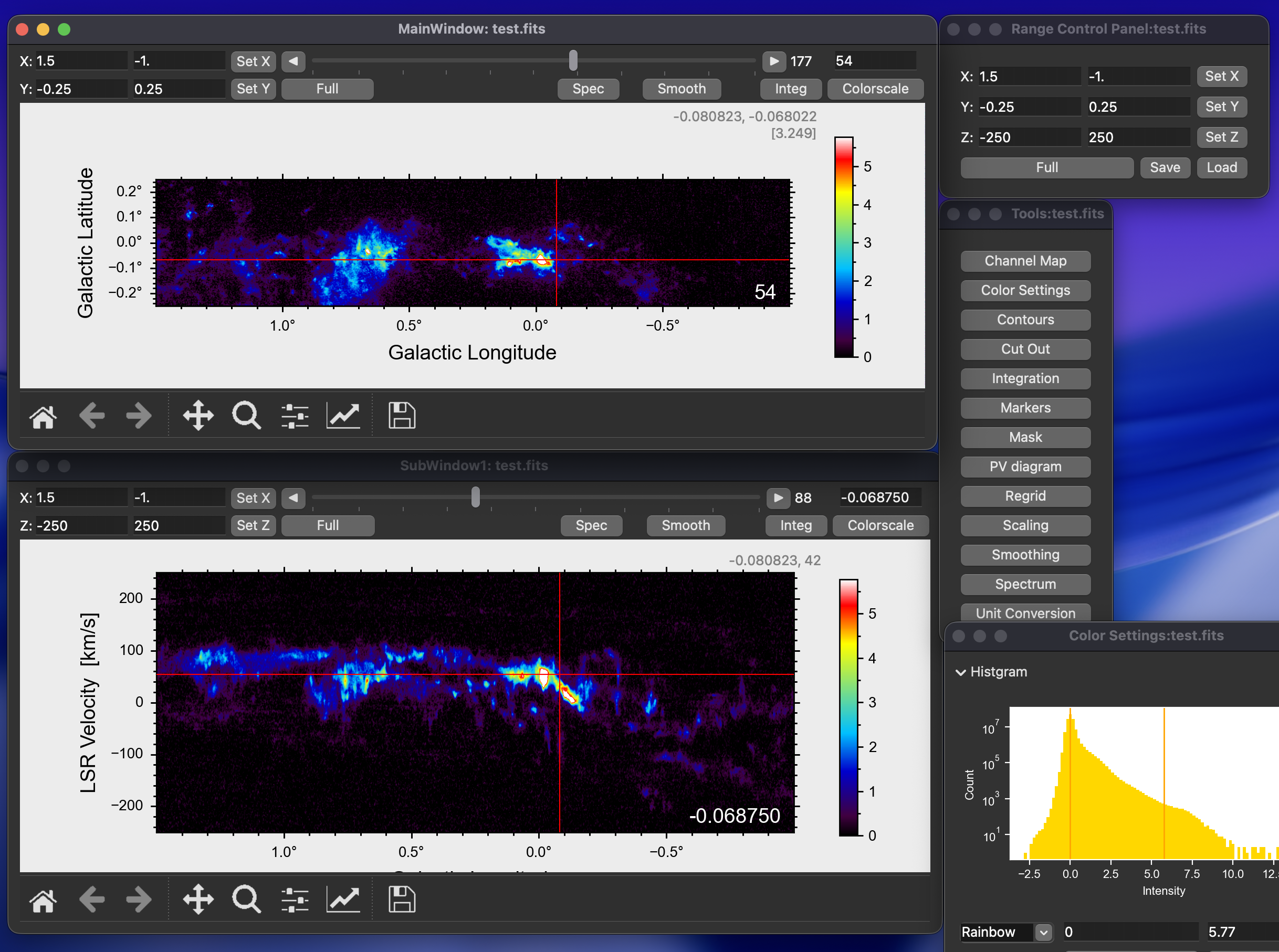
1. Multi-View Cube Visualization
Visualize 3D FITS data cubes with synchronized XY, XZ, and ZY planes.
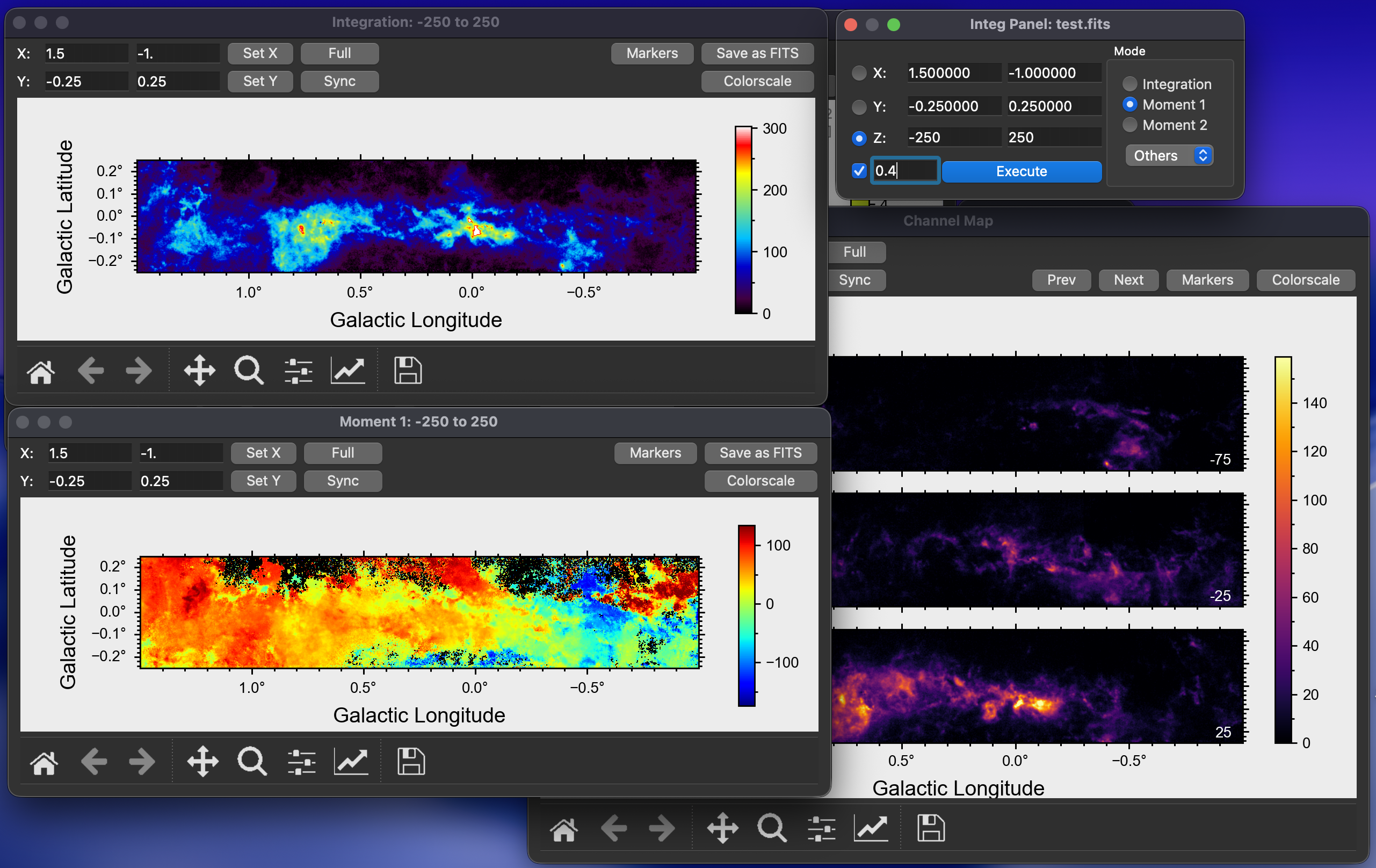
2. Moment Maps & Channel Maps
Calculate moment maps (Integrated Intensity, Velocity Field, Velocity Dispersion) and create tiled channel maps.
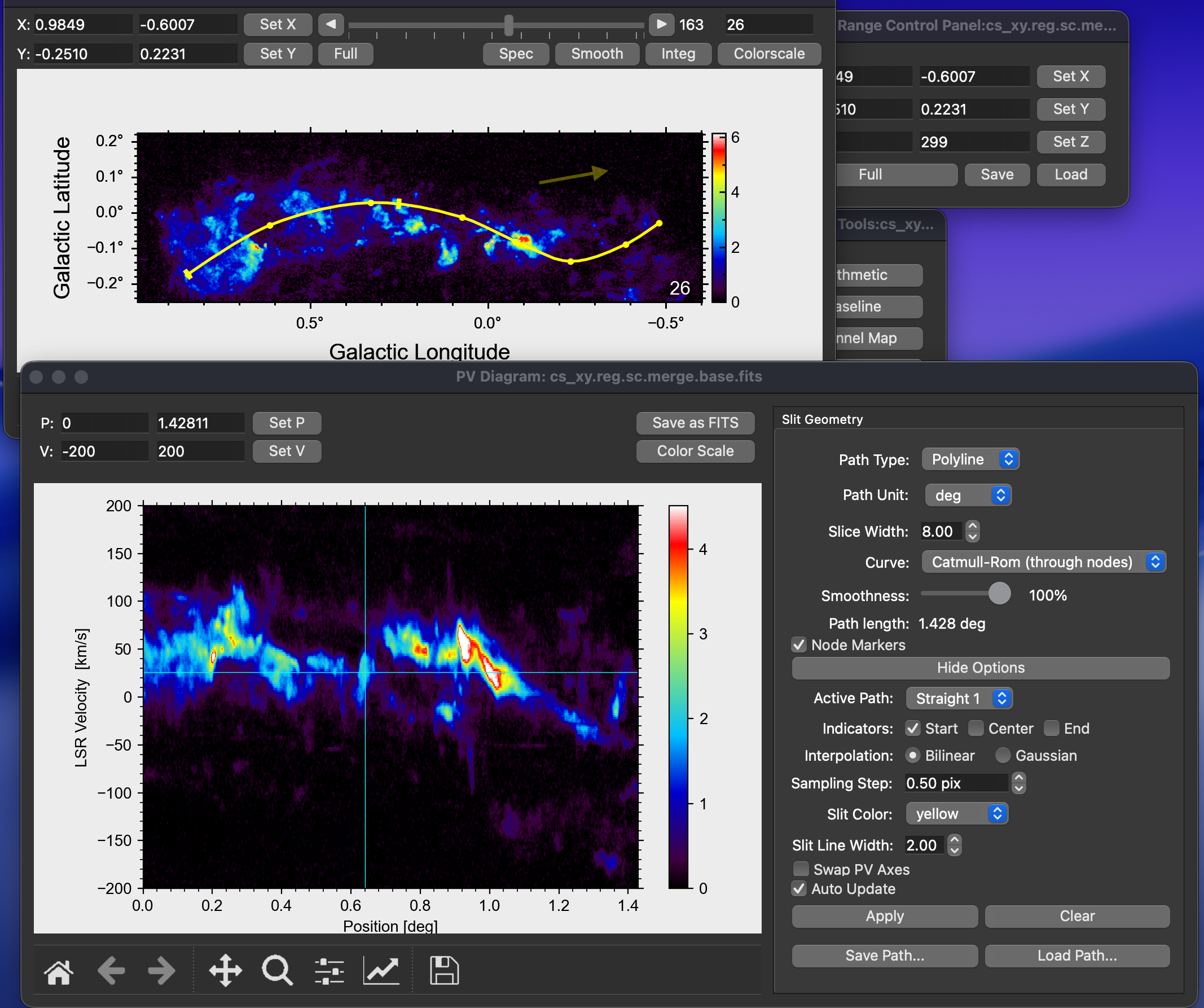
3. Interactive P-V Diagram
Interactively draw extraction paths — straight lines, polylines, smooth spline curves, and elliptical arcs — to generate Position-Velocity (P-V) diagrams instantly.
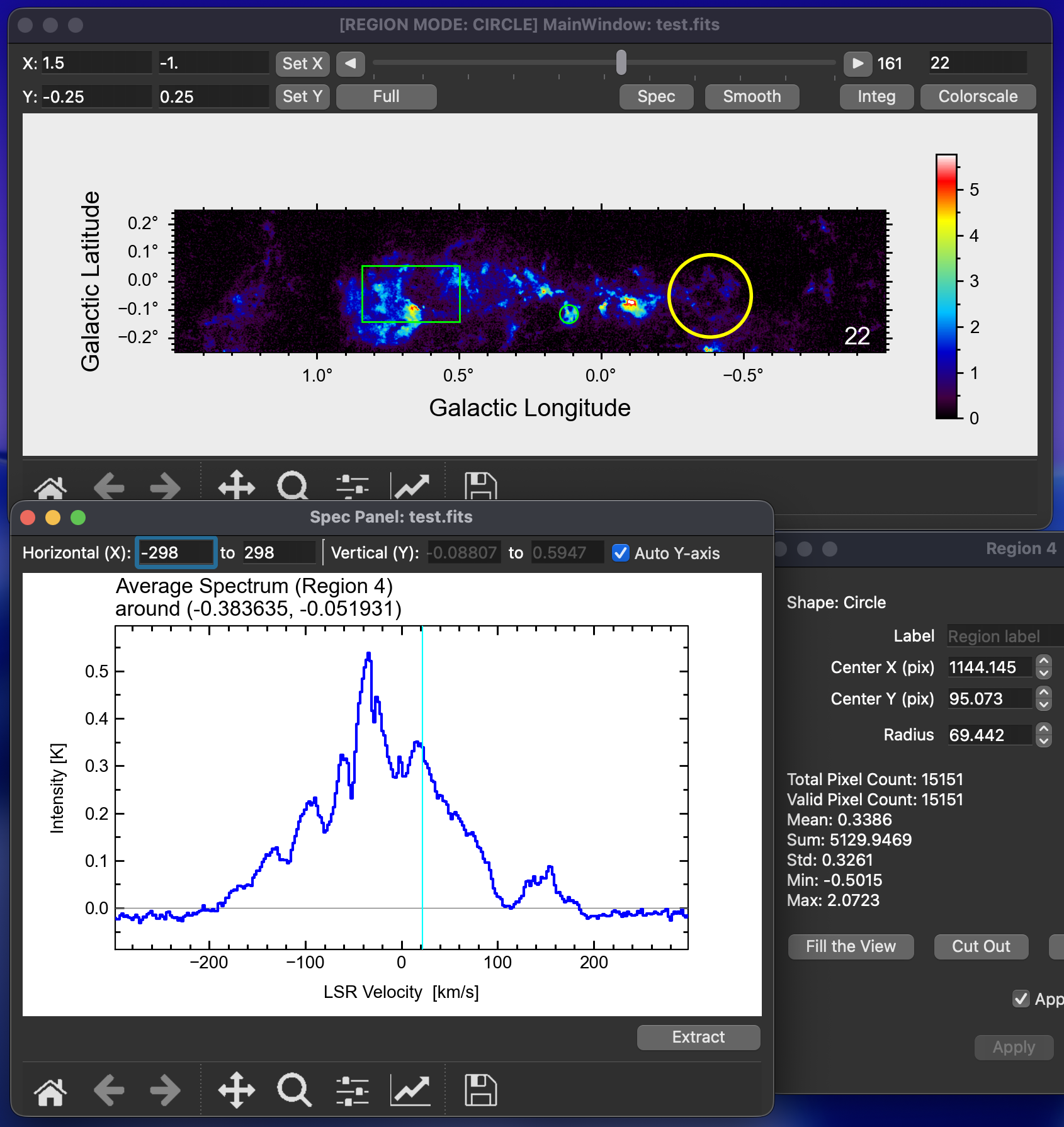
4. Spectrum Analysis
Extract spectra from a single pixel or calculate the average spectrum within selected regions (Circle, Rectangle, Ellipse, Cube).
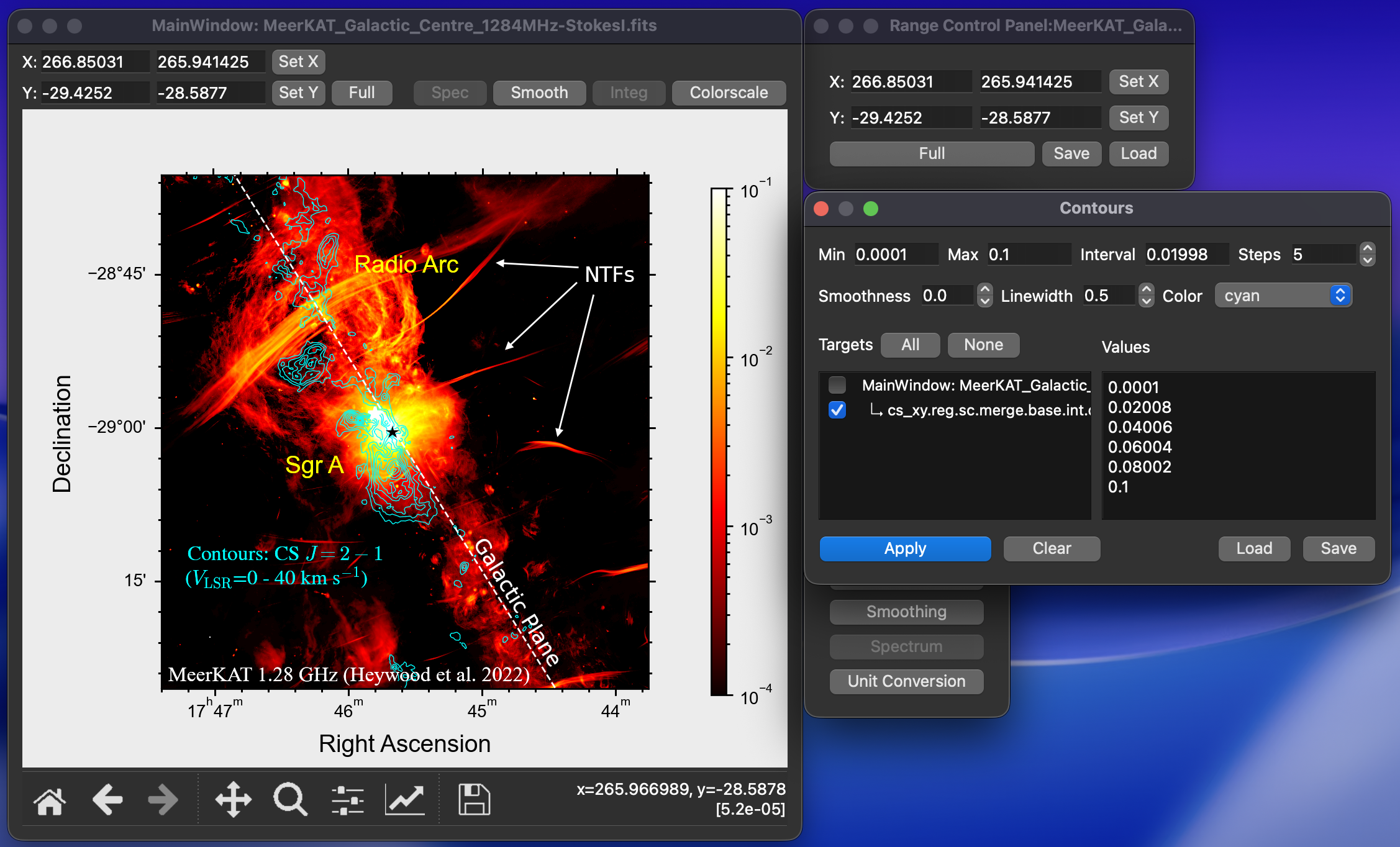
5. Publication-Quality Figures
Generate publication-quality figures directly from the GUI.
- Contours: Overlay customizable contours with adjustable levels. Contours can also be loaded from another FITS file with a live preview; the dialog shows data range/rms, lets you generate linear Min/Max/Steps levels or edit the Levels field directly, and aligns the resulting contours through the source WCS so images on different grids can be compared without regridding. Double-click an imported overlay in the contour panel to re-edit its levels.
- Markers: Annotate images with symbols, lines, and text.
- Beam Size: Visualize the HPBW ellipse.
- Vector Export: Save plots in PDF, EPS, or SVG formats.
Other Tools
- Regridding: Resample data to a new grid, different coordinate system, or a FITS template.
- Smoothing: Apply Gaussian/Boxcar spatial smoothing and Hanning smoothing along the velocity axis.
- Masking: Apply threshold-based or external masks to data.
- Cutout: Crop data cubes based on regions or coordinate ranges.
- Image Arithmetic: Perform mathematical operations between FITS cubes or with constants using numpy-like expressions.
- Unit Conversion: Convert spectral or intensity units for analysis.
- Baseline Subtraction: Fit and subtract spectral baselines from data cubes.
- Clump Finding: Identify structures using ClumpFind, FellWalker, Dendrogram, and SCIMES (dendrogram clustering) algorithms.
Research use
If you use this software in scientific publications, please cite the Zenodo DOI:
https://doi.org/10.5281/zenodo.18328843
For a specific release, cite the version DOI listed on Zenodo.
Algorithm Citations
The tools below implement established analysis algorithms. If you use them for your analysis, please cite the original papers:
Clump Finding
Cite the paper corresponding to the algorithm you used:
- ClumpFind — Williams, J. P., de Geus, E. J., & Blitz, L. (1994). Determining structure in molecular clouds. The Astrophysical Journal, 428, 693-712. doi:10.1086/174279
- FellWalker — Berry, D. S. (2015). FellWalker-A clump identification algorithm. Astronomy and Computing, 10, 22-31. doi:10.1016/j.ascom.2014.11.004
- Dendrogram — Rosolowsky, E. W., Pineda, J. E., Kauffmann, J., & Goodman, A. A. (2008). Structural Analysis of Molecular Clouds: Dendrograms. The Astrophysical Journal, 679(2), 1338-1351. doi:10.1086/587685
- SCIMES (Dendrogram clustering) — Colombo, D., Rosolowsky, E., Ginsburg, A., Duarte-Cabral, A., & Hughes, A. (2015). Graph-based interpretation of the molecular interstellar medium segmentation. Monthly Notices of the Royal Astronomical Society, 454(2), 2067-2091. doi:10.1093/mnras/stv2063 — a modified copy is bundled under
takefits/logic/scimes/(BSD 3-Clause).
Masking / Moment Analysis
- Rosolowsky, E., & Leroy, A. (2006). Bias-free Measurement of Giant Molecular Cloud Properties. Publications of the Astronomical Society of the Pacific, 118(842), 590-610. doi:10.1086/502982
- Dame, T. M. (2011). The Technique of Velocity-Resolved Moment Masking. arXiv e-prints, arXiv:1101.1499. arXiv:1101.1499
Contact
shunya_at_kanagawa-u.ac.jp
1 maintainer

Metadata
1 maintainer
Release files for takefits 0.3.5
For a detailed explanation of source distributions (sdists) and built distributions (wheels), please see the package formats documentation.
Source distribution (sdist)
| File | Size | Uploaded | |
|---|---|---|---|
| takefits-0.3.5.tar.gz | 899.8 kB | Details |
Built distribution (wheel)
| File | Interpreter | ABI | Platform | Reset |
|---|---|---|---|---|
| takefits-0.3.5-py3-none-any.whl | Python 3 | none | any | Details |
Total release size: 1.9 MB
Release files / takefits-0.3.5.tar.gz
| Download URL | takefits-0.3.5.tar.gz |
|---|---|
| Size | 899.8 kB |
| Tags | Source |
|
SHA-256 checksum How to use checksums |
3d209e075c528d4c8df93f143edee88d97779e3faa0ea991642d2a01bb8946cf
|
|
BLAKE2b-256 checksum How to use checksums |
040e6505e8c24114685a2ed945be64bbfbcdf3b7145e6a8f4f07150579527b8d
|
| Upload date | |
|
Uploaded using Trusted Publishing? What is trusted publishing? |
Yes |
| Uploaded via |
twine/7.0.0 CPython/3.13.14
|
Provenance
Provenance describes where a file came from. On PyPI, provenance is shared via attestations, which provide a verifiable record of the build or publishing details. View details, limitations and caveats.


PyPI Publish Attestation
PyPI verified that this artifact, at this checksum, originated from the publisher listed below.
Signed by GitHub Actions, verified by PyPI on Sep 28, 2026.
Transparency logRelease files / takefits-0.3.5-py3-none-any.whl
| Download URL | takefits-0.3.5-py3-none-any.whl |
|---|---|
| Size | 959.9 kB |
| Tags | Python 3 |
|
SHA-256 checksum How to use checksums |
78c6d6649ec4a3339a63620eaac62f694f60b75278cd919f92a16908fb8ba24e
|
|
BLAKE2b-256 checksum How to use checksums |
e6e0b74b3a25128a8077f51e300065dec36babe3748e745034f9575553413d6c
|
| Upload date | |
|
Uploaded using Trusted Publishing? What is trusted publishing? |
Yes |
| Uploaded via |
twine/7.0.0 CPython/3.13.14
|
Provenance
Provenance describes where a file came from. On PyPI, provenance is shared via attestations, which provide a verifiable record of the build or publishing details. View details, limitations and caveats.
PyPI Publish Attestation
PyPI verified that this artifact, at this checksum, originated from the publisher listed below.
Signed by GitHub Actions, verified by PyPI on Sep 28, 2026.
Transparency log













