
CLI for running Talend Cloud jobs

Project description
talend-task
CLI for running Talend Cloud jobs
- Copyright (c) 2026 Corey Goldberg
- Development: GitHub
- Releases: PyPI
- License: MIT
Status
| Latest Version |

|
| Build/Tests (CI) |

|
| Supported Python Versions |

|
About
talend_task is a Python CLI for running Talend Cloud
jobs, including ETL pipelines, workflows, and tasks. It uses the Talend
Processing API to trigger
job runs and monitor status.
Select a job interactively, or specify one directly with --job.
Installation
Install the package from PyPI:
pip install talend-task
CLI
After installation, the talend_task command is available in your shell.
CLI Options:
$ talend_task --help
usage: talend_task [-h] [--debug] [--wait] [--activity] [--job NAME] [--timeout SECS]
                   [--poll-interval SECS]

Talend Cloud CLI

options:
  -h, --help            show this help message and exit
  --debug               enable debug logging
  --wait                wait for job to complete and return status
  --activity            show recent runs without executing job (cannot be used with --wait)
  --job NAME            job name
  --timeout SECS        timeout (requires --wait, default: none)
  --poll-interval SECS  polling interval (requires --wait, default: 5)
Configuration
The CLI requires an Access Token and an API URL for your Talend region.
- Access Token: Generate it in the Talend Management Console.
- API URL: Base endpoint URL for the API you will connect to.
Configuration is provided via environment variables:
export API_URL=https://api.<region>.talend.com
export ACCESS_TOKEN=<access-token>
Alternatively, you can define these variables in a .env file in the current
directory:
API_URL=https://api.<region>.talend.com
ACCESS_TOKEN=<access-token>
Usage Examples
Direct mode
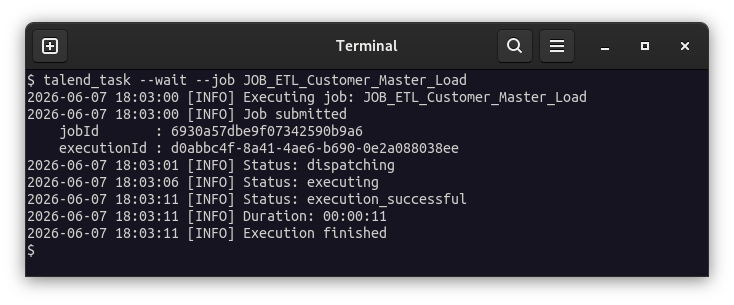
Run a job immediately by providing --job <name>:
talend_task --job Job1
Interactive mode
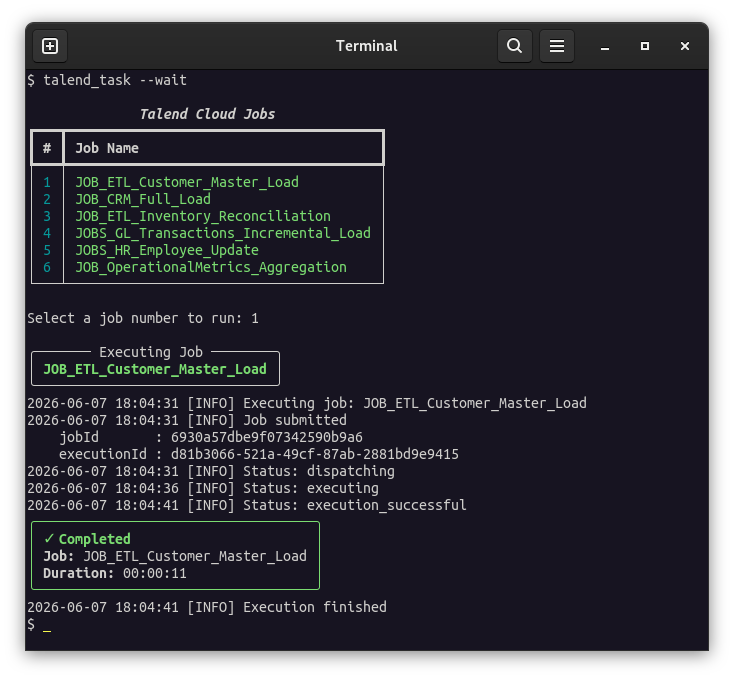
Run the CLI without specifying a job to select and execute one from a menu:
talend_task
Screenshots
Interactive mode
Direct mode
Development
-
Install as editable package with required development/testing dependencies:
pip install --editable --group dev --group test . -
Run all tests:
pytest -
Run linting and formatting:
tox -e lint -
Run validation, linting, formatting, and all tests across all supported/installed Python environments:
tox
Project Structure
./
├── .github/
│   └── workflows/
│       └── test.yml
├── src/
│   └── talend_task/
│       ├── __init__.py
│       ├── cli.py
│       └── talend_client.py
├── tests/
│   ├── test_cli.py
│   └── test_talend_client.py
├── pyproject.toml
└── tox.ini
Project details
Release history Release notifications | RSS feed


Download files
Download the file for your platform. If you're not sure which to choose, learn more about installing packages.
Source Distribution
Built Distribution
Filter files by name, interpreter, ABI, and platform.
If you're not sure about the file name format, learn more about wheel file names.
Copy a direct link to the current filters
File details
Details for the file talend_task-0.1.4.tar.gz.
File metadata
- Download URL: talend_task-0.1.4.tar.gz
- Upload date:
- Size: 13.7 kB
- Tags: Source
- Uploaded using Trusted Publishing? No
- Uploaded via: twine/6.2.0 CPython/3.14.6
File hashes
| Algorithm | Hash digest | |
|---|---|---|
| SHA256 |
f80ea3c4013863a3f4daa6d398b7ad5526c2d7c89c016bf3c694c9cea616c3b6
|
|
| MD5 |
ba85f9860ca9996c01d08aa2e2a8b723
|
|
| BLAKE2b-256 |
f6e1e1a31f3ccf4df917f6340f9ec6b035b0d5fccf13873fd3eebb95e4644d65
|
File details
Details for the file talend_task-0.1.4-py3-none-any.whl.
File metadata
- Download URL: talend_task-0.1.4-py3-none-any.whl
- Upload date:
- Size: 8.8 kB
- Tags: Python 3
- Uploaded using Trusted Publishing? No
- Uploaded via: twine/6.2.0 CPython/3.14.6
File hashes
| Algorithm | Hash digest | |
|---|---|---|
| SHA256 |
8978768d579615d031f1d444a37584378687d9120b848e64e6db6bacf2a7f3a6
|
|
| MD5 |
1186d62468eadcbc52dabae1f6939a50
|
|
| BLAKE2b-256 |
5c1e0c8e26191d7f191ffa7beeba20e06ab73b818034a23ba342edf6c0fcef32
|






