
tali • The CLI magic for task alchemists • Weave productivity spells with symbols that conjures order from chaos.
Verified details
These details have been verified by PyPIProject links
GitHub Statistics
Maintainers

Project description
tali 🧙♂️
The CLI magic 🔮 for task alchemists -- Weave productivity spells with symbols that conjure order 📓 from chaos 🌀.


tali is a magical command-line task manager.
It manipulates tasks with intuitive symbols
for fast yet powerful filtering, grouping, sorting and batch operations.

Contents
- 🔝 Top
- ✨ Features
- 📦 Installation
- 📖 Usage Examples
- ⚙️ Configuration
- 📜 Symbol Cheat Sheet
- 🚀 Productivity Tips
- 🧙♂️ Contribute
- 💡 Inspired by
✨ Features
- 🚀 Fast Symbolic Syntax --
Intuitive symbols for fast task filtering and editing:
@tag,/project,^1week. - 🔎 Powerful Filtering, Grouping and Sorting --
Filter, group and sort items with ease:
tali /work ! ^today @ =^. - 📒 Batch Operations --
Modify multiple filtered tasks at once:
tali /grocery @fruit . ,dmarks tasks with tag@fruitin/groceryproject as done. - 😄 Emoji Support --
Use Emoji markups for visual flair:
💥 =
:boom:. - ⏪ Undo/Redo --
Never fear accidental changes
with
-u/--undoand-r/--redo. - ⚙️ Highly Customizable --
Configure symbols, aliases,
rendering format/style, editor, pager,
database location, and more
in
~/.config/tali/config.toml. - 📁 Folder-specific Task Management --
Organize tasks in specific directories
by creating a
.talifolder in any directory. - 📇 JSON Storage/Export --
Machine-readable output with
-j/--json. - 📜 Cheat Sheet Built-in --
Always available with
-c/--cheatsheet. - 1️⃣ Idempotent Operations -- Use interactive editor or scripts to modify tasks.
📦 Installation
-
Using pip
pip install tali-cli
-
Using uv
uv tool install tali-cli
-
From source
git clone https://github.com/admk/tali && cd tali && pip install .
-
Requires
Python 3.10+.
📖 Usage Examples
🪄 Basic Usage
tali . "Buy milk" /grocery ^today  # Create a task with project and deadline
tali . "Meeting notes" /work ^"tue 4pm" ,n  # Create a note
tali . "Fix bug" /tali !high @urgent  # Create high-priority task with tag
tali 42 . ,  # Toggle completion for task 42
tali 42 . ,x  # Delete task
tali ^today . @star  # Toggle star tag for all tasks due today
🔎 Filtering & Querying
tali /work !high ^today  # Show high-priority work tasks due today
tali /work + /home  # Show tasks in /work or /home
tali '(/work + /home) @urgent'  # Show urgent tasks in /work or /home
tali /work ~@waiting  # Show /work tasks without the @waiting tag
tali ^fri  # Select tasks that are due by Friday
tali @ =^  # Group tasks by tag sorted by deadline
tali 42 ?^  # Query deadline of task 42
✏️ Task Modifications
tali 42 . ,done  # Mark task 42 as done ☑️
tali 42 . ,  # Toggle task status
tali 42 . @star  # Toggle star tag ⭐
tali 42 . @fav  # Toggle favorite tag ❤️
tali 42 . !h  # Set high priority ‼️
tali 42 . ,x  # Delete task 🗑️
tali 42 . : "Details..."  # Add description
tali 42 . "New title" /newproject ,n  # Edit multiple properties
⏰ Deadline Management
tali 42 . ^+3d  # Postpone deadline by 3 days
tali 42 . ^2mon  # Set to Monday after next
tali 42 . ^M  # Set to end of month
tali 42 . ^oo  # Remove deadline
📒 Batch Operations
tali 1..5 . ,x  # Delete tasks 1-5
tali @urgent . !high  # Set all @urgent tasks to high priority
tali /home .  # Edit all tasks in /home project in text editor
🧪 Advanced Options
tali (-d|--debug) <...>  # Debug mode
tali (-j|--json) <...>  # Output in JSON format
tali (-H|--history)  # Show commit history
tali (-u|--undo)  # Undo last operation; repeat, e.g. -uu, to undo more
tali (-r|--redo)  # Redo last undone operation; repeat, e.g. -rr, to redo more
tali (-R|--re-index)  # Re-index database
📝 Editor Usage
You can invoke an interactive editor by running:
tali (-e|--edit)  # start an empty editor for task editing
tali <selection> .  # or edit tasks filtered by <selection>
In the editor,
you can write task editing or adding commands
without the tali prefix.
When you save and close the editor:
- Each line will be treated as a separate command
- Commands will be executed sequentially
- Supports recursive prefix sharing for faster editing
Example:
. /home/grocery ^today buy
  @fruit
    apples
    oranges
  milk
This would be interpreted as:
. /home/grocery ^today @fruit buy apples
. /home/grocery ^today @fruit buy oranges
. /home/grocery ^today buy milk
To add nested tasks without knowing the parent's ID,
start each nested child line with .:
. /work release checklist
  . draft outline
  . collect screenshots
    . crop hero image
Indented lines without a leading . still use prefix sharing.
This also works inside nested blocks:
. /work
  release checklist
    @urgent
      . draft outline
      . collect screenshots
For multi-line descriptions in editor mode,
use indented : lines under the task:
. /work release checklist
  : First description line.
  : Second description line.
For longer descriptions,
use a fenced block.
The fence defaults to """
and can be changed with token.description_fence:
. /work release checklist : """
First description line.
Second description line.
"""
⚙️ Configuration
Global configuration is stored in ~/.config/tali/config.yaml
(or $XDG_CONFIG_HOME/tali/config.yaml).
It also uses .tali/config.yaml in your project directory
for project-specific setting overrides if it exists.
Edit with:
tali --edit-rc
See config.yaml for all default configurations.
See Configuration Guide
for details of how to customize tali.
📜 Symbol Cheat Sheet
| Token | Name | Description | Example |
|---|---|---|---|
. |
separator | Separates selection from action | 1..3 . ,done |
.. |
id range | Range of item IDs | 1..5 |
, |
status | Task status (see values below) | ,pending |
/ |
project | Project category | /work |
@ |
tag | Custom tag | @critical |
! |
priority | Priority level (see values below) | !high |
^ |
deadline | Due date/time expression | ^tomorrow |
= |
sort | Sort results | =! (priority) |
? |
query | Query attributes | ?^ (deadline) |
: |
description | Long description | : details... |
+ |
or | OR between selection clauses | /work + /home |
~ |
not | Negate the next selection filter | ~@waiting |
( |
group open | Opens a selection expression | (/work + /home |
) |
group close | Closes a selection expression | /home) @tag |
- |
stdin | Read from standard input | - |
Settable token values:
- Status accepts
pending,done,note,archive, anddelete. Default aliases arep,d/c,n,a, andx. A bare,action togglespending/done. - Priority accepts
high,normal, andlow. Default aliases areh,n, andl. A bare!action sets high priority;!+raises priority and!-lowers it. - Deadline accepts date expressions such as
today,tomorrow,feb21,10am,mon,+3d,-1w, and+M1d. Quote values with spaces, for example^"tue 4pm". In actions,^ooclears the deadline. - Selection adjacency is AND, a standalone
+is OR, and~negates the next selection filter. Parentheses group selection expressions; through a shell, quote or escape them, for example'(/work + /home) @urgent'. These defaults are configured withtoken.or,token.not,token.open_paren, andtoken.close_paren.
🚀 Productivity Tips
📟 Shell Aliases
Use t as an alias for tali.
For example:
- Add the following line to your
~/.bashrcor~/.zshrc:alias t='tali'
source ~/.bashrcorsource ~/.zshrcto apply the changes.- Use
t <...>instead oftali <...>for extra speed.
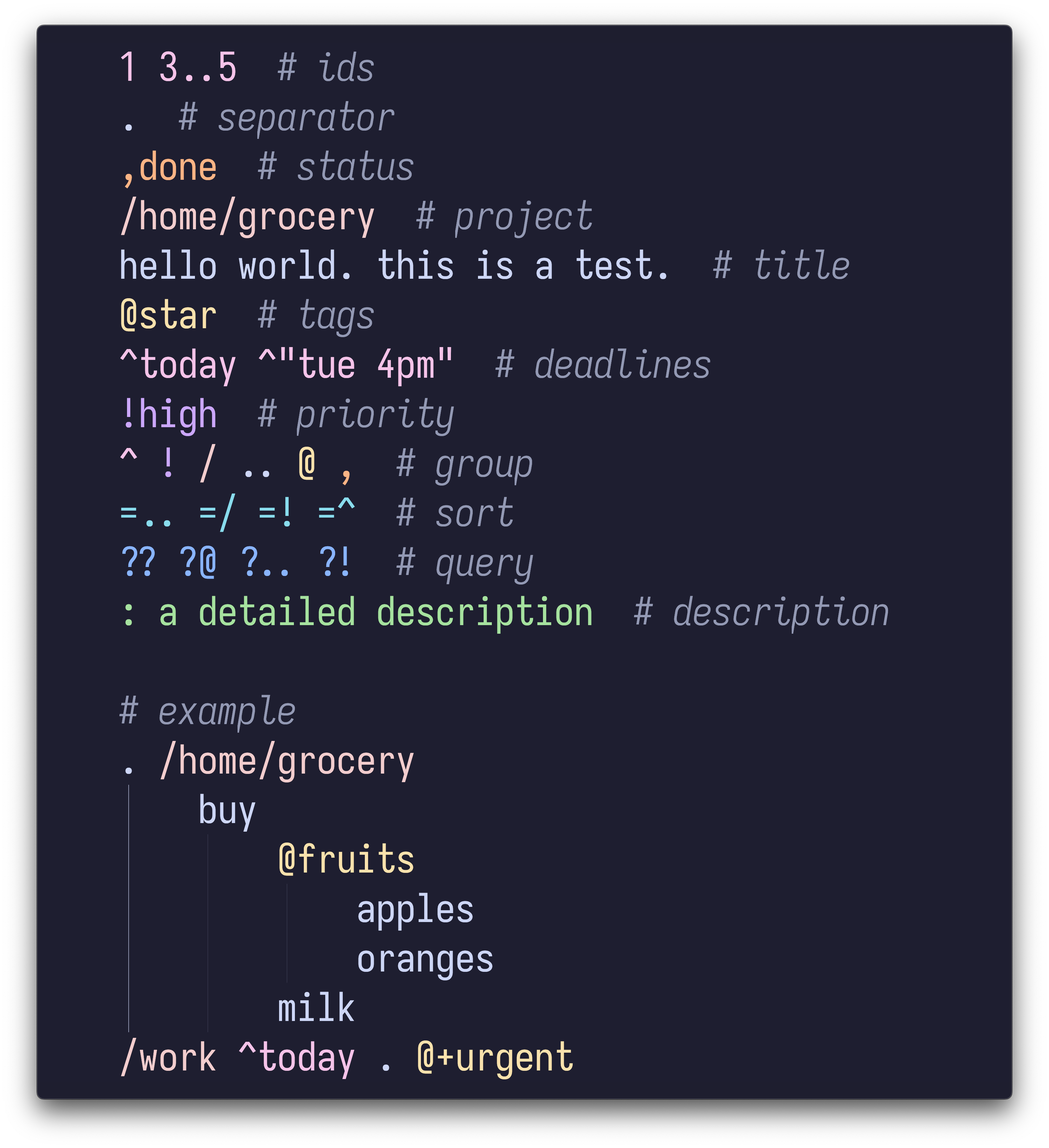
🎨 Syntax Highlighting
- Use
tali.vimfor Neovim/Vim syntax highlighting. Install with lazy.nvim:{ "admk/tali.nvim", ft = "tali", }
- Color theme: Catppuccin Mocha
Screenshot
🧙♂️ Contribute
- ❓ Need Help? FAQs
- 🔮 Report bugs: Issue Tracker
- 📥 Submit PRs: Pull Requests
- 💬 Discuss: Discussions
💡 Inspired by
- taskbook: Tasks, boards & notes for the command-line habitat.
- taskwarrior: A command line task list management utility.
Project details
Verified details
These details have been verified by PyPIProject links
GitHub Statistics
Maintainers


Download files
Download the file for your platform. If you're not sure which to choose, learn more about installing packages.
Source Distribution
Built Distribution
Filter files by name, interpreter, ABI, and platform.
If you're not sure about the file name format, learn more about wheel file names.
Copy a direct link to the current filters
File details
Details for the file tali_cli-0.3.0.tar.gz.
File metadata
- Download URL: tali_cli-0.3.0.tar.gz
- Upload date:
- Size: 63.8 kB
- Tags: Source
- Uploaded using Trusted Publishing? Yes
- Uploaded via: twine/6.1.0 CPython/3.13.12
File hashes
| Algorithm | Hash digest | |
|---|---|---|
| SHA256 |
e9d62a5a6c5764dccb5f9c8ed5b720d232817cfa963ebab51aadd671488588c0
|
|
| MD5 |
91dd98b617c2102bc83f2c36173707af
|
|
| BLAKE2b-256 |
da95e8cf8c94ec518c7e5f9a35c60e4e261aba7bb59d1fb0535c8eaec124abe5
|
Provenance
The following attestation bundles were made for tali_cli-0.3.0.tar.gz:
Publisher:
publish.yml on admk/tali
-
Statement:
-
Statement type:
https://in-toto.io/Statement/v1 -
Predicate type:
https://docs.pypi.org/attestations/publish/v1 -
Subject name:
tali_cli-0.3.0.tar.gz -
Subject digest:
e9d62a5a6c5764dccb5f9c8ed5b720d232817cfa963ebab51aadd671488588c0 - Sigstore transparency entry: 1776302329
- Sigstore integration time:
-
Permalink:
admk/tali@973ca09e4e96af97b358516b735476416b115efb -
Branch / Tag:
refs/heads/main - Owner: https://github.com/admk
-
Access:
public
-
Token Issuer:
https://token.actions.githubusercontent.com -
Runner Environment:
github-hosted -
Publication workflow:
publish.yml@973ca09e4e96af97b358516b735476416b115efb -
Trigger Event:
push
-
Statement type:
File details
Details for the file tali_cli-0.3.0-py3-none-any.whl.
File metadata
- Download URL: tali_cli-0.3.0-py3-none-any.whl
- Upload date:
- Size: 55.2 kB
- Tags: Python 3
- Uploaded using Trusted Publishing? Yes
- Uploaded via: twine/6.1.0 CPython/3.13.12
File hashes
| Algorithm | Hash digest | |
|---|---|---|
| SHA256 |
214700333a2bc5f58a94cd4e18edd324b86a42aba884b9cf15229a0591fe758b
|
|
| MD5 |
e643e2e3b91eaaea1a1318e1e95b2173
|
|
| BLAKE2b-256 |
15ed5af4b227fa93fd6e64c285cffa7b959502e4912f792a48bac607cb90f530
|
Provenance
The following attestation bundles were made for tali_cli-0.3.0-py3-none-any.whl:
Publisher:
publish.yml on admk/tali
-
Statement:
-
Statement type:
https://in-toto.io/Statement/v1 -
Predicate type:
https://docs.pypi.org/attestations/publish/v1 -
Subject name:
tali_cli-0.3.0-py3-none-any.whl -
Subject digest:
214700333a2bc5f58a94cd4e18edd324b86a42aba884b9cf15229a0591fe758b - Sigstore transparency entry: 1776302457
- Sigstore integration time:
-
Permalink:
admk/tali@973ca09e4e96af97b358516b735476416b115efb -
Branch / Tag:
refs/heads/main - Owner: https://github.com/admk
-
Access:
public
-
Token Issuer:
https://token.actions.githubusercontent.com -
Runner Environment:
github-hosted -
Publication workflow:
publish.yml@973ca09e4e96af97b358516b735476416b115efb -
Trigger Event:
push
-
Statement type:






