
A utility to help you locate UI elements using HTML and natural language.

Project description
talk2dom — Locate Web Elements with One Sentence





talk2dom is a focused utility that solves one of the hardest problems in browser automation and UI testing:
✅ Finding the correct UI element on a page.
🧠 Why talk2dom
In most automated testing or LLM-driven web navigation tasks, the real challenge is not how to click or type — it's how to locate the right element.
Think about it:
- Clicking a button is easy — if you know its selector.
- Typing into a field is trivial — if you've already located the right input.
- But finding the correct element among hundreds of
<div>,<span>, or deeply nested Shadow DOM trees? That's the hard part.
talk2dom is built to solve exactly that.
🎯 What it does
talk2dom helps you locate elements by:
- Understands natural language instructions and turns them into browser actions
- Supports single-command execution or persistent interactive sessions
- Uses LLMs (like GPT-4 or Claude) to analyze live HTML and intent
- Returns flexible output: actions, selectors, or both — providing flexible outputs: actions, selectors, or both — depending on the instruction and model response
- Compatible with both desktop and mobile browsers via Selenium
🤔 Why Selenium?
While there are many modern tools for controlling browsers (like Playwright or Puppeteer), Selenium remains the most robust and cross-platform solution, especially when dealing with:
- ✅ Safari (WebKit)
- ✅ Firefox
- ✅ Mobile browsers
- ✅ Cross-browser testing grids
These tools often have limited support for anything beyond Chrome-based browsers. Selenium, by contrast, has battle-tested support across all major platforms and continues to be the industry standard in enterprise and CI/CD environments.
That’s why talk2dom is designed to integrate directly with Selenium — it works where the real-world complexity lives.
📦 Installation
pip install talk2dom
🧩 Code-Based ActionChain Mode
For developers and testers who prefer structured Python control, ActionChain lets you drive the browser step-by-step.
Basic Usage
By default, talk2dom uses gpt-4o-mini to balance performance and cost. However, during testing, gpt-4o has shown the best performance for this task.
Make sure you have OPENAI_API_KEY
export OPENAI_API_KEY="..."
Note: All models must support chat completion APIs and follow OpenAI-compatible schema.
Sample Code
from selenium import webdriver
from selenium.webdriver.common.keys import Keys

from talk2dom import ActionChain

driver = webdriver.Chrome()

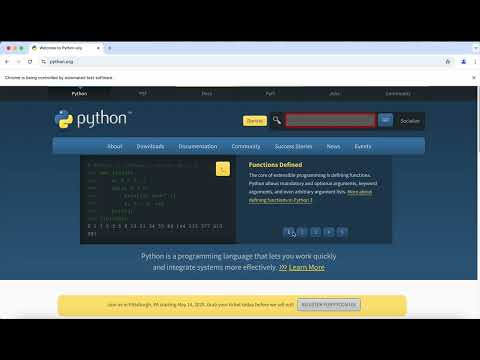
ActionChain(driver) \
    .open("http://www.python.org") \
    .find("Find the Search box") \
    .type("pycon") \
    .wait(2) \
    .type(Keys.RETURN) \
    .assert_page_not_contains("No results found.") \
    .valid("the 'PSF PyCon Trademark Usage Policy' is exist") \
    .close()
Free Models
You can also use talk2dom with free models like llama-3.3-70b-versatile from Groq.
✨ Philosophy
Our goal is not to control the browser — you still control your browser. Our goal is to find the right DOM element, so you can tell the browser what to do.
✅ Key Features
- 💬 Natural language interface to control the browser
- 🔁 Persistent session for multi-step interactions
- 🧠 LLM-powered understanding of high-level intent
- 🧩 Outputs: actionable XPath/CSS selectors or ready-to-run browser steps
- 🧪 Built-in assertions and step validations
- 💡 Works with both CLI scripts and interactive chat
🌐 Hosted API Service
While talk2dom can be used locally as a lightweight Python package, it also powers a production-ready hosted service — making it easy to integrate into your automation agents, testing pipelines, and internal tools.
Getting Started
# Clone the repository
git clone https://github.com/itbanque/talk2dom.git
cd talk2dom

# Launch the talk2dom-integrated stack
docker compose up
The API is available at http://localhost:8000/docs with full OpenAPI schema and interactive Swagger UI.
⚙️ Service Features
The hosted version of talk2dom includes a full-featured backend system with:
- 🔐 User Authentication & Account Management — including registration, login, and session handling
- 🧾 Project Management — organize different workflows under separate projects
- 🔑 API Key Management — issue and revoke keys per project
- 💳 Subscription & Credit System — users can purchase or subscribe for API usage credits (Stripe supported)
- 🧠 Intelligent Selector Caching — automatic deduplication and re-use of prior LLM results via PostgreSQL
This transforms talk2dom from a Python utility into a scalable service with all necessary infrastructure to support production-grade applications.
Deploy on your own cloud or integrate with tools like Zapier, Retool, or internal RPA systems.
For detailed deployment instructions, contact us via GitHub discussions.
📄 License
Apache 2.0
Contributing
Please read CONTRIBUTING.md for details on our code of conduct, and the process for submitting pull requests to us.
💬 Questions or ideas?
We’d love to hear how you're using talk2dom in your AI agents or testing flows.
Feel free to open issues or discussions!
You can also tag us on GitHub if you’re building something interesting with talk2dom!
⭐️ If you find this project useful, please consider giving it a star!
Release history Release notifications | RSS feed


Download files
Download the file for your platform. If you're not sure which to choose, learn more about installing packages.
Source Distribution
Built Distribution
Filter files by name, interpreter, ABI, and platform.
If you're not sure about the file name format, learn more about wheel file names.
Copy a direct link to the current filters
File details
Details for the file talk2dom-0.2.6.tar.gz.
File metadata
- Download URL: talk2dom-0.2.6.tar.gz
- Upload date:
- Size: 21.1 kB
- Tags: Source
- Uploaded using Trusted Publishing? No
- Uploaded via: twine/6.1.0 CPython/3.12.11
File hashes
| Algorithm | Hash digest | |
|---|---|---|
| SHA256 |
f9d0e4e428c3c28dacb5777697b1a9eb70a61a48ba8dc022c7fde0893f82800c
|
|
| MD5 |
2c6328ea862e74b757068c499b826265
|
|
| BLAKE2b-256 |
8ff9e7e52876b53985512de8038837553760519d0498765323ff1faaa6ecb975
|
File details
Details for the file talk2dom-0.2.6-py3-none-any.whl.
File metadata
- Download URL: talk2dom-0.2.6-py3-none-any.whl
- Upload date:
- Size: 18.4 kB
- Tags: Python 3
- Uploaded using Trusted Publishing? No
- Uploaded via: twine/6.1.0 CPython/3.12.11
File hashes
| Algorithm | Hash digest | |
|---|---|---|
| SHA256 |
c968664df84a1f4bb29559b111361bdb449abca4f80032e334ffc30a4c0bfad1
|
|
| MD5 |
f74d9e2b11eddca7c1ce6385ab5453d7
|
|
| BLAKE2b-256 |
5ba958e4edd7919f288d27d70238518a21110cd8c7532b247bcb5f8b0e102a8c
|






