
talk2shorts
English · 한국어 · 日本語 · 中文 · Português · हिन्दी · Bahasa Indonesia · Français · Русский
Turn a section of a horizontal talk, lecture or interview into a vertical short, in one command. The crop follows the speaker, the captions are written from the speech and placed where YouTube Shorts, TikTok and Instagram Reels buttons will not cover them, and the sound is set to -14 LUFS.
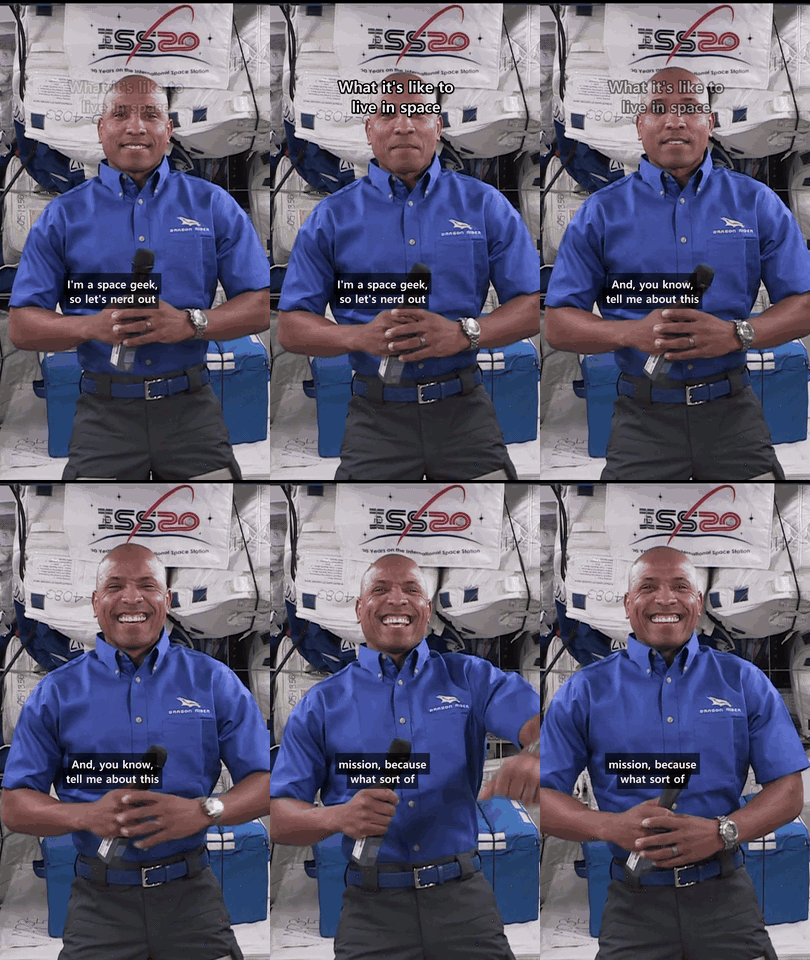
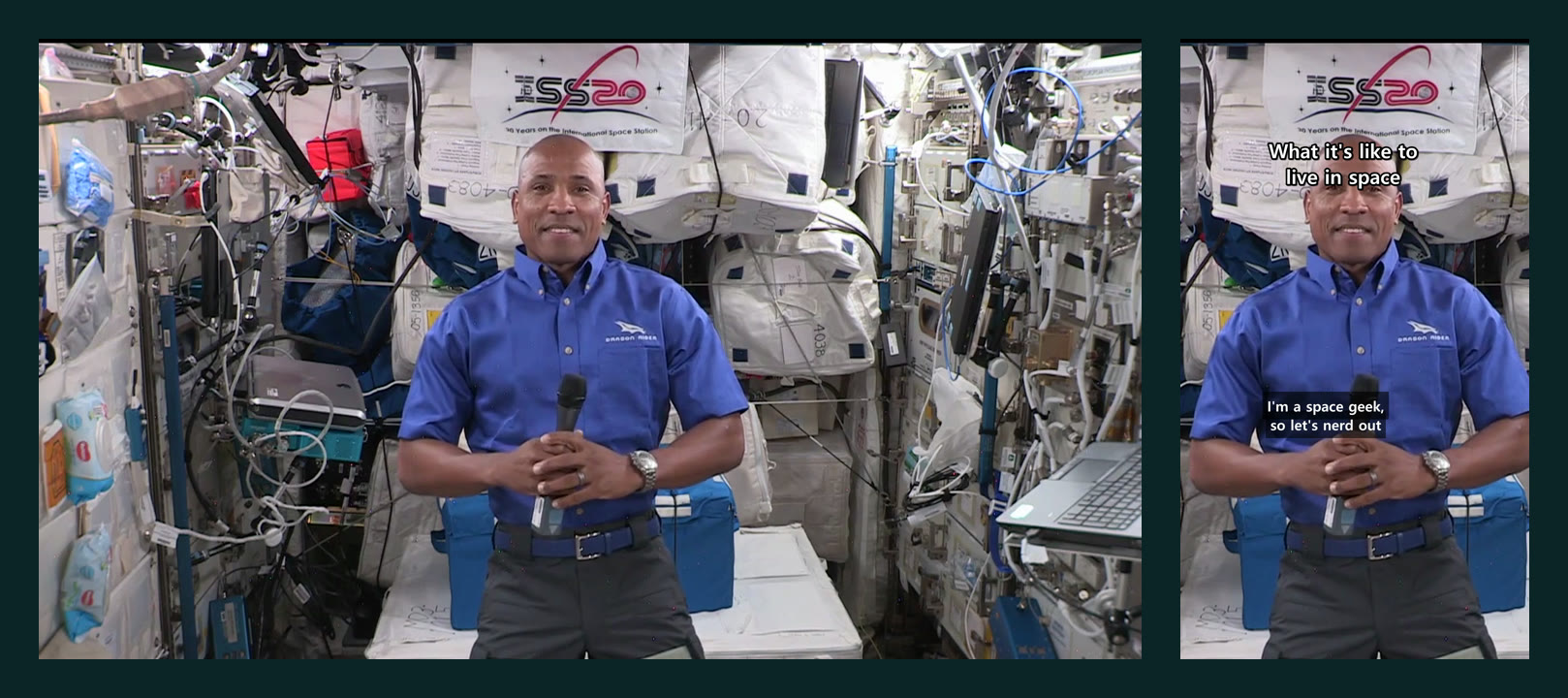
talk2shorts interview.mp4 --start 0:10 --end 0:50 --title "What it's like to live in space"
What it does
- Follows the face. OpenCV's YuNet detector finds the speaker five times a second; the 9:16 crop follows bigger moves and ignores small ones, so it does not shake with every gesture.
- Writes the captions. faster-whisper transcribes the section with word timings, and talk2shorts groups the words into captions of up to two balanced lines, cut at pauses, sentence ends and commas, never leaving one word on its own. Or bring your own SRT.
- Keeps text clear of the players. Captions and the title go inside the area that is clear on all three platforms, using the zones measured from each platform's own templates in shorts-safezone. On TikTok that area is narrow at the bottom (its buttons sit on the right), so captions sit slightly left of centre; pass
--platforms youtubeto use YouTube's wider area alone. - Sets the sound. Two-pass loudness normalisation to -14 LUFS, true peak under -1.5 dB, with a fade at the end.
- Checks the result. A report says whether every caption and the title are clear on each platform, the measured loudness, how often a face was found, and whether the title covers the face.
Everything runs on your computer. Nothing is uploaded.
Install
You need ffmpeg on your PATH (with libass, as in most builds), then:
pip install "talk2shorts[captions]"
Leave out [captions] if you will always pass your own --srt. The face model (230 KB, MIT licence) downloads once on first use and is checked against its SHA-256.
Use
talk2shorts talk.mp4 --start 3:33 --end 4:25
talk2shorts talk.mp4 --start 213 --end 265 --title "Where does happiness come from?" --language en
talk2shorts talk.mp4 --start 3:33 --end 4:25 --srt talk.srt          # your captions, in source time
talk2shorts talk.mp4 --start 3:33 --end 4:25 --model large-v3        # better captions, slower
talk2shorts talk.mp4 --start 3:33 --end 4:25 --platforms youtube     # only YouTube's buttons
It writes talk_short.mp4, the captions as talk_short.srt, and talk_short.report.json:
{
  "face_found_share": 1.0,
  "captions": 22,
  "caption_safe": { "youtube": [], "tiktok": [], "reels": [] },
  "title_safe":   { "youtube": [], "tiktok": [], "reels": [] },
  "title_covers_face": true,
  "loudness": { "source": -23.05, "output": -14.05 }
}
An empty list means clear on that platform. The command exits with 1 when any text is covered, so it can guard a batch script.
| Option | Default | |
|---|---|---|
--title |
none | Shown at the top for the first 3 seconds; \n breaks the line |
--srt |
speech recognition | Your own captions, timed to the source video |
--model |
small |
faster-whisper model: tiny, base, small, medium, large-v3 |
--language |
detected | Spoken language code, such as en, ko, ja |
--lines |
2 |
Lines per caption, 1 or 2 |
--platforms |
all |
youtube, tiktok, reels, or a comma list |
--font |
a bold system font for the script | A font file for captions and title |
--no-track |
off | Keep the crop centred |
--no-captions |
off | No captions |
A GPU speeds up speech recognition when faster-whisper's CUDA libraries are installed; without them talk2shorts falls back to the CPU on its own.
Languages
Speech recognition covers the languages faster-whisper knows (about 99). The caption font follows the script being written, so every language gets a bold face that has its letters:
| Script | Windows | macOS | Linux |
|---|---|---|---|
| Korean | Malgun Gothic | Apple SD Gothic Neo | Noto Sans CJK |
| Japanese | Yu Gothic | Hiragino Sans | Noto Sans CJK |
| Chinese | Microsoft YaHei | PingFang | Noto Sans CJK |
| Hindi (Devanagari) | Nirmala UI | Kohinoor | Noto Sans Devanagari |
| Arabic | Segoe UI | Geeza Pro | Noto Sans Arabic |
| Thai | Leelawadee UI | Thonburi | Noto Sans Thai |
| Latin, Cyrillic | Segoe UI | Helvetica Neue | Noto Sans |
Han characters alone are read as Chinese; pass --language ja for Japanese written without kana. Arabic is laid out right to left. Captions break after sentence ends and commas (、 and ,too), never start a line with closing punctuation, and keep Thai and Devanagari vowel signs with their letter. Use --font to choose your own.
Limits
- One speaker in frame works best. With two people side by side the crop follows the larger face.
- Subtitles already burned into the source stay in the picture.
- When the speaker's head is near the top of the frame, a title may cover it; the report says so (
title_covers_face). A shorter, one-line title helps. - Thai is written without spaces between words, and talk2shorts has no Thai dictionary, so a long Thai line can break inside a word.
- Speech recognition makes mistakes, especially with names. Read the
.srtand re-render with--srtafter fixing it.
Development
python -m venv .venv
.venv/Scripts/pip install -e ".[test,captions]"     # or .venv/bin/pip on macOS and Linux
.venv/Scripts/python -m pytest
Credits
- Demo footage: NASA astronaut Victor Glover in an in-flight interview with KCAL-TV, 30 December 2020 (NASA Image and Video Library). NASA material is in the public domain; NASA does not endorse this project.
- Face detection: YuNet, MIT licence.
- Speech recognition: faster-whisper, MIT licence.
License
MIT
1 maintainer

Metadata
1 maintainer
Release files for talk2shorts 0.1.1
For a detailed explanation of source distributions (sdists) and built distributions (wheels), please see the package formats documentation.
Source distribution (sdist)
| File | Size | Uploaded | Provenance | Actions |
|---|---|---|---|---|
| talk2shorts-0.1.1.tar.gz | 3.1 MB | With provenance | Details for talk2shorts-0.1.1.tar.gz |
Built distribution (wheel)
| File | Interpreter | ABI | Platform | Actions Reset |
|---|---|---|---|---|
| talk2shorts-0.1.1-py3-none-any.whl | Python 3 | none | any | Details for talk2shorts-0.1.1-py3-none-any.whl |
Total release size: 3.1 MB
Release files / talk2shorts-0.1.1.tar.gz
| Download URL | talk2shorts-0.1.1.tar.gz |
|---|---|
| Size | 3.1 MB |
| Tags | Source |
|
SHA-256 checksum How to use checksums |
9640e347c9f1e0afd2a478e56f34e9c13f691a0e0eee6c0f59172eaeb702b129
|
|
BLAKE2b-256 checksum How to use checksums |
dbcb5f2f7bbf0c56b01acc4c1f3f7f4b1b096640d3da53d89bc762a32bf886ea
|
| Upload date | |
|
Uploaded using Trusted Publishing? What is trusted publishing? |
Yes |
| Uploaded via |
twine/7.0.0 CPython/3.13.16
|
Provenance
Provenance describes where a file came from. On PyPI, provenance is shared via attestations, which provide a verifiable record of the build or publishing details. View details, limitations and caveats.


PyPI Publish Attestation
PyPI verified that this artifact, at this checksum, originated from the publisher listed below.
Signed by GitHub Actions, verified by PyPI on Nov 24, 2026.
Transparency logRelease files / talk2shorts-0.1.1-py3-none-any.whl
| Download URL | talk2shorts-0.1.1-py3-none-any.whl |
|---|---|
| Size | 23.5 kB |
| Tags | Python 3 |
|
SHA-256 checksum How to use checksums |
dc7be321f8cc9f991f33983dd8cf8ebd2368d2d1653518a27f298673ce36f4b7
|
|
BLAKE2b-256 checksum How to use checksums |
4be3a65327c7cd7e467f42c3af5f16ceb4aa12547b5ab08a2192d8b57ac865b6
|
| Upload date | |
|
Uploaded using Trusted Publishing? What is trusted publishing? |
Yes |
| Uploaded via |
twine/7.0.0 CPython/3.13.16
|
Provenance
Provenance describes where a file came from. On PyPI, provenance is shared via attestations, which provide a verifiable record of the build or publishing details. View details, limitations and caveats.
PyPI Publish Attestation
PyPI verified that this artifact, at this checksum, originated from the publisher listed below.
Signed by GitHub Actions, verified by PyPI on Nov 24, 2026.
Transparency logSecurity for talk2shorts 0.1.1
Provenance
Provenance describes where a file came from. On PyPI, provenance is shared via attestations, which provide a verifiable record of the build or publishing details. View details, limitations and caveats.
Full provenance
Both files in this release have been uploaded with provenance metadata.
Attestation for talk2shorts-0.1.1.tar.gz
PyPI Publish Attestation
PyPI verified that this artifact, at this checksum, originated from the publisher listed below.
Signed by GitHub Actions, verified by PyPI on Nov 24, 2026.
Transparency logA note on package security
PyPI is a repository for distributing packages, not a service for auditing them. While third-party security researchers and our staff do their best to detect and remove malicious packages, PyPI cannot guarantee the quality, security or suitability of any given package.
To learn more about protecting yourself from malicious actors, visit our package security documentation.














