
talkthrough


A walkthrough that talks. Any HTML page or PDF becomes a narrated video of itself.
By Ami Shah and Karan Bansal.
A camera moves over the real page one section at a time, a spotlight shows what is being explained, a voice explains it, and captions follow the voice. Nothing on screen is redrawn or restyled: every frame is a real crop of your page, so the diagram in the video is the diagram in the document.
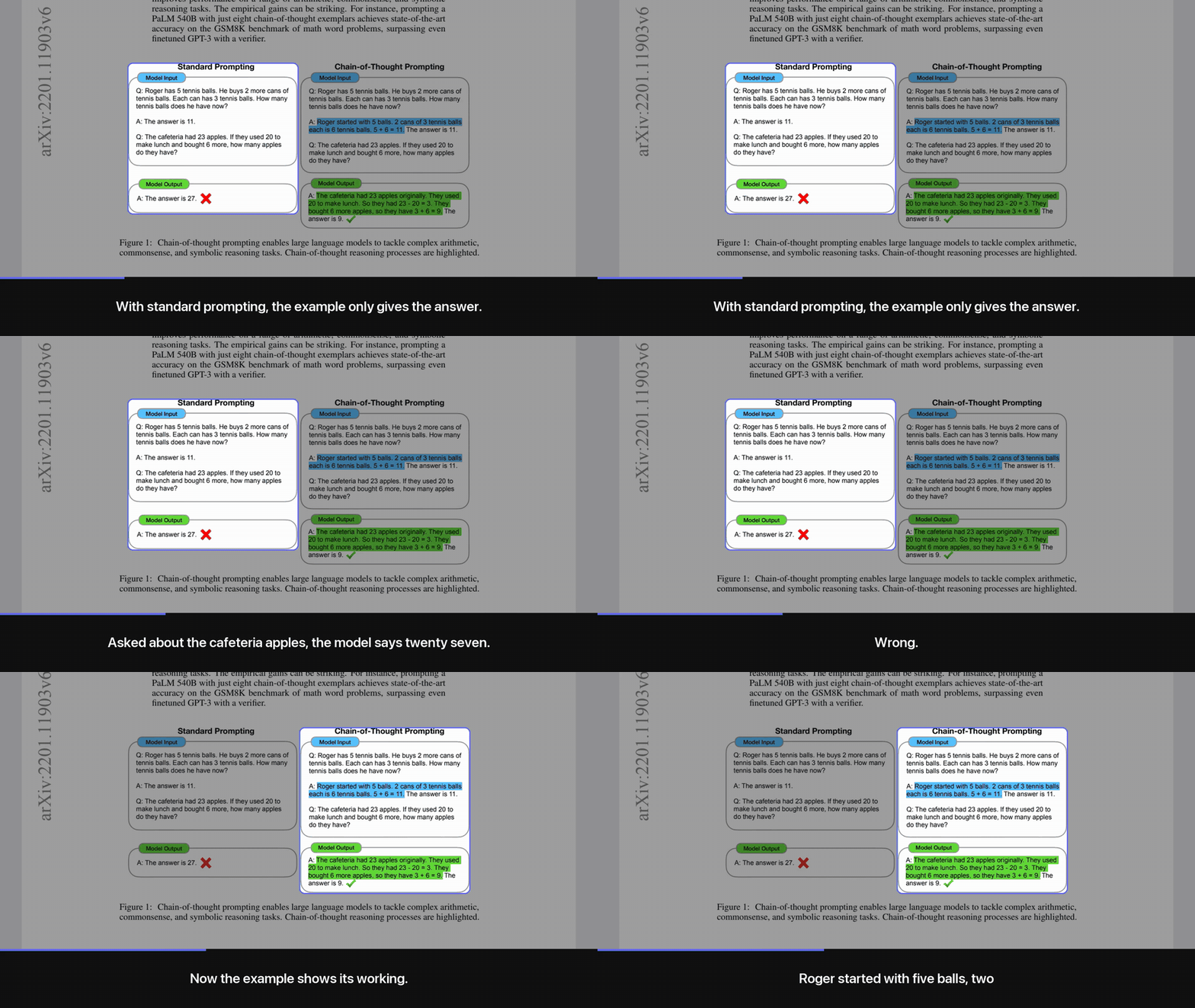
The Chain-of-Thought Prompting paper (Wei et al. 2022, CC BY 4.0). The full 58-second walkthrough, with sound and the free local voice:
https://github.com/user-attachments/assets/bbc0805c-d711-4213-aeb9-a08ec82a8158
The narration is written by Claude from the page's own text, under one rule: add nothing the page does not say. That keeps the numbers right far more often than a fresh script would, but it is a model writing text, not a guarantee. Read the shot list or the preview sheet before you share a video about numbers that matter.
Use it for the report nobody will open, the recap your students watch on the bus, or the docs page you want to post as a 90-second clip.
Quickstart
In Claude Code (recommended)
/plugin marketplace add amishah1998/talkthrough
/plugin install talkthrough-video@amishah1998
Then ask: "make a walkthrough video of report.pdf". Claude reads the page, decides what to focus on, writes the shot list, checks the framing on a preview sheet, and renders with the free local voice. No API key needed; the agent does the planning.
Not to be confused with talkthrough-mcp, a
different project that turns screen recordings into bug reports. This plugin is talkthrough-video.
The skill in skills/talkthrough/ follows the Agent Skills format, so other agents that read
skills can use the same folder.
From the command line
You write the shot list, the tool does the rest. No API key, and this is the path the test suite runs on Linux:
pip install "talkthrough[local]"
talkthrough doctor                                  # checks browser, ffmpeg and a voice
talkthrough capture report.pdf --out work/          # page image and a numbered list of sections
# write work/shots.json (format below), then:
talkthrough preview work/ && talkthrough render work/ --out report.mp4 --open
The plan and make commands are untested as of this release; the capture, hand-written
shots.json, preview and render path is verified. talkthrough make report.pdf does it all in one go,
with Claude choosing the sections through the API, and needs ANTHROPIC_API_KEY plus
pip install "talkthrough[all]".
How it works
page.html / report.pdf
   │  capture   headless browser (HTML) or pdfium (PDF): one tall image + a list of sections
   ▼
page.png + boxes.json
   │  plan      an agent or Claude picks the sections that matter and writes what to say
   ▼
shots.json
   │  preview   one spotlighted frame per shot, to check framing before rendering
   │  render    voice per shot, eased camera moves, spotlight, captions, H.264 + AAC
   ▼
walkthrough.mp4   (portrait 1080x1920 by default; landscape and square too)
Step by step, with a shot list you write or edit yourself:
talkthrough capture recap.html --out work/
talkthrough plan work/ --seconds 90 --note "focus on the pricing table"   # or write work/shots.json by hand
talkthrough preview work/
talkthrough render work/ --out recap.mp4
A shot list looks like this:
{
  "format": "portrait",
  "tts": "auto",
  "shots": [
    {"boxes": ["b0"], "say": "Here is the whole report in ninety seconds. Three findings, one decision."},
    {"rect": [95, 828, 470, 440], "move": "hold", "say": "This chart is the one to remember: costs fell while usage doubled."}
  ]
}
Title card, end card, file size
Every video opens on a short title card (the page title and the running time) and closes on an end
card: "Read the full page", the page's link, and a small "made with talkthrough" line. In the
shot list, "title" and "link" override what is shown (set "link" to the public URL when you
render a local file), and "intro": false, "outro": false or "credit": false turn parts off.
--speed 1.25 (or "speed": 1.25) makes the voice itself talk faster, with natural pitch; the camera
and captions follow because they are timed from the audio. Useful for readers who would otherwise
watch at 1.5x.
render --share (or "quality": "share") encodes for chat apps at about half the size of the
default, with no visible loss on text. Audio is loudness-normalised in both modes, so every voice
comes out at the same level.
Voices
It picks the first one available, in this order, or you choose with "tts" in the shot list or --tts:
| Voice | Setup | Captions | Cost | Notes |
|---|---|---|---|---|
| Cartesia Sonic 3.6 | CARTESIA_API_KEY |
exact word timings | about $0.25 per 1,000 words | #1 on the Artificial Analysis TTS leaderboard when this was written |
| ElevenLabs | ELEVENLABS_API_KEY |
exact word timings | about $0.30 to $0.60 per 1,000 words | Large voice library |
| OpenAI gpt-4o-mini-tts | OPENAI_API_KEY |
per sentence | cents per video | Tone and pace steerable with "instructions" |
| Kokoro (local, free) | pip install "talkthrough[local]" |
per sentence | free | Apache-2.0 weights, runs on CPU on macOS, Linux and Windows; one-time ~350 MB download |
macOS say |
nothing | per sentence | free | Zero setup on a Mac; clearly synthetic |
"Per sentence" means each sentence is voiced on its own and measured, so captions change exactly on sentence boundaries; words inside a sentence are spread by length.
Requirements
| For | Needs | Notes |
|---|---|---|
| Everything | Python 3.10+ and ffmpeg | Pillow, websockets and pypdfium2 install with the package |
| HTML pages | Chrome, Chromium or Edge | Found automatically; or set CHROME=/path/to/browser |
| PDFs | nothing extra | Rendered with pdfium; sections come from the page's white space, not its text layer |
| A voice | one of the options above | talkthrough doctor shows what it found |
| Auto-planning | anthropic and ANTHROPIC_API_KEY |
Not needed when an agent writes the shot list |
Limits
- Tested on macOS by hand and on Ubuntu (Python 3.10 and 3.12) by the smoke test on every push: an HTML page and a PDF rendered with the Kokoro voice. Windows support is written but untested.
- The Cartesia, ElevenLabs and OpenAI voices and the
planandmakecommands have not been run end to end yet. The local Kokoro voice has. - Section detection splits on white space, so a figure with tightly packed panels can come out as
one section. Frame part of it with a
rect; the outline snaps to the content you meant. - Pages behind a login or that build slowly can capture half-loaded. Capture a saved copy or a PDF.
- Narration works best in English or Hinglish in Roman letters. Pages in any language capture fine, and Hindi in a caption gets a Devanagari font, but the voices are tuned for English and correctly joined Hindi letters need libraqm installed.
Made by
Ami Shah and Karan Bansal, built with Claude Code.
Licence
1 maintainer

Metadata
1 maintainer
Release files for talkthrough 0.1.2
For a detailed explanation of source distributions (sdists) and built distributions (wheels), please see the package formats documentation.
Source distribution (sdist)
| File | Size | Uploaded | |
|---|---|---|---|
| talkthrough-0.1.2.tar.gz | 30.7 kB | Details |
Built distribution (wheel)
| File | Interpreter | ABI | Platform | Reset |
|---|---|---|---|---|
| talkthrough-0.1.2-py3-none-any.whl | Python 3 | none | any | Details |
Total release size: 61.4 kB
Release files / talkthrough-0.1.2.tar.gz
| Download URL | talkthrough-0.1.2.tar.gz |
|---|---|
| Size | 30.7 kB |
| Tags | Source |
|
SHA-256 checksum How to use checksums |
b9d6b2dfa7d261595945c592d7724b0f563356be42275d2e71204d8b3080e5ff
|
|
BLAKE2b-256 checksum How to use checksums |
389d8fc5b569691705858de075f79ff3de58c6ef8ccebc1f01bb4c5aa91df0c4
|
| Upload date | |
|
Uploaded using Trusted Publishing? What is trusted publishing? |
Yes |
| Uploaded via |
twine/7.0.0 CPython/3.13.14
|
Provenance
Provenance describes where a file came from. On PyPI, provenance is shared via attestations, which provide a verifiable record of the build or publishing details. View details, limitations and caveats.


PyPI Publish Attestation
PyPI verified that this artifact, at this checksum, originated from the publisher listed below.
Signed by GitHub Actions, verified by PyPI on Oct 4, 2026.
Transparency logRelease files / talkthrough-0.1.2-py3-none-any.whl
| Download URL | talkthrough-0.1.2-py3-none-any.whl |
|---|---|
| Size | 30.7 kB |
| Tags | Python 3 |
|
SHA-256 checksum How to use checksums |
81f193c1a70d5df2760f8a0a49cf24d9386a7ba7fd323ce7e81d5c46fd70845c
|
|
BLAKE2b-256 checksum How to use checksums |
c017db660b582582463b8f3f587cb9031bd0db3efcadccbffb4dd5b0be2359b2
|
| Upload date | |
|
Uploaded using Trusted Publishing? What is trusted publishing? |
Yes |
| Uploaded via |
twine/7.0.0 CPython/3.13.14
|
Provenance
Provenance describes where a file came from. On PyPI, provenance is shared via attestations, which provide a verifiable record of the build or publishing details. View details, limitations and caveats.
PyPI Publish Attestation
PyPI verified that this artifact, at this checksum, originated from the publisher listed below.
Signed by GitHub Actions, verified by PyPI on Oct 4, 2026.
Transparency log













