
Tallyman
Know the shape of your project, not just the size.
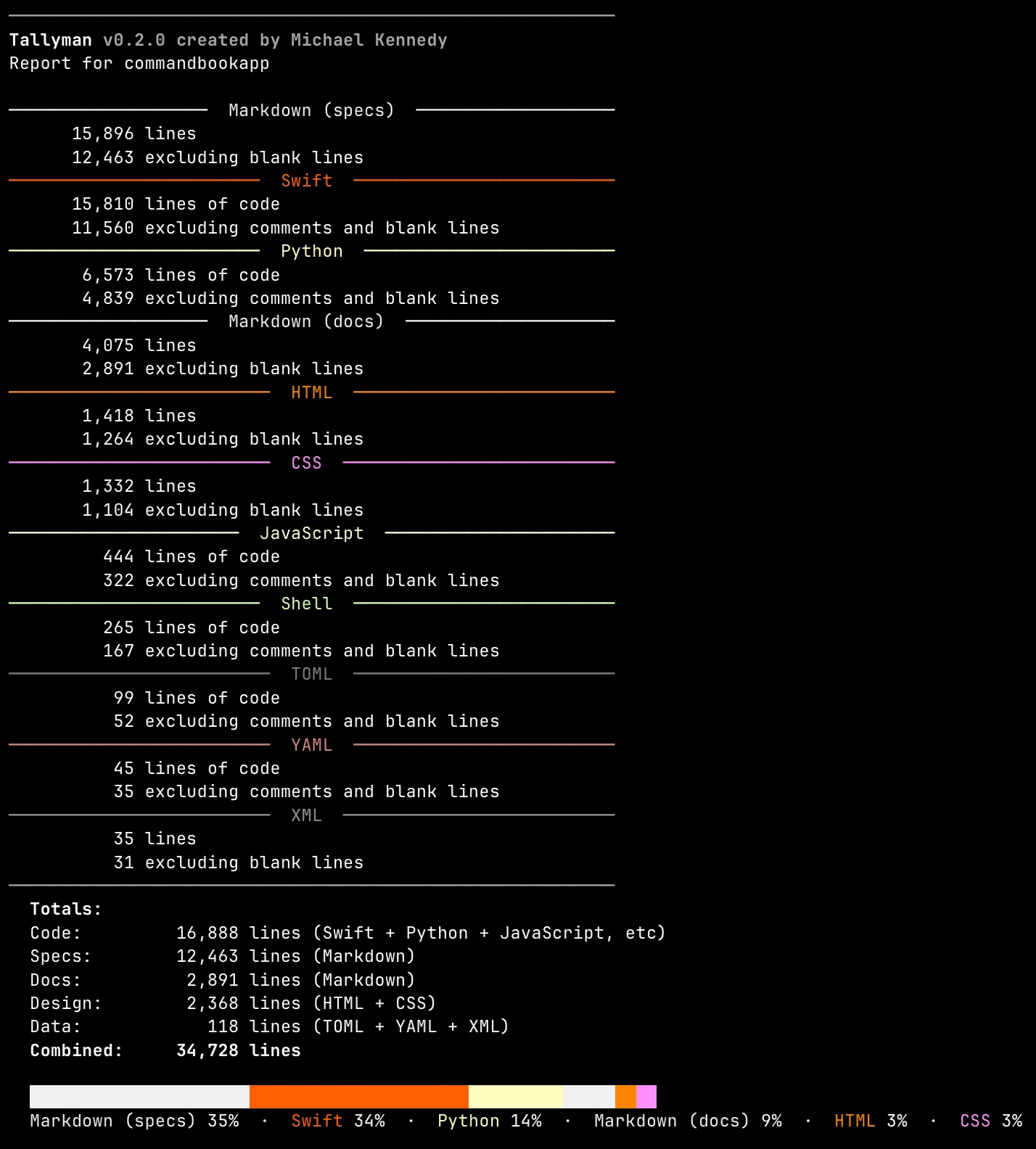
Tallyman is a command-line tool that gives you a real picture of your codebase - not just raw line counts, but where your effort actually lives. It groups results into meaningful categories like Code, Design, Docs, Specs, and Data, so you can see at a glance whether your project is mostly Python logic, CSS styling, or Markdown documentation.


Install
uv tool install tallyman-metrics
Then just point it at a project:
tallyman                    # analyze current directory
tallyman /path/to/project   # analyze a specific path
tallyman --setup            # re-run the interactive setup
tallyman --no-color         # disable colored output
tallyman --image            # save a PNG summary card to Desktop
tallyman --image-light      # light-themed PNG variant
tallyman --with-spaces      # use total lines (incl. comments/blanks) for totals
Why Tallyman?
Tools like cloc, tokei, and scc are excellent at counting lines of code. If all you need is raw numbers, they're great choices.
But line counts alone don't tell you much about a project's shape. Is your codebase mostly application logic, or has the CSS layer quietly grown to rival your backend? Are those Markdown files general docs, or are they specifications driving your development? How much of your project is configuration and data files versus actual code?
Tallyman answers these questions. It organizes every recognized file into one of six categories - Code, DevOps, Design, Docs, Specs, and Data - and shows you both the raw line count and the "effective" line count (excluding comments and blank lines) for each.
A few things that set it apart:
- Category-aware analysis - Results grouped by intent, not just by file extension. You see what kind of work your project contains, not just how many lines of each language.
- Automatic spec detection - Markdown and reStructuredText files in directories like
specs/,plans/, oragents/are automatically reclassified from Docs to Specs. If you're using planning documents to drive development (especially with AI-assisted workflows), Tallyman tracks that separately. - Interactive first-run setup - On first run, Tallyman launches a TUI where you can walk your project's directory tree and mark directories to exclude or flag as spec directories. Your choices are saved to
.tally-config.tomlso subsequent runs are instant. - Gitignore-aware - Tallyman reads your
.gitignoreand.git/info/excludepatterns automatically. It skips virtual environments,node_modules, build artifacts, and anything else you've already told Git to ignore. - Visual composition bar - A colored percentage bar at the bottom shows you the language distribution of your project in a single glance.
Features
- Dual line counts - Total lines and effective lines (excluding comments and blanks) per language. Use
--with-spacesto base summaries and percentages on total lines instead - Six categories - Code, DevOps, Design, Docs, Specs, and Data, each with aggregated totals
- 40 languages - From Python and Rust to Terraform and Docker, with full template support for HTML (Jinja, Nunjucks, Handlebars, and more)
- Beautiful output - Colored, formatted results with a language composition bar, powered by Rich
- Realistic metrics - Only counts files you wrote, not third-party dependencies or generated code
- Persistent config - Your setup choices are saved to
.tally-config.tomland reused on every run - Image export - Generate a shareable PNG summary card with
--image(dark) or--image-light(light theme) - Interactive TUI setup - Visual directory tree for configuring exclusions and spec directories, powered by Textual
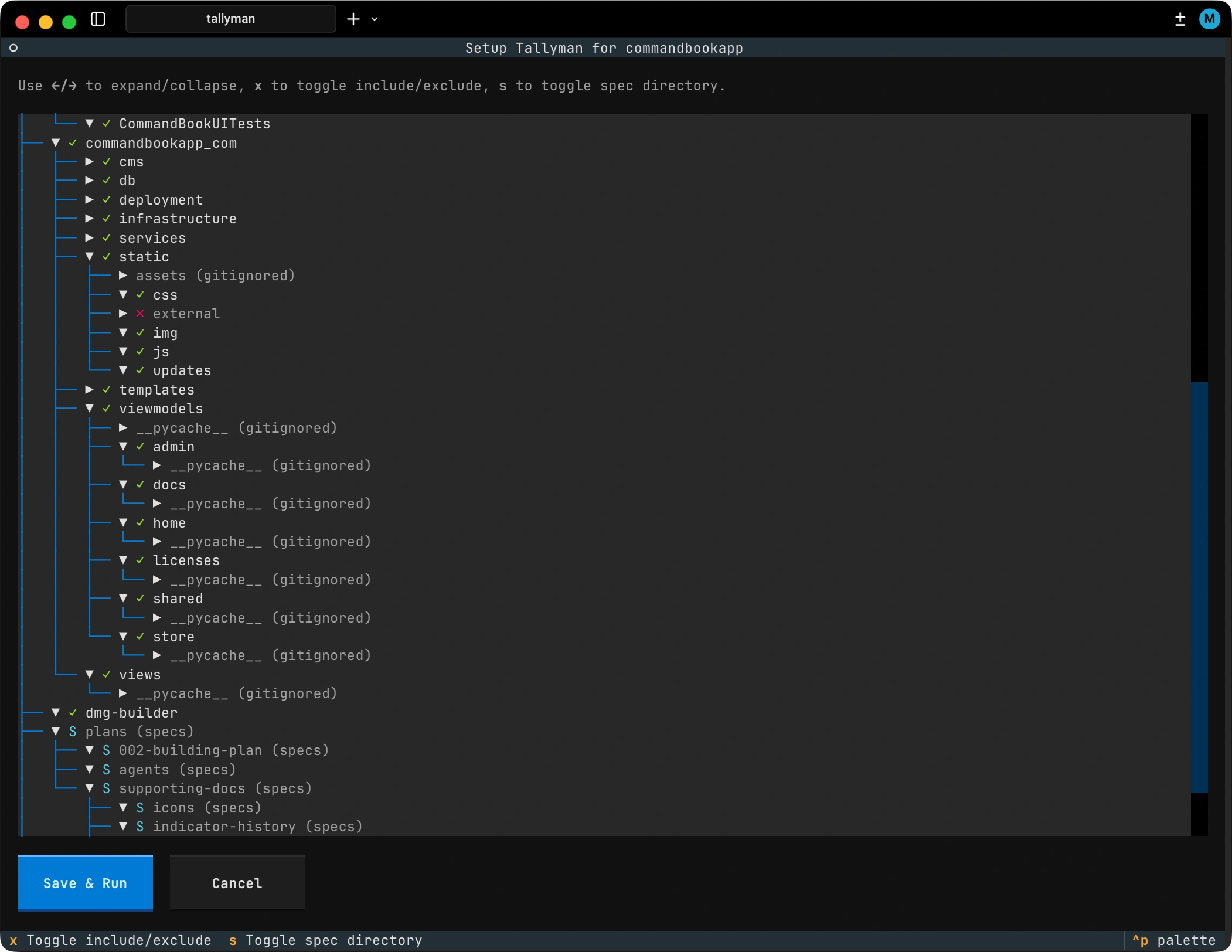
Image Export
Want to share your project's code stats in a README, a slide deck, or a social post? Use --image to generate a clean PNG summary card:
tallyman --image              # dark theme (default)
tallyman --image-light        # light theme
The image is saved to your Desktop (or the current directory if no Desktop is found) with a filename based on the project name. Here's an example from the CommandBook macOS app:
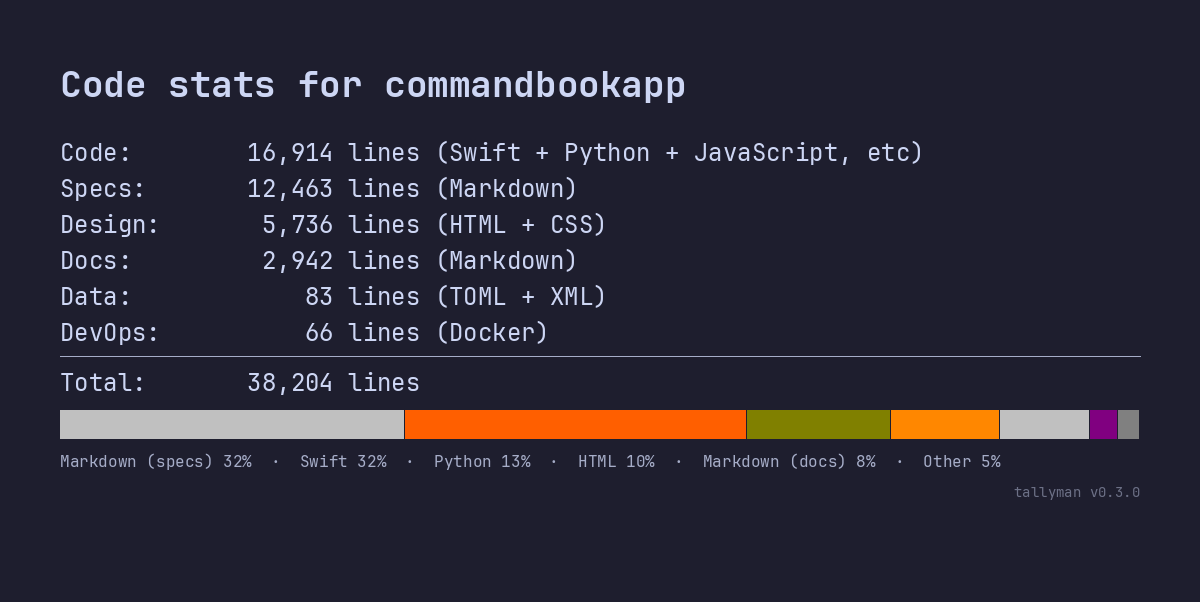
The card includes category totals with effective line counts, a colored language composition bar, and a compact legend - everything you need to show the shape of your project at a glance.
Supported Languages
Tallyman recognizes 40 languages across six categories:
| Category | Languages |
|---|---|
| Code | Python, Rust, Go, JavaScript, TypeScript, Java, C, C++, C#, Swift, Kotlin, Ruby, Shell, Lua, PHP, Perl, R, Dart, Scala, Elixir, Zig, Haskell, Erlang, OCaml, Nim, V |
| DevOps | Terraform, Makefile, Docker |
| Design | CSS, SCSS, LESS, HTML (+ 12 template formats), SVG |
| Docs | Markdown, reStructuredText |
| Specs | Markdown and reStructuredText files auto-detected in spec directories |
| Data | TOML, YAML, JSON, XML, SQL |
Full language details with file extensions
Code
| Language | Extensions / Filenames |
|---|---|
| Python | .py |
| Rust | .rs |
| Go | .go |
| JavaScript | .js, .jsx, .mjs |
| TypeScript | .ts, .tsx |
| Java | .java |
| C | .c |
| C Header | .h |
| C++ | .cpp, .hpp, .cc, .cxx |
| C# | .cs |
| Swift | .swift |
| Kotlin | .kt, .kts |
| Ruby | .rb |
| Shell | .sh, .bash, .zsh |
| Lua | .lua |
| PHP | .php |
| Perl | .pl, .pm |
| R | .r, .R |
| Dart | .dart |
| Scala | .scala |
| Elixir | .ex, .exs |
| Zig | .zig |
| Haskell | .hs |
| Erlang | .erl |
| OCaml | .ml, .mli |
| Nim | .nim, .nims |
| V | .v, .vv |
DevOps
| Language | Extensions / Filenames |
|---|---|
| Terraform | .tf, .tfvars |
| Makefile | .mk, Makefile, makefile, GNUmakefile |
| Docker | .dockerfile, Dockerfile*, docker-compose.yml/yaml, compose.yml/yaml |
Design
| Language | Extensions |
|---|---|
| CSS | .css |
| SCSS | .scss |
| LESS | .less |
| HTML | .html, .htm, .xhtml, .shtml, .pt, .jinja, .jinja2, .j2, .njk, .hbs, .ejs, .mustache |
| SVG | .svg |
Docs
| Language | Extensions |
|---|---|
| Markdown | .md, .mdx |
| reStructuredText | .rst |
Data
| Language | Extensions |
|---|---|
| TOML | .toml |
| YAML | .yml, .yaml |
| JSON | .json |
| XML | .xml |
| SQL | .sql |
How It Works
Tallyman runs a simple pipeline:
- Walk your project directory, respecting gitignore patterns and your config exclusions
- Identify each file's language by extension (O(1) lookup)
- Count lines, classifying each as code, comment, or blank
- Aggregate results by language and category
- Display a colored report with per-language stats, category totals, and a composition bar
Spec directories (specs/, plans/, specifications/, agents/) are auto-detected. Any Markdown or reStructuredText files inside them are reclassified from Docs to Specs, giving you a clear picture of how much of your project is specification-driven.
Comment detection covers single-line comment styles (#, //, --, %, ;). Multi-line comment blocks (/* */, """ """) are not currently detected - lines inside them are counted as code.
Configuration
On first run, Tallyman launches an interactive TUI where you can browse your project tree and configure which directories to exclude or mark as spec directories. Your choices are saved to .tally-config.toml in the project root.
To re-run setup at any time:
tallyman --setup
Tallyman also respects the NO_COLOR environment variable to disable colored output, following the no-color.org convention.
Requirements
- Python 3.14+
Contributing
Contributions are welcome! Whether it's adding support for a new language, improving detection, or fixing a bug, we'd love the help.
Before opening a PR, please create an issue first to discuss what you have in mind. This helps make sure your idea aligns with the direction of the project and saves everyone time. Once we've agreed on the approach, fire away with the pull request.
License
MIT License - Created by Michael Kennedy
1 maintainer

Release files for tallyman-metrics 0.3.2
For a detailed explanation of source distributions (sdists) and built distributions (wheels), please see the package formats documentation.
Source distribution (sdist)
| File | Size | Uploaded | |
|---|---|---|---|
| tallyman_metrics-0.3.2.tar.gz | 843.7 kB | Details |
Built distribution (wheel)
| File | Interpreter | ABI | Platform | Reset |
|---|---|---|---|---|
| tallyman_metrics-0.3.2-py3-none-any.whl | Python 3 | none | any | Details |
Total release size: 1.1 MB
Release files / tallyman_metrics-0.3.2.tar.gz
| Download URL | tallyman_metrics-0.3.2.tar.gz |
|---|---|
| Size | 843.7 kB |
| Tags | Source |
|
SHA-256 checksum How to use checksums |
5c3d7f7622ff323f3cbd299f45046cd157bf840741a660a5f93c439b1e1e3d4f
|
|
BLAKE2b-256 checksum How to use checksums |
1f5a1b1a39bda4fc612feae41465eb242b1ac79551049afb74f85e24e9bae978
|
| Upload date | |
|
Uploaded using Trusted Publishing? What is trusted publishing? |
No |
| Uploaded via |
uv/0.10.8 {"installer":{"name":"uv","version":"0.10.8","subcommand":["publish"]},"python":null,"implementation":{"name":null,"version":null},"distro":{"name":"macOS","version":null,"id":null,"libc":null},"system":{"name":null,"release":null},"cpu":null,"openssl_version":null,"setuptools_version":null,"rustc_version":null,"ci":null}
|
Release files / tallyman_metrics-0.3.2-py3-none-any.whl
| Download URL | tallyman_metrics-0.3.2-py3-none-any.whl |
|---|---|
| Size | 284.3 kB |
| Tags | Python 3 |
|
SHA-256 checksum How to use checksums |
61282739f766c846d763d2baab7ee77259cbb99600f6b29ad77a2da15bf09b38
|
|
BLAKE2b-256 checksum How to use checksums |
2121a8486096d368af60218c1d3bebb34f21bad22e09ac4b5dce68ffc014d4a4
|
| Upload date | |
|
Uploaded using Trusted Publishing? What is trusted publishing? |
No |
| Uploaded via |
uv/0.10.8 {"installer":{"name":"uv","version":"0.10.8","subcommand":["publish"]},"python":null,"implementation":{"name":null,"version":null},"distro":{"name":"macOS","version":null,"id":null,"libc":null},"system":{"name":null,"release":null},"cpu":null,"openssl_version":null,"setuptools_version":null,"rustc_version":null,"ci":null}
|














