

Git item labeller for Talon
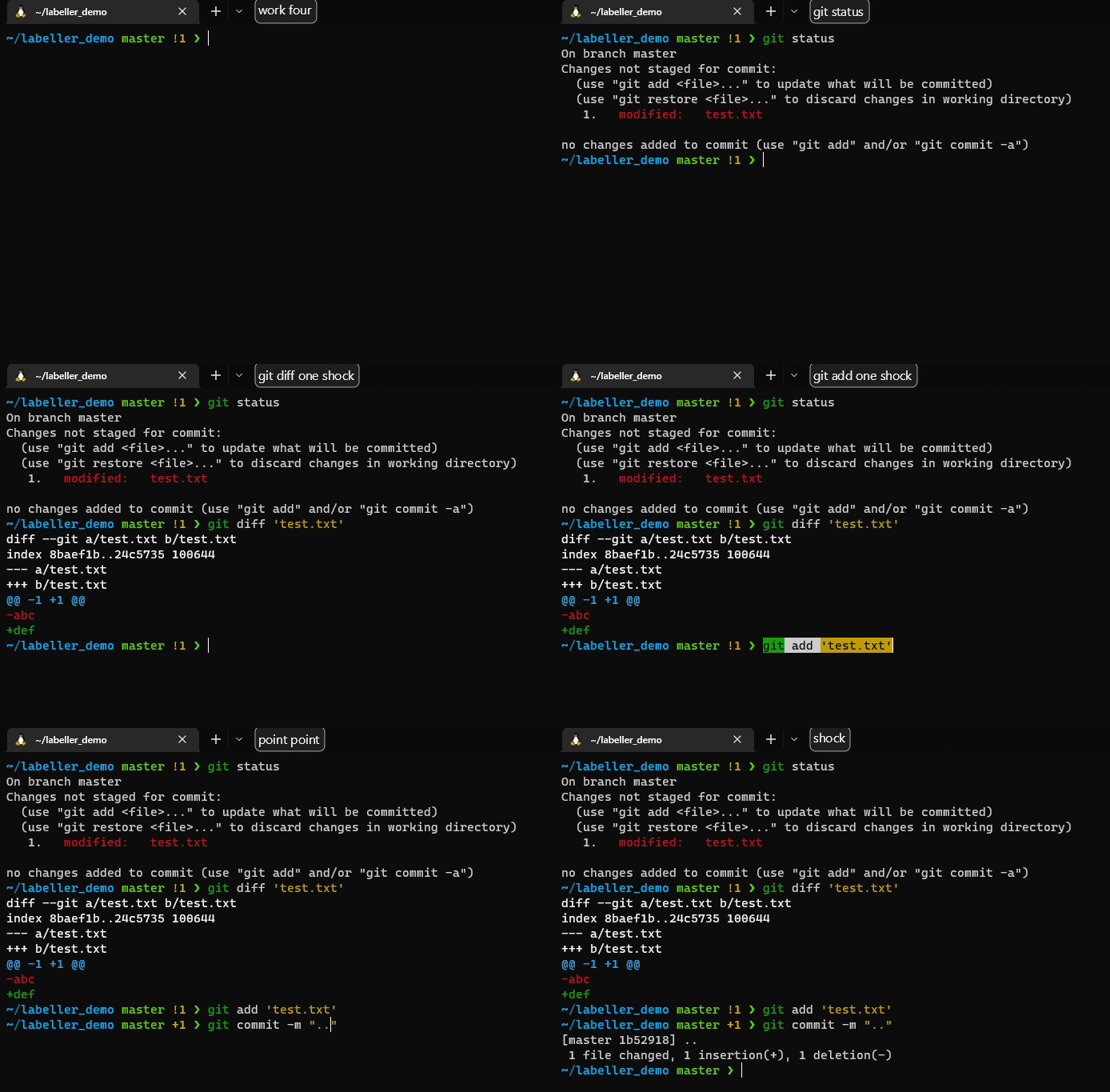
These scripts replace git commands, numbering items in the output and creating a talon list of the items so they can be referred to with voice commands. For example:
$ git tl-status
On branch master

No commits yet

Untracked files:
  (use "git add <file>..." to include in what will be committed)

   1.   .gitignore
   2.   README.md
   3.   status.py
   4.   utils.py

nothing added to commit but untracked files present (use "git add" to track)
with the following items being added to a list:
{'one': '.gitignore', 'two': 'README.md', 'three': 'status.py', 'four': 'utils.py'}
Instructions
- Install pipx:
pip3 install pipx
- Install the
talon_git_labellerpackage globally:
pipx install talon_git_labeller
- Switch to using the new git commands:
git status->git tl-statusgit branch->git tl-branchgit stash pop->git tl-stash-pop
- Create some commands to use the
git_status_itemsandgit_branch_itemslists in talon, e.g.:
git status: "git tl-status\n"
git add {user.git_status_items}: "git add '{git_status_items}'"
git diff {user.git_status_items}: "git diff '{git_status_items}'"
git file {user.git_status_items}: "'{git_status_items}'"

git branch: "git tl-branch\n"
git checkout {user.git_branch_items}: "git checkout '{git_branch_items}'"
- Use the commands by saying e.g. "git add one" after using "git tl-status" in a git repository.
1 maintainer

Metadata
1 maintainer
Release files for talon-git-labeller 0.1.6
For a detailed explanation of source distributions (sdists) and built distributions (wheels), please see the package formats documentation.
Source distribution (sdist)
| File | Size | Uploaded | Provenance | Actions |
|---|---|---|---|---|
| talon_git_labeller-0.1.6.tar.gz | 5.4 kB | Without provenance | Details for talon_git_labeller-0.1.6.tar.gz |
Built distribution (wheel)
| File | Interpreter | ABI | Platform | Actions Reset |
|---|---|---|---|---|
| talon_git_labeller-0.1.6-py3-none-any.whl | Python 3 | none | any | Details for talon_git_labeller-0.1.6-py3-none-any.whl |
Total release size: 12.3 kB
Release files / talon_git_labeller-0.1.6.tar.gz
| Download URL | talon_git_labeller-0.1.6.tar.gz |
|---|---|
| Size | 5.4 kB |
| Tags | Source |
|
SHA-256 checksum How to use checksums |
82ab48c5f13993d455e6e53d4a2d8b572c07d584e26d79ef7c31c336977c481a
|
|
BLAKE2b-256 checksum How to use checksums |
bf6294d0c9ea7b2349fadc042a84a122391c965403b1a5211038e3d000ea9a34
|
| Upload date | |
|
Uploaded using Trusted Publishing? What is trusted publishing? |
No |
| Uploaded via |
twine/4.0.2 CPython/3.10.6
|
Release files / talon_git_labeller-0.1.6-py3-none-any.whl
| Download URL | talon_git_labeller-0.1.6-py3-none-any.whl |
|---|---|
| Size | 6.9 kB |
| Tags | Python 3 |
|
SHA-256 checksum How to use checksums |
820903d6d3c5370fe2d47819be5d28cdd42e0c12da948c674de9e7311003317e
|
|
BLAKE2b-256 checksum How to use checksums |
c9519a82e9a279d69a3d7e867e62bfaf82e1fb1641914cac6208724236c54b6c
|
| Upload date | |
|
Uploaded using Trusted Publishing? What is trusted publishing? |
No |
| Uploaded via |
twine/4.0.2 CPython/3.10.6
|
Security for talon-git-labeller 0.1.6
Provenance
Provenance describes where a file came from. On PyPI, provenance is shared via attestations, which provide a verifiable record of the build or publishing details. View details, limitations and caveats.
No provenance found
None of the files in this release were uploaded with provenance metadata.
A note on package security
PyPI is a repository for distributing packages, not a service for auditing them. While third-party security researchers and our staff do their best to detect and remove malicious packages, PyPI cannot guarantee the quality, security or suitability of any given package.
To learn more about protecting yourself from malicious actors, visit our package security documentation.














