
Tamga 
A modern, high-performance logging utility for Python with multiple output formats and colorful console output.

🤖 AI Integration: For AI/LLM integration, see LLMs.txt or access documentation directly via Context7
tam·ga /ˈtæmɡə/ · noun An ancient Turkic symbol or seal used for marking ownership, identity, or lineage.
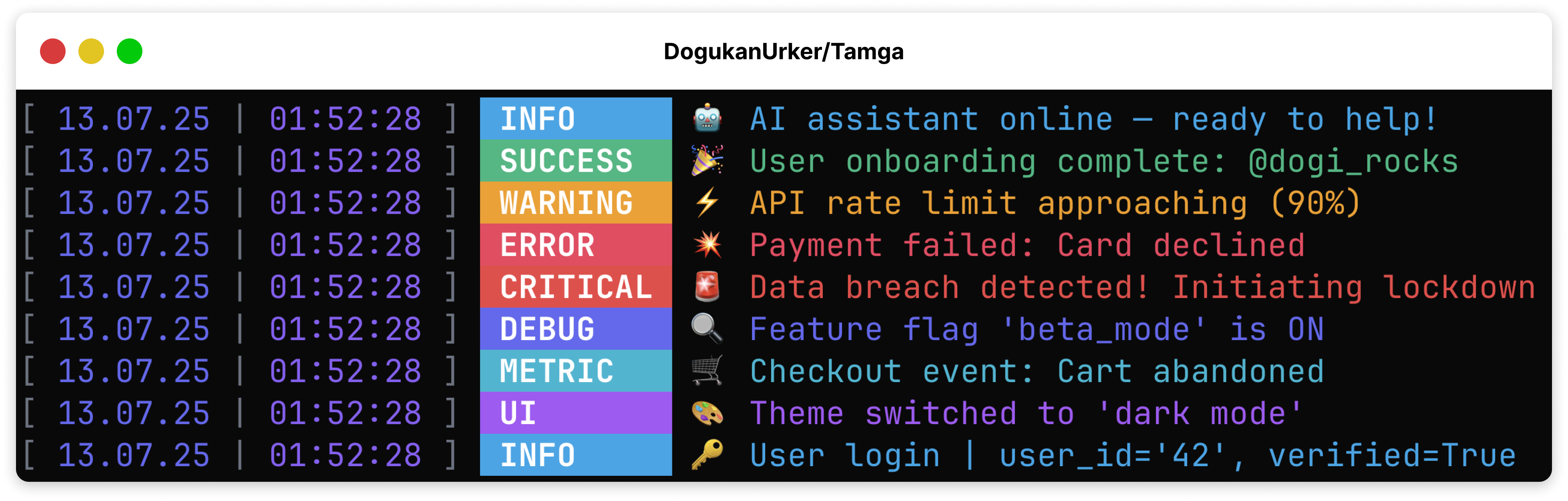
✨ Features
- 🎨 Beautiful Console Output - Colorful, formatted logs using Tailwind CSS colors
- ⚡ High Performance - Buffered writing system (10x faster than traditional logging)
- 📊 Multiple Outputs - Console, file, JSON, SQLite, MongoDB
- 🔄 Automatic Rotation - File size management with backup support
- 🧵 Thread-Safe - Safe for multi-threaded applications
- 🔔 Notifications - Multi-service notifications via Apprise (Discord, Slack, Email, SMS, and more)
- 🔍 Structured Logging - Key-value data support with all log methods
🚀 Quick Start
See examples/simple_usage.py for a full script.
from tamga import Tamga

# Create logger with default settings
logger = Tamga()

# Log messages
logger.info("Application started")
logger.warning("Memory usage at 85%")
logger.error("Failed to connect to API")
logger.success("User registered successfully")
logger.debug("Cache initialized with 1000 entries")
🧑💻 Examples
See examples/ for ready-to-run scripts:
simple_usage.py— basic loggingfastapi_webapp.py— FastAPI integrationadvanced_config.py— production confighigh_performance.py— high-speed big data logging demo
📦 Installation
pip install tamga                    # Basic installation
pip install tamga[mongo]             # With MongoDB support
pip install tamga[notifications]     # With notification support
pip install tamga[all]              # All features
🎯 Usage Examples
Basic Configuration
logger = Tamga(
    # Display settings
    colored_output=True,        # Colored output
    show_time=True,         # Include timestamp
    show_timezone=False,    # Include timezone

    # Output destinations
    file_output=True,        # Log to file
    file_path="app.log",     # Log file path
    buffer_size=50,         # Buffer size for performance
)
Structured Logging
# Log with key-value data using any log method
logger.info("User action",
    user_id="123",
    action="login",
    ip_address="192.168.1.1",
    success=True
)

# Works with all log levels
logger.error("Database connection failed",
    host="localhost",
    port=5432,
    timeout=30,
    retry_count=3
)

logger.success("Payment processed",
    amount=99.99,
    currency="USD",
    method="credit_card",
    transaction_id="tx_123"
)
Production Setup
logger = Tamga(
    # File rotation
    file_output=True,
    max_file_size_mb=50,         # 50MB max file size
    enable_backup=True,     # Create backups

    # Performance
    buffer_size=200,        # Larger buffer for production
    console_output=False,    # Disable console for speed

    # External services
    mongo_output=True,
    mongo_uri="mongodb://...",

    # Multi-service notifications
    notify_services=[
        "discord://webhook_id/webhook_token",
        "slack://tokenA/tokenB/tokenC/#alerts",
        "mailto://user:pass@smtp.gmail.com:587/?to=alerts@company.com",
        "twilio://SID:Token@+1234567890/+0987654321",
    ],
    notify_levels=["CRITICAL", "ERROR", "NOTIFY"],
)
📋 Log Levels
| Level | Color | Method | Use Case |
|---|---|---|---|
| INFO | Sky | logger.info() |
General information |
| WARNING | Amber | logger.warning() |
Warning messages |
| ERROR | Rose | logger.error() |
Error messages |
| SUCCESS | Emerald | logger.success() |
Success messages |
| DEBUG | Indigo | logger.debug() |
Debug information |
| CRITICAL | Red | logger.critical() |
Critical issues |
| DATABASE | Green | logger.database() |
Database operations |
| NOTIFY | Purple | logger.notify() |
Send notifications |
| METRIC | Cyan | logger.metric() |
Performance metrics |
| TRACE | Gray | logger.trace() |
Detailed trace info |
| CUSTOM | Any | logger.custom() |
Custom levels |
🔧 Advanced Features
Notifications
# Configure notification services (supports 80+ services via Apprise)
logger = Tamga(
    notify_services=[
        "discord://webhook_id/webhook_token",
        "slack://tokenA/tokenB/tokenC/#channel",
    ],
    notify_levels=["CRITICAL", "ERROR", "NOTIFY"],
    notify_title="{appname}: {level} Alert",
    notify_format="markdown",  # text, markdown, or html
)

# Send notification
logger.notify("Payment received from user #123")

# Critical logs also trigger notifications
logger.critical("Database connection lost")
Custom Log Levels
logger.custom("Deploy completed", "DEPLOY", "purple")
logger.custom("Payment received", "PAYMENT", "green")
Buffer Control
# Force write all buffered logs
logger.flush()
File Rotation
When log files reach max_file_size_mb, Tamga automatically:
- Creates timestamped backups (if enabled)
- Clears the original file
- Continues logging seamlessly
📊 Performance
Tamga uses a buffered writing system that delivers significantly faster performance compared to traditional logging. The buffering mechanism provides optimal throughput for high-volume logging scenarios while maintaining thread safety.
🤝 Contributing
Contributions are welcome! Please feel free to submit a Pull Request.
📄 License
This project is licensed under the MIT License - see the LICENSE file for details.
🔗 Links
Made with ❤️ by Doğukan Ürker
1 maintainer

Metadata
1 maintainer
Release files for tamga 1.4.0
For a detailed explanation of source distributions (sdists) and built distributions (wheels), please see the package formats documentation.
Source distribution (sdist)
| File | Size | Uploaded | |
|---|---|---|---|
| tamga-1.4.0.tar.gz | 21.5 kB | Details |
Built distribution (wheel)
| File | Interpreter | ABI | Platform | Reset |
|---|---|---|---|---|
| tamga-1.4.0-py3-none-any.whl | Python 3 | none | any | Details |
Total release size: 38.6 kB
Release files / tamga-1.4.0.tar.gz
| Download URL | tamga-1.4.0.tar.gz |
|---|---|
| Size | 21.5 kB |
| Tags | Source |
|
SHA-256 checksum How to use checksums |
960faf5cc6a19333aeb04d45ec0980d3f6ad5bcbbd5075d7925e644552011c02
|
|
BLAKE2b-256 checksum How to use checksums |
eb2b1f8841bb4d36b950bb283bd833ccddc8a646858806a3f4ca0b9ba23b6ed9
|
| Upload date | |
|
Uploaded using Trusted Publishing? What is trusted publishing? |
Yes |
| Uploaded via |
uv/0.7.20
|
Release files / tamga-1.4.0-py3-none-any.whl
| Download URL | tamga-1.4.0-py3-none-any.whl |
|---|---|
| Size | 17.1 kB |
| Tags | Python 3 |
|
SHA-256 checksum How to use checksums |
e2000fb9410582278337af15b397efe76ba96c72d57b81c9af5b626085bbe092
|
|
BLAKE2b-256 checksum How to use checksums |
bf1aa7dbf8d4f381db5bd941c3db4bcb4932a3b1dcfdb1b9e926a5bde402ce02
|
| Upload date | |
|
Uploaded using Trusted Publishing? What is trusted publishing? |
Yes |
| Uploaded via |
uv/0.7.20
|














