
🤝 tandem
One coding session. Two AI agents. Zero lost context.
Run Claude Code and OpenAI Codex CLI as a single paired session — each model in its own native harness. Work in either one, switch at any moment, and pick up exactly where you left off. No double spend: only one model runs per turn; the other stays in sync through pure local file translation.


uv tool install tandem-cli
🆕 New in 0.2 — GPT subagents
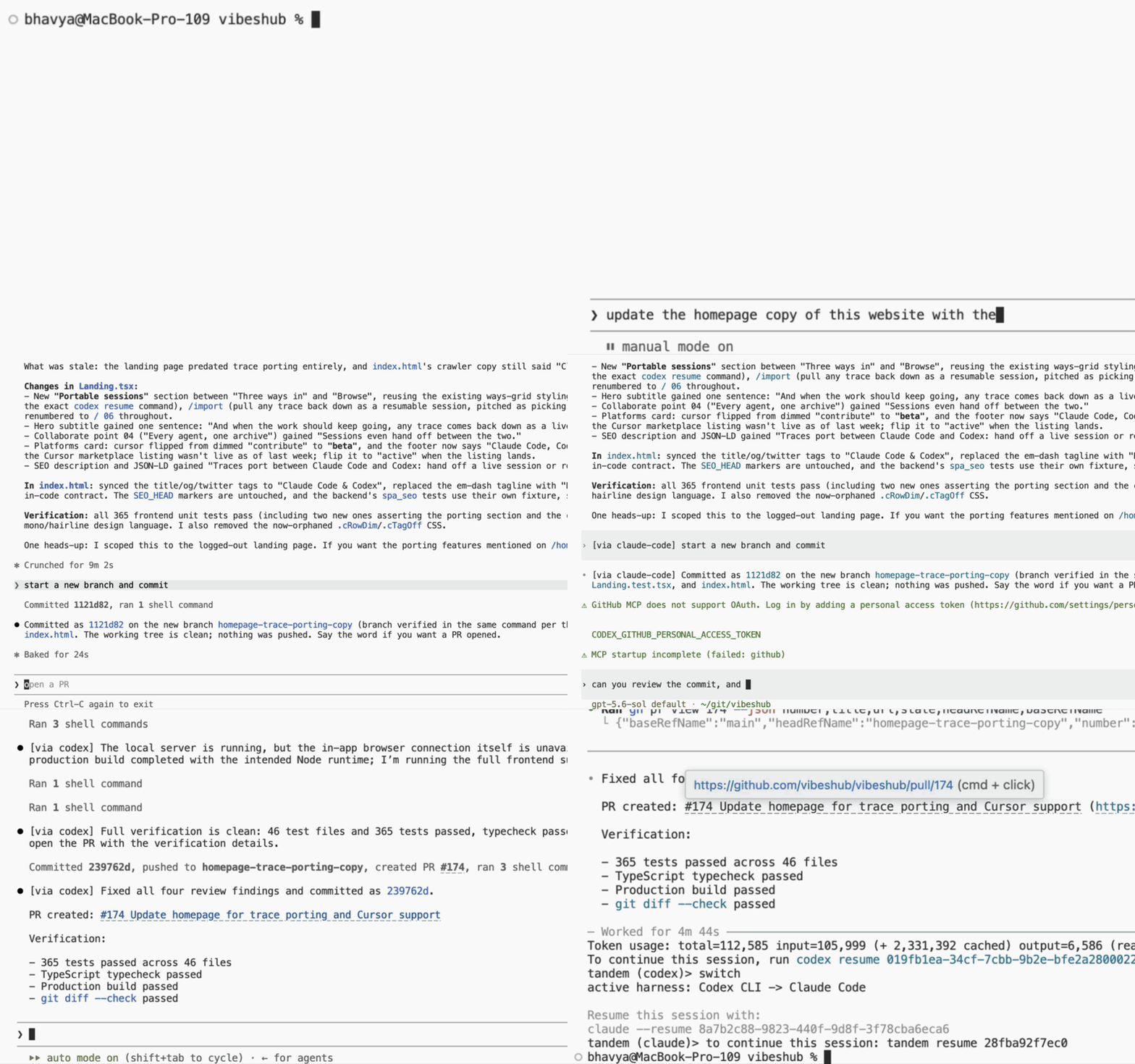
Ask for a second opinion without leaving Claude Code. Type "get the code reviewed by gpt" like you'd ask for anything else — tandem's plugin dispatches a codex worker with the full task brief, GPT's verdict lands back in your Claude session, and Claude applies the fixes. Name any model your codex account offers ("ask gpt-5.4-mini to review it"), or set a cheap default once and let every dispatch ride on it: Claude orchestrates, codex does the legwork, and your Claude quota stays on the main thread.

Setup and the full routing story: Subagents on the cheap model.
Why tandem?
⏳ Hit a usage limit? Just keep going.
Claude runs out of its usage window mid-refactor? Type switch and Codex
continues the same conversation a second later — same files, same
history, same plan. Your two subscriptions become one long runway instead
of two separate walls.
🌩️ Immune to outages.
An Anthropic or OpenAI outage doesn't stop your work. If the active
model's API goes down, switch — the same session continues seamlessly
in the other harness, and you can switch back whenever the outage clears.
💳 Subscriptions, not API bills.
tandem wraps the official CLIs under the auth you already have — your Claude and ChatGPT subscription logins work as-is. No API keys to provision, no per-token surprises. tandem itself makes zero network calls; every model call happens inside the real CLI, on your existing plan.
🧠 Two model families on one problem.
Claude and GPT have different strengths and different blind spots. Get a second opinion with full session context — no copy-pasting walls of text between terminals:
tandem run --on codex "second opinion: why is this test flaky?"
🐣 Subagents on the cheap model.
Load tandem's Claude Code plugin and GPT subagents are one ask away: "ask
gpt to review this migration" runs the dispatch on a codex model instead of
Claude's, with the task brief forwarded verbatim. Name a model — "ask
gpt-5.4-mini to review it" — and the worker runs on exactly that one. Want
every dispatch rerouted without asking each time? Set route = "all".
Either way the result comes back through Claude's own machinery. Claude
orchestrates; codex does the legwork; your Claude quota stays on the
main thread. Two pieces: the tandem binary the hook shells out to, and
the plugin that registers the hook — the plugin lives in this repo, not in
the wheel, and without the binary on PATH it is inert.
uv tool install tandem-cli   # the binary the hook drives
tandem                       # first launch offers the plugin install — hit enter
Said no at the prompt, or running non-interactively? One command performs both marketplace steps whenever you're ready:
tandem plugin install   # = claude plugin marketplace add Bhavya6187/tandem
                        #   + claude plugin install tandem@tandem
The marketplace tracks this repo's default branch, but nothing updates
behind your back: the first-launch offer asks before touching anything, and
you pull new versions when you run claude plugin marketplace update (or
/plugin marketplace update inside Claude).
Then create ~/.tandem/config.toml and pick your plan's cheap model as the
worker default — the ids your account can actually use are listed in
~/.codex/models_cache.json, the same catalog a per-dispatch model request
resolves against:
[subagents]
model = "gpt-5.6-luna"  # ← the whole point: set this
route = "manual"        # manual | all | off
context = "match"       # match | task | full
keep_forks = false      # keep each worker's rollout for debugging
Without model, workers run on your codex account's default model —
probably not the cheap one. Every other key above is already the default;
that one is not, and an explicitly asked-for gpt subagent bills that
default just as automatic rerouting would, so tandem doctor warns until
you set it.
route = "manual"(the default) keeps dispatches on Claude until you ask for codex — "use gpt subagents for this", "ask codex to review the migration". Name a model in the ask and the request rides along as atandem-model:first line in the brief, which tandem resolves against your codex install's own catalog before codex is ever invoked; say the name however you say it out loud, since matching ignores case and punctuation. A name that resolves to nothing fails fast, listing the slugs your account actually offers, while a generic one ("gpt", "codex") names no model at all and just runs yourmodelabove — or your codex account's default, reported ascodex default. A reply from a model-pinned dispatch ends with a[tandem-sub model: …]trailer naming what ran. (route = "off"is the same routing silence, butmanualkeepstandem doctor's subagent checks on, since you still send work to codex.)route = "all"reroutes every native subagent dispatch to codex automatically, no asking. It's all or nothing, though: underall, "have Claude and GPT both review this" comes back as codex twice —manualis the mode where mix-and-match works.- Write access follows your Claude permission mode. Dispatch while you're in
acceptEditsorbypassPermissionsand the codex worker runs with--sandbox workspace-write; in any other mode tandem passes no sandbox flag at all, so the worker gets codex's own default — read-only, unless you configured codex otherwise. A read-only worker that tried to edit files comes back with a[tandem-sub blocked: write]trailer naming the rejected paths; then it's your call — have it rerun withtandem sub -q --sandbox workspace-write, or apply what it returned yourself. - Know the trust boundary:
--sandboxontandem suboverrides whatever consent your permission mode stamped, and the only thing stopping a task brief from talking the relay into adding that flag is the relay's own instructions — so dispatching a task brief you don't trust is handing that text the relay's privileges. - Your own agents named
gptorcodex-workerare never rerouted — the loop guard matches on the last segment of the agent name in any scope — so a local.claude/agents/gpt.mdof yours keeps dispatching natively.
Optional per-harness tables add flags to every interactive session tandem
opens (tandem, tandem resume) — one-off relays (tandem run),
subagent dispatch, and doctor probes are unaffected:
[claude]
args = ["--dangerously-skip-permissions"]

[codex]
args = ["--dangerously-bypass-approvals-and-sandbox"]
The flags shown disable the harnesses' own permission prompts for sessions tandem launches — set them only if that is what you want. The list is passed to the harness raw: a flag that expects a value can swallow the settings tandem appends after it and break turn tracking. Malformed values (a non-list, empty or non-string elements) are silently ignored rather than failing the launch.
Fork dispatches stay on Claude even under route = "all", each worker's
full codex log is kept under ~/.tandem/subagents/, and tandem status
lists the workers running right now. The plugin is installed for every
Claude session, but nothing reaches codex from a directory with no paired
tandem session: dispatches run natively (under route = "all" the first
one says so once, then the session stays quiet), and a hand-picked gpt
subagent there comes back telling you to run tandem in that directory
first. claude plugin uninstall tandem@tandem and Claude is stock again — add claude plugin marketplace remove tandem to also unregister the marketplace.
Hacking on the plugin itself? Skip the marketplace and point Claude at your
clone: claude --plugin-dir /path/to/tandem/plugin.
🏠 Every model in its native harness.
This is not a lowest-common-denominator wrapper UI. Claude runs in real Claude Code; GPT runs in real Codex CLI. Your keybindings, slash commands, MCP servers, and muscle memory all work exactly as they do today — tandem sits underneath, not in between.
⚡ Switching is instant.
While one agent is active, tandem quietly keeps the other one's native session file up to date by translating the transcript as it grows — pure local file I/O, no model calls, no "exporting…" step. The other side is always resume-ready.
🔒 Local, private, no lock-in.
Everything lives in the CLIs' own session files plus a small SQLite
database in ~/.tandem. No cloud sync, no telemetry. Uninstall tandem
tomorrow and both sessions still resume natively with claude --resume
and codex resume.
Quick start
You'll need Python 3.11+ and the claude and codex CLIs on your PATH.
uv tool install tandem-cli   # or: pip install tandem-cli
cd your-project
tandem                       # fresh paired session; drops you into claude
Work normally. When you exit the agent, you land at tandem's prompt instead of your shell — that's where the magic lives:
tandem (claude)> switch      # continue instantly in codex
tandem (codex)> exit
to continue this session: tandem resume a1b2c3d4e5f6
Come back anytime:
tandem resume                # most recent session in this directory
tandem resume a1b2c3d4e5f6   # a specific one (id from the exit hint)
Command cheat sheet
| Command | What it does |
|---|---|
tandem |
Start a fresh paired session (Claude active; --active codex to flip) |
switch |
Flip active/shadow and enter the other agent — at the tandem prompt, or one-shot from your shell (one-shot only flips, it doesn't enter) |
tandem resume [id] |
Continue the most recent (or a specific) session |
tandem run --on codex "…" |
One-off prompt to the other agent, with full context |
tandem sub "…" |
Run one delegated task on a codex model (used by the plugin's reroute hook; --sandbox read-only|workspace-write overrides the dispatching session's write consent) |
tandem status |
Show pairing, roles, and sync position |
tandem plugin install |
Install the tandem Claude Code plugin through claude's own CLI (marketplace add + install) |
There are also three maintenance commands — tandem doctor (health
check: verifies both sessions are resumable), tandem sync (manual
catch-up translation), and tandem sync-mcp (share MCP server configs
between the tools).
How it works
- One model per command — always. Only the active harness's model is
ever invoked (or, for
run --on, the target's). The shadow side is pure local file I/O: tandem tails the active transcript, translates each entry, and appends it to the shadow's session file. The shadow's model is never called to "catch up". - A persistent prompt, not the OS shell. Leaving the harness lands you
at
tandem (claude)>. There,switchflips roles and drops you straight into the other tool, Enter re-enters the current one, andstatus/sync/doctor/run --on/sync-mcpall run against this session.exit(or Ctrl-D) returns to your shell and prints the resume hint. Every command also works one-shot from your shell, targeting the directory's most recently used session. - PTY passthrough. tandem launches the real CLI on a pty (raw mode,
resize forwarding, signals through the line discipline) and never
scrapes terminal output — the transcript files are the source of truth.
Turn-complete hooks (
claude --settingsStop hook,codex -c notify=[…]) are wired per-invocation as wake-up signals, with fs-watching as the data path and fallback. If your codex config already setsnotify, tandem leaves it alone. - Append-only, crash-safe sync. Each transcript entry is translated as it lands — no bulk re-export at switch time. Appends are whole-line + fsync, and a write-ahead intent in the sync cursor makes translation exactly-once across crashes; on restart, sync resumes from the last confirmed entry.
- Tool calls translate natively. The harnesses speak different tool
vocabularies, so each completed call+result pair is re-expressed in the
shadow's own terms —
Bash↔exec_command,Edit/Write↔apply_patch,TodoWrite↔update_plan— and lands as a real tool-call record, so shadow history reads as the shadow's own work. Anything that wouldn't map truthfully passes through verbatim; a call whose result never arrived is closed with a(tool result not recorded)placeholder at handoff, since both replay APIs reject dangling calls. - Attribution stays legible. Every synced text message is tagged
[via claude-code]/[via codex](tandem's own notes use[tandem]), so interleaved histories make sense to you and to the models. Tool activity is untagged — it's mirrored as native records, not prose. - Errors are contained. An entry that fails translation becomes a
single per-turn placeholder in the shadow, with the raw entry
quarantined under
~/.tandem/quarantine/…— and sync continues. The shadow is never corrupted or truncated. - Memory files stay in step. Fresh launches and every switch sync
CLAUDE.md ↔ AGENTS.md: shared content lives in a
<!-- tandem:shared:begin/end -->block (newer file wins), tool-specific text outside the block is preserved, and a file without markers is read from but never rewritten. Git state is never touched.
Compatibility
Session formats are internal to the CLIs and drift between releases. tandem pins what it was built against (observed formats documented in docs/formats.md):
| CLI | Tested | Accepted range |
|---|---|---|
| Claude Code | 2.1.220 | ≥ 2.0, < 3 |
| Codex CLI | 0.145.0 | ≥ 0.140, < 0.150 |
Outside the range, tandem warns and asks you to run tandem doctor.
Format knowledge is isolated per tool in
src/tandem/harness/claude_code.py and src/tandem/harness/codex.py.
Where your data lives
~/.tandem/state.db— SQLite: session pairing + per-source sync cursors (override the directory withTANDEM_HOME)~/.tandem/quarantine/<session>/— raw entries that failed translation~/.claude/projects/<munged-cwd>/<session-id>.jsonl— claude transcript~/.codex/sessions/YYYY/MM/DD/rollout-<ts>-<session-id>.jsonl— codex rollout (CLAUDE_CONFIG_DIR/CODEX_HOMEhonored)
Claude session ids are minted by tandem (claude --session-id); codex
mints its own on first run and tandem captures it from the new rollout
file.
Extending tandem
The sync engine talks to a small adapter interface
(tandem.converter.TraceConverter):
class TraceConverter(Protocol):
    def translate_entry(entry, direction, ctx) -> list[TargetEntry] | TranslationError
ReferenceConverter implements it via a normalized event model
(tandem/events.py) derived from the observed formats. Pass your own
converter to SyncEngine(store, session, source, converter=...).
Development
uv sync && uv run pytest
pipx install .        # or: uv tool install .
Dependencies are deliberately small: click (CLI), pydantic v2 (event
schema), watchdog (transcript tailing), pexpect/ptyprocess (PTY
passthrough); state is stdlib sqlite3.
License
1 maintainer

Download files
Download the file for your platform. If you're not sure which to choose, learn more about installing packages.
Source Distribution
Built Distribution
Filter files by name, interpreter, ABI, and platform.
If you're not sure about the file name format, learn more about wheel file names.
Copy a direct link to the current filters
File details
Details for the file tandem_cli-0.2.0.tar.gz.
File metadata
- Download URL: tandem_cli-0.2.0.tar.gz
- Upload date:
- Size: 7.3 MB
- Tags: Source
- Uploaded using Trusted Publishing? No
- Uploaded via: uv/0.11.14 {"installer":{"name":"uv","version":"0.11.14","subcommand":["publish"]},"python":null,"implementation":{"name":null,"version":null},"distro":{"name":"macOS","version":null,"id":null,"libc":null},"system":{"name":null,"release":null},"cpu":null,"openssl_version":null,"setuptools_version":null,"rustc_version":null,"ci":null}
File hashes
| Algorithm | Hash digest | |
|---|---|---|
| SHA256 |
697d38014c9bfe722206e66213767c9c7e16cb0ef04aa1c1e97ae01ec27428ef
|
|
| MD5 |
3aa7335d5cf0182e5c84740b801a0294
|
|
| BLAKE2b-256 |
99892cd67875440d61eee062886cd79bec713aff36f0b8f2bb453fb2aa5cb92a
|
File details
Details for the file tandem_cli-0.2.0-py3-none-any.whl.
File metadata
- Download URL: tandem_cli-0.2.0-py3-none-any.whl
- Upload date:
- Size: 81.6 kB
- Tags: Python 3
- Uploaded using Trusted Publishing? No
- Uploaded via: uv/0.11.14 {"installer":{"name":"uv","version":"0.11.14","subcommand":["publish"]},"python":null,"implementation":{"name":null,"version":null},"distro":{"name":"macOS","version":null,"id":null,"libc":null},"system":{"name":null,"release":null},"cpu":null,"openssl_version":null,"setuptools_version":null,"rustc_version":null,"ci":null}
File hashes
| Algorithm | Hash digest | |
|---|---|---|
| SHA256 |
393d7ea2ad06a25c0d4924d3bb12d4aaace24011d831593632fe87f0dbf1f7ab
|
|
| MD5 |
b636bddb4e65de7a5a280c015fb9fd77
|
|
| BLAKE2b-256 |
771e1ea41396b9d97fd0e36dc6328e6c9e2568ebc9115c57b878dab9f621ac67
|







