
tango-mlflow




MLflow integration for ai2-tango
Introduction
tango-mlflow is a Python library that connects the Tango to MLflow.
Tango, developed by AllenAI, is a flexible pipeline library for managing experiments and caching outputs of each step.
MLflow, on the other hand, is a platform that helps manage the Machine Learning lifecycle, including experimentation, reproducibility, and deployment.
This integration enables you to store and manage complete experimental settings and artifacts of your Tango run in MLflow, thus enhancing your experiment tracking capabilities.
Here's a screenshot of the MLflow interface when executing with tango-mlflow:
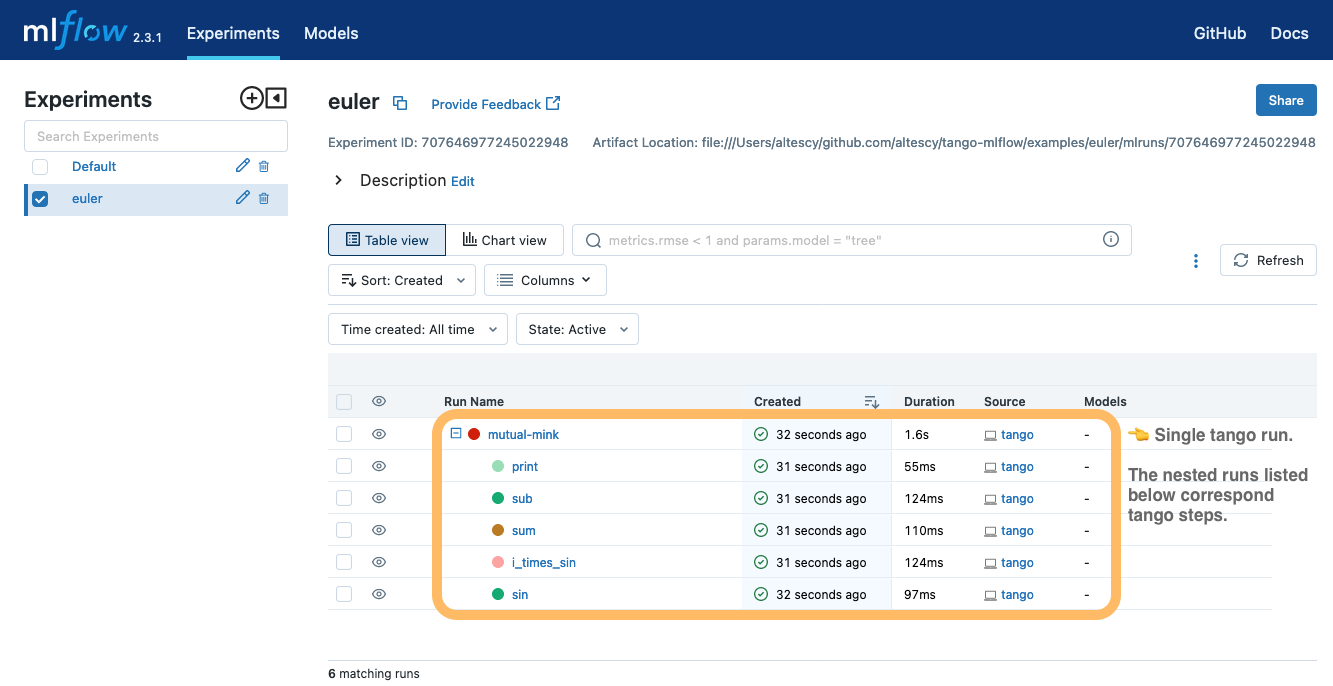
- Tango run: The top-level run in MLflow corresponds to a single execution in Tango, and its name matches the execution name in Tango.
- Tango steps: Results of each step in Tango are recorded as nested runs in MLflow. The names of these nested runs correspond to the names of the steps in Tango.
- Parameters and Metrics: The entire settings for the execution, as well as the parameters for each step, are automatically logged in MLflow.
- Artifacts and Caching: The cached outputs of each step's execution are saved as artifacts under the corresponding MLflow run. These can be reused when executing Tango, enhancing efficiency and reproducibility.
Installation
Install tango-mlflow by running the following command in your terminal:
pip install tango-mlflow[all]
Usage
You can use the MLFlowWorkspace with command line arguments as follows:
tango run --workspace mlflow://your_experiment_name --include-package tango_mlflow
Alternatively, you can define your configuration in a tango.yml file:
workspace:
  type: mlflow
  experiment_name: your_experiment_name

include_package:
  - tango_mlflow
In the above tango.yml configuration, type specifies the workspace type as MLflow, and experiment_name sets the name of your experiment in MLflow.
The include_package field needs to include the tango_mlflow package to use tango-mlflow functionality.
Remember to replace your_experiment_name with the name of your specific experiment.
To log runs remotely, set the MLFLOW_TRACKING_URI environment variable to a tracking server’s URI like below:
export MLFLOW_TRACKING_URI=https://mlflow.example.com
Functionalities
Logging metrics into MLflow
The tango-mlflow package provides the MlflowStep class, which allows you to easily log the results of each step execution to MLflow.
from tango_mlflow.step import MlflowStep

class TrainModel(MlflowStep):
    def run(self, **params):

        # pre-process...

        for epoch in range(max_epochs):
            loss = train_epoch(...)
            metrics = evaluate_model(...)
            # log metrics with mlflow_logger
            for name, value in metrics.items():
                self.mlflow_logger.log_metric(name, value, step=epoch)

        # post-process...
In the example above, the TrainModel step inherits from MlflowStep.
Inside the step, you can directly record metrics to the corresponding MLflow run by invoking self.mlflow_logger.log_metric(...).
Please note, this functionality must be used in conjunction with MlflowWorkspace.
Summarizing Tango run metrics
You can specify a step to record its returned metrics as representative values of the Tango run by setting the class variable MLFLOW_SUMMARY = True.
This feature enables you to conveniently view metrics for each Tango run directly in the MLflow interface
class EvaluateModel(Step):
    MLFLOW_SUMMARY = True  # Enables MLflow summary!

    def run(self, ...) -> dict[str, float]:
        # compute metrics ...
        return metrics
In the example above, the EvaluateModel step returns metrics that are logged as the representative values for that Tango run. These metrics are then recorded in the corresponding (top-level) MLflow run.
Please note the following requirements:
- The return value of a step where
MLFLOW_SUMMARY = Trueis set must always bedict[str, float]. - You don't necessarily need to inherit from
MlflowStepto useMLFLOW_SUMMARY.
Tuning hyperparameters with Optuna
tango-mlflow also provides the tango-mlflow tune command for tuning hyperparameters with Optuna.
For more details, please refer to the examples/breast_cancer directory.
Examples
- Basic example: examples/euler
- Hyper parameter tuning with Optuna: examples/breast_cancer
1 maintainer

Download files
Download the file for your platform. If you're not sure which to choose, learn more about installing packages.
Source Distribution
Built Distribution
Filter files by name, interpreter, ABI, and platform.
If you're not sure about the file name format, learn more about wheel file names.
Copy a direct link to the current filters
File details
Details for the file tango_mlflow-2.0.0.tar.gz.
File metadata
- Download URL: tango_mlflow-2.0.0.tar.gz
- Upload date:
- Size: 22.9 kB
- Tags: Source
- Uploaded using Trusted Publishing? No
- Uploaded via:
poetry/1.8.3 CPython/3.10.9 Linux/6.5.0-1022-azure
File hashes
| Algorithm | Hash digest | |
|---|---|---|
| SHA256 |
103c5114cead57dcb39c90b0b97eeb81d998ee128a1503b71cc03ba6f7b2fe39
|
|
| MD5 |
61f1c0102f61e0b041f9f802f8b6f851
|
|
| BLAKE2b-256 |
2453ad5ae3c63de413d8bbded25f027b56b03135bc9c032da1e696cf09732c30
|
File details
Details for the file tango_mlflow-2.0.0-py3-none-any.whl.
File metadata
- Download URL: tango_mlflow-2.0.0-py3-none-any.whl
- Upload date:
- Size: 26.3 kB
- Tags: Python 3
- Uploaded using Trusted Publishing? No
- Uploaded via:
poetry/1.8.3 CPython/3.10.9 Linux/6.5.0-1022-azure
File hashes
| Algorithm | Hash digest | |
|---|---|---|
| SHA256 |
48e785c88a062198653fc858fb2698ec303e887123e839279a1d6b60569d1ff4
|
|
| MD5 |
65875bb16a2bb979d4669c9b729d8932
|
|
| BLAKE2b-256 |
a9b9d51027133457c6b9e4cefdaed52d7d80c0ac79f8213cb1579eb883155853
|














