
Archicad Tapir MCP Server
Connect your AI assistant to Archicad. Use natural language to explore projects and automate workflows through the Tapir add-on and the official Archicad JSON API.





See it in action
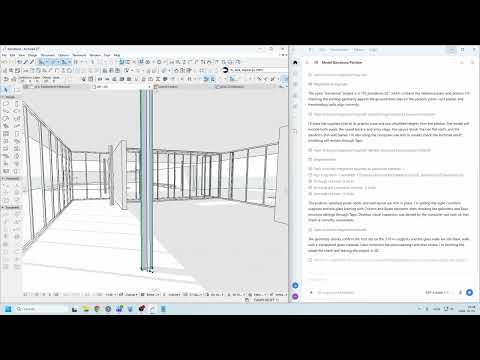
Astra uses photos and a plan as references to model in Archicad.
What can it do?
- Inspect open projects, elements, properties, and attributes.
- Find elements that match conditions on type, properties, and classifications.
- Create and modify model elements, and work with views and layouts.
- Export project data and use supported IFC and Teamwork commands.
- Access 800+ Archicad commands, discovered on demand by your assistant.
- Connect to multiple running Archicad instances.
Quick start
Before installing the MCP server, make sure Archicad is running on Windows or macOS and install these two requirements:
- Tapir add-on — an Archicad add-on that gives the server access to Archicad's automation commands. Install it in Archicad for the version you use.
- uv — a tool that installs and runs the MCP server and its dependencies. Install it on the computer running Archicad.
You'll also need an MCP client: the AI application that connects to the server.
Ask your AI to install it
Copy this prompt into your AI assistant:
Install the Archicad Tapir MCP server for my MCP client, following the instructions at https://github.com/SzamosiMate/tapir-archicad-MCP/blob/master/docs/setup-and-configuration.md. Help me verify that it can connect to my running Archicad instance.
Install it yourself
If your client supports MCP bundles, download tapir-archicad.mcpb and open it in your client. The client must be able to find uv on its PATH.
Prefer the old-school approach? Follow the manual setup instructions—editing a config file is optional hacker cred.
Try it
With Archicad running, ask your assistant:
What Archicad projects do I have open?
The assistant can list ready instances, their project names and ports, and report instances that are unavailable. If you have multiple projects open, specify the port when asking it to work on one.
How it works
Your MCP client runs this server, which connects to Archicad through multiconn_archicad. The server exposes five MCP tools for finding instances, searching and browsing commands, looking up their schemas, executing commands, and checking long-running jobs. Your assistant can search for several workflow steps at once and narrow results by command group.
Important to know
The server can create, modify, and delete model elements, export files, and interact with Teamwork. Project names, paths, and model data returned by commands are sent to your MCP client. Review changes made to your projects and use a copy when experimenting.
Available commands depend on your installed Archicad and Tapir versions. Instance discovery reports a missing Tapir add-on as unavailable and warns when the installed Tapir version differs from the version supported by the server.
Documentation
See Setup and configuration for client setup, troubleshooting, server options, HTTP transports, jobs, and pagination.
See Command discovery for keyword search, follow-up searches, and benchmarks.
See Element queries for finding and filtering elements.
Development and contributing
To develop the server, clone the repository and run uv sync from the project directory. Then configure your MCP client to run the Python interpreter from that checkout's virtual environment:
| Client setting | Windows | macOS |
|---|---|---|
| Command | <project>\.venv\Scripts\python.exe |
<project>/.venv/bin/python |
| Arguments | -m, tapir_archicad_mcp.server |
-m, tapir_archicad_mcp.server |
Replace <project> with the absolute path to your checkout. This runs the local code instead of the published uvx package. Restart the server in your client after making changes. Run tests with uv run pytest tests.
Generated commands
The Archicad command wrappers in src/tapir_archicad_mcp/tools/generated/ are generated from the exact multiconn-archicad version pinned in pyproject.toml. The generator reads command metadata from that release's Git tag; scripts/generator_config.py controls naming, exclusions, pagination, and image handling, and scripts/generate_tools.py produces the wrappers. To change generated behavior, review the generator and its configuration rather than only editing the generated files, since regeneration can overwrite those edits.
Contributions
Ideas, bug fixes, and small, focused improvements are welcome. For larger features, architectural changes, or major rewrites, please open an issue to discuss the approach before investing in a pull request. I may prefer to work through those changes myself as part of understanding and shaping the design.
AI-assisted contributions are welcome. Please keep pull request descriptions short and in plain language: explain the problem, your solution, and how you checked it. For larger changes in particular, understand the proposed implementation and be ready to discuss the design and trade-offs.
License and acknowledgments
This project is licensed under the MIT License. The bundle icon uses the Tapir mark from ENZYME-APD/tapir-archicad-automation (branding/logo/png/tapir_logo_black_512.png), MIT, Copyright 2024 Enzyme APD.
1 maintainer

Metadata
1 maintainer
Release files for tapir-archicad-mcp 0.7.0
For a detailed explanation of source distributions (sdists) and built distributions (wheels), please see the package formats documentation.
Source distribution (sdist)
| File | Size | Uploaded | Provenance | Actions |
|---|---|---|---|---|
| tapir_archicad_mcp-0.7.0.tar.gz | 278.2 kB | Without provenance | Details for tapir_archicad_mcp-0.7.0.tar.gz |
Built distribution (wheel)
| File | Interpreter | ABI | Platform | Actions Reset |
|---|---|---|---|---|
| tapir_archicad_mcp-0.7.0-py3-none-any.whl | Python 3 | none | any | Details for tapir_archicad_mcp-0.7.0-py3-none-any.whl |
Total release size: 464.4 kB
Release files / tapir_archicad_mcp-0.7.0.tar.gz
| Download URL | tapir_archicad_mcp-0.7.0.tar.gz |
|---|---|
| Size | 278.2 kB |
| Tags | Source |
|
SHA-256 checksum How to use checksums |
4c8bdffb13b9e23f928278836aa6f501c6d4c78b348a465b0a4d0f10ec413843
|
|
BLAKE2b-256 checksum How to use checksums |
a2eb67818d49e5eb494d7e31306ff165b37bc4e38d9581192593bd9d7879d204
|
| Upload date | |
|
Uploaded using Trusted Publishing? What is trusted publishing? |
Yes |
| Uploaded via |
uv/0.13.9 {"installer":{"name":"uv","version":"0.13.9","subcommand":["publish"]},"python":null,"implementation":{"name":null,"version":null},"distro":{"name":"Ubuntu","version":"26.04","id":"resolute","libc":null},"system":{"name":null,"release":null},"cpu":null,"openssl_version":null,"setuptools_version":null,"rustc_version":null,"ci":true}
|
Release files / tapir_archicad_mcp-0.7.0-py3-none-any.whl
| Download URL | tapir_archicad_mcp-0.7.0-py3-none-any.whl |
|---|---|
| Size | 186.2 kB |
| Tags | Python 3 |
|
SHA-256 checksum How to use checksums |
69924b65e7611b2d23a9dea667717e42e76797bc8fbb4c0b24c89cb1f950616c
|
|
BLAKE2b-256 checksum How to use checksums |
93bc66b371a96a992ce08ce053181df563046c512f585c9e3fa4f185826edb6c
|
| Upload date | |
|
Uploaded using Trusted Publishing? What is trusted publishing? |
Yes |
| Uploaded via |
uv/0.13.9 {"installer":{"name":"uv","version":"0.13.9","subcommand":["publish"]},"python":null,"implementation":{"name":null,"version":null},"distro":{"name":"Ubuntu","version":"26.04","id":"resolute","libc":null},"system":{"name":null,"release":null},"cpu":null,"openssl_version":null,"setuptools_version":null,"rustc_version":null,"ci":true}
|
Security for tapir-archicad-mcp 0.7.0
Provenance
Provenance describes where a file came from. On PyPI, provenance is shared via attestations, which provide a verifiable record of the build or publishing details. View details, limitations and caveats.
No provenance found
None of the files in this release were uploaded with provenance metadata.
A note on package security
PyPI is a repository for distributing packages, not a service for auditing them. While third-party security researchers and our staff do their best to detect and remove malicious packages, PyPI cannot guarantee the quality, security or suitability of any given package.
To learn more about protecting yourself from malicious actors, visit our package security documentation.














