
No project description provided

Project description
Target Tiller
This is the portfolio rebalancer that eases you on target for any stage of your investment journey.
TL;DR See also the Getting it to work section.
Look in the demo directory, the Jupyter notebook walks through some examples.
You should have some target allocations that you would like your portfolios to meet (eg., 50% of one fund, 30% or another, 20% for a third one). "Portfolio rotation" is a method performed at semi-regular intervals to make sure that your asset holdings match these target proportions.
A question you might want to ask: do you need to meet those targets today, or is it okay to reach them gradually over time as you either grow your portfolio (for example through monthly contributions), or start funding your life through periodic withdrawls? If you have the time, this software might be a good fit for your financial journey.
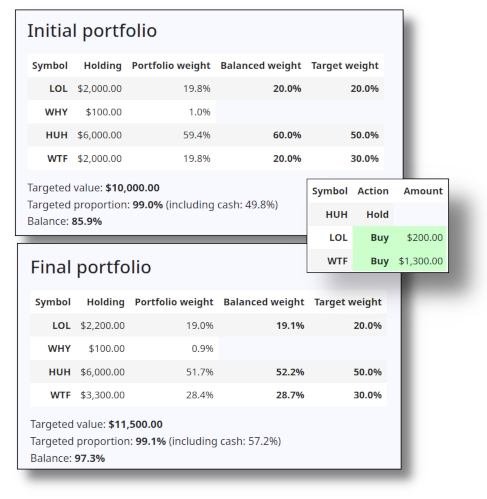
This is why this software is called a "tiller": it steers your asset proportions toward your targets, rather than teleporting them there immediately (but if you wish it can also be told to take you directly to your targets).
If you would like to know more about portfolio rebalancing, I would recommend you search for information on the "Couch Potato Strategy", which uses periodic rebalancing to grow wealth over time, typically through the acquisition of index funds.
Warning: This software only suggests purchases and sales, based on some parameters you feed it, it doesn't do the work for you. You assume any risk involved if you follow the suggestions. The software is for informational purposes only, and can not be held liable for any loses you may make on your investment journey. The only goal of the software is to suggest ways that you can (eventually) keep your portfolio in balance (via fairly basic math), it does not give suggestions on what to buy/sell, nor does it advise on how you can make money. This is possibly the least sexy form of investing known to man: you should only follow this course if you want to "get rich slow" (and the "get rich" part isn't guaranteed).
Three types of balancing
TargetTiller has three rebalancing options to reach your goals:
-
Buy-only: this options is great for people in the accumulation stage of their lives: you tell the transaction calculator how much you would like to spend and it will only buy assets as it charts a course towards perfect balance based on your targets. This is also a great choice for accounts that are subject to capital gains taxes on the sale of assets. It may not get you there immediately, but it will send you in the right direction towards the target. If you spend enough money and if you spend enough times it will eventually get you in balance.
-
Sell-only: this options is for people who are actively liquidating their wealth, an ideal option to fund life in retirement. Here you tell the transaction calculator how much you would like to withdraw and it will only sell assets as it heads towards perfect balance based on your targets. Again, it may not get you there immediately, but it will send you in the right direction towards the target so that you will get their over time (or if you withdraw enough money).
-
Buy/sell: this option is allowed to both buy and sell assets to try to keep your portfolio in balance. This is good for when you want to reach the targets quickly, often because your portfolio is much larger in size compared to the amounts you are either adding or removing from the portfolio (or maybe you aren't adding/removing money from the portfolio at all, and you just want to rebalance a static portfolio).
Getting it to work
First you should ensure the requirements are installed.
A requirements.txt file is supplied, you should install
the package requirements from there, usually in a virtual
environment. Google will tell you how to do this if you
don't know already, but typically it looks like this:
# venv is the name/directory of the virtual environment
virtualenv --no-download venv

# Activate it, or it's not good for anything (you're prompt will change)
source venv/bin/activate

# Install the requirements
pip install -r requirements.txt

# With the virtual environment activated, do some things ...
# E.g., run the test suite
pytest

# E.g., start jupyter and play with the demo notebook
jupyter-notebook &

# E.g., run the demo script (--help for options)
python -m target_tiller --demo

# Deactivate the virtual environment
deactivate
The engine ...
The work done by this software is performed by a "transactions
calculator" (via the class
target_tiller.TranscationsCalculator). This controls the
rebalancing analysis, provides access to the before and
after states of rebalancing, and keeps a list of transactions
needed to do the rebalancing. It provides the information
needed to report on the rebalancing activity.
In order to do the work, objects of this class need three things:
- A set of targets (class
target_tiller.Targets) that outline the proportions you would like to meet in the balanced part of your portfolio. - A portfolio that has asset holdings and cash
(class
target_tiller.Portfolio). Some of the assets can be balanced through targets, while others you can leave only (the software will not make suggestions for these other assets). - A configuration for the transactions to perform
(class
target_tiller.TransactionsConfig). This tells the transactions calculator what method to use (buy only, sell only, or buy/sell), the amount to add or remove from the assets (e.g., due to a deposit in the account, or due to withdrawl, or keep the amount of assets the same if you prefer), and the minimum/maximum values of any given transaction (e.g., some brokerages won't allow transactions less than $100 for some funds).
Input/Output
The target_tiller.input and target_tiller.output module have
classes to handle loading and saving information from this
program. There is a class called target_tiller.input.FilesHelper
that helps find input files in standard places and can be configured
to find the files via environment variables. See the demo notebook
for some examples.
Most readers and writers operatate on YAML format (the notable exception being a TD Webroker reader that understands CSV).
Future extensions
This software only reads data you give it, and only reports on suggested transactions, so an obvious extension is to grab the data from your trading platform, and somehow upload the desired transactions there. My online broker doesn't support these activities, so they don't exist (and I would question letting a python script do transactions on ones behalf without a human-involved sanity check first). Anyways, there may be some ways to automate how data is retrieved, or how transactions are performed.
Release history Release notifications | RSS feed


Download files
Download the file for your platform. If you're not sure which to choose, learn more about installing packages.
Source Distribution
Built Distribution
Filter files by name, interpreter, ABI, and platform.
If you're not sure about the file name format, learn more about wheel file names.
Copy a direct link to the current filters
File details
Details for the file target_tiller-1.0.1.tar.gz.
File metadata
- Download URL: target_tiller-1.0.1.tar.gz
- Upload date:
- Size: 24.6 kB
- Tags: Source
- Uploaded using Trusted Publishing? No
- Uploaded via: twine/6.2.0 CPython/3.13.7
File hashes
| Algorithm | Hash digest | |
|---|---|---|
| SHA256 |
a066e456c36ba13e00d196deda130f353646252df76a2bfb0c9e207903d3c536
|
|
| MD5 |
3955cdec62b0296c545279b8f12c260a
|
|
| BLAKE2b-256 |
90091f175d86a61f3a2a4893467975d98758700ef45053c06620ff3e8fe41332
|
File details
Details for the file target_tiller-1.0.1-py3-none-any.whl.
File metadata
- Download URL: target_tiller-1.0.1-py3-none-any.whl
- Upload date:
- Size: 30.9 kB
- Tags: Python 3
- Uploaded using Trusted Publishing? No
- Uploaded via: twine/6.2.0 CPython/3.13.7
File hashes
| Algorithm | Hash digest | |
|---|---|---|
| SHA256 |
4d0e8dd0f35d5dd73959e662de17eb93d872ede4fd87ad646c4ea5be2e3fa73f
|
|
| MD5 |
490cd131bae3b6e5c174103bd937ae43
|
|
| BLAKE2b-256 |
57a2230ad1dd3f07e404d6d53521e8c323ba3794a4d160c6474f67596c890cfc
|






