
[!NOTE]
App is in review process, it will be released herehttps://apps.apple.com/app/apple-store/id6746345658
Public Beta avialable here
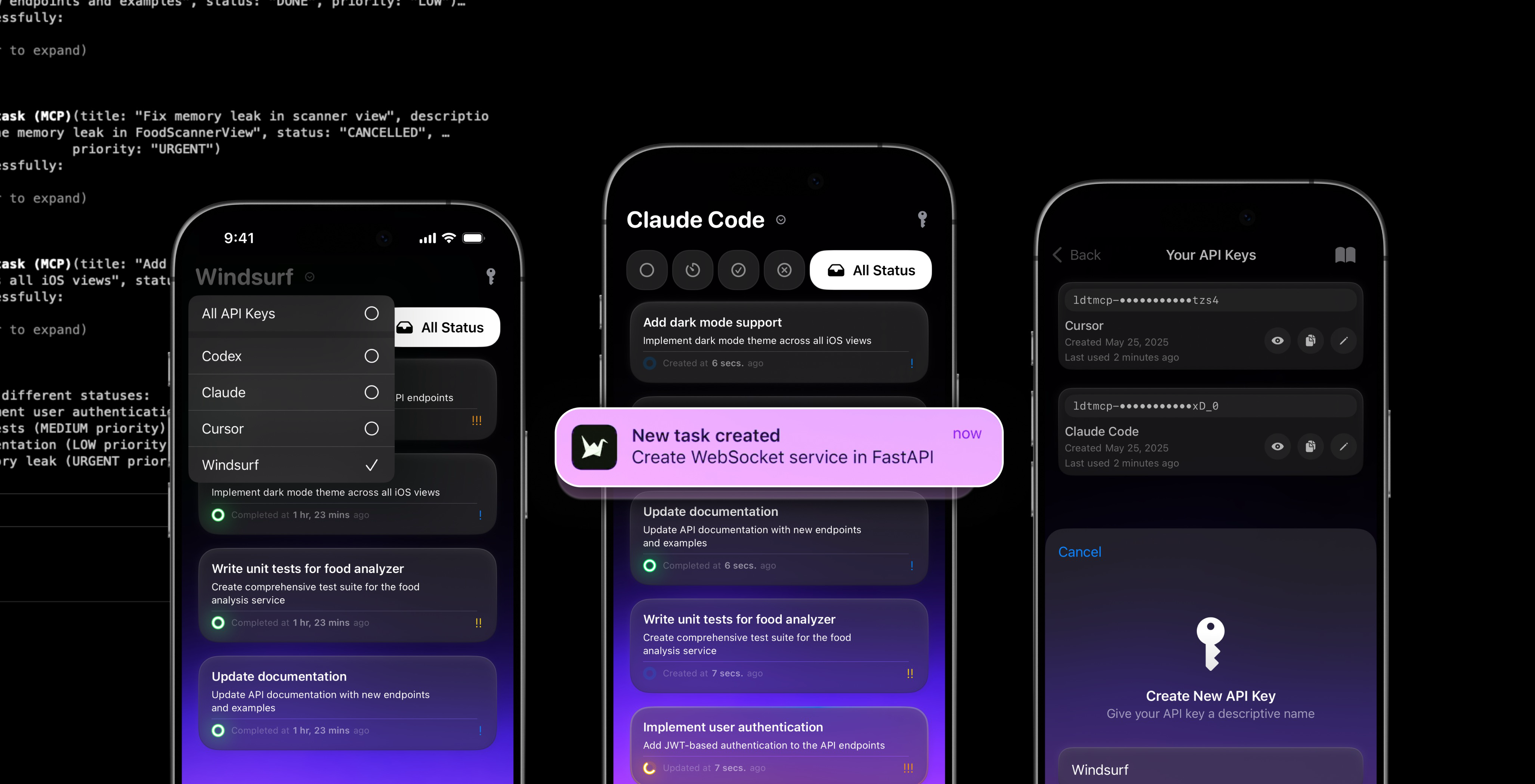
MCP Client for iOS





Verified with






Task Management MCP Server
Bridge AI assistants with real-world task management
This MCP server connects Claude Desktop, Cursor, and other AI tools to a powerful task management API, enabling intelligent workflows that create, update, and track tasks automatically on your iPhone.
What You Can Do
- Ask Claude to create tasks during coding sessions
- Let Cursor update task status as it completes work
- Get notifications on your iPhone when AI assistants finish tasks
- Track progress across multiple AI tools and automation scripts
- Manage priorities with AI-suggested urgency levels
Perfect for developers who want their AI assistants to collaborate on real projects with automatic task tracking and mobile notifications.
Quick Start
1. Get Your API Key
Download the iOS app here
2. Choose Your Setup
For Claude Desktop (Recommended)
Add this to ~/Library/Application Support/Claude/claude_desktop_config.json:
{
  "mcpServers": {
    "task-manager": {
      "command": "npx",
      "args": [
        "mcp-remote",
        "https://task-mcp-server.aayushpokharel9029.workers.dev/sse?apiKey=YOUR_API_KEY"
      ]
    }
  }
}
For Cursor or Other MCP Clients
{
  "mcpServers": {
    "task-manager": {
      "url": "https://task-mcp-server.aayushpokharel9029.workers.dev/sse?apiKey=YOUR_API_KEY"
    }
  }
}
Replace YOUR_API_KEY with your actual API key.
3. Start Using It
Once configured, your AI assistant can:
- "Create a high-priority task to review the pull request"
- "Show me all pending tasks"
- "Mark the deployment task as completed"
- "Update the bug fix to urgent priority"
Available Tools
The server provides these capabilities to AI assistants:
create_task
Create new tasks with title, description, priority, and notification settings.
list_tasks
View all tasks with optional filtering by status, priority, or date.
get_task
Get detailed information about any specific task.
update_task
Modify task properties including status, priority, and description.
delete_task
Remove completed or cancelled tasks.
Technical Details
Documentation
- REST API Documentation:
- MCP Server Documentation: https://task-mcp-server.aayushpokharel9029.workers.dev
API Details
- Authentication: API key via
X-API-Keyheader - Supported Priorities: LOW, MEDIUM, HIGH, URGENT
- Supported Statuses: TODO, IN_PROGRESS, DONE, CANCELLED
Security & Privacy
- API Key Isolation: Each key maintains completely separate task data
- No Cross-Access: Tasks are never shared between different API keys
- Secure Communication: All requests require authentication headers
- Real-time Updates: Changes sync instantly to your iPhone app
Need Help?
If your AI assistant isn't connecting:
- Check that your API key is correctly formatted
- Verify the configuration file location
- Restart your MCP client after configuration changes
For issues or feature requests, visit the GitHub Issues.
GitHub: @Aayush9029 • Twitter: @aayushbuilds
1 maintainer

Metadata
1 maintainer
Release files for task-mcp 2.0.1
For a detailed explanation of source distributions (sdists) and built distributions (wheels), please see the package formats documentation.
Source distribution (sdist)
| File | Size | Uploaded | |
|---|---|---|---|
| task_mcp-2.0.1.tar.gz | 7.5 kB | Details |
Built distribution (wheel)
| File | Interpreter | ABI | Platform | Reset |
|---|---|---|---|---|
| task_mcp-2.0.1-py3-none-any.whl | Python 3 | none | any | Details |
Total release size: 22.9 kB
Release files / task_mcp-2.0.1.tar.gz
| Download URL | task_mcp-2.0.1.tar.gz |
|---|---|
| Size | 7.5 kB |
| Tags | Source |
|
SHA-256 checksum How to use checksums |
4be4a3e8be9d1030880b714874f583ebf7292109f08fb8b68bc42c6479c29fae
|
|
BLAKE2b-256 checksum How to use checksums |
2c02e469d7534794adbcb44f85999030b473766577e7230ff7fb4903c686d31b
|
| Upload date | |
|
Uploaded using Trusted Publishing? What is trusted publishing? |
No |
| Uploaded via |
twine/6.1.0 CPython/3.11.12
|
Release files / task_mcp-2.0.1-py3-none-any.whl
| Download URL | task_mcp-2.0.1-py3-none-any.whl |
|---|---|
| Size | 15.4 kB |
| Tags | Python 3 |
|
SHA-256 checksum How to use checksums |
23947eeb8a8bb6ad501bcac6189030f22e035caaecddfb6bca517b2cf11315bd
|
|
BLAKE2b-256 checksum How to use checksums |
ec32a2642f83d5d5d183b41faf28c98431bc82d0e3c5dc935466481f1dbdc754
|
| Upload date | |
|
Uploaded using Trusted Publishing? What is trusted publishing? |
No |
| Uploaded via |
twine/6.1.0 CPython/3.11.12
|














