
task-tracker
Install
Currently, task-tracker is not available on pip or conda. It will be accessible via the command below after release, whenever a stable version is created.
pip install task_tracker
How to use
Example on how to use task-tracker on a lasagne recipe.
Note
You can find the notebook and the results of the
lasagne recipeat https://github.com/KonKob/task-tracker/blob/main/test_data.
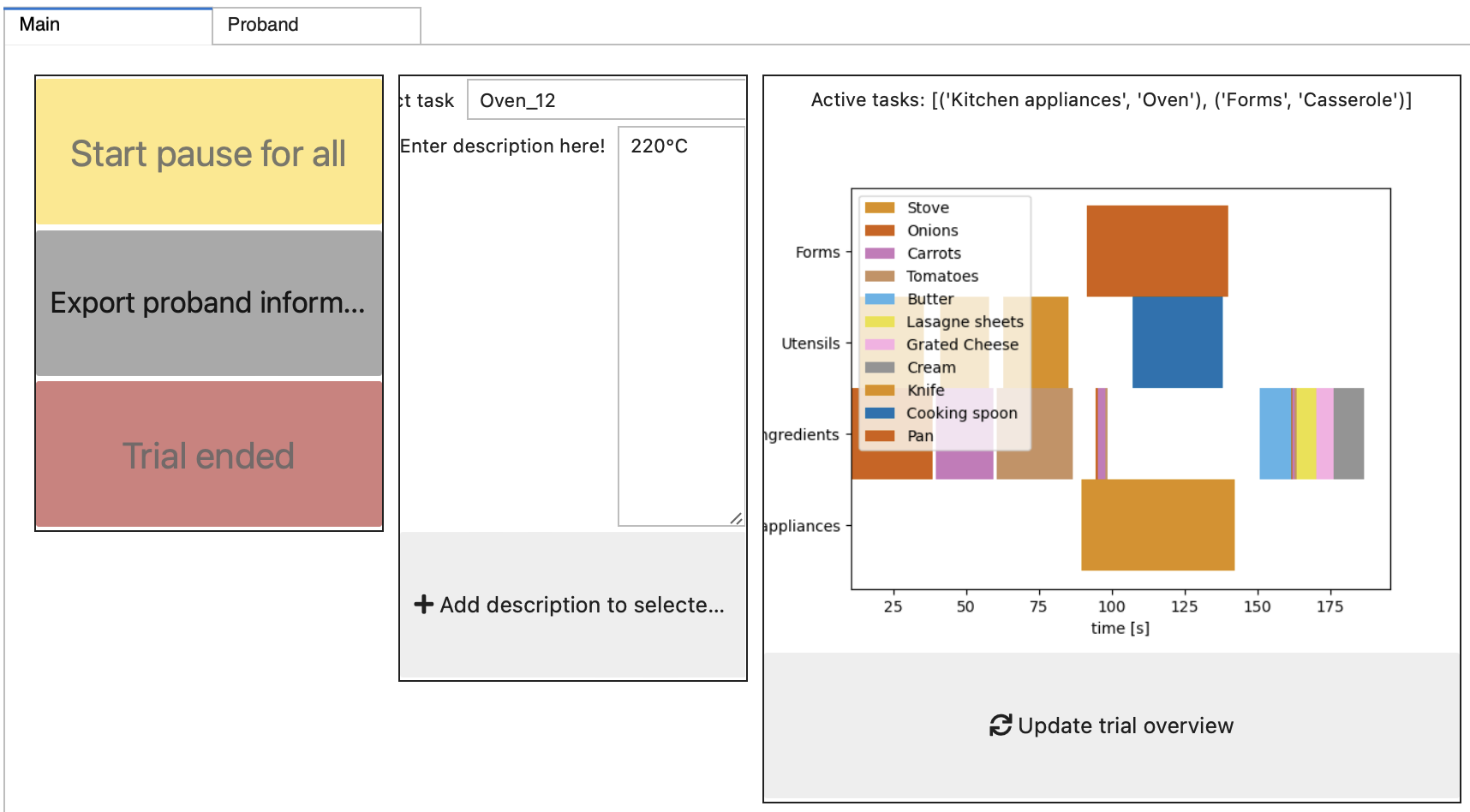
This is how the landing page looks like after completing a trial:
-
Whenever the trial is started here, an audio recording is started, that can be transcribed after completion of the trial.
-
At the right you see the timeline of tasks over the session so far. You can update it at any time.
-
In the middle of the landing page, you can add a description manually to running or finished tasks.
-
The proband metadata can be saved at any time by clicking
Export proband metadata. -
To pause all tasks, you can click
Start pause for allduring a running trial.
The proband metadata can be entered in the following mask:

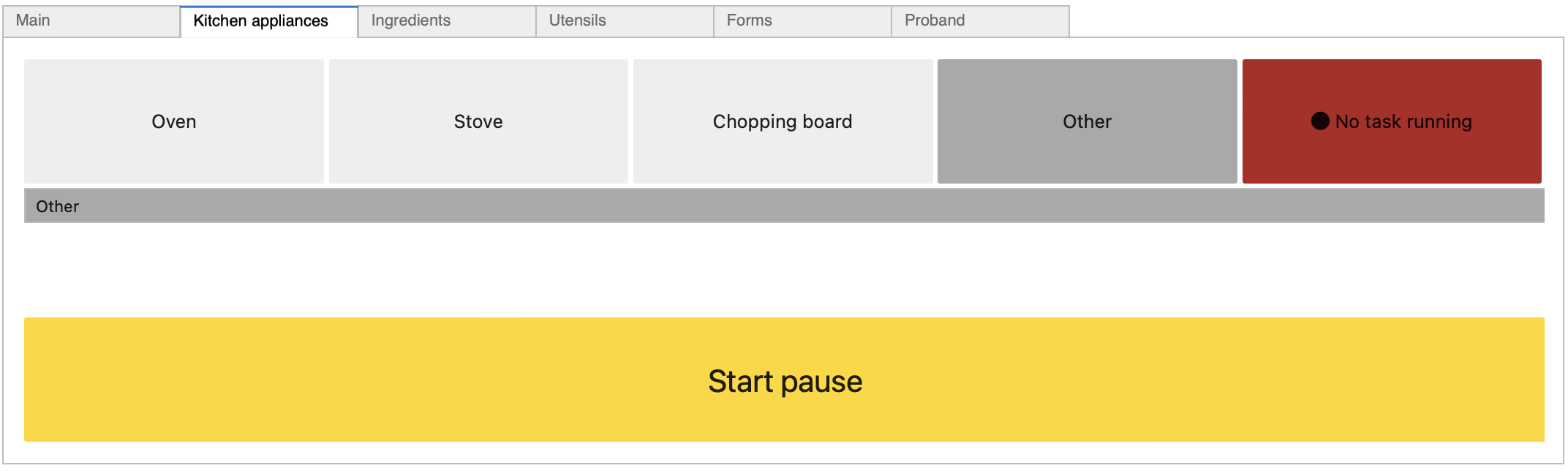
Tasks, that you want to track, are shown in different tabs.
-
Whenever you click on a task, this task is started and another task running in this tab is ended. You can end a task by clicking
No task runningas well. -
If you find, that you forgot a tasks, you can add it by entering the name in the grey line
Otherand then clicking the grey buttonOther. -
To pause a task, just hit
Start pause.
Exporting the results creates excel files.
from task_tracker.utils import load_trial
trial = load_trial("../test_data/2023-08-07_17.43.23_0000_Chef/")
trial.tasks_dataframe.head()
| lane | duration_in_s | task_number | task_name | start_time | end_time | description_0 | |
|---|---|---|---|---|---|---|---|
| 0 | Kitchen appliances | 1.3528 | 12 | Pause | 203.6099 | 204.9627 | 220°C |
| 1 | Kitchen appliances | 52.8952 | 6 | Stove | 89.5415 | 142.4367 | NaN |
| 2 | Kitchen appliances | 111.9687 | 12 | Oven | 142.4370 | 255.7585 | 220°C |
| 3 | Ingredients | 28.0470 | 0 | Onions | 10.3749 | 38.4219 | NaN |
| 4 | Ingredients | 19.8456 | 2 | Carrots | 39.5850 | 59.4306 | NaN |
For visualization, several plots are created.
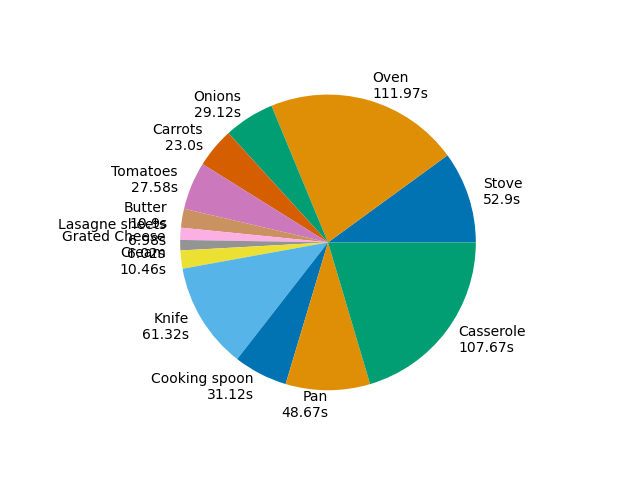
The cumulative duration spent in certain tasks can be shown as bar and tie plots.
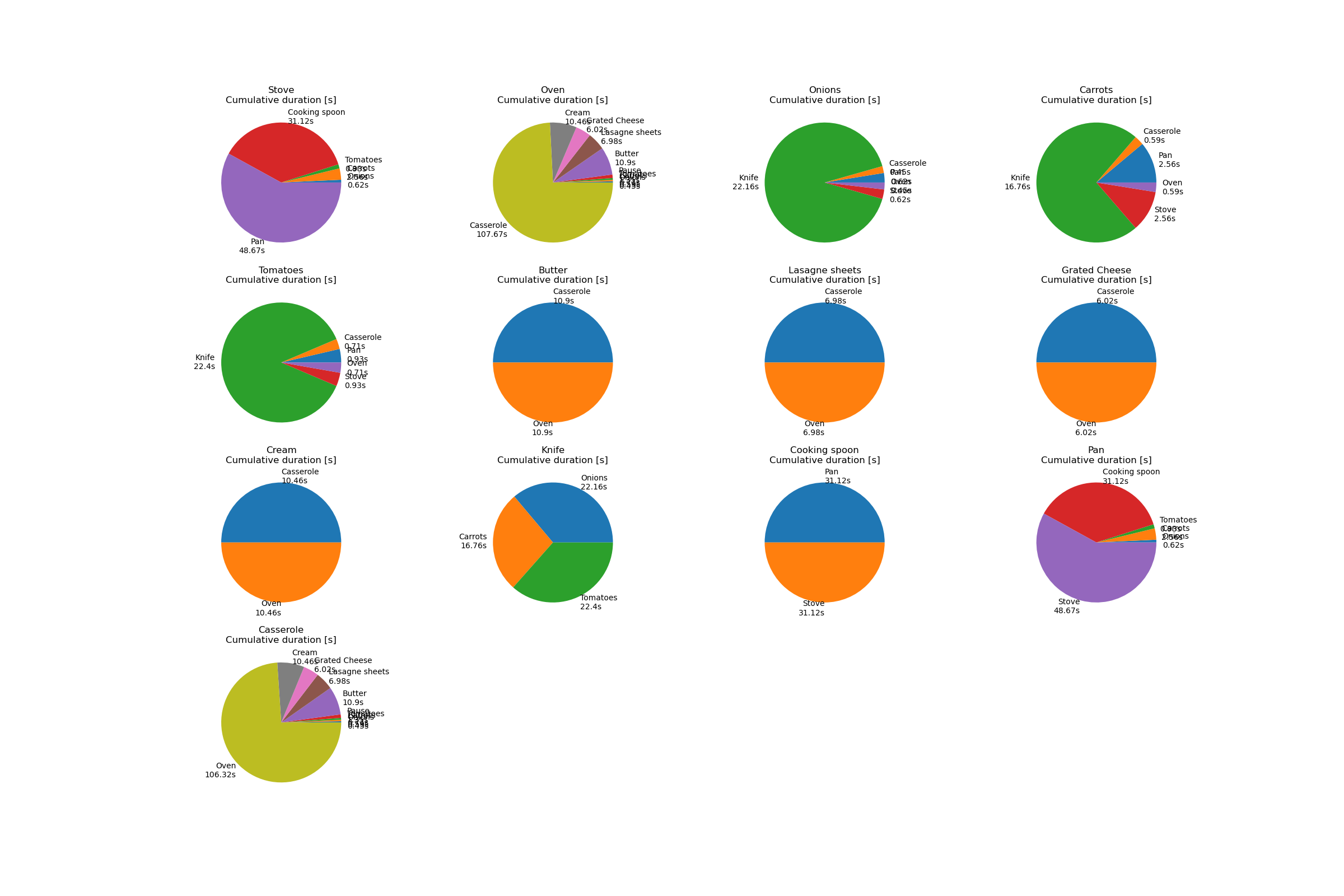
It can also be shown, how much time was spent in tasks running in parallel to other tasks.
1 maintainer

Metadata
1 maintainer
Release files for task-tracking 0.0.2
For a detailed explanation of source distributions (sdists) and built distributions (wheels), please see the package formats documentation.
Source distribution (sdist)
| File | Size | Uploaded | Provenance | Actions |
|---|---|---|---|---|
| task_tracking-0.0.2.tar.gz | 23.4 kB | Without provenance | Details for task_tracking-0.0.2.tar.gz |
Built distribution (wheel)
| File | Interpreter | ABI | Platform | Actions Reset |
|---|---|---|---|---|
| task_tracking-0.0.2-py3-none-any.whl | Python 3 | none | any | Details for task_tracking-0.0.2-py3-none-any.whl |
Total release size: 45.8 kB
Release files / task_tracking-0.0.2.tar.gz
| Download URL | task_tracking-0.0.2.tar.gz |
|---|---|
| Size | 23.4 kB |
| Tags | Source |
|
SHA-256 checksum How to use checksums |
860146397f59777c3d2720e19f259acdd4b889c131e99dad6274845bf33e1702
|
|
BLAKE2b-256 checksum How to use checksums |
498143ff1b55d55c20a5f93923f3ca6a482b82a975eb1920ff0290e24488028f
|
| Upload date | |
|
Uploaded using Trusted Publishing? What is trusted publishing? |
No |
| Uploaded via |
twine/4.0.2 CPython/3.11.4
|
Release files / task_tracking-0.0.2-py3-none-any.whl
| Download URL | task_tracking-0.0.2-py3-none-any.whl |
|---|---|
| Size | 22.4 kB |
| Tags | Python 3 |
|
SHA-256 checksum How to use checksums |
5c489825af44b02286a355a5da9956edd95f86862328b92ea7170d8d1f5ba600
|
|
BLAKE2b-256 checksum How to use checksums |
f690cfdb49cfce87a08fa1eab8174c9abd91bfb7e81e79fb31c7a483cdba8095
|
| Upload date | |
|
Uploaded using Trusted Publishing? What is trusted publishing? |
No |
| Uploaded via |
twine/4.0.2 CPython/3.11.4
|
Security for task-tracking 0.0.2
Provenance
Provenance describes where a file came from. On PyPI, provenance is shared via attestations, which provide a verifiable record of the build or publishing details. View details, limitations and caveats.
No provenance found
None of the files in this release were uploaded with provenance metadata.
A note on package security
PyPI is a repository for distributing packages, not a service for auditing them. While third-party security researchers and our staff do their best to detect and remove malicious packages, PyPI cannot guarantee the quality, security or suitability of any given package.
To learn more about protecting yourself from malicious actors, visit our package security documentation.













