
Automatic scheduler for taskwarrior

Project description
A non-AI automatic scheduler for taskwarrior (i.e. alternative to skedpal/timehero/flowsavvy/reclaim/trevor/motion)
This is a taskwarrior extension checks if tasks can be completed on time, considering estimated time and working hours.
Features
- Use arbitrarily complex time maps
- Use ical to block time from scheduling (e.g. for meetings, vacations, etc.)
- Implement scheduling algorithm for parallely working on multiple tasks
- Use Google API to access calendars
- Export tasks to iCal calendar and API calendars
Install
pipx install taskchecktaskcheck --install
How does it work
This extension parses your pending and waiting tasks sorted decreasingly by urgency and tries to schedule them in the future. It considers their estimated time to schedule all tasks starting from the most urgent one.
UDAs
Taskcheck leverages to UDAs, estimated and time_map. The estimated attribute is
the expected time to complete the task in hours. The time_map is a comma-separated list of strings
that indicates the hours per day in which you will work on a task (e.g. work, weekend, etc.).
The exact correspondence between the time_map and the hours of the day is defined in the configuration
file of taskcheck. For instance:
[time_maps]
# get an error)
[time_maps.work]
monday = [[9, 12.30], [14, 17]]
tuesday = [[9, 12.30], [14, 17]]
# ...
They say it's an "AI"
Taskcheck will also parse online iCal calendars (Google, Apple, etc.) and will match them with your time maps.
It will then modify the Taskwarrior tasks by adding the completion_date attribute with the expected
date of completion and the scheduled attribute with the date in which the task is expected to
start.
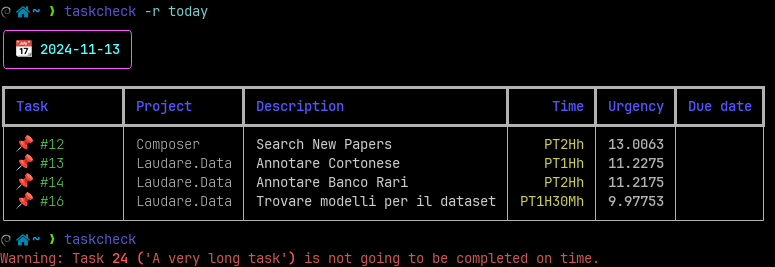
It will also print a red line for every task whose completion_date is after its due_date.
In general, it is recommended to run taskcheck rather frequently and at least once at the beginning of your working day.
Reports
You can also print simple reports that exploit the scheduling UDA filled by Taskcheck to grasp
how much time you have to work on which task in which day. For
instance:
taskcheck -r todaywill show the tasks planned for todaytaskcheck -r 1wwill show the tasks planned for the next week,
Algorithm
The algorithm allocates a fixed amount of time for each task (e.g. 1 hour) and then recomputes the urgency and restart the allocation procedure.
If after 1 hour the long task has decreased urgency, that will be noticed and the newer most urgent task will get scheduled in its place.
The minimum time for a task is by default 2 hours, but you can change it by tuning the min_block
taskwarrior UDA.
Configuration
taskcheck --install allows you to create required and recommended configurations for
taskwarrior. It will also generate a default configuration file for taskcheck.
Below is an example of taskcheck configuration file:
[time_maps]
# in which hours you will work in each day (in 24h format, if you use e.g. 25.67 you will likely
# get an error)
[time_maps.work]
monday = [[9, 12.30], [14, 17]]
tuesday = [[9, 12.30], [14, 17]]
wednesday = [[9, 12.30], [14, 17]]
thursday = [[9, 12.30], [14, 17]]
friday = [[9, 12.30], [14, 17]]

[time_maps.weekend]
saturday = [[9, 12.30], ]
sunday = [[9, 12.30], ]

[scheduler]
days_ahead = 1000 # how far go with the schedule (lower values make the computation faster)

[calendars]
# ical calendars can be used to block your time and make the scheduling more precise
[calendars.1]
url = "https://your/url/to/calendar.ics"
expiration = 0.08 # in hours (0.08 hours =~ 5 minutes)
timezone = "Europe/Rome" # if set, force timezone for this calendar; timezone values are TZ identifiers (https://en.wikipedia.org/wiki/List_of_tz_database_time_zones)

[calendars.holidays]
url = "https://www.officeholidays.com/ics-clean/italy/milan"
event_all_day_is_blocking = true
expiration = 720 # in hours (720 hours = 30 days)

[report]
additional_attributes = ["estimated", "due", "urgency"] # additional attributes to show in the report
# when these words are matched in the task description, the corresponding emoji is used
emoji_keywords = {"meet"=":busts_in_silhouette:", "review"=":mag_right:"}
include_unplanned = true # include unplanned tasks in the report in an ad-hoc section
additional_attributes_unplanned = ["due", "urgency"] # additional attributes to show in the report for unplanned tasks
Tips and Tricks
- You can exclude a task from being scheduled by removing the
time_maporestimatedattributes. - You can see tasks that you can execute now with the
task readyreport.
CLI Options
-v, --verbose: increase output verbosity
-i, --install: install taskcheck configuration
-r, --report: show tasks planned until a certain time
TODO
- Consider due dates are nearer while planning in the future
Release history Release notifications | RSS feed


Download files
Download the file for your platform. If you're not sure which to choose, learn more about installing packages.
Source Distribution
Built Distribution
Filter files by name, interpreter, ABI, and platform.
If you're not sure about the file name format, learn more about wheel file names.
Copy a direct link to the current filters
File details
Details for the file taskcheck-0.3.3.post1.tar.gz.
File metadata
- Download URL: taskcheck-0.3.3.post1.tar.gz
- Upload date:
- Size: 29.6 kB
- Tags: Source
- Uploaded using Trusted Publishing? No
- Uploaded via: uv/0.5.2
File hashes
| Algorithm | Hash digest | |
|---|---|---|
| SHA256 |
c058853adea9a47e8e36d4ef6e7abcba59f3a088bda442b9eb57bc7787d00833
|
|
| MD5 |
cb5641c3b5f72a86aa1afa5b47d1a541
|
|
| BLAKE2b-256 |
d706523686905725e84c2dd8f38fa5cf6688b3f727da9286c06a9b76fee81a3d
|
File details
Details for the file taskcheck-0.3.3.post1-py3-none-any.whl.
File metadata
- Download URL: taskcheck-0.3.3.post1-py3-none-any.whl
- Upload date:
- Size: 29.8 kB
- Tags: Python 3
- Uploaded using Trusted Publishing? No
- Uploaded via: uv/0.5.2
File hashes
| Algorithm | Hash digest | |
|---|---|---|
| SHA256 |
86f78268bd6ed3bd5bb301a74a52c36dbd5082abc4a7eb14ff4c198bb5a874f9
|
|
| MD5 |
b0b467f11efda187d5a25ca76806b77b
|
|
| BLAKE2b-256 |
c595325a877c1b6b10c78852a8161ef6b6d1b1577ff99d0a0bcb7c050ff68a50
|






