
Taskiq + Aiogram



This repo adds integration between your aiogram application and taskiq.
It runs all startup and shutdown events of your application and adds 3 dependencies, that you can use in your tasks.
Dispatcher- that were used along with executor;Bot- your main bot instance;List[Bot]- all your bots.
Usage
Define startup and shutdown events for your dispatcher. We use events, because we need to identify what your bot wants to do on startup and shutdown.
Also, it's useful for bot developers to distinct buisness logic from startup of the bot.
Below you'll find an example, how to integrate taskiq with your favorite bot framework.
import asyncio
import logging
import sys

from aiogram import Bot, Dispatcher

# Your taskiq broker
from your_project.tkq import broker

dp = Dispatcher()
bot = Bot(token="TOKEN")
bot2 = Bot(token="TOKEN")


@dp.startup()
async def setup_taskiq(bot: Bot, *_args, **_kwargs):
    # Here we check if it's a clien-side,
    # Becuase otherwise you're going to
    # create infinite loop of startup events.
    if not broker.is_worker_process:
        logging.info("Setting up taskiq")
        await broker.startup()


@dp.shutdown()
async def shutdown_taskiq(bot: Bot, *_args, **_kwargs):
    if not broker.is_worker_process:
        logging.info("Shutting down taskiq")
        await broker.shutdown()


async def main():
    await dp.start_polling(bot, bot2)


if __name__ == "__main__":
    logging.basicConfig(level=logging.INFO, stream=sys.stdout)
    asyncio.run(main())
The only thing that left is to add few lines to your broker definition.
# Please use real broker for taskiq.
from taskiq_broker import MyBroker
import taskiq_aiogram

broker = MyBroker()

# This line is going to initialize everything.
taskiq_aiogram.init(
    broker,
    "your_project.__main__:dp",
    "your_project.__main__:bot",
    "your_project.__main__:bot2",
)
That's it.
Let's create some tasks! I created task in a separate module,
named tasks.py.
from aiogram import Bot
from your_project.tkq import broker

@broker.task(task_name="my_task")
async def my_task(chat_id: int, bot: Bot = TaskiqDepends()) -> None:
    print("I'm a task")
    await asyncio.sleep(4)
    await bot.send_message(chat_id, "task completed")
Now let's call our new task somewhere in bot commands.
from aiogram import types
from aiogram.filters import Command

from tasks import my_task


@dp.message(Command("task"))
async def message(message: types.Message):
    await my_task.kiq(message.chat.id)
To start the worker, please type:
taskiq worker your_project.tkq:broker --fs-discover
We use --fs-discover to find all tasks.py modules recursively
and import all tasks into broker.
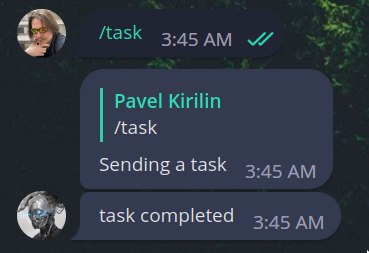
Now we can fire the task and see everything in action.
Metadata
Release files for taskiq-aiogram 0.3.1
For a detailed explanation of source distributions (sdists) and built distributions (wheels), please see the package formats documentation.
Source distribution (sdist)
| File | Size | Uploaded | |
|---|---|---|---|
| taskiq_aiogram-0.3.1.tar.gz | 4.6 kB | Details |
Built distribution (wheel)
| File | Interpreter | ABI | Platform | Reset |
|---|---|---|---|---|
| taskiq_aiogram-0.3.1-py3-none-any.whl | Python 3 | none | any | Details |
Total release size: 9.8 kB
Release files / taskiq_aiogram-0.3.1.tar.gz
| Download URL | taskiq_aiogram-0.3.1.tar.gz |
|---|---|
| Size | 4.6 kB |
| Tags | Source |
|
SHA-256 checksum How to use checksums |
0175ac768d7f315318b637eece2ddb24f35a1768990616021c344ca3383186dc
|
|
BLAKE2b-256 checksum How to use checksums |
c3d9741ba505b98c1a5fd77996e3d8c1c8d57411352be305dbd8fd5e1b817234
|
| Upload date | |
|
Uploaded using Trusted Publishing? What is trusted publishing? |
No |
| Uploaded via |
poetry/1.6.1 CPython/3.10.12 Linux/5.15.0-1041-azure
|
Release files / taskiq_aiogram-0.3.1-py3-none-any.whl
| Download URL | taskiq_aiogram-0.3.1-py3-none-any.whl |
|---|---|
| Size | 5.2 kB |
| Tags | Python 3 |
|
SHA-256 checksum How to use checksums |
6332f5cd6db219c8f9e7cee8db5ba2dc96757e12aaddb443394128a9c3264ba6
|
|
BLAKE2b-256 checksum How to use checksums |
2223bfb229bb6373af141b0d3ddbbd0ebc3a524663a87a9099aa4a492003bead
|
| Upload date | |
|
Uploaded using Trusted Publishing? What is trusted publishing? |
No |
| Uploaded via |
poetry/1.6.1 CPython/3.10.12 Linux/5.15.0-1041-azure
|














