
Tasks TUI
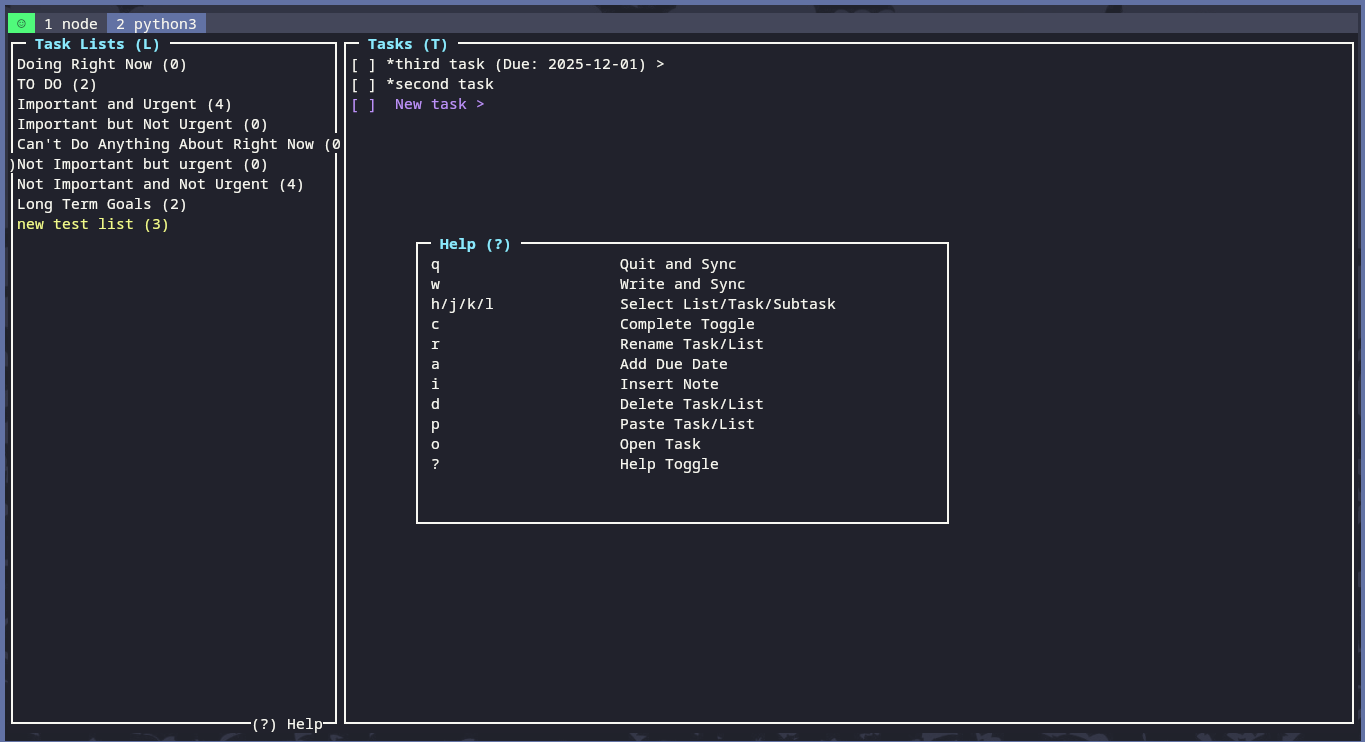
A simple, fast, and intuitive Terminal User Interface (TUI) for Google Tasks.
Features
- View your Google Tasks directly in the terminal
- Add new tasks and lists.
- Mark tasks as complete.
- Rename tasks and lists.
- Switch between your task lists.
- Add due dates, notes, or subtasks
- Vim-style keybindings for navigation.
Screenshots
Installation
-
Install via pip:
pip install tasks-tui-app
-
Clone the repository (optional, for development):
git clone https://github.com/your-username/Gtask.git
cd Gtask
-
Install the dependencies (if cloning for development):
pip install -r requirements.txt
-
Enable the Google Tasks API Guide
- Go to the Google API Console.
- Create a new project.
- Enable the Google Tasks API for your project.
- Create an OAuth 2.0 Client ID for a Desktop application.
- Download the JSON file and rename it to
client_secrets.json. - Place the
client_secrets.jsonfile in the ~/.gtask.
Usage
To run the application, use the following command:
tasks-tui
Keyboard Shortcuts
| Key | Action |
|---|---|
q |
Quit application |
w |
Write and Sync |
↑ / k |
Move selection up |
↓ / j |
Move selection down |
← / h |
Exit selection |
→ / l |
Enter selection |
o |
Open new selection |
d |
Delete selection |
r |
Rename selection |
c |
Toggle task completion |
a |
Add due date |
i |
Insert/view task note |
p |
Paste from buffer |
? |
Toggle Help |
Task Status Symbols
| Symbol | Meaning |
|---|---|
[ ] |
Task needs action |
[X] |
Task completed |
('Task Counts') |
Count of tasks/subtasks within (subtasks of subtasks do not display in web Google Tasks) |
When you run the application for the first time, it will open a web browser and ask you to authorize the application to access your Google Tasks. After you authorize the application, it will create a token.json file in the ~/.gtask directory. This file contains your access and refresh tokens, so you won't have to authorize the application every time you run it. (Occasionally your token might become expire, so just delete token.json from ~/.gtask and rerun the application to reauthenticate!)
Contributing
Contributions are welcome! If you have any ideas, suggestions, or bug reports, please open an issue or submit a pull request.
License
This project is licensed under the MIT License. See the LICENSE file for details.
1 maintainer

Metadata
1 maintainer
Release files for tasks-tui-app 0.1.7
For a detailed explanation of source distributions (sdists) and built distributions (wheels), please see the package formats documentation.
Source distribution (sdist)
| File | Size | Uploaded | |
|---|---|---|---|
| tasks_tui_app-0.1.7.tar.gz | 14.5 kB | Details |
Built distribution (wheel)
| File | Interpreter | ABI | Platform | Reset |
|---|---|---|---|---|
| tasks_tui_app-0.1.7-py3-none-any.whl | Python 3 | none | any | Details |
Total release size: 29.1 kB
Release files / tasks_tui_app-0.1.7.tar.gz
| Download URL | tasks_tui_app-0.1.7.tar.gz |
|---|---|
| Size | 14.5 kB |
| Tags | Source |
|
SHA-256 checksum How to use checksums |
32da966766a34120a67c8016038904a50d98702f6d54fd7ee7fa3fd37b9f4ee3
|
|
BLAKE2b-256 checksum How to use checksums |
32772fbd1428b1f59e10be6874c706d4254e18f53634a6b4c940eaf87ff792c6
|
| Upload date | |
|
Uploaded using Trusted Publishing? What is trusted publishing? |
No |
| Uploaded via |
twine/6.2.0 CPython/3.13.7
|
Release files / tasks_tui_app-0.1.7-py3-none-any.whl
| Download URL | tasks_tui_app-0.1.7-py3-none-any.whl |
|---|---|
| Size | 14.6 kB |
| Tags | Python 3 |
|
SHA-256 checksum How to use checksums |
72bf0360a27d63c6fd761a88ed492cd94055112dabb8955773bbdf48373f0329
|
|
BLAKE2b-256 checksum How to use checksums |
7bf3d78c1d3a25e228a57c155e9eb57c21ac0366a0366ebb25a42188ea627b60
|
| Upload date | |
|
Uploaded using Trusted Publishing? What is trusted publishing? |
No |
| Uploaded via |
twine/6.2.0 CPython/3.13.7
|














