
Taskuary


Automate your job.
Your inbox and your coding agents in one place. Email, Teams, Slack, GitHub issues and scheduled reports land on one timeline; AI triage says what is real work; the coding CLI you already use does it; you approve the result. Runs entirely on your machine.
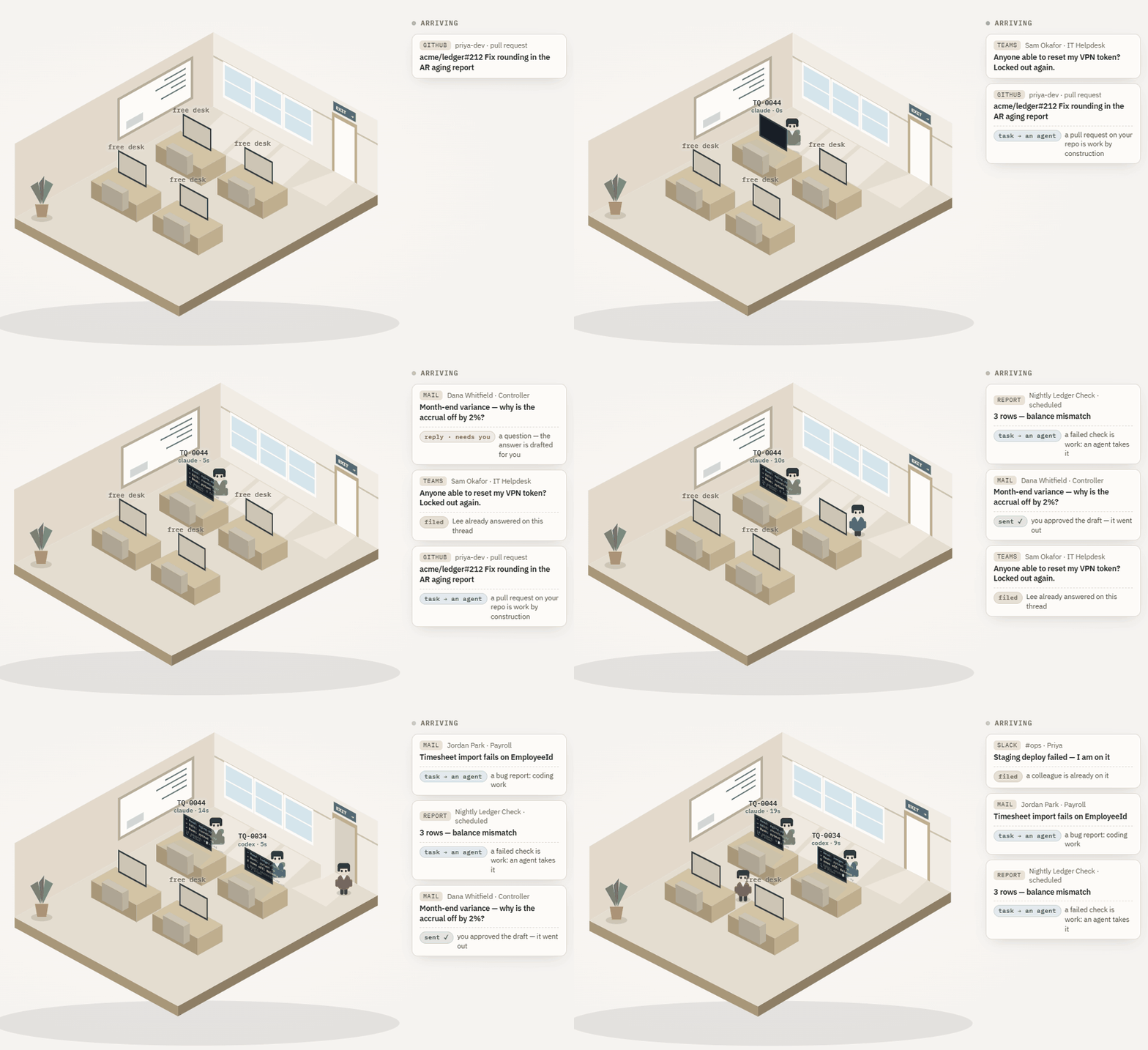
Where it is: early — v0.3.1, and moving fast. The funnel, the review queue, the agent sessions and the reports pipeline are all real and in daily use on my own inbox; the edges are still being knocked off, and breaking changes are possible before 1.0. Issues get answered. Full status and roadmap ↓
⭐ Useful to you? Star the repo. Stars are how other people find Taskuary — and the clearest signal of what to keep building.
Why
Work arrives as messages, but work is tasks — and you are the translation layer. You read the mail, decide what it means, open the ticket, do the thing, and write back. The first and last steps are where the day goes.
Taskuary automates the ends and leaves you the middle. Triage reads everything and files the noise. Real work becomes a task and goes to your agent, which works in your repos and reports back with the diff. Replies come back as drafts. Nothing sends, closes, or ships without you — and nothing leaves your machine except the calls you configured.
It learns your job
Every verdict you give teaches it. Edit a draft before sending — it learns your voice.
Reject one — it learns what should never have been drafted. Say "Not our task" — it
learns where your job ends. That verdict is kept as evidence: a dated line naming the
subject and sender it was given on (LEARNED.md → Verdicts, and Settings → Agent memory).
The next similar message is triaged with those lines in view, and the model judges how alike
it really is — the same sender asking the same thing is binding, a shared word is not. Only a
ruling on the same conversation decides without a model.
The general lessons take a stricter road, so one odd Tuesday never becomes a rule:
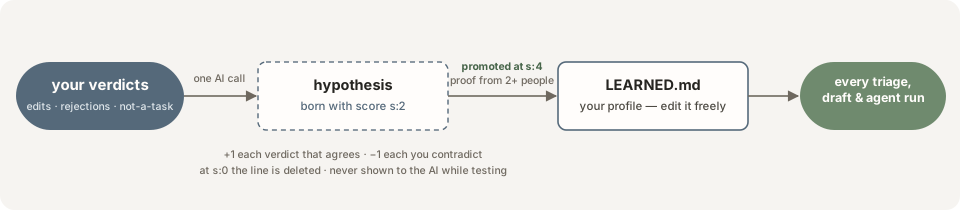
How the memory works, concretely. Each lesson is one line in LEARNED.md (Docs tab) —
a guess with a score. Say you strip the greeting off three drafts this week; the file soon
carries:
- John drops greetings and signs off in one word. [s:4 | ev: rv12,rv15,rv31 | seen: 2026-08-19]
Read the tag left to right: s:4 is the score — how often the guess has held. It starts
at 2, gains a point every verdict that agrees, loses one every verdict that contradicts; at
4 the line is promoted and starts steering triage and drafts, at 0 it's deleted.
ev: is the receipts — the exact verdicts that taught it (rv12 = your decision on
review #12), so you can see why it believes something. seen: is the last day it held.
Delete the line and the lesson is gone; lines you write yourself carry no tag and are never
touched. Two more guardrails: a rule that would hide mail (never a task, auto-file) waits
for your explicit OK instead of promoting itself, and SOUL.md — the rules you write —
always outranks the learned file. One switch in Settings turns the whole loop off.
And it can learn the job you had before it. Verdicts take weeks to accumulate; your mailbox already holds months of them. Docs → TRIAGE.md or STYLE.md → Generate from history reads your last three months of mail (sent + inbox, straight from the mailbox), pairs every inbound thread with whether you answered it, and writes the distilled guidance into a marked block of the doc — regenerate any time, your own lines outside the markers always survive. What each one feeds from then on:
TRIAGE.md+ its history block → every triage verdict: what kinds of asks you actually answer, which senders and domains matter (backed by a per-domain answer-rate roll-up), what's reliably ignorable;STYLE.md+ its history block → every reply draft: your greeting and sign-off, tone and length, characteristic phrasing, how you push back — distilled from the replies you yourself sent.
Get started
pip install taskuary
taskuary        # opens http://127.0.0.1:7787
Python 3.10+ is all you need.
Which OS? CI runs the full test matrix on Windows, Linux and macOS, and the app runs on all three — but it is developed on Windows, so that is where the terminal, the desktop shell and the agent presets get the most real use. On macOS and Linux expect the core to work and the occasional rough edge; open an issue and it gets fixed. The single-file prebuilt
.exeis Windows-only.
Then, in Connectors — a minute or two each:
- AI — paste an Anthropic / OpenAI / Azure OpenAI / OpenRouter key — or no key at all: the Ollama card runs triage on a local open-source model. Triage is now on. (A small, cheap model is the right pick here; the expensive one goes in step 3.)
- A channel — Outlook (Sign in with Microsoft: your own account, a code, no Azure portal — or a tenant app if you are the admin), Gmail/IMAP, Teams, Slack, Telegram, WhatsApp or Discord. Mail starts landing on the Timeline — and Jira/Asana/Monday/ClickUp/Todoist/Linear/Trello/ GitLab/Azure DevOps items assigned to you, Sentry errors and PagerDuty incidents ride the same funnel.
- Your coding CLI — pick a preset (Claude Code, Codex, Gemini, Cursor, Copilot), Save, Test. Add a GitHub PAT and repos are discovered for you.
- Reports (optional) — or just say what you want: “read C:/exports/census-.csv every morning, total the beds by facility and flag anything under 70”* fills the builder in for you. It can only use connections you have actually set up, it reads a system's real schema before writing a query against it, and it asks rather than guesses — then you preview it against the live system before anything is scheduled. Or point it by hand at SQL Server, any database by connection string, AWS, Azure, Sage Intacct, Prometheus, Datadog, MCP, REST or RSS. One ships ready-made: the Morning digest, a daily brief of your own funnel — edit its prompt to taste, or delete it.
No cloud key at all? Set Settings → Triage & routing → Triage brain to your CLI agent and skip step 1 — one brain does everything, slower and pricier per message. See One brain or two.
Prefer a desktop app? pip install "taskuary[desktop]"
then taskuary-desktop — the same UI in a native window. A prebuilt single-file
Taskuary.exe is attached to every CI run.
Prefer Docker? No Python install on the machine:
git clone https://github.com/ldbumble/taskuary && cd taskuary
docker compose up
# http://127.0.0.1:7787 — data lives in the taskuary-data volume
The container is the web app (Timeline, Review, Reports, Connectors). Coding CLIs
(Claude Code, Codex, …) and the WhatsApp bridge stay on the host — they are programs on
your machine. Publish the port past localhost only with TASKUARY_TOKEN set.
The workspace
The Timeline is where you live. Everything inbound on one day-grouped rail — mail, chats, issues, the reports you scheduled — each row wearing one chip that says what it is and whether it needs you. Click a row and the whole story opens beside it: the message, why triage ruled the way it did, the drafted reply waiting for your approval, and every way out.

Demo data. The seven "needs you" chips are the whole point: nothing else on the page is waiting on you.
One tab per question, two lines each; the details live in the app's own help text.
- Timeline — everything inbound on one day-grouped rail, chips saying what each row IS
and whether it needs you. The chip is triage's verdict in one word —
coding(sent to the agent),to do(yours, not code),review(a reply drafted for you),info(a person told you something — green, worth the eye),automated(a system did),promo(a newsletter; skim past),filed,ignored. A colleague's FYI and a vendor's marketing mail are both "nothing to do", and they deliberately do not wear the same tag; your own domain counts as team, add more under Settings →team_domains. Click a row: the whole message (stored whole, not a preview), its attachments drawn inline — half of "see below" mail is the screenshot — and every way out: approve the drafted reply, send it to a coding agent, hand it to a person, split or merge, "not our task" (which teaches triage for next time). - Board — the agent kanban: Queued / Working / Waiting on you / Done, by what is TRUE right now — a live session counts as working, and a session gone quiet moves its card to waiting on you with the question showing. Cards working now show a live peephole and the files their agent has modified so far; a queued card says whom it waits behind (see Many agents, one repo). Flip it to Studio for the same board as a floor you can walk around — below.
- Tasks — the page is a terminal: your CLI in the task's repo, prompt typed in and
sent, and you keep talking. Taskuary picks the checkout from the SOUL.md repo map (one
click to override); the prompt carries the ask, the mail, the files and the rules, so the
agent never re-fetches what it was handed. Done — wrap it up reads the transcript,
writes the report and drafts the reply — the agent is asked nothing, and both still work
after the terminal itself is long gone. Pause keeps a handover note the next session is
seeded with. The kind is a control: "this is not a coding task" is one dropdown, and
saying
replyroutes it into Review instead of a repo. - Your calendar — a reply about time ("are you free Tuesday at 1?") is drafted with your
busy slots in view: the Outlook card's calendar (signed in, or
Calendars.Readon a tenant app) and a Google calendar if its OAuth fields are on the Gmail card. A busy time is never offered; a clash is said plainly with the nearest free one; an unreadable calendar makes the draft say it will confirm instead of promising. Agents can read the same thing (calendartool). - Review — the decision queue. Approve & send sends whatever is in the box on the channel it arrived on, in-thread; a refused send says so right there and keeps the text. A reply drafted before an agent looked at the problem waits as held and comes back rewritten from what the agent actually found.
- Reports — sources at the top (SQL, REST, MCP…), one AI prompt at the bottom, a schedule. The rows come back as an .xlsx and a bar chart the summarizing model itself chose the columns for; capped slices are named as capped so the AI never calls a truncated slice "all of them". Preview runs the whole pipeline first. The Morning digest ships as one of these — your own funnel as the data source, the daily brief on the Timeline — so every install starts with a working example.
- Connectors — a catalog with a wizard per card. Every connection has roles you choose: trigger (inbound work), feed (shown, never triaged), report, tool (agents may use it), notify (Taskuary pushes pings TO it). Nothing is polled without a role.
- Docs — the six plain-markdown documents that steer everything (see
The six documents); they maintain themselves as connectors and
repos appear, and two can generate themselves from your mail history. Your name lives
in ONE field here and fills every
{{owner}}mention. - Settings — triage knobs with plain-English help, deterministic routing policies that no model confidence can override, the learned memory, notification level, and one-click audit-chain verification.
Two principles hold everywhere: nothing sends or ships without your approval, and agents work where you can watch — a real terminal, never a hidden run. Out of the box it works the mail (auto-dispatch + auto-draft, both switchable); triage is AI-gated, so with no AI connected messages file visibly instead of heuristics spraying tasks.
The floor — capacity you can see
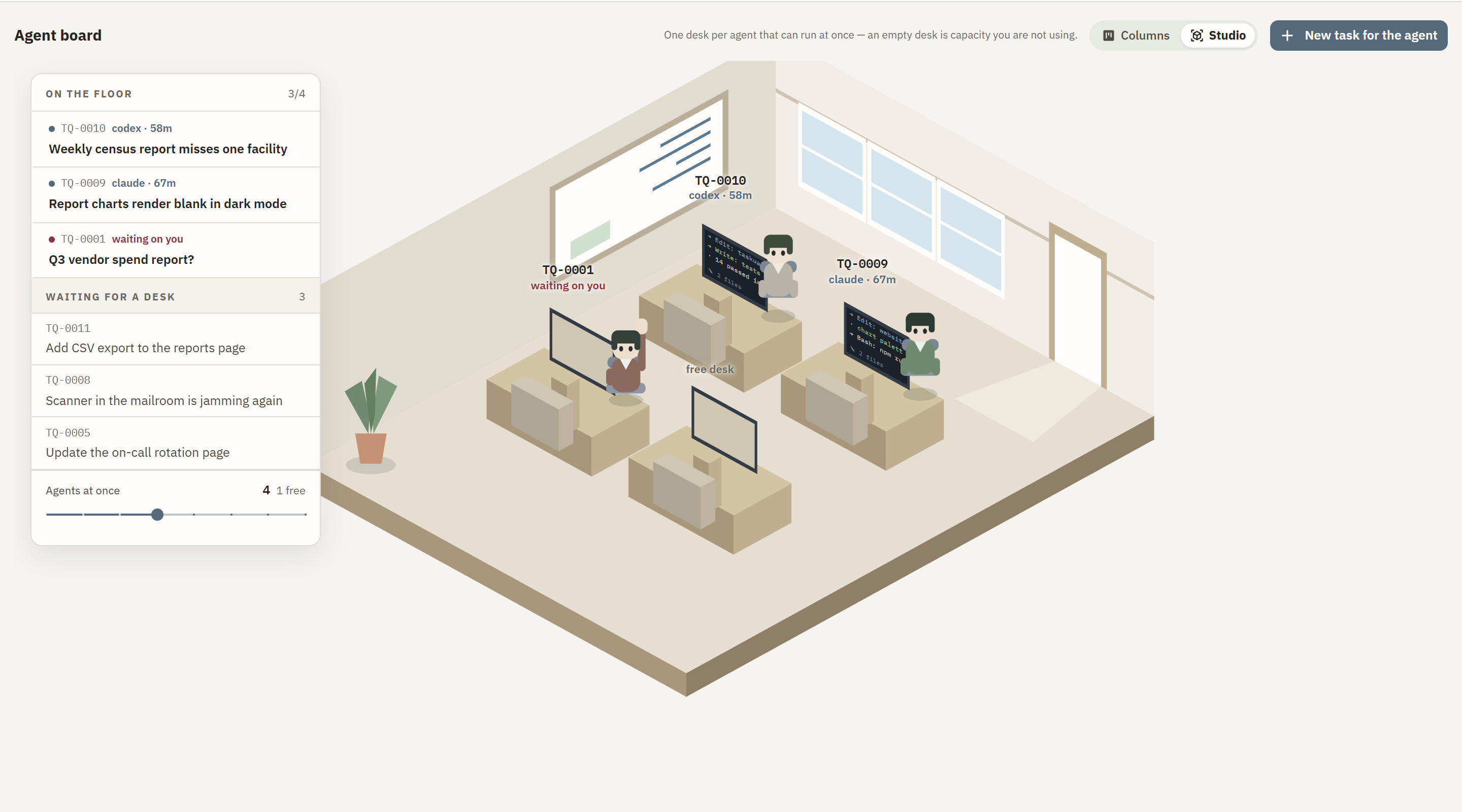
"How much can run at once" is a number in Settings — Agents at once, four by default — and on the Board's Studio toggle it stops being a number. One desk per slot: a desk with somebody at it is a task being worked, an empty desk is capacity you are not using, and the posture says which kind of work it is rather than making you read a chip. Drag to turn the room, scroll to zoom, click a desk to fly to it; raise the limit in Settings and the floor widens rather than crowding.
Processing — one by one, or ranked together
Every inbound connector card has a Processing step (Connectors → the card → Inbound) with two modes, and it decides how the tasks that connection creates reach the agents:
-
One by one (default) — every task goes to an agent as it arrives, in arrival order. When all agent slots are busy the next ones queue, first in first out, until the inbox is clear. A worker's mode: the inbox is the job.
-
Ranked together — tasks from that connection join one queue ordered by value, and only the top K are worked at once. An executive's mode: cc'd on most of it, a few things matter, and what matters is relative.
-
The funnel. The top K are worked (K = Agents at once, the same number the floor shows). When one finishes, the most valuable waiting task slides in. A new arrival re-ranks the queue rather than joining its tail. Nothing is dropped — a low value waits, it does not vanish.
-
Value is words first, a number second. A deterministic floor comes from what the funnel already knows — addressed to you or merely cc'd, how many people are on it, whether a colleague has already replied, urgency, who the author is on a code host — and the card shows those words, never a decimal. When two or more tasks wait, one listwise call to the triage brain orders the head of the queue and adds its own six-word reason; that is blended half-and-half with the floor. No AI configured → the floor alone. A task that has waited gains a little per day so the bottom never starves.
-
On the Timeline a funnel bar under the dock reads In the funnel 3/4 · Next up 7 ▸. Nothing ranked lower is laid out on the page — click to unfold the queue, each row with its rank and its reason, and two buttons: Start now (pins it to the top) and Later. The Board's Queued column is in the same order.
-
What is not yet here: duplicate-PR grouping, decay of stale items into fyi, and a more frequent digest for rank-mode users so the fold line never means "missed". Being cc'd is a weak signal for act-value but often high know-value — that split is where this goes next.
Many agents, one repo — no stepping on each other
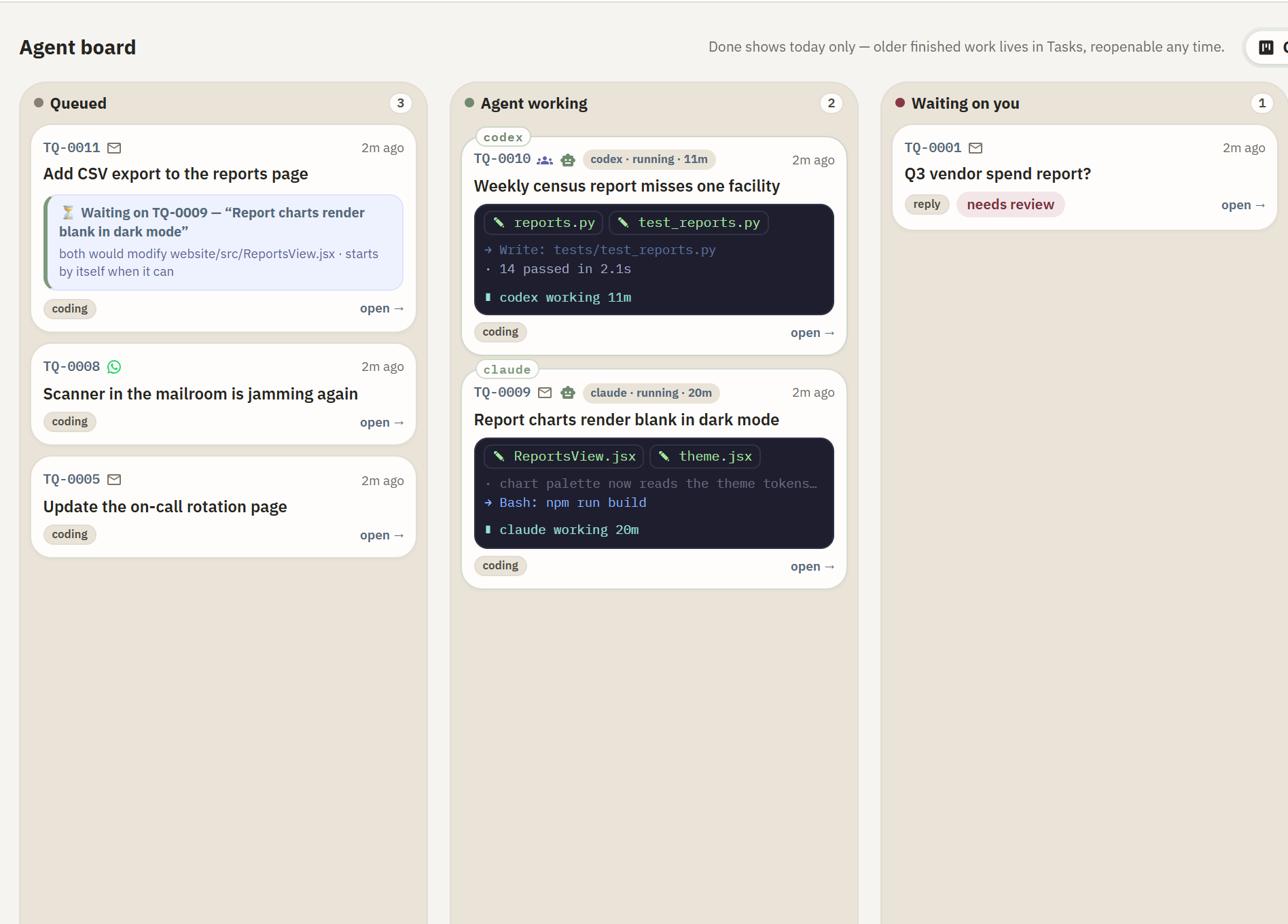
Auto-dispatch can put several CLIs to work at once — and the board keeps them out of each other's way with three light moves. No locks, no worktrees, no manager agent:
- Affinity routing — before a task auto-starts, Taskuary asks the triage brain one cheap question: would it likely modify the same files as something already running in that checkout? Likely yes → the task queues behind the running one — the ⏳ chip on the card says behind whom and why (hover it) — and starts by itself the moment that agent finishes. A full house (every session slot busy) queues the same way. Wrong guesses are cheap by design: a wrong yes waits some minutes, a wrong no is caught by the next move.
- Tell the agent — a funnel of prompts that drips in — you get ideas while the agent works, and interrupting it is how a mid-edit agent loses the thread. Type them into the ✎ Tell the agent box instead — under the terminal on the task page, on any Board card, in the Timeline's funnel bar. Nothing is typed mid-turn: each note lands the moment the agent parks at its prompt, and never on top of a question it is waiting on you to answer; that comes first. Paste a list and twenty prompts become twenty notes, in order, and they drip: one per stop, each with the agent's full attention, the agent told how many wait behind it so it never goes looking. A session that already ended reopens with the next note as the ask. Withdraw any note until it has gone in. (Settings → Coder agent turns the drip into one batch if you prefer.)
- The blackboard — the board itself is what agents know about each other. Every working card shows the files its agent has actually modified so far — read off git (dirty files minus what was already dirty when the session opened) and the run trace, never off a plan, because agents predicting their own scope get it wrong and their tracks do not. An agent starting in the same checkout gets exactly that picture in its opening prompt: who else is here, on which task, in which files.
- First in has control — and the newcomer is told so, plainly: those files are the other
agent's; never edit, revert, stash or commit them; no
git add -A/commit -a; stage only what you yourself changed. Agents in other repos are deliberately never mentioned — awareness costs prompt tokens, so they are spent only where a collision is physically possible.
One brain or two
Two different jobs, two very different price tags: triage reads one message and answers in a line (thousands of times a month), coding rewrites your repositories (a few times a day). Taskuary lets you split them or tier them:
| setup | triage / drafts / summaries | coding sessions | when |
|---|---|---|---|
| Two brains (recommended) | a small cloud model — Anthropic / OpenAI / Azure OpenAI / OpenRouter connector, fractions of a cent per message | your CLI agent, its full model | you have (or can get) one cheap API key |
| One brain, two gears | the same CLI, downshifted to its light model (set it on the agent: haiku, gemini-2.5-flash…) |
the same CLI, its main model | one subscription, no API key — Claude Max, Codex |
| One brain, one gear | the CLI at full model | the CLI at full model | works, but every newsletter costs a frontier-model run |
| Local brain | an open-source model on your own machine — the Ollama connector, or any OpenAI-compatible server (LM Studio, llama.cpp, vLLM) | your CLI agent, or a CLI wrapping the same local model | no key, no cloud, no mail leaving the box |
Suggested setup: connect an Anthropic key with claude-haiku-4-5 as the triage brain
(Settings → Triage & routing), keep claude as the coder with its default model — or, with
no API key at all, set the coder's light model to haiku (Connectors → AI CLI agents →
Edit) and point the triage brain at cli: coder. Either way the expensive model only ever
runs when there is real work in a real repository, and the cheap one handles the reading:
intent triage, reply drafts, report summaries, the morning digest, the lessons distilled
into LEARNED.md.
The six documents
Plain markdown, all on the Docs tab, all yours to edit. Three you write, two write
themselves, and two can bootstrap themselves from your mail history (TRIAGE.md and
STYLE.md — the Generate from history button). Each feeds exactly the calls it belongs in.

| document | what it is | who reads it |
|---|---|---|
TRIAGE.md |
the classifier's instructions — what makes a task, a question, or FYI; ships as a default, edit it to reshape every verdict — Generate from history adds what 3 months of your answered-vs-ignored mail says matters | triage (cheap model) |
STYLE.md |
how you write replies — greeting, tone, length, phrasing; write it, or let Generate from history distill it from 3 months of your sent mail | reply drafts |
SOUL.md |
the constitution: your rules, voice, escalation lines, the repo map | triage, replies, coding agents |
CODER.md |
how the coding agent works and closes out | coding agents (your CLI) |
LEARNED.md |
your profile, learned from your verdicts — SOUL.md outranks it |
triage, replies, coding agents |
DIGEST.md |
your morning brief: what's in flight, who waits on whom — written by the Morning digest report (Reports tab), whose prompt decides what goes in | you — it lands on your Timeline daily; delete the report to turn it off |
Your verdicts ride alongside as evidence: dated, sender-and-subject-specific lines pulled
into triage and replies when the sender or topic matches — the specific layer under
LEARNED.md's general one, and mirrored into its Verdicts section.
Bring your own agent — and pick its model
Every run surface (Board dialog, task page, "send to coding agent") asks two questions:
which CLI works it, and which model that CLI runs. The model list comes from the
CLI — opus / sonnet / haiku and the full claude-* ids for Claude Code, the
gpt-5-codex family for Codex, and so on — and "the agent's default model" leaves it to
the profile. Under the hood it is one flag appended to the command (--model by default,
model_arg if your CLI spells it differently), so a per-run choice never edits your saved
profile.
Any CLI that reads a prompt on stdin works. The presets ship the right headless flags —
the important one being the auto-approve flag (--dangerously-skip-permissions,
--full-auto, --yolo, …): without it a headless agent hangs waiting for an approval
click that never comes. The built-in Test runs one tiny prompt through your CLI to
prove the wiring before it goes live. Claude Code's JSON output is parsed natively,
which enables resumable message-the-agent sessions; plain-text CLIs work too.
Integrations
| type | status | notes |
|---|---|---|
outlook / teams / slack |
✅ | inbound channels → Timeline through AI triage |
gmail / imap |
✅ | any mailbox that speaks IMAP — Gmail (App Password), a domain.com address, Yahoo, an ISP. In through triage, approved replies back over the provider's own SMTP, in-thread |
telegram |
✅ | a bot token from @BotFather and nothing else — chats in through triage (photos reach the vision triage), approved replies back into the same chat. Approve-first: a new chat registers OFF under Sources with its chat id, and only the ones you flip on become work — a public bot can be messaged by anyone. With the notify role it also pings your phone with what's waiting on you ("the work is done, the reply is drafted in Review") |
whatsapp |
✅ | your own account, via a small Baileys bridge that runs beside the app (cd taskuary/whatsapp && npm install && node bridge.mjs, pair once by QR or code) — asks in through triage, approved answers back into the chat, notify role pushes pings out. The heavy dependency deliberately lives in the bridge, not Taskuary — unofficial protocol, use a number you'd risk |
imessage |
✅ | Apple Messages on a Mac — iMessage, SMS and RCS that reach the machine, read from the history macOS already keeps (read-only, no token, no relay) and answered through Messages.app's own scripting. Chats in through triage, approved replies back into the same chat, your own messages kept as context. Two macOS permissions — Full Disk Access to read, Automation to send — and Test names the host process macOS will ask about. macOS 13+; the card is visible everywhere, live only on a Mac |
github |
✅ | PAT → auto repo discovery, issue loop, repo map in SOUL.md; optional inbound trigger (new issues/PRs → Timeline → triage). Tasks born from a PR or issue carry the card's editable standing prompt — the PR default says judge it (useful? safe? minimal?), run the tests, report a verdict, never merge |
jira / asana / monday |
✅ | items assigned to you land on the Timeline through triage, linking back — "assigned in Jira" and "asked by email" end up in the one funnel. Read-only; each card takes an optional standing agent prompt |
gitlab |
✅ | issues + merge requests assigned to you → Timeline through triage — gitlab.com or your own instance. Read-only |
azdo (Azure DevOps) |
✅ | work items assigned to you (WIQL @Me) → Timeline through triage. Read-only |
linear / trello / notion |
✅ | Linear issues and Trello cards assigned to you flow through triage; Notion pages shared with the integration surface as a feed when they change |
discord |
✅ | watch channels with a bot — messages in through triage, approved replies post back into the channel |
sentry / pagerduty |
✅ | new unresolved errors and open incidents land on the Timeline through triage — production breakage joins the same funnel as the mail about it |
anthropic / openai / azure_openai |
✅ | AI for triage + report summaries |
openrouter |
✅ | one key, the whole catalog — open-weights Llama / Qwen / Mistral and every closed model, as the triage brain |
ollama |
✅ | local open-source models, no key and no cloud — Ollama out of the box, base_url reaches LM Studio / llama.cpp / vLLM |
mssql |
✅ | connect once; build AI-summarized reports on the Reports tab |
database |
✅ | any engine by connection string — postgres / mysql / snowflake / oracle URLs via SQLAlchemy, raw ODBC strings via pyodbc; write {password} in the string and the real one stays write-only |
aws |
✅ | Test & discover lists what your keys can reach — every S3 bucket and CloudWatch log group — and each object picks its own job: report (default, nothing polled), feed, tasks, or off. Plus any service call as a report or agent tool. IAM keys or the server's own credential chain |
azure |
✅ | same discovery for blob containers and Log Analytics workspaces across the subscriptions your app can see, each with its own report/feed/tasks picker — plus any ARM path. Reuses the Outlook card's app registration automatically; it just needs RBAC roles |
entra_* |
✅ | Entra ID on the same app registration: people (with accountEnabled, so a disabled account never reads as active), a group's transitive members, sign-in activity, and licence SKUs with seats consumed vs spare — the unused-seat report. Test names which of these the app is actually permitted |
prometheus / datadog |
✅ | PromQL instant queries (each series = a row of labels + value); Datadog monitor states, trouble sorted first — reports and agent tools |
intacct |
✅ | Sage Intacct over the XML gateway — GL detail, AP bills, vendors, budgets, statistical accounts, read-only. Name an object and the fields you want, or ask “what fields exist” and it reports the real schema, custom fields included |
netsuite quickbooks sap workday adp epic cerner pointclickcare |
🗺 planned | the rest of the systems-of-record shelf — finance, HR, and the EMRs |
winrm |
✅ | run PowerShell on any machine you can RDP into; output → Timeline |
mcp |
✅ | any MCP server's tool as a scheduled report |
sqlite / rest / rss |
✅ | scheduled reports, AI summaries optional |
sharepoint_list google_sheets graphql smb_file |
🗺 planned | one ~15-line executor away — PRs welcome |
Anything can also push items in: POST /api/ingest/push with
{subject, body, from_email, channel} — cron jobs, webhooks, other apps. The full API is
browsable at /api/docs while the server runs.
Development
git clone https://github.com/ldbumble/taskuary && cd taskuary
pip install -e .[dev,mssql,desktop]
taskuary --debug            # verbose console; every run also logs to ~/.taskuary/taskuary.log

pytest -q                   # 300 tests, no network or credentials needed

cd website                  # the React UI (React 18 + MUI, Vite)
npm install
npm run dev                 # dev server, proxies /api to a running taskuary on :7787
npm run build               # emits taskuary/web/ (committed - pip installs need no node)

# the README hero: drive a seeded demo through the funnel, then assemble the GIF
npm i --no-save puppeteer-core
python seed_demo.py                            # with TASKUARY_HOME pointed at a scratch dir
node hero_frames.mjs http://127.0.0.1:PORT     # frames + per-frame delays
python hero_gif.py                             # -> docs/hero.gif (Pillow; no ffmpeg needed)

pip install -e .[build]
pyinstaller taskuary.spec   # dist/Taskuary.exe - single-file desktop build
Data lives in ~/.taskuary/ (override with TASKUARY_HOME): taskuary.db (SQLite),
config.toml, taskuary.log. Docker uses /data inside the container for the same
files (TASKUARY_HOST / TASKUARY_PORT / TASKUARY_TOKEN overlay [server] at
runtime only — they are never written back). For LAN use set
[server].token in config (or TASKUARY_TOKEN) and send it as the X-Taskuary-Token
header. CI runs the test matrix on Windows / Linux / macOS × py3.10 / 3.12 on every
push and pull request, plus the web build and a Docker image smoke. The single-file
exe is built on push to master.
Status / roadmap
Early (v0.3.1) and moving fast — said up top too, because it should not be something you find out at the bottom.
- AI-gated triage, review queue, resumable agent sessions, hash-chained audit
- Reports tab: source → query → AI summary → Timeline pipelines
- Connectors catalog with setup wizards: channels, AI, GitHub, SQL Server
- Agent presets (Claude Code, Codex, Gemini, Cursor, Copilot) with one-click Test
- Desktop app + single-file Windows exe
- Interactive agent terminal (pty + websocket + xterm.js) and hand-anything-to-an-agent
- Per-connection roles (trigger / report / tool) and authority (read / write / admin) over what agents may do through one
- GitHub issues as an inbound trigger
- Configurable triage brain — a cloud key or your CLI agent — and
/api/tools/run - Self-learning triage: LEARNED.md distilled from your verdicts, with strength + evidence per line
- Generate from history: TRIAGE.md and STYLE.md bootstrapped from 3 months of your own mailbox
- Data connections: any database by connection string, AWS, Azure, Prometheus, Datadog
- Systems of record: Sage Intacct (read-only, with schema discovery)
- Reports written in plain English — the model drafts the config against your real connections and schemas, asks when it cannot tell, and you preview before saving
- Developer inboxes: GitLab, Azure DevOps, Linear, Trello, Notion, Discord, Sentry, PagerDuty
- Board inboxes: Jira, Asana, Monday.com, ClickUp, Todoist
- The round trip: answers typed into the working agent's session; reviews decided from your phone
- Automation ideas: a weekly report mining your own funnel for the next thing worth automating
- Proof of work on every review: files changed, the tests that actually ran, CI, attempts — and what is not evidenced
- Closed git loop: a draft PR or a direct push to the default branch (your call), CI watched either way, a red build handed back to the agent that wrote the code
- Safe outputs: agents propose high-impact actions (PR, public comment, close, tool run); code validates, you approve
- Follow-ups — track what YOU are owed: a sent reply or hand-off that asked a question starts a quiet timer; no answer in N days surfaces a "nudge?" with the follow-up drafted
- Earned autonomy — auto-answer offered per pattern once your unedited approvals prove the draft (with the receipts, revocable per rule); today auto_answer is a policy you write by hand
- Teams as a phone-approvals channel (Telegram and WhatsApp carry it today)
- Remaining report connectors (table above)
- Tray + notifications for the desktop shell
Contributing
The single best first PR is a report connector — ~15 lines turns any system (Postgres, Google Sheets, Jira, Prometheus…) into an AI-summarized Timeline report. CONTRIBUTING.md has the recipe, the repo map, and the dev setup; good first issues are seeded and waiting. Tests run offline in ~2 seconds — no credentials needed to hack on the funnel. Please read the Code of Conduct; security issues go through SECURITY.md, not a public issue.
Looking for collaborators
Taskuary is early and I'd rather build it with people than alone. I'm looking for a few regulars, not one-off drive-bys — though a single good PR is very welcome too.
Where help goes furthest right now:
- Connectors — every row marked 🗺 in the table above, plus whatever system runs your day. One executor function and you own that integration.
- Non-Windows polish — see the note by the install instructions: development happens on Windows. macOS and Linux users who hit rough edges (and fix them) are gold.
- Agent CLIs beyond the presets — if your CLI needs different flags to run headless, that's a preset PR and a paragraph in the README.
- Design and UX — this was built by one person with strong opinions and no designer. Argue with them.
- Real-world war stories — run it on your own inbox for a week and open an issue about what broke, what felt wrong, or what you kept doing by hand anyway. That feedback shapes the roadmap more than feature requests do.
Want a bigger piece? Say so in an issue — follow-up tracking, a notifications/tray shell,
and a plugin API for connectors are all on the roadmap and all up for grabs. Interested in
maintaining an area long-term? Open an issue titled maintainer: <area> and let's talk.
1 maintainer

Download files
Download the file for your platform. If you're not sure which to choose, learn more about installing packages.
Source Distribution
Built Distribution
Filter files by name, interpreter, ABI, and platform.
If you're not sure about the file name format, learn more about wheel file names.
Copy a direct link to the current filters
File details
Details for the file taskuary-0.3.1.tar.gz.
File metadata
- Download URL: taskuary-0.3.1.tar.gz
- Upload date:
- Size: 1.0 MB
- Tags: Source
- Uploaded using Trusted Publishing? Yes
- Uploaded via:
twine/7.0.0 CPython/3.13.14
File hashes
| Algorithm | Hash digest | |
|---|---|---|
| SHA256 |
95b502fb3e0876404e50873362c4e4b131573009ba998dde14101daf5746a7fe
|
|
| MD5 |
56de3dfa6c6f3e46b7a1b34afc349139
|
|
| BLAKE2b-256 |
7a774a9bc65d24a2af88df660b144b3202d056aaa60303fd87f3a5ad8af059e6
|
Provenance
The following attestation bundles were made for taskuary-0.3.1.tar.gz:
Publisher:
publish.yml on ldbumble/taskuary
-
Statement:
-
Statement type:
https://in-toto.io/Statement/v1 -
Predicate type:
https://docs.pypi.org/attestations/publish/v1 -
Subject name:
taskuary-0.3.1.tar.gz -
Subject digest:
95b502fb3e0876404e50873362c4e4b131573009ba998dde14101daf5746a7fe - Sigstore transparency entry: 2626669181
- Sigstore integration time:
-
Permalink:
ldbumble/taskuary@d0dce77c346350bf7951e385d1b259487eb3580a -
Branch / Tag:
refs/tags/v0.3.1 - Owner: https://github.com/ldbumble
-
Access:
public
-
Token Issuer:
https://token.actions.githubusercontent.com -
Runner Environment:
github-hosted -
Publication workflow:
publish.yml@d0dce77c346350bf7951e385d1b259487eb3580a -
Trigger Event:
push
-
Statement type:
File details
Details for the file taskuary-0.3.1-py3-none-any.whl.
File metadata
- Download URL: taskuary-0.3.1-py3-none-any.whl
- Upload date:
- Size: 838.9 kB
- Tags: Python 3
- Uploaded using Trusted Publishing? Yes
- Uploaded via:
twine/7.0.0 CPython/3.13.14
File hashes
| Algorithm | Hash digest | |
|---|---|---|
| SHA256 |
005f01202f7e203d1d620dbcf5cfa4bc3776efc9da8afb7525a4a0638fd754fa
|
|
| MD5 |
5e0d305fd7dc78177b256c87dec424f8
|
|
| BLAKE2b-256 |
ff521793c17ce6c9196af8f51bfaeae400564608af287fff510e9000b3ed5bf7
|
Provenance
The following attestation bundles were made for taskuary-0.3.1-py3-none-any.whl:
Publisher:
publish.yml on ldbumble/taskuary
-
Statement:
-
Statement type:
https://in-toto.io/Statement/v1 -
Predicate type:
https://docs.pypi.org/attestations/publish/v1 -
Subject name:
taskuary-0.3.1-py3-none-any.whl -
Subject digest:
005f01202f7e203d1d620dbcf5cfa4bc3776efc9da8afb7525a4a0638fd754fa - Sigstore transparency entry: 2626669183
- Sigstore integration time:
-
Permalink:
ldbumble/taskuary@d0dce77c346350bf7951e385d1b259487eb3580a -
Branch / Tag:
refs/tags/v0.3.1 - Owner: https://github.com/ldbumble
-
Access:
public
-
Token Issuer:
https://token.actions.githubusercontent.com -
Runner Environment:
github-hosted -
Publication workflow:
publish.yml@d0dce77c346350bf7951e385d1b259487eb3580a -
Trigger Event:
push
-
Statement type:














