
SCALPEL: Strategic Calendar Action Layer for Planning, Execution, and Logistics.

Project description

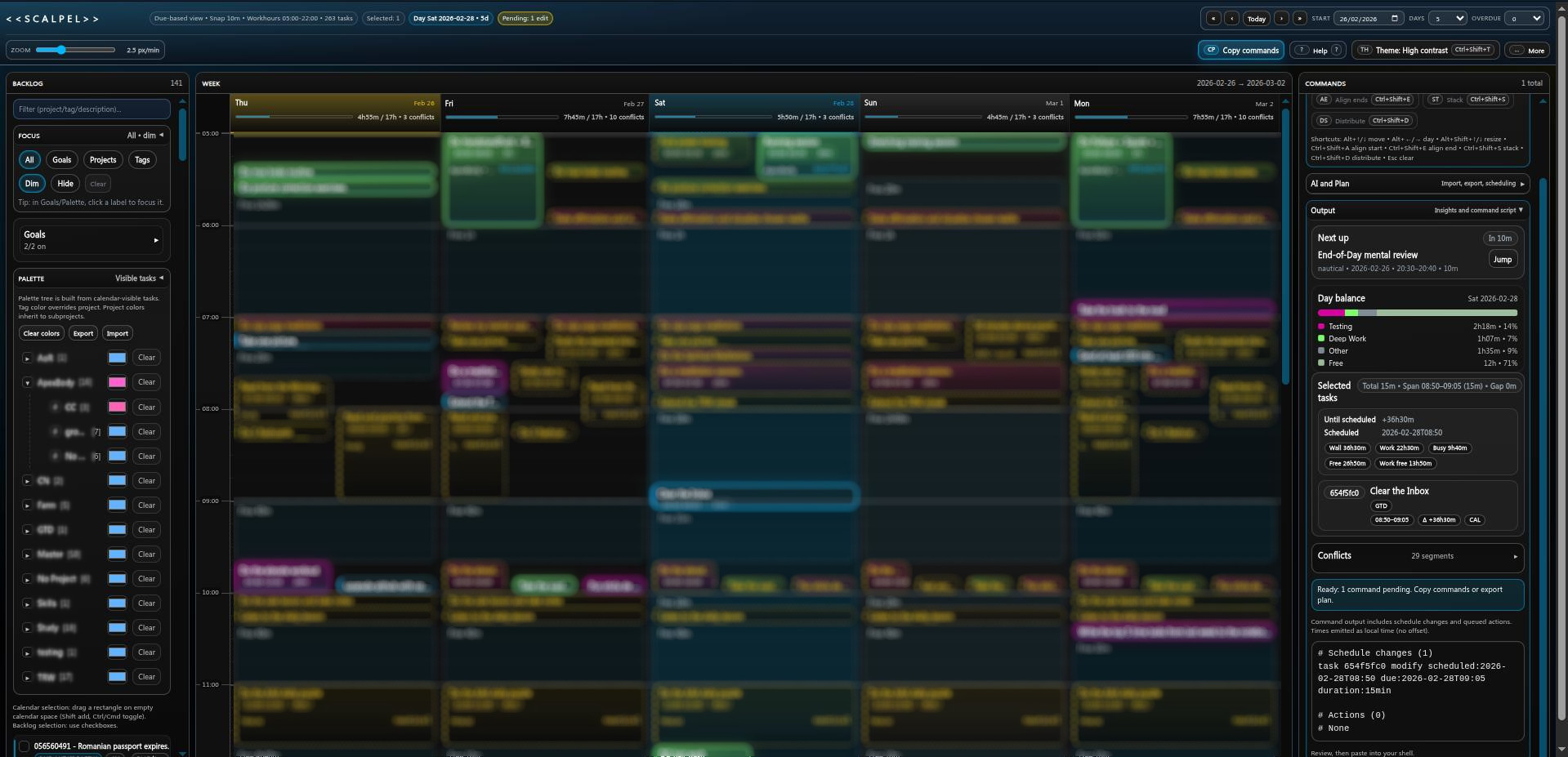
SCALPEL
Mission-grade personal planning with Taskwarrior + calendar.
SCALPEL is a CLI-first planning and rendering toolchain for Taskwarrior users. It turns task export data into a validated, versioned calendar payload and renders a self-contained interactive HTML planning view.
It is designed for people who want:
- A visual planning surface without giving up CLI workflows
- A reproducible pipeline (payload JSON + replay rendering)
- A safe way to test schedule changes before applying them in Taskwarrior
- Optional AI-assisted planning on top of a stable payload/render contract
Important: SCALPEL generates command output and plan JSON. It does not execute Taskwarrior commands automatically.
Status
Stable 1.0.0 release line.
- Core payload/schema/rendering interfaces are versioned and contract-tested.
- Replay/validation/filtering is part of the supported workflow.
- Planner/AI helpers (stub + optional LM Studio integration) are layered on top of the stable payload pipeline.
What It Feels Like To Use
- Run
scalpelto export your Taskwarrior tasks and open a planning page in your browser. - Drag/resize tasks, queue adds/completes/deletes, and shape the schedule visually.
- Copy the generated
task ... modify/ action commands or export a plan JSON for later replay/apply.
Product Highlights
Interactive planning UI
- Multi-day calendar with configurable work hours and vertical scale
- Drag/resize scheduling with snap-to-grid behavior
- Selection-driven planning actions
- Queue actions for selected tasks: complete, delete, add placeholders
- Copy command output for shell execution
- Export/import plan JSON (
scalpel.plan.v1) - Notes panel and quick command palette (
Ctrl/Cmd+K) - Goal/project/tag color mapping and theme customization
- Optional AI scheduling modal (works with the plan-result flow)
CLI-first, replayable workflow
- Live Taskwarrior export -> payload -> HTML (
scalpel) - HTML -> extract embedded payload JSON (
scalpel-validate-payload --from-html) - Filter payloads with query syntax (
scalpel-filter-payload) - Re-render from payload JSON (
scalpel-render-payload) - Validate and upgrade payloads across schema versions (never downgrades)
Planning + AI tooling
- Deterministic planner ops (
align-starts,align-ends,stack,distribute,nudge) viascalpel-plan-ops - Stub AI planner for deterministic local testing (
scalpel-ai-plan-stub) - Optional LM Studio local model integration (
scalpel-ai-plan-lmstudio) - Plan validation/apply tools (
scalpel-validate-plan-result,scalpel-apply-plan-result)
Installation
Requirements:
- Python
>=3.11 - Taskwarrior installed on
PATHfor the main live-export command (scalpel)
Taskwarrior setup (~/.taskrc):
SCALPEL expects a duration UDA so generated commands like duration:10min round-trip cleanly.
uda.duration.type=duration
uda.duration.label=duration
uda.duration.default=PT10M
Install from PyPI:
python3 -m pip install taskwarrior-scalpel
Or from a local checkout:
python3 -m pip install .
Names:
- PyPI package:
taskwarrior-scalpel - Python module:
scalpel - Main CLI:
scalpel
Quick Start
Generate an interactive planning page from your live Taskwarrior data:
scalpel --no-open --out build/scalpel_schedule.html
Common options:
--filter "status:pending +work": Taskwarrior filter passed totask export--start YYYY-MM-DD: start date of the view--days N: number of days to show--workhours HH:MM-HH:MM: visible planning window--tz/--display-tz: bucketing vs display timezone--plan-overrides FILE.json/--plan-result FILE.json: apply changes before render
Common Workflows
1) Daily planning from live Taskwarrior
scalpel --filter "status:pending" --days 7 --out build/scalpel.html
Then:
- Adjust the schedule in the browser
- Copy generated commands
- Review them
- Run them manually in your shell
2) Reproducible payload + replay workflow
Useful for debugging, sharing, testing, and offline iteration.
scalpel --no-open --out build/scalpel.html
scalpel-validate-payload --from-html build/scalpel.html --write-json build/payload.json
scalpel-filter-payload --in build/payload.json --q "project:work -blocked" --out build/work.json --pretty
scalpel-render-payload --in build/work.json --out build/work.html
3) AI-assisted planning (local-first)
Deterministic stub planner flow:
scalpel --no-open --out build/scalpel.html
scalpel-validate-payload --from-html build/scalpel.html --write-json build/payload.json

# build/selected.json contains a JSON array of selected task UUIDs
scalpel-ai-plan-stub --in build/payload.json --selected build/selected.json --prompt "align starts" --out build/plan.json --plan-schema v2
scalpel-apply-plan-result --in build/payload.json --plan build/plan.json --out build/payload_planned.json
scalpel-render-payload --in build/payload_planned.json --out build/scalpel_planned.html
Optional LM Studio backend:
scalpel-ai-plan-lmstudio \
  --in build/payload.json \
  --selected build/selected.json \
  --prompt "align starts" \
  --out build/plan.json \
  --base-url http://127.0.0.1:1234 \
  --model your-model-name
Advanced: Query Language (Payload Filtering)
scalpel-filter-payload uses the SCALPEL query language (scalpel.query_lang).
Supported filters include:
uuid:<id>project:<name>[,<name>...]status:<status>[,<status>...]day:YYYY-MM-DD+tag/tag:tag1,tag2-tag(exclude tag)desc:substringdesc~regex/desc!~regex- Bare tokens (description substring match, case-insensitive)
Examples:
scalpel-filter-payload --in build/payload.json --q "project:work +focus -blocked" --out build/focus.json
scalpel-filter-payload --in build/payload.json --q "day:2026-02-26 desc~meeting" --out build/meetings.json
Advanced: Tooling Commands (Installed)
Core workflow:
scalpelscalpel-render-payloadscalpel-validate-payloadscalpel-filter-payloadscalpel-plan-opsscalpel-apply-plan-resultscalpel-validate-plan-resultscalpel-ai-plan-stubscalpel-ai-plan-lmstudio
Engineering/support:
scalpel-doctorscalpel-checkscalpel-ciscalpel-smoke-buildscalpel-gen-fixturesscalpel-minify-fixturescalpel-ddmin-shrinkscalpel-bench
Advanced: Public Python API (Stable Surface)
Import from scalpel.api (preferred) or import scalpel (re-export).
Contract-tested public API includes:
load_payload_from_json(...)load_payload_from_html(...)normalize_payload(...)iter_tasks(...)task_by_uuid(...)tasks_by_status(...)tasks_by_project(...)tasks_by_tag(...)tasks_by_day(...)filter_payload(...)
Example:
from scalpel.api import load_payload_from_html, tasks_by_day

payload = load_payload_from_html("build/scalpel.html")
today = tasks_by_day(payload, "2026-02-26")
print(len(today))
Advanced: Timezones
SCALPEL separates two timezone concerns:
- Bucketing timezone (
--tz/SCALPEL_TZ): controls day boundaries,day_key, and view-window anchoring. - Display timezone (
--display-tz/SCALPEL_DISPLAY_TZ): controls timestamp formatting in the HTML UI and generated command text.
Typical usage:
- Interactive local use:
--tz local --display-tz local(defaults) - Deterministic CI/fixtures:
--tz UTCand choose display (localorUTC)
Advanced: Nautical Hooks (Optional)
Nautical preview task expansion is enabled by default.
- Disable per run:
scalpel --no-nautical-hooks - Control default via env:
SCALPEL_ENABLE_NAUTICAL_HOOKS=0|1
When enabled, SCALPEL attempts to load nautical_core (including from ~/.task / ~/.task/hooks if present) and generate anchor/CP preview tasks.
Advanced: Docs / References
docs/AI_FLOW.mddocs/AI_INTERFACE.mddocs/PLANNER_CORE.mddocs/SCHEMA_EVOLUTION_PROTOCOL.mddocs/PACKAGING_RELEASE_CHECKLIST.md
Golden fixture maintenance:
scalpel-gen-fixtures --check
scalpel-gen-fixtures --write
Release history Release notifications | RSS feed

Download files
Download the file for your platform. If you're not sure which to choose, learn more about installing packages.
Source Distribution
Built Distribution
Filter files by name, interpreter, ABI, and platform.
If you're not sure about the file name format, learn more about wheel file names.
Copy a direct link to the current filters
File details
Details for the file taskwarrior_scalpel-1.0.0.tar.gz.
File metadata
- Download URL: taskwarrior_scalpel-1.0.0.tar.gz
- Upload date:
- Size: 310.5 kB
- Tags: Source
- Uploaded using Trusted Publishing? No
- Uploaded via: twine/6.2.0 CPython/3.11.2
File hashes
| Algorithm | Hash digest | |
|---|---|---|
| SHA256 |
8e00d4e33aa5ca3e4eb1dff80966f1f8a851866c284d53c925fe7e6df1070ccf
|
|
| MD5 |
0fe01e0d8787ec7feabca35ca56d147b
|
|
| BLAKE2b-256 |
83cc65661a6cf4baabb5378147cde0ad0e84dc630cf1b5a35e7d55f36f241526
|
File details
Details for the file taskwarrior_scalpel-1.0.0-py3-none-any.whl.
File metadata
- Download URL: taskwarrior_scalpel-1.0.0-py3-none-any.whl
- Upload date:
- Size: 316.2 kB
- Tags: Python 3
- Uploaded using Trusted Publishing? No
- Uploaded via: twine/6.2.0 CPython/3.11.2
File hashes
| Algorithm | Hash digest | |
|---|---|---|
| SHA256 |
df9487d1814bd47515010f68c8a72c17b9459fa94e2f12137f530148b21f74e9
|
|
| MD5 |
f4d46d115ffba10ba59e997b5d092922
|
|
| BLAKE2b-256 |
ca73ea89cd9bfaba80ff968db5f7d4328ea64ac2bbd7a7b2fef1bd1902fd3270
|






