





🥔 TATERS: Takes All Things, Extracts Relevant Stuff
Point Taters at video, audio, text files, or a spreadsheet you already have. It pulls the audio out of video, transcribes it (with or without speaker labels), measures the language about a thousand different ways, runs your statistics, and trains or applies models — leaving behind tidy datasets, figures, and a plain-English report.
It's a Python library, a command-line tool, and — if you've never written a line of Python — an app that lets you do it all without writing a single line of code. Pretty neat, right?

- Documentation: https://www.taters.wiki
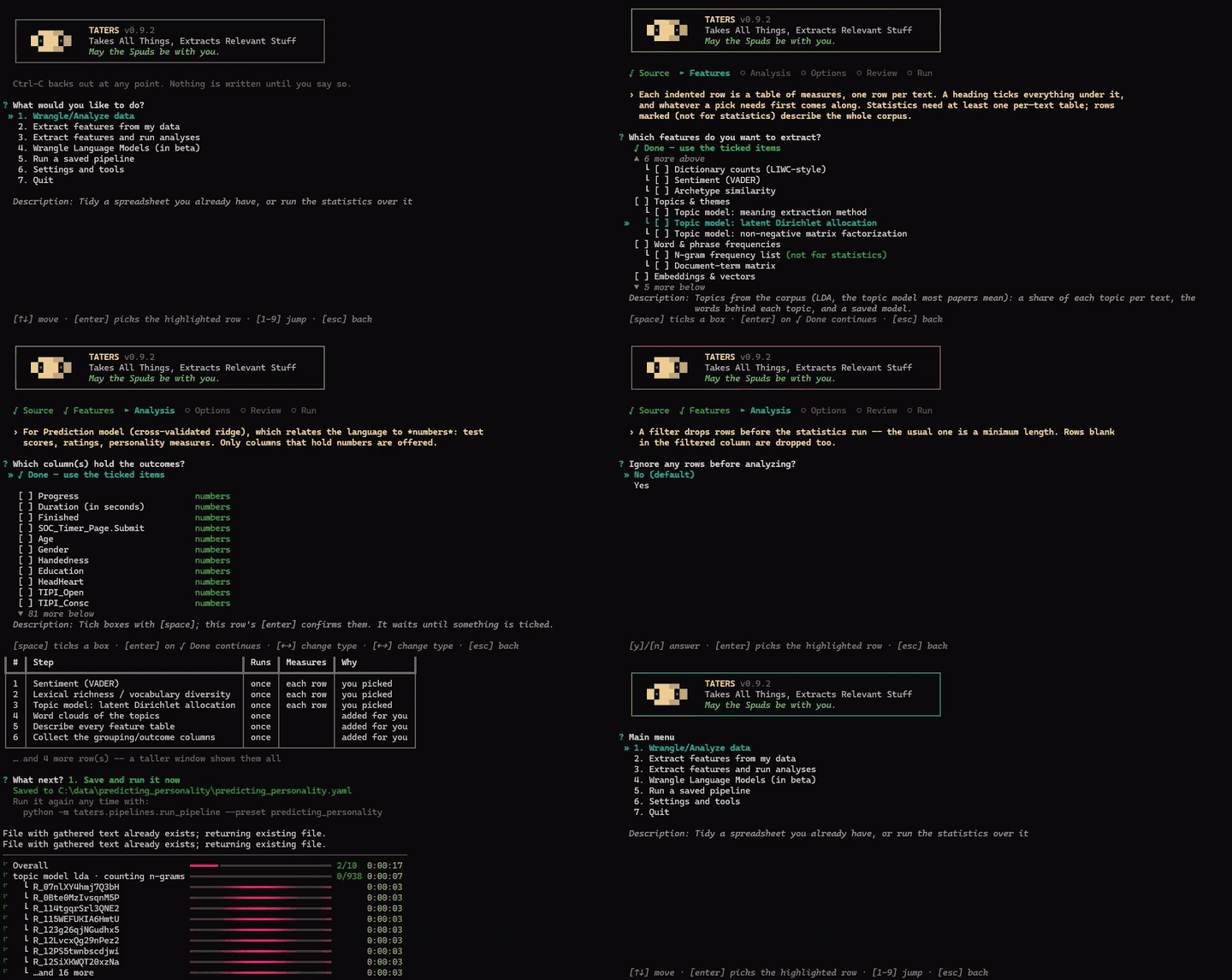
Never written Python? Start here
pip install taters
taters
That's it. After that, running the command taters opens the app. It asks what you want out of your data, works out which steps that takes, and offers to run them for you. How friendly!
Every pipeline gets a folder of its own holding the pipeline file, the results, and a record of what ran — so you can re-run it, edit it, or hand the whole thing to a colleague, share it on OSF, whatever's clever.
The menu is basically just a list of verbs. What would you like to do? Tidy up a spreadsheet, extract features, extract features and run the statistics, run statistics on numbers you already have, train a model, or re-run something you built before? Sure, we can do that.
It works on audio and video, and on text you already have. To be fair, it's mostly for text. But hey, it does other things too. More stuff being added regularly as I have the time. Point it at a folder of .txt (or .docx, or .pdf) files or a spreadsheet with a column of text and start extracting features to your heart's content. No ffmpeg, no models, no GPU if you don't need them.
Read more: The app guide
What can it measure?
Quite a lot. Everything you've ever wanted? Well, probably not. Maybe? It depends on how curious you are. Everything listed below is geared toward text analysis — transcribed or otherwise — and the measures (i.e., "features") come out as a nice and tidy table, one row per text (or per speaker, or per participant, or per whatever you tell it a row should be).
Words, style, and structure
- Readability — Flesch-Kincaid, SMOG, Coleman-Liau, Dale-Chall, Gunning fog, Spache and friends
- Lexical richness — TTR, RTTR/CTTR, Herdan's C, Yule's K/I, MTLD, MATTR, HD-D, vocd-D
- Entropy & information — Shannon with four bias corrections, Rényi/Hill profiles, Tsallis, conditional entropy, compression rates, over both words and characters (~60 columns)
- Text cohesion — closer to the TAACO family of stuff (similar to, but kind of different from, the Coh-Metrix stuff): lexical overlap between sentences and paragraphs, connectives, givenness, synonym overlap, semantic similarity (~150 columns)
- Parts of speech — tag frequencies and syntactic n-grams, NLTK or Stanza, Penn or Universal tagsets
Content and meaning
- Dictionary counts — LIWC-style content coding with any
.dic/.dicx/.csvdictionary - Word norms — average concreteness, valence, age of acquisition, sensorimotor strength and friends, with coverage beside each
- Sentiment — VADER
- Archetypes — theory-driven similarity to curated seed phrases, in embedding space
- Topic models — the Meaning Extraction Method (PCA + varimax), LDA, and NMF, each with automatic topic-count selection and word clouds
Counts and matrices
- N-gram frequency lists — words and phrases, with NPMI and logDice collocation statistics
- Document-term matrices — counts, binary, relative frequency, or TF-IDF
Embeddings and vectors
- Sentence embeddings — from any sentence-transformers model
- Transformer embeddings — from any Hugging Face encoder, with control over layers and pooling
- Word vectors — train word2vec or fastText on your own corpus, or import GloVe/word2vec/fastText, and score texts against concept dictionaries
Voice and audio
- Transcription — Whisper, with or without speaker diarization
- Acoustic measures — pitch, loudness, pauses, and friends
- Whisper embeddings — audio embeddings over non-silent spans
And your own
- Score with models you already have — any model you trained in Taters, or a Hugging Face classifier, applied to a new dataset
New measures get added as I have time, so this list is potentially already outdated. If something you want isn't here, open an issue and tell me about it.
Read more: The text analysis guide
And then what?
Extraction is only half of it. Taters can also run some stats for you on the features it just extracted:
- Group differences (ANOVA with post-hoc tests)
- Correlations with an outcome
- Prediction models (cross-validated ridge)
- Classification models (cross-validated logistic regression)
Everything is out-of-fold, corrected for multiple comparisons, and written out as tidy tables plus a plain-English report you can actually paste into a manuscript. Models you fit get saved and can be applied to a completely different dataset later.
You can also train language models on your own texts: adapt an existing encoder to your corpus, train one from scratch, or fine-tune a transformer to predict your outcomes directly.
Read more: The statistics guide · Training models
The stats stuff is pretty lean at the moment. It'll grow, but it's less of a priority at the moment. The nice thing is that you can take any/all of the features and toss them into R or Python (or SAS, or SPSS, or whatever you like to use) and run whatever stats make you happy. Stats make you happy, don't they? Of course they do.
If you have written Python
from taters import Taters
t = Taters()

# Pull audio out of video, transcribe it
wavs = t.audio.extract_wavs_from_video(input_path="input.mp4")
asr = t.audio.transcribe_with_whisper(audio_path=wavs[0], device="auto")
transcript = asr.raw_files["csv"]

# Measure things (defaults write under ./features/)
t.text.analyze_with_dictionaries(csv_path=transcript, dict_paths=["dictionaries/liwc"])
t.text.analyze_entropy(csv_path=transcript)
t.text.analyze_cohesion(csv_path=transcript)
Every step is also a command-line tool:
python -m taters.audio.transcribe_with_whisper \
  --audio_path audio/lecture.wav --whisper_model small.en
And to batch a whole dataset, there's a YAML pipeline runner:
python -m taters.pipelines.run_pipeline \
  --root_dir videos --file_type video \
  --preset conversation_video \
  --workers 8 --var device=cuda
Read more: The Python/CLI reference · Pipelines
Installation
pip install taters
Two things to know:
- Python 3.10+ for everything is pretty much expected, except speaker diarization and training word vectors, which need 3.10–3.13. NeMo doesn't install on 3.14 and gensim has no 3.14 wheels (yet?). Taters doesn't need either, strictly speaking, so you can install without them and those specific features will just be missing. Everything will still work, but if you want every possible feature under the sun to work, I'd recommend Python 3.13 for now.
- If you want the GPU, install PyTorch on
cu128— not the newest CUDA your driver allows. Transcription runs on CTranslate2, which needs CUDA 12's libraries. Acu13xbuild leaves it on the CPU while PyTorch happily keeps using the card.
Check my setup in the app detects and tells you what all your system can do, and it tries to also give you some helpful information on what needs to happen if certain features won't run on your setup for whatever reason.
Read more: The install guide covers CPU and CUDA setups, FFmpeg, and the optional extras.
Contributing
Contributions are more than welcome. If you are using Taters on real projects, feedback is definitely helpful, especially if you run into any issues or odd behavior.
If you want to make a contribution: create a fork and a pull request:
- Fork the repository and branch off
main. - Make the change, and add a test that fails without it. The suite should be
green before you open the request (
pytest, from the repository root). - Open a pull request that explains, in plain words, what the change does, why it is needed, and how you know that it actually works.
Please write the explanation for somebody who cannot read minds and is only a half-competent coder (i.e., me). Say why a thing is done the way it is, not only what it does — in the pull request, and in comments where the reason is not obvious from the code.
One rule above the others: if I can't figure out what your code does, I will not merge it. That is not a judgment on you or on the idea. It's simple the case that I'm responsible for everything merged here, and I can't be a responsible guy by merging in code that I can't debug (or understand).
License
MIT. See LICENSE for details. Two bundled components are under their own terms and are listed in THIRD_PARTY_LICENSES.md: the tokenizer behind the n-gram, document-term-matrix and parts-of-speech features (Potts / Schwartz, CC BY-NC-SA 3.0, so those features carry a NonCommercial restriction), and the vendored whisper-diarization scripts (Mahmoud Ashraf, BSD 2-Clause).
Basically, for anything in Taters that is mine / not leaning on something with a 3rd party license, you can use it for whatever you'd like, but I'm not liable for what you do with it. You should probably use this software responsibly. That's just my take on the situation.
Generative AI (genAI) Declaration
Does the author use genAI for development? You betcha he does. However, this is not a vibe-coded funtime project built by a 15-year-old who also spends their time trying to get ChatGPT to draw naked cartoon characters for them. In Taters, GenAI is used primarily for:
- Cleaning up my atrociously bad documentation;
- Test development (I've never been that good at writing tests to break my own code);
- Tidying up formatting, docstrings, etc. Have you seen my old codebases? Nobody wants more of that.
I've been writing software for a long time now — long enough that much of my back catalog is monochromatic. Yikes, I'm getting old. But, like, not "when I was your age, I was feeding punchcards into a PDP" old. Anyways, I'm still young at heart.
What I've found is that genAI is most helpful for making this codebase readable to someone who isn't me, and for iterating and catching bugs, so those are the primary use-cases. I'm still in here manually testing and reviewing my own code and its iterations, comparing the outputs against older codebases of mine, fumbling around with writing performant-but-still-readable code, and hand-rolling stupid easter eggs that will amuse no more than about three people (myself included).
If you do wish to contribute (see above), I have no major objections to genAI being a part of how you get there. The golden rule just still applies: if I can't figure out what your code does, I won't merge it. However clever the thing that wrote it, human or otherwise, I can only evaluate what I can understand.
1 maintainer

Release files for taters 1.1.0
For a detailed explanation of source distributions (sdists) and built distributions (wheels), please see the package formats documentation.
Source distribution (sdist)
| File | Size | Uploaded | |
|---|---|---|---|
| taters-1.1.0.tar.gz | 11.6 MB | Details |
Built distribution (wheel)
| File | Interpreter | ABI | Platform | Reset |
|---|---|---|---|---|
| taters-1.1.0-py3-none-any.whl | Python 3 | none | any | Details |
Total release size: 23.0 MB
Release files / taters-1.1.0.tar.gz
| Download URL | taters-1.1.0.tar.gz |
|---|---|
| Size | 11.6 MB |
| Tags | Source |
|
SHA-256 checksum How to use checksums |
bcada1dfc1ca1ee078fb4d71c75c38e20758cd44bba68bb172c21287f929c35f
|
|
BLAKE2b-256 checksum How to use checksums |
0e649306c58972aacad0f384a87242f0d7b89969d74adaf713ce1502fbb2b541
|
| Upload date | |
|
Uploaded using Trusted Publishing? What is trusted publishing? |
No |
| Uploaded via |
twine/7.0.0 CPython/3.13.15
|
Release files / taters-1.1.0-py3-none-any.whl
| Download URL | taters-1.1.0-py3-none-any.whl |
|---|---|
| Size | 11.4 MB |
| Tags | Python 3 |
|
SHA-256 checksum How to use checksums |
ebab3162a9b43f1768d847bde4edd51da81986b79e6f4f331401f9a5e332f208
|
|
BLAKE2b-256 checksum How to use checksums |
d6a28e00e479d1d8092779d086329a07d89a34ca40e2754cd197f023ede728d1
|
| Upload date | |
|
Uploaded using Trusted Publishing? What is trusted publishing? |
No |
| Uploaded via |
twine/7.0.0 CPython/3.13.15
|














