
tato


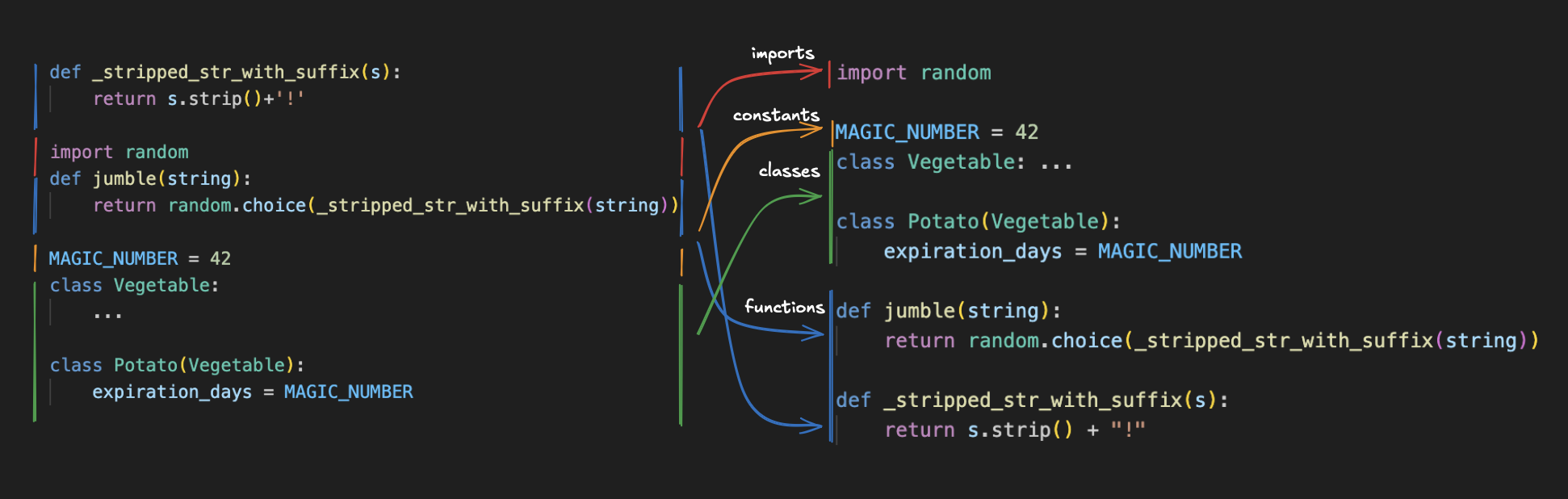
Tato is Python file layout formatter. In contrast to other autoformatters, tato only formats the organization/layout of a file. It tries to organize files into four sections: imports, constants, classes, and functions.
Here's a (contrived) example to illustrate the idea
Quick start
pip install tato
tato format <path_to_file>
- Tato should be used alongside other autoformatters like black or ruff.
- Tato is probably too disruptive to run on save.
- If the output from tato is confusing, consider splitting the file into smaller chunks and running tato on each chunk.
- It's fine (even encouraged) to use tato to "reset" a file, but then apply the finishing touches manually. It'll never be better than a thoughtful layout, but it's often much better than random layouts.
Motivation
In large, mature codebases, it’s common to encounter files that lack a coherent structure. While the initial version of a file may have been thoughtfully crafted with a logical organization, this structure often erodes over time. (There are many reasons for this erosion, but that’s a topic for another time.)
Tato offers a reset button, providing consistency by deterministically organizing the file. While it may not be the optimal layout, this consistency should reduce the cognitive load required to understand the code.
Layout details
Tato organizes files into four main sections:
- Imports
- Constants
- Classes
- Functions
Imports: Tato preserves the original import order, leaving the task of sorting to tools like isort or ruff.
Constants: Constants are moved to the top of the file. Typically, these have brief definitions and act as key control points for program behavior.
Classes: Classes are arranged according to their inheritance hierarchy, with base classes appearing first.
Functions: Functions are placed in the final section and sorted by call
hierarchy. This order places the main() function first, ensuring that the most
important functions appear at the top.
Handling Interdependencies
Strict adherence to this four-section layout may not always be possible due to interdependencies. For example, a constant might depend on a class or function definition. In such cases, Tato will elevate the necessary definitions to maintain file validity. These elevated definitions form valid subsections (constants, classes, functions), although most fields in these subsections are typically empty.
If a file has too many subsections, it’s likely a sign that it should be broken up.
1 maintainer

Metadata
1 maintainer
Release files for tato 0.2.3
For a detailed explanation of source distributions (sdists) and built distributions (wheels), please see the package formats documentation.
Source distribution (sdist)
| File | Size | Uploaded | |
|---|---|---|---|
| tato-0.2.3.tar.gz | 18.2 kB | Details |
Built distribution (wheel)
| File | Interpreter | ABI | Platform | Reset |
|---|---|---|---|---|
| tato-0.2.3-py3-none-any.whl | Python 3 | none | any | Details |
Total release size: 45.5 kB
Release files / tato-0.2.3.tar.gz
| Download URL | tato-0.2.3.tar.gz |
|---|---|
| Size | 18.2 kB |
| Tags | Source |
|
SHA-256 checksum How to use checksums |
d4be720539d5a2ce35fcef67312ee011f033268a0bd66a3e9ec407be0ff7a254
|
|
BLAKE2b-256 checksum How to use checksums |
224d65f81fcda63fdf296414dc8a6b854b1c1e17c46b86a08d128b39f95ece31
|
| Upload date | |
|
Uploaded using Trusted Publishing? What is trusted publishing? |
No |
| Uploaded via |
python-httpx/0.27.0
|
Release files / tato-0.2.3-py3-none-any.whl
| Download URL | tato-0.2.3-py3-none-any.whl |
|---|---|
| Size | 27.2 kB |
| Tags | Python 3 |
|
SHA-256 checksum How to use checksums |
62f31550462a76c67277e61721a82b491c689ffdac75bc9eb9b70436a697e05c
|
|
BLAKE2b-256 checksum How to use checksums |
147d8f66bd1f50ac14d7f567c7cdf5dbdfbfdcd253710c6200293b0a5bb5d617
|
| Upload date | |
|
Uploaded using Trusted Publishing? What is trusted publishing? |
No |
| Uploaded via |
python-httpx/0.27.0
|














