
English · 简体中文





Edit the figure. Keep the source.
The last mile before submission usually goes like this: the plots are done, but now they have to become Figure 1 — resize the fonts, move the legend, align everything. So you go back to Python, change a line, re-run the script, look again. Twenty times. Or you drag the PDFs into Illustrator and lose the connection to your code for good.
Tavotto lets you edit the figure directly. Drop your matplotlib panels onto a page and arrange them freely. Double-click any panel and you can select the things inside it — title, axis labels, curves, legend — then change the font size, the colour, or just drag them. Dragging and dialling are instant — the figure follows your cursor frame by frame, and matplotlib runs once, when you let go, to make it official.
Every change is non-destructive: your script is never modified, and anything can be undone. On export the engine re-renders each panel at full quality and composes a PDF whose text is still real, selectable vector text.
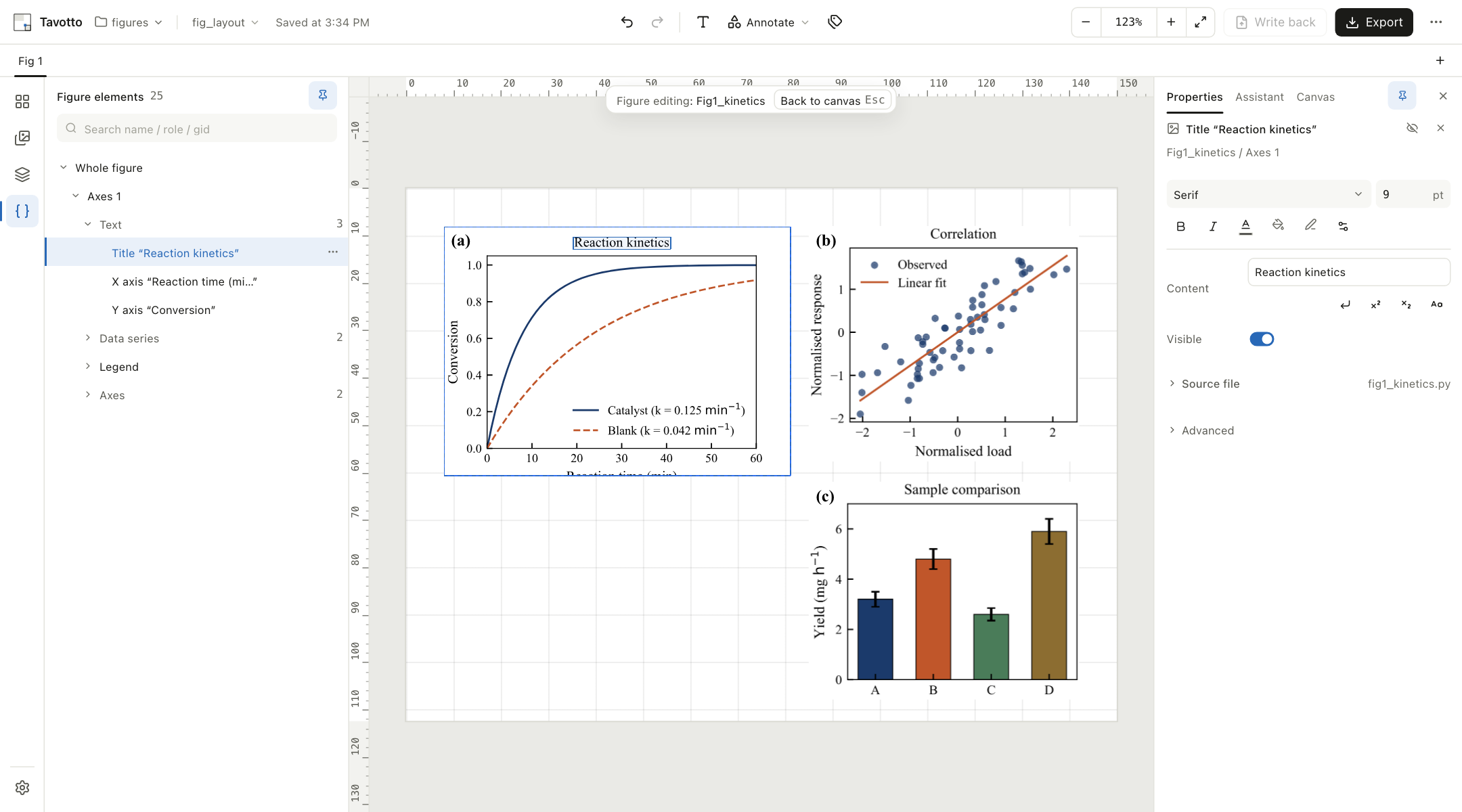
Left: elements inside the figure · Middle: a 150 × 130 mm page · Right: properties of the selected title — the source file is still fig1_kinetics.py
Install
Download an installer from the latest release
— .dmg for macOS, .exe for Windows — install it, and double-click. Tavotto opens
in its own desktop window, and updates itself from then on — it checks, downloads,
installs and restarts without sending you back to this page.
You do not need to install Python. Both the macOS and the Windows installer ship a private Python runtime with the usual scientific stack already in it — numpy, matplotlib, pandas, scipy, seaborn and Pillow, at pinned versions, identical on both platforms so the same script draws the same figure. Rendering works the moment the installer finishes, with no download and no network, and without Homebrew, Conda or Xcode. Tavotto never touches a Python or Conda you already have; if a figure of yours needs a package that is not in that list, point Tavotto at your own environment under Settings → Rendering environment. See Good to know.
The macOS build is Apple Silicon (arm64) only. Intel Macs are not currently built or tested — use the PyPI install below.
Or install from PyPI, which works the same on all three platforms:
pipx install "tavotto[worker]"
tavotto
Your browser opens at http://127.0.0.1:5089.
Using pip · reusing your own scientific environment · running from source
pip (installs into the current environment):
pip install "tavotto[worker]"
tavotto
Reuse the environment your figures were made in. Drop the [worker] extra and
point Tavotto at your own interpreter, so figures render against exactly the
dependencies they were written for:
pipx install tavotto
export TAVOTTO_WORKER_PYTHON=/path/to/your/env/bin/python     # Windows: setx TAVOTTO_WORKER_PYTHON "..."
tavotto
From source (needs node + pnpm to build the interface):
git clone https://github.com/Tavotto/Tavotto.git && cd Tavotto
python -m venv .venv && .venv/bin/pip install -e ".[worker,dev]"
python scripts/build_frontend.py
.venv/bin/tavotto
Options: tavotto --figures <dir> opens a figure directory straight away;
--port 5089 changes the port; --no-browser skips opening a browser.
Try it
A ready-to-open example project ships with the repository:
tavotto --figures examples/figures
Three panels appear in the asset browser. Drag them onto the page, then double-click
one — you get a tree of everything inside that figure, and clicking the title lets you
change its size. examples/figures/ holds two perfectly ordinary matplotlib scripts;
Tavotto does not ask you to write them in any special way.
What you can edit inside a figure
| Text | Title, axis labels, tick labels, legend, annotations — content, size, colour, weight, style, rotation, opacity, visibility. Draggable. |
| Data series | Line width, dash pattern, colour, markers (scatter markers can be swapped wholesale), legend entry order |
| Arrows | Arrows your script draws (FancyArrowPatch): drag the whole arrow or either endpoint, and change arrow style, line style, width, head size and colour. Arrows attached to annotate() keep their data anchors — style only. |
| Axes | Tick groups, axis lines, grid, 3D viewing angle (elev/azim/roll), 3D axis arrows and panes. Drag a subplot and what belongs to it travels along — a label you had moved, its colourbar, a twin axis. |
| Figure | Overall figure size (the layout reflows), background |
| Not editable | Data-space properties such as axis limits, scales and spines, and colourbar orientation. Change those in your script. |
Around the page there is a full layout toolset: snapping and alignment guides, multi-select distribute, grouping, layout groups (row / column / grid constraints that reflow when sizes change), text / arrow / shape annotations at any rotation, presets for research figures (reversible-reaction arrows, scale bars, error markers, zoom boxes), multiple canvases in tabs, a version timeline, and named styles you can apply across a whole document.
Export
PDF export embeds each original vector panel as-is, so the text stays selectable and searchable. PNG is rendered from that same PDF, so the two can never disagree. Before exporting, Tavotto checks for panels off the page, overlaps, tiny fonts, low effective DPI, stale renders and missing assets, and can write a proof report alongside the figure for your submission records.
Two deliberate exceptions: a panel with opacity < 1 or a flip applied is embedded as a
bitmap at your export DPI, because PDF vector content supports neither.
Code signing policy
Free code signing provided by SignPath.io, certificate by SignPath Foundation. Windows release installers are built from this repository by GitHub Actions and are submitted for manual signing before they are described as signed releases. See the complete Code signing policy and Privacy policy.
AI assistant (optional)
The assistant panel can hand a request to the Codex or Claude CLI on your machine to edit the script itself — for example "move the legend to the top left and make it 7 pt". Your script is snapshotted first; afterwards you see the diff and the figure re-renders, and one click reverts it. Everything else works without these tools installed.
Sending a figure in from elsewhere
Just made a figure somewhere else — ran a script yourself, or had Codex / Claude write one? One command hands it over:
tavotto open figures/Fig1_kinetics.pdf   # the output file
tavotto open figures/fig1_kinetics.py    # or the script — output name is resolved for you
tavotto open figures/                    # or the whole figure library
It opens the figure's library as a project, adds any missing entries to the script registry, then launches the desktop app (if it's already running the figure goes straight into that window — no second copy). Without the desktop app it falls back to browser mode.
Codex plugin
Install it and the matplotlib figures Codex writes come out in a shape Tavotto can take over (script next to its output, vector PDF, statically resolvable output name) — and you can finish them without leaving Codex:
codex plugin marketplace add Tavotto/Tavotto && codex plugin add tavotto@tavotto
Start a new session afterwards. The CLI and the Codex desktop app share one plugin directory,
so installing once covers both; codex plugin marketplace upgrade tavotto pulls updates.
The plugin ships three layers with clear boundaries:
- a skill that teaches Codex the conventions a Tavotto-editable figure has to satisfy;
- a local MCP server exposing the engine — open a figure, apply canonical overrides, run a publication preflight, export true-vector PDF/SVG or PNG at an explicit DPI. All six tools work in hosts with no UI at all;
- an MCP App canvas rendered inside Codex, built from the same frontend code the desktop app uses — dragging, hit-testing, snapping and undo have no second implementation.
Every edit is an override; your Python source is never rewritten. Multi-panel layout,
canvas annotations and write-back still live in the Tavotto window, one tavotto open away.
See codex-plugin/README.md — including which parts are not yet
verified inside a real Codex Desktop. Design notes are in
ADR 0006; the distribution roadmap
(including the official directory submission checklist) is in
docs/codex-plugin-distribution.md.
Publication profile and preflight
Export runs a profile-driven preflight first. The rules live in one versioned JSON file
(src/tavotto/profiles/publication.json) that both the Python engine and the TypeScript
frontend read — so there is no second copy to drift.
The default lab-publication-v1 encodes: 80 mm single / 150 mm double column, 16:9 · 4:3 · 1:1
aspect ratios, 9 pt body text with a hard floor of more than 8 pt of final effective size
(8.5 pt strict), ≥ 300 dpi rasters, Times New Roman plus an explicit CJK fallback, 0.5 / 0.75 /
1.0 / 1.5 pt line widths, ticks in, enclosed spines, frameless legends, Title (unit) axis
labels, and Scientific colour maps by semantic type.
Font sizes are checked at their final physical size — a panel scaled to 60 % is judged on
fontsize × 0.6, not on what the script asked for. Findings come in four levels: error
blocks export until you explicitly confirm, warn is always shown, not_verifiable is what
we honestly cannot check (text inside an external bitmap) and needs a human, and suggestion
never decides anything for you. Everything, including the confirmation, is written into the
proof report next to the exported files.
Journals with their own widths need an override, not a fork:
{"widths_mm": {"double": 178}} — the rest is inherited, and the override is recorded in the
proof report.
Where your data lives
On your machine. Rendering, composition and export are all local processes; nothing about your figures or data is uploaded.
| Documents and autosaves | ~/Library/Application Support/Tavotto/ (Linux ~/.local/share/tavotto/, Windows %LOCALAPPDATA%\Tavotto\) |
| Exports, canvas files and version history | Inside your project, in one tavottofile/ folder: exports in tavottofile/export/, named canvases alongside them, version history in tavottofile/versions/. Visible, backupable, and synced with your figures. Files written by older versions stay readable where they were. |
| Your scripts and figures | Read-only, unless you explicitly choose "write back to original file" — which can be locked off per project |
| The only outbound request | A once-a-day check for a new release — plus the download itself, if you accept an update in the desktop app. Both stop when you turn the check off in Settings → Check for updates. |
Good to know
-
The first open of a figure runs your script. Light figures take a second; heavy ones take as long as they normally do. Every edit after that is sub-second.
-
Rendering needs a Python that can import what your scripts import. Where that Python comes from depends on how you installed Tavotto:
Install Interpreter used for rendering Windows .exeThe bundled runtime that ships inside the installer — CPython 3.13 with numpy, matplotlib, pandas, scipy, seaborn and Pillow at pinned versions. Nothing to install, nothing to download. macOS .dmg(arm64)The same bundled runtime, same pinned versions. No Homebrew, Conda or Xcode needed. PyPI with the [worker]extraThe environment you installed it into. Tavotto picks in this order:
TAVOTTO_WORKER_PYTHON→ the interpreter you chose in Settings → the bundled runtime → its own interpreter → a Python/Conda it finds on the machine. Whatever you choose explicitly always wins, and Tavotto only launches the environment you point it at — it never installs anything into it, and never modifies an existing Python or Conda. The bundled runtime is likewise never written to: bytecode and the Matplotlib font cache go to Tavotto's own data folder, so the installed app stays byte-identical (on macOS, writing into it would break the code signature).The bundled runtime covers the common scientific stack — it is not a promise to cover whatever your scripts import. If a script needs a package it does not have (rdkit, astropy, your lab's own library), Tavotto says which package is missing and offers to switch to your own environment under Settings → Rendering environment; it will not install that package for you, into its own runtime or into yours. Without any working interpreter, layout, annotation and export still work — only in-figure editing needs one.
Settings → Privacy, diagnostics and About shows which interpreter is in use, where it came from (
bundled,configured,system, …), and — for the bundled runtime — its Python version and the exact pinned version of every package, read from theruntime-manifest.jsonthat ships beside it. The same information is in the diagnostics bundle. -
Desktop installers are large: ~180 MB to download, ~490 MB installed (measured on macOS arm64; v0.7.0, without the bundled runtime, was 62 MB / 131 MB). The difference is the runtime: CPython plus numpy/scipy/pandas/matplotlib and their compiled extensions. It is the price of "install and render", paid once, offline. The PyPI install stays a few MB because it reuses the Python you already have.
Development
.venv/bin/python -m pytest        # backend
cd web && pnpm test               # frontend
cd web && pnpm build              # type-check (tsc -b) + bundle

# Desktop builds (macOS and Windows): build the bundled rendering runtime first.
# Versions are pinned per platform/arch in packaging/runtime-lock.json; the script
# verifies the CPython download's SHA-256, checks every installed version against
# the lock, then imports each package with the freshly built interpreter and draws
# a real PDF. Any step failing fails the build.
python scripts/build_worker_runtime.py              # picks the target for this host
python scripts/build_worker_runtime.py --list-targets
python scripts/build_desktop.py                     # full desktop chain (includes it)
Issues and pull requests are welcome — see CONTRIBUTING.md for how to verify a change and which boundaries the codebase keeps deliberately. When reporting a bug, Settings → Privacy, diagnostics and About → Download diagnostics bundle collects everything usually needed, with keys and personal paths redacted. Security issues go through private reporting, not a public issue.
License
Using Tavotto, modifying it, and running it inside your lab are all unrestricted, and the figures and PDFs you produce with it are entirely yours — the licence does not reach your work. The obligations apply to distribution: if you give a modified Tavotto to others or run it as a network service for them, the corresponding source has to be available to those users.
Star history
1 maintainer

Download files
Download the file for your platform. If you're not sure which to choose, learn more about installing packages.
Source Distribution
Built Distribution
Filter files by name, interpreter, ABI, and platform.
If you're not sure about the file name format, learn more about wheel file names.
Copy a direct link to the current filters
File details
Details for the file tavotto-0.8.0.tar.gz.
File metadata
- Download URL: tavotto-0.8.0.tar.gz
- Upload date:
- Size: 1.6 MB
- Tags: Source
- Uploaded using Trusted Publishing? Yes
- Uploaded via:
twine/7.0.0 CPython/3.13.14
File hashes
| Algorithm | Hash digest | |
|---|---|---|
| SHA256 |
b4125305e0cbe141b6813d1e21a2a1920fe220656b7d636617aad0d4b0357bcf
|
|
| MD5 |
7e0df03b57bb6716bdea18160c03ebda
|
|
| BLAKE2b-256 |
fbbea39a745eca87560e843bc07237e3e97bc80d2cd8db5168483f5523c30ce2
|
Provenance
The following attestation bundles were made for tavotto-0.8.0.tar.gz:
Publisher:
release.yml on Tavotto/Tavotto
-
Statement:
-
Statement type:
https://in-toto.io/Statement/v1 -
Predicate type:
https://docs.pypi.org/attestations/publish/v1 -
Subject name:
tavotto-0.8.0.tar.gz -
Subject digest:
b4125305e0cbe141b6813d1e21a2a1920fe220656b7d636617aad0d4b0357bcf - Sigstore transparency entry: 2527351998
- Sigstore integration time:
-
Permalink:
Tavotto/Tavotto@62e9fed81e1b2dba6699e4d287b4eb56c0292735 -
Branch / Tag:
refs/tags/v0.8.0 - Owner: https://github.com/Tavotto
-
Access:
public
-
Token Issuer:
https://token.actions.githubusercontent.com -
Runner Environment:
github-hosted -
Publication workflow:
release.yml@62e9fed81e1b2dba6699e4d287b4eb56c0292735 -
Trigger Event:
push
-
Statement type:
File details
Details for the file tavotto-0.8.0-py3-none-any.whl.
File metadata
- Download URL: tavotto-0.8.0-py3-none-any.whl
- Upload date:
- Size: 729.0 kB
- Tags: Python 3
- Uploaded using Trusted Publishing? Yes
- Uploaded via:
twine/7.0.0 CPython/3.13.14
File hashes
| Algorithm | Hash digest | |
|---|---|---|
| SHA256 |
5edd53337b0e9db07b8bc7f5fefe4ee96446d609e861d3da477c7a698819eaa2
|
|
| MD5 |
9ce199d367580b95b46b33c3e350575d
|
|
| BLAKE2b-256 |
e7150838b059615419f55b23243040a39b892f658e892c0fc79b2cbaf7fd0203
|
Provenance
The following attestation bundles were made for tavotto-0.8.0-py3-none-any.whl:
Publisher:
release.yml on Tavotto/Tavotto
-
Statement:
-
Statement type:
https://in-toto.io/Statement/v1 -
Predicate type:
https://docs.pypi.org/attestations/publish/v1 -
Subject name:
tavotto-0.8.0-py3-none-any.whl -
Subject digest:
5edd53337b0e9db07b8bc7f5fefe4ee96446d609e861d3da477c7a698819eaa2 - Sigstore transparency entry: 2527352014
- Sigstore integration time:
-
Permalink:
Tavotto/Tavotto@62e9fed81e1b2dba6699e4d287b4eb56c0292735 -
Branch / Tag:
refs/tags/v0.8.0 - Owner: https://github.com/Tavotto
-
Access:
public
-
Token Issuer:
https://token.actions.githubusercontent.com -
Runner Environment:
github-hosted -
Publication workflow:
release.yml@62e9fed81e1b2dba6699e4d287b4eb56c0292735 -
Trigger Event:
push
-
Statement type:







