
taxonomy-synthesis
An AI-driven framework for synthesizing adaptive taxonomies, enabling automated data categorization and classification within dynamic hierarchical structures.
TLDR: copy this README and throw it into ChatGPT. It will figure things out for you. (will create a "GPT" soon)
Join our Discord Community for questions, discussions, and collaboration!
Check out our YouTube demo video to see Taxonomy Synthesis in action!
Explain Like I'm 5 🤔
Imagine you have a big box of different animals, but you’re not sure how to group them. You know there are "Mammals" and "Reptiles," but you don’t know the smaller groups they belong to, like which mammals are more similar or which reptiles go together. This tool uses smart AI helpers to figure out those smaller groups for you, like finding out there are "Rodents" and "Primates" among the mammals, and "Lizards" and "Snakes" among the reptiles. It then helps you sort all the animals into the right groups automatically, keeping everything neatly organized!
Features 🛠️
- Manual and Automatic Taxonomy Generation: Flexibly create taxonomy trees manually or automatically from arbitrary items.
- Recursive Tree Primitives: Utilize a tree structure that supports recursive operations, making it easy to manage hierarchical data.
- AI-Generated Subcategories: Automatically generate subcategories using AI models based on the context and data provided.
- AI Classification: Automatically classify items into appropriate categories using advanced AI models.
Quickstart Guide (colab) 🚀
In this quickstart, we'll walk you through the process of using taxonomy-synthesis to create a simplified phylogenetic tree for a list of animals. We'll demonstrate how to initialize the package, set up an OpenAI client, manually create a taxonomy tree, generate subcategories automatically, and classify items using AI.
1. Download and Install the Package
First, ensure you have the package installed. You can install taxonomy-synthesis directly using pip:
pip install taxonomy-synthesis
2. Set Up OpenAI Client
Before proceeding, make sure you have an OpenAI API key.
# Set up the OpenAI client
from openai import OpenAI

client = OpenAI(api_key='sk-...')
3. Prepare Your Data
We'll start with a list of 10 animal species, each represented with an arbitrary schema containing fields like name, fun fact, lifespan, and emoji. The only required field is id, which should be unique for each item.
# Prepare a list of items (animals) with various attributes
items = [
  {"id": "🦘", "name": "Kangaroo", "fun_fact": "Can hop at high speeds", "lifespan_years": 23, "emoji": "🦘"},
  {"id": "🐨", "name": "Koala", "fun_fact": "Sleeps up to 22 hours a day", "lifespan_years": 18, "emoji": "🐨"},
  {"id": "🐘", "name": "Elephant", "fun_fact": "Largest land animal", "lifespan_years": 60, "emoji": "🐘"},
  {"id": "🐕", "name": "Dog", "fun_fact": "Best friend of humans", "lifespan_years": 15, "emoji": "🐕"},
  {"id": "🐄", "name": "Cow", "fun_fact": "Gives milk", "lifespan_years": 20, "emoji": "🐄"},
  {"id": "🐁", "name": "Mouse", "fun_fact": "Can squeeze through tiny gaps", "lifespan_years": 2, "emoji": "🐁"},
  {"id": "🐊", "name": "Crocodile", "fun_fact": "Lives in water and land", "lifespan_years": 70, "emoji": "🐊"},
  {"id": "🐍", "name": "Snake", "fun_fact": "No legs", "lifespan_years": 9, "emoji": "🐍"},
  {"id": "🐢", "name": "Turtle", "fun_fact": "Can live over 100 years", "lifespan_years": 100, "emoji": "🐢"},
  {"id": "🦎", "name": "Gecko", "fun_fact": "Can climb walls", "lifespan_years": 5, "emoji": "🦎"}
]
4. Initialize the Tree Structure
Create the root node for our taxonomy tree and initialize two subclasses: Mammals and Reptiles.
from taxonomy_synthesis.models import Category, Item
from taxonomy_synthesis.tree.tree_node import TreeNode

# Create root node and two primary subclasses
root_category = Category(name="Animals", description="All animals")
mammal_category = Category(name="Mammals", description="Mammal species")
reptile_category = Category(name="Reptiles", description="Reptile species")

root_node = TreeNode(value=root_category)
mammal_node = TreeNode(value=mammal_category)
reptile_node = TreeNode(value=reptile_category)

# Add subclasses to the root node
root_node.add_child(mammal_node)
root_node.add_child(reptile_node)
5. Classify Items in the Root Node
Classify all items under the root node into Mammals or Reptiles using the AI classifier.
from taxonomy_synthesis.tree.node_operator import NodeOperator
from taxonomy_synthesis.classifiers.gpt_classifier import GPTClassifier

# Initialize the GPT classifier and node operator
classifier = GPTClassifier(client=client)
generator = None  # We'll use manual generation for this part
operator = NodeOperator(classifier=classifier, generator=generator)

# Convert dictionary items to Item objects and classify
item_objects = [Item(**item) for item in items]
classified_items = operator.classify_items(root_node, item_objects)

print("After initial classification:")
print(root_node.print_tree())
Output:
After initial classification:
Animals: []
  Mammals: [🦘, 🐨, 🐘, 🐕, 🐄, 🐁]
  Reptiles: [🐊, 🐍, 🐢, 🦎]
6. Generate Subcategories for Mammals
Use AI to automatically generate subcategories under Mammals based on the provided data.
from taxonomy_synthesis.generator.taxonomy_generator import TaxonomyGenerator

# Initialize the Taxonomy Generator
generator = TaxonomyGenerator(
    client=client,
    max_categories=2,
    generation_method="Create categories inaccordance to the philogenetic tree."
)
operator.generator = generator

# Generate subcategories under Mammals
new_categories = operator.generate_subcategories(mammal_node)

print("Generated subcategories under 'Mammals':")
print(mammal_node.print_tree())
Output:
Generated subcategories under 'Mammals':
Mammals: [🦘, 🐨, 🐘, 🐕, 🐄, 🐁]
  marsupials: []
  placentals: []
7. Reclassify Items under Mammals
Now classify the items specifically under the Mammals node into their newly generated subcategories.
# Reclassify items under Mammals based on the new subcategories
classified_items = operator.classify_items(mammal_node, mammal_node.get_all_items())

print("After reclassification under 'Mammals':")
print(root_node.print_tree())
Output:
After reclassification under 'Mammals':
Mammals: []
  marsupials: [🦘, 🐨]
  placentals: [🐘, 🐕, 🐄, 🐁]
8. Print the Final Tree Structure
Finally, print the entire tree to see the categorized structure.
# Print the final tree structure
print("Final taxonomy tree structure:")
print(root_node.print_tree())
Output:
Final taxonomy tree structure:
Animals: []
  Mammals: []
    marsupials: [🦘, 🐨]
    placentals: [🐘, 🐕, 🐄, 🐁]
  Reptiles: [🐊, 🐍, 🐢, 🦎]
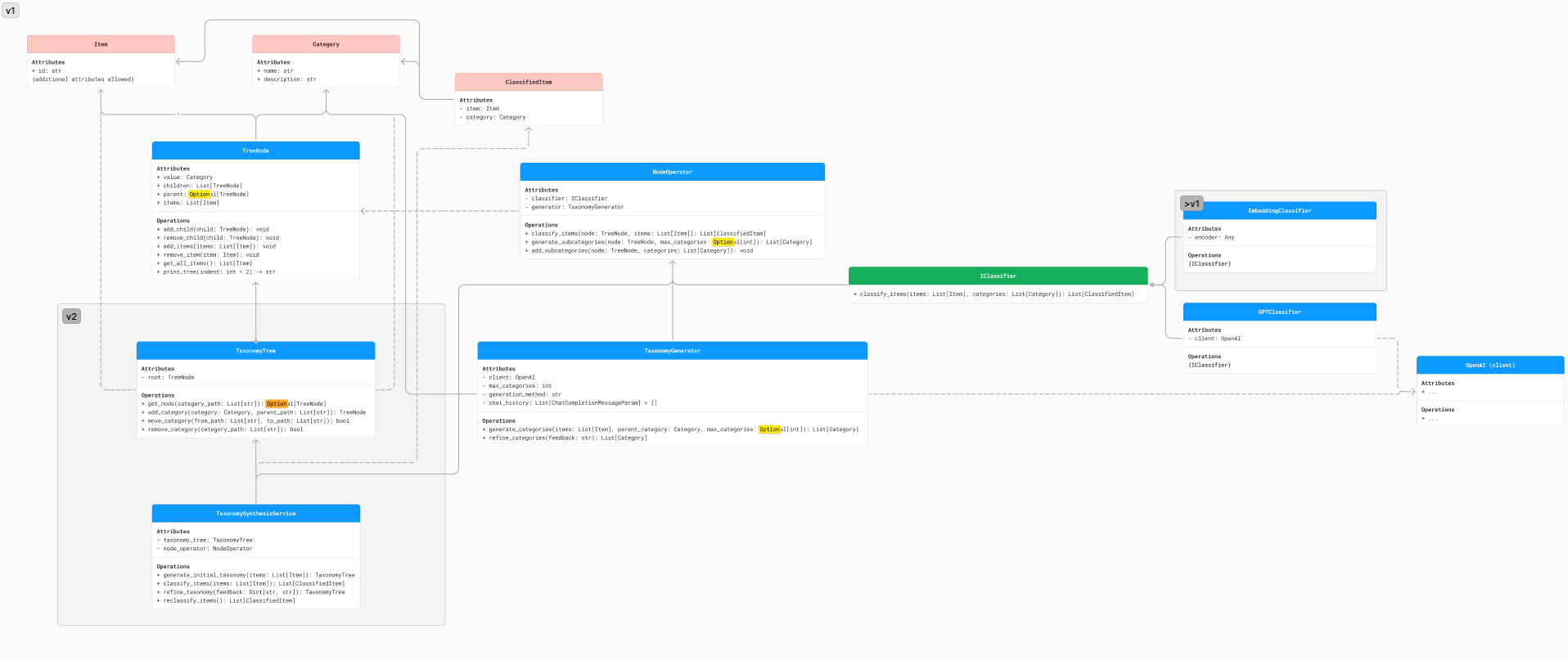
System Diagram 🎨
For a visual representation of the system architecture and its components, refer to the following diagram:
Contributing 🤗
Contributions are welcome! To get started, follow these steps to set up your development environment:
-
Clone the Repository:
git clone https://github.com/CakeCrusher/TaxonomySynthesis.git
cd taxonomy-synthesis
-
Install Poetry (if not already installed):
curl -sSL https://install.python-poetry.org | python3 -
-
Install Dependencies:
Use Poetry to install all the dependencies in a virtual environment:
poetry install -
Activate the Virtual Environment:
To activate the virtual environment created by Poetry:
poetry shell -
Run Pre-Commit Hooks:
To maintain code quality, please run pre-commit hooks before submitting any pull requests:
poetry run pre-commit install
poetry run pre-commit run --all-files
We encourage you to open issues for any bugs you encounter or features you'd like to see added. Pull requests are also highly appreciated! Let's work together to improve and expand this project.
1 maintainer

Metadata
1 maintainer
Release files for taxonomy-synthesis 0.1.9
For a detailed explanation of source distributions (sdists) and built distributions (wheels), please see the package formats documentation.
Source distribution (sdist)
| File | Size | Uploaded | Provenance | Actions |
|---|---|---|---|---|
| taxonomy_synthesis-0.1.9.tar.gz | 12.4 kB | Without provenance | Details for taxonomy_synthesis-0.1.9.tar.gz |
Built distribution (wheel)
| File | Interpreter | ABI | Platform | Actions Reset |
|---|---|---|---|---|
| taxonomy_synthesis-0.1.9-py3-none-any.whl | Python 3 | none | any | Details for taxonomy_synthesis-0.1.9-py3-none-any.whl |
Total release size: 26.0 kB
Release files / taxonomy_synthesis-0.1.9.tar.gz
| Download URL | taxonomy_synthesis-0.1.9.tar.gz |
|---|---|
| Size | 12.4 kB |
| Tags | Source |
|
SHA-256 checksum How to use checksums |
6abae374babbba384db0cd4b21fc4cd2cf46f6fc4af041e1910314e1e80d8e65
|
|
BLAKE2b-256 checksum How to use checksums |
247b1c4a6c4ca0eec75b7b5eff0e91612935c3bf5617432152ba96caa93729b6
|
| Upload date | |
|
Uploaded using Trusted Publishing? What is trusted publishing? |
No |
| Uploaded via |
poetry/1.8.4 CPython/3.9.20 Linux/6.5.0-1025-azure
|
Release files / taxonomy_synthesis-0.1.9-py3-none-any.whl
| Download URL | taxonomy_synthesis-0.1.9-py3-none-any.whl |
|---|---|
| Size | 13.5 kB |
| Tags | Python 3 |
|
SHA-256 checksum How to use checksums |
16be28436813ff76e3b69c55cf1439c8d0e19ecb2ec1c1f6094abe7bd5acf0a4
|
|
BLAKE2b-256 checksum How to use checksums |
fa96ac0cce6b7b48348f67ed04d5d6dc28d17d65335e44eae804059eb089d3a1
|
| Upload date | |
|
Uploaded using Trusted Publishing? What is trusted publishing? |
No |
| Uploaded via |
poetry/1.8.4 CPython/3.9.20 Linux/6.5.0-1025-azure
|
Security for taxonomy-synthesis 0.1.9
Provenance
Provenance describes where a file came from. On PyPI, provenance is shared via attestations, which provide a verifiable record of the build or publishing details. View details, limitations and caveats.
No provenance found
None of the files in this release were uploaded with provenance metadata.
A note on package security
PyPI is a repository for distributing packages, not a service for auditing them. While third-party security researchers and our staff do their best to detect and remove malicious packages, PyPI cannot guarantee the quality, security or suitability of any given package.
To learn more about protecting yourself from malicious actors, visit our package security documentation.














