
tcms-test-browser
Test Case, Test Plan, Test Run, and Consolidated Browser plugin for Kiwi TCMS with tree navigation, statistics dashboards, interactive chart drill-down, detail panels, and report exports (CSV, Excel, Word, PDF).
Features
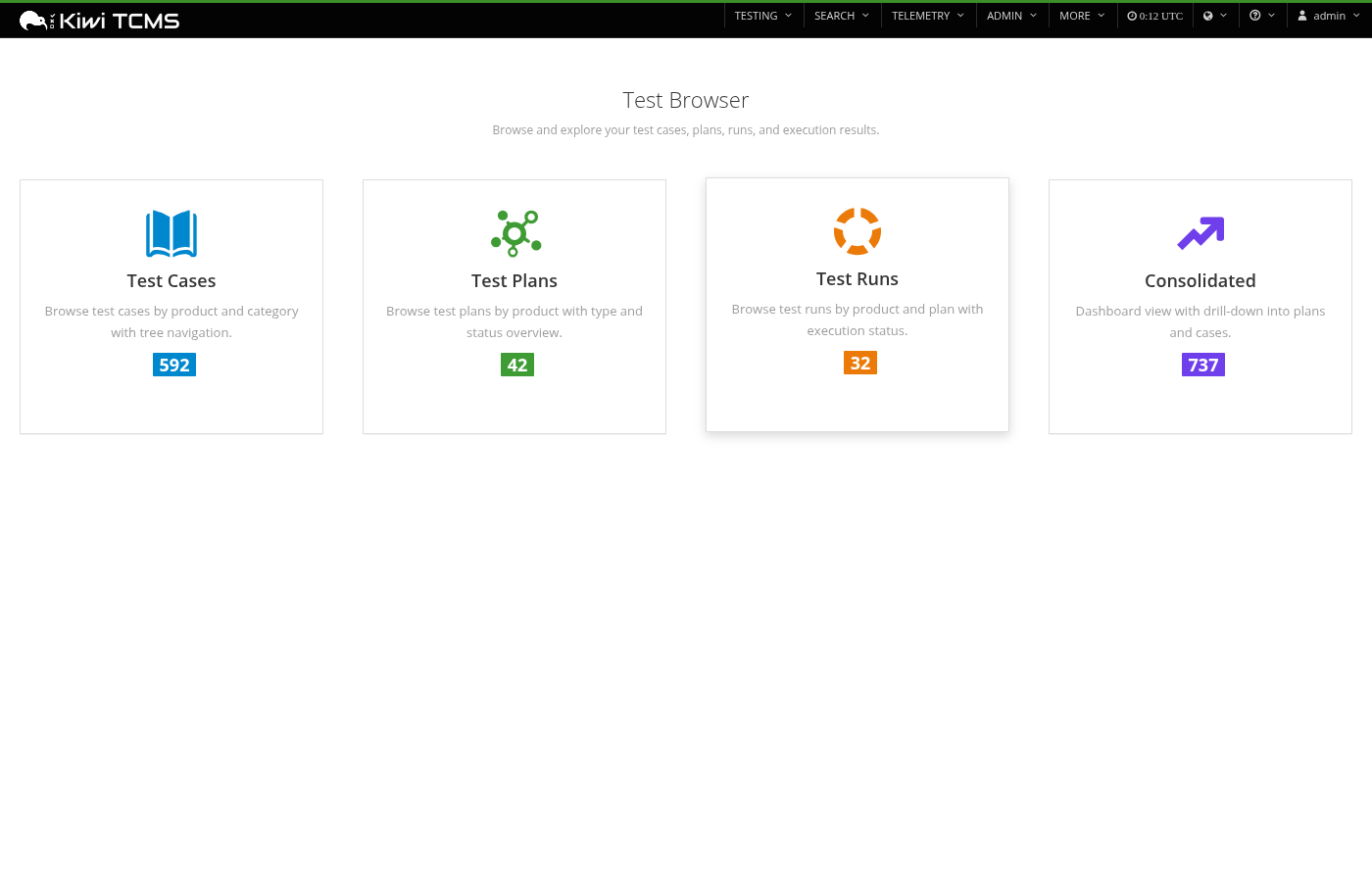
Landing Page
- Quick Navigation: Cards linking to each browser view with live totals
- At-a-Glance Counts: Total test cases, plans, runs, and executions
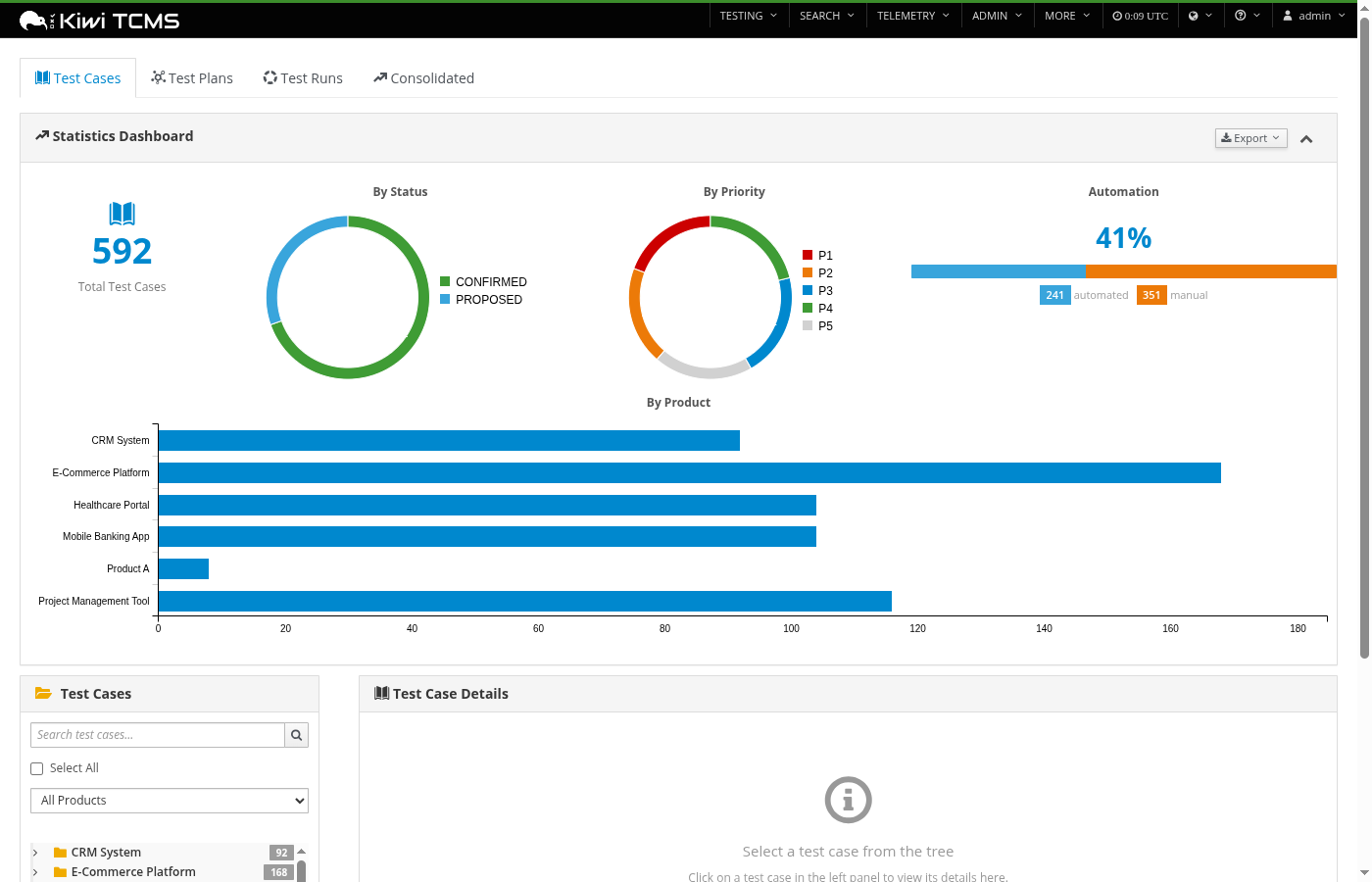
Test Case Browser
- Tree View: Product > Category > Test Case hierarchy with counts
- Statistics Dashboard: Total count, status/priority donuts, automation progress, per-product bar chart
- Chart Click-to-Filter: Click any chart segment to see filtered test cases in a modal
- Detail Panel: Steps, information, and related items tabs
- Related Items: Test plans displayed as sortable table (ID, Name)
- Quick Search: Live search with 300ms debounce
- Product Filter: Filter tree and stats by product
- Selection Export: Checkbox selection for filtered CSV/Excel/Word/PDF exports
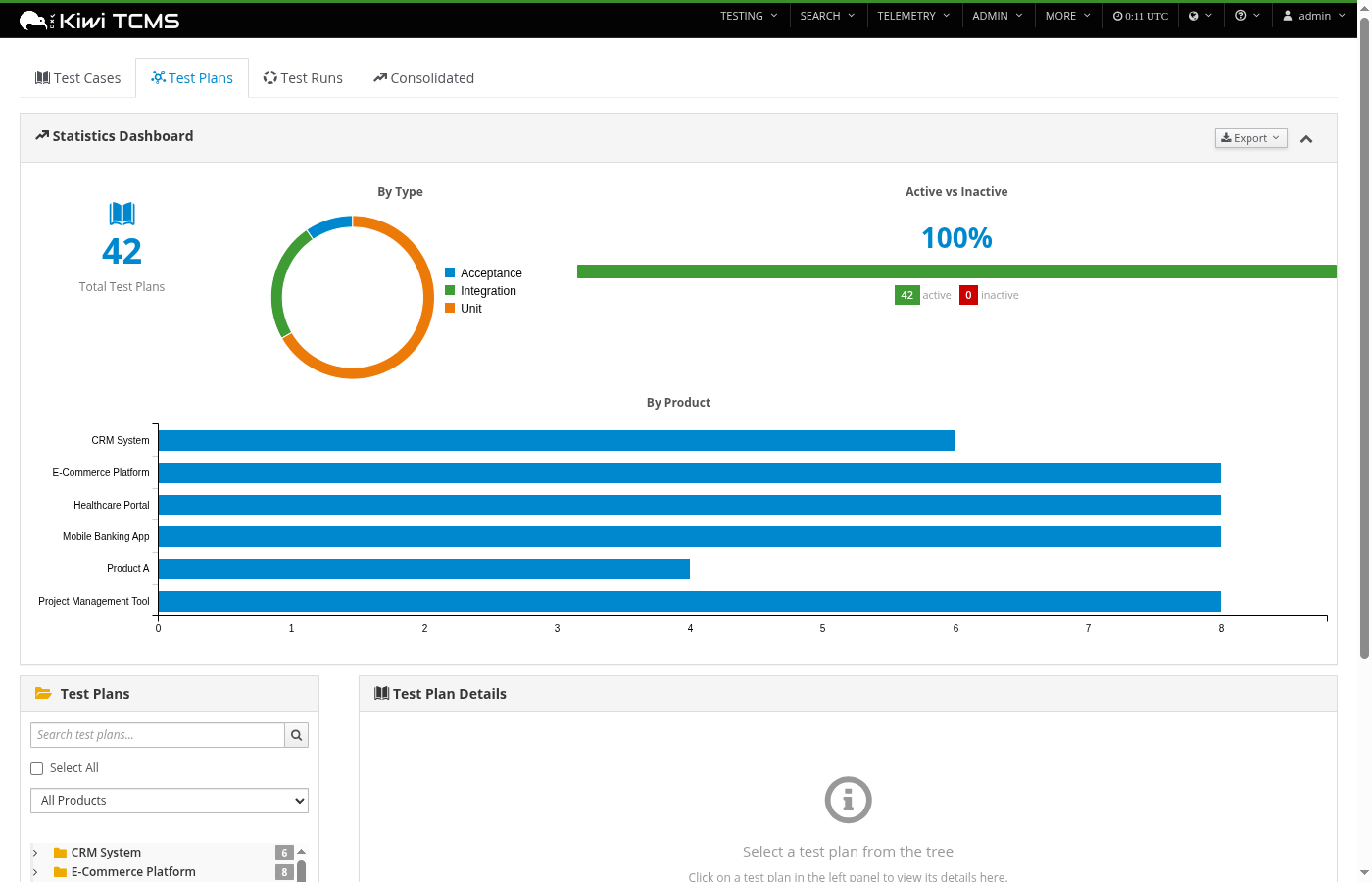
Test Plan Browser
- Tree View: Product > Test Plan hierarchy with counts
- Statistics Dashboard: Total count, by-type donut, active/inactive progress bar, per-product bar chart
- Chart Click-to-Filter: Click any chart segment to see filtered test plans in a modal
- Detail Panel: Description, information, and related tabs
- Related Items: Test cases and test runs displayed as tables (ID, Summary)
- Quick Search: Search plans by name
- Selection Export: Checkbox selection for filtered CSV/Excel/Word/PDF exports
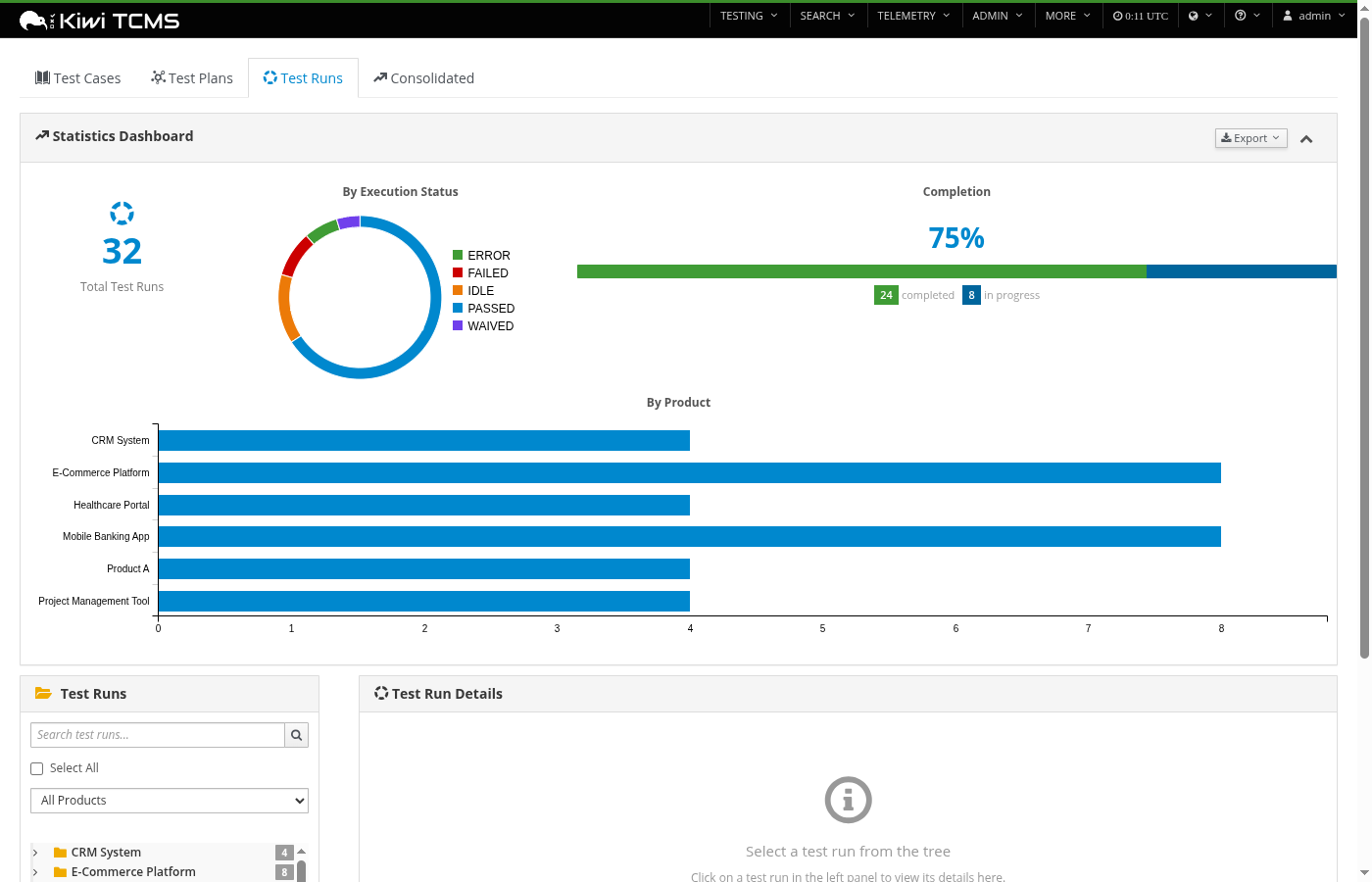
Test Run Browser
- Tree View: Product > Test Plan > Test Run hierarchy with counts
- Statistics Dashboard: Total count, execution status donut, completion progress bar, per-product bar chart
- Chart Click-to-Filter: Click any chart segment to see filtered test runs in a modal
- Detail Panel: Executions table (with colored status badges), information, and notes tabs
- Quick Search: Search runs by summary
- Selection Export: Checkbox selection for filtered CSV/Excel/Word/PDF exports
Consolidated Browser
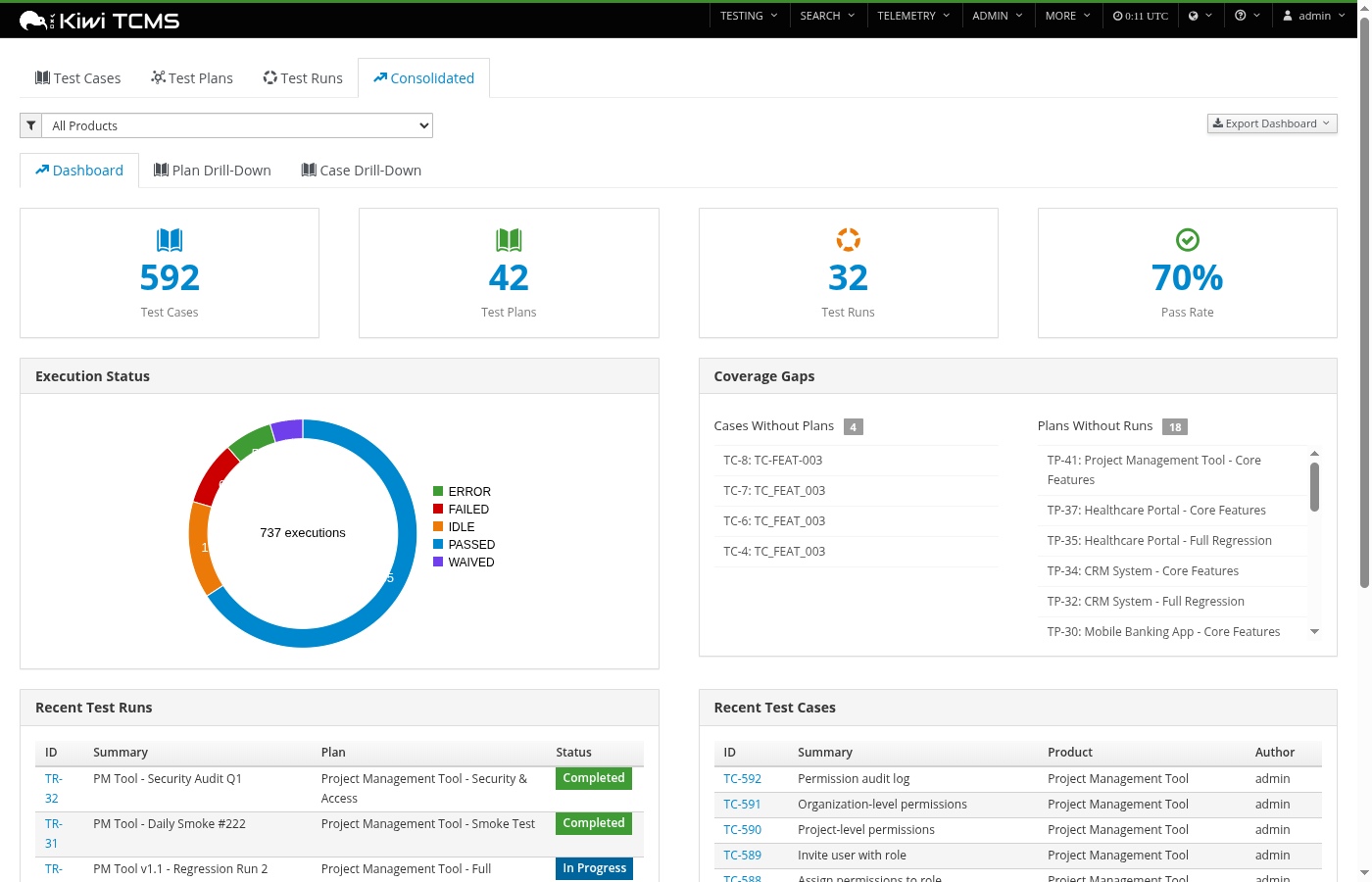
- Dashboard Tab: Totals (cases, plans, runs, pass rate), execution status donut, coverage gaps (cases without plans, plans without runs), recent activity tables
- Chart Click-to-Filter: Click execution status donut to see filtered executions in a modal
- Plan Drill-Down Tab: Search any plan, view runs summary table, cases-by-runs execution matrix with color-coded status cells, CSV/Excel/Word/PDF export
- Case Drill-Down Tab: Search any case, view associated plans as table, execution timeline across all runs, CSV/Excel/Word/PDF export
- Product Filter: Filter dashboard data by product
Common
- View Navigation Tabs: Switch between browsers without returning to the menu
- Responsive Design: Works on desktop and tablet
- PatternFly/Bootstrap 3: Consistent with Kiwi TCMS UI
- C3.js Charts: Interactive donut and bar charts with click-to-filter drill-down
- Selection Checkboxes: Select items in tree for filtered exports
- Rich Export Reports: CSV, Excel, Word, and PDF reports include pie charts (horizontal layout with legends below), styled tables with branded headers, and metadata with bullet-pointed test plan lists
Screenshots
Landing Page
Test Case Browser
Test Plan Browser
Test Run Browser
Consolidated Browser
Layout
+---------------------------------------------------------------+
| [Test Cases] [Test Plans] [Test Runs] [Consolidated]          |
+---------------------------------------------------------------+
| Statistics Dashboard (collapsible)                [Export v]   |
| +------+ +----------+ +----------+ +----------+ +-----------+ |
| |Total | | Status   | | Priority | |Automation| |By Product | |
| | 150  | | (donut)  | | (donut)  | |(progress)| |  (bar)    | |
| +------+ +----------+ +----------+ +----------+ +-----------+ |
+---------------------------------------------------------------+
| Tree Nav (left)          | Detail Panel (right)               |
| [Search]                 | TC-123: Login test                 |
| [Filter]                 | Status: Confirmed  Priority: P1    |
| v Product A (15)         |                                    |
|   v Login (5)            | [Steps] [Information] [Related]    |
|     [x] TC-123           |                                    |
|     [ ] TC-124           | 1. Open the login page             |
|   > Registration (3)     | 2. Enter valid username            |
| > Product B (23)         | 3. Click Submit                    |
|                          |                                    |
|                          | [View Full Details] [Edit]         |
+--------------------------+------------------------------------+
Installation
pip install tcms-test-browser
Or for development:
cd tcms-test-browser
pip install -e .
After installation, collect static files and rebuild Kiwi TCMS webpack bundle:
# Deploy plugin static files
cd /path/to/kiwi-tcms
./manage.py collectstatic --noinput

# Rebuild webpack bundle (from the Kiwi TCMS tcms/ directory)
cd tcms/
npx webpack
Note:
pip installwill attempt to runcollectstaticautomatically. If it fails (e.g. Django not configured), run the commands above manually.
This installs the required dependencies:
- openpyxl - Excel export
- python-docx - Word export
- reportlab - PDF export
- Pillow - Chart images in Word export
Usage
After installation:
- The plugin automatically registers via the
kiwitcms.pluginsentry point - Access the browsers from MORE > Test Browser in the navigation:
- Home -
/tcms_test_browser/(landing page) - Test Case Browser -
/tcms_test_browser/cases/ - Test Plan Browser -
/tcms_test_browser/plans/ - Test Run Browser -
/tcms_test_browser/runs/ - Consolidated Browser -
/tcms_test_browser/consolidated/
- Home -
- Use the tab bar at the top of any browser view to switch between views
API Endpoints
Test Case Browser
| Endpoint | Method | Description |
|---|---|---|
/tcms_test_browser/cases/ |
GET | Main browser page |
/tcms_test_browser/api/category/<id>/testcases/ |
GET | Test cases for a category |
/tcms_test_browser/api/testcase/<id>/ |
GET | Test case detail |
/tcms_test_browser/api/search/?q=<query> |
GET | Search test cases |
/tcms_test_browser/api/browse/ |
GET | Paginated browse (supports status, priority, product_name filters) |
/tcms_test_browser/api/statistics/ |
GET | Statistics for charts |
/tcms_test_browser/api/report/ |
GET | Download CSV report |
/tcms_test_browser/api/report/excel/ |
GET | Download Excel report |
/tcms_test_browser/api/report/docx/ |
GET | Download Word report |
/tcms_test_browser/api/report/pdf/ |
GET | Download PDF report |
Test Plan Browser
| Endpoint | Method | Description |
|---|---|---|
/tcms_test_browser/plans/ |
GET | Plan browser page |
/tcms_test_browser/plans/api/plan/<id>/ |
GET | Plan detail |
/tcms_test_browser/plans/api/search/?q=<query> |
GET | Search plans |
/tcms_test_browser/plans/api/browse/ |
GET | Paginated browse (supports type_name, product_name filters) |
/tcms_test_browser/plans/api/statistics/ |
GET | Plan statistics |
/tcms_test_browser/plans/api/report/ |
GET | Download CSV report |
/tcms_test_browser/plans/api/report/excel/ |
GET | Download Excel report |
/tcms_test_browser/plans/api/report/docx/ |
GET | Download Word report |
/tcms_test_browser/plans/api/report/pdf/ |
GET | Download PDF report |
Test Run Browser
| Endpoint | Method | Description |
|---|---|---|
/tcms_test_browser/runs/ |
GET | Run browser page |
/tcms_test_browser/runs/api/run/<id>/ |
GET | Run detail with executions |
/tcms_test_browser/runs/api/search/?q=<query> |
GET | Search runs |
/tcms_test_browser/runs/api/browse/ |
GET | Paginated browse (supports exec_status, product_name filters) |
/tcms_test_browser/runs/api/statistics/ |
GET | Run statistics |
/tcms_test_browser/runs/api/report/ |
GET | Download CSV report |
/tcms_test_browser/runs/api/report/excel/ |
GET | Download Excel report |
/tcms_test_browser/runs/api/report/docx/ |
GET | Download Word report |
/tcms_test_browser/runs/api/report/pdf/ |
GET | Download PDF report |
Consolidated Browser
| Endpoint | Method | Description |
|---|---|---|
/tcms_test_browser/consolidated/ |
GET | Consolidated browser page |
/tcms_test_browser/consolidated/api/dashboard/ |
GET | Dashboard data |
/tcms_test_browser/api/executions/browse/ |
GET | Paginated executions browse (supports exec_status filter) |
/tcms_test_browser/consolidated/api/plan/<id>/detail/ |
GET | Plan drill-down data |
/tcms_test_browser/consolidated/api/plan/<id>/report/ |
GET | Plan drill-down CSV |
/tcms_test_browser/consolidated/api/plan/<id>/report/excel/ |
GET | Plan drill-down Excel |
/tcms_test_browser/consolidated/api/plan/<id>/report/docx/ |
GET | Plan drill-down Word |
/tcms_test_browser/consolidated/api/plan/<id>/report/pdf/ |
GET | Plan drill-down PDF |
/tcms_test_browser/consolidated/api/case/<id>/detail/ |
GET | Case drill-down data |
/tcms_test_browser/consolidated/api/case/<id>/report/ |
GET | Case drill-down CSV |
/tcms_test_browser/consolidated/api/case/<id>/report/excel/ |
GET | Case drill-down Excel |
/tcms_test_browser/consolidated/api/case/<id>/report/docx/ |
GET | Case drill-down Word |
/tcms_test_browser/consolidated/api/case/<id>/report/pdf/ |
GET | Case drill-down PDF |
All endpoints require authentication. Browser list endpoints accept an optional ?product=<id> filter. Report endpoints accept ?ids=<comma-separated> for selection-based export. Browse endpoints support chart drill-down filters specific to their entity type.
Requirements
- Kiwi TCMS 12.0+
- Python 3.11+
License
MIT - see LICENSE for details.
1 maintainer

Metadata
1 maintainer
Release files for tcms-test-browser 1.2.0
For a detailed explanation of source distributions (sdists) and built distributions (wheels), please see the package formats documentation.
Source distribution (sdist)
| File | Size | Uploaded | |
|---|---|---|---|
| tcms_test_browser-1.2.0.tar.gz | 418.3 kB | Details |
Built distribution (wheel)
| File | Interpreter | ABI | Platform | Reset |
|---|---|---|---|---|
| tcms_test_browser-1.2.0-py3-none-any.whl | Python 3 | none | any | Details |
Total release size: 844.7 kB
Release files / tcms_test_browser-1.2.0.tar.gz
| Download URL | tcms_test_browser-1.2.0.tar.gz |
|---|---|
| Size | 418.3 kB |
| Tags | Source |
|
SHA-256 checksum How to use checksums |
f2eca264e76e7af3025a8072c8d0bed010fdb86ffb036a809b2bb9dcf52083d0
|
|
BLAKE2b-256 checksum How to use checksums |
6453150b849216ca4e17409f231a6f65768506ef5b12eed9b9f5d7aed47a4a68
|
| Upload date | |
|
Uploaded using Trusted Publishing? What is trusted publishing? |
No |
| Uploaded via |
twine/6.2.0 CPython/3.11.14
|
Release files / tcms_test_browser-1.2.0-py3-none-any.whl
| Download URL | tcms_test_browser-1.2.0-py3-none-any.whl |
|---|---|
| Size | 426.4 kB |
| Tags | Python 3 |
|
SHA-256 checksum How to use checksums |
5fd1ddc06da278d1bbe92f1740a85d2913a242736cd8443f5fc9ea1bb672054f
|
|
BLAKE2b-256 checksum How to use checksums |
921043f8eb770d5a72d2143aaede3509793139c0cfc6fbdcfce522dfb3c8c4d0
|
| Upload date | |
|
Uploaded using Trusted Publishing? What is trusted publishing? |
No |
| Uploaded via |
twine/6.2.0 CPython/3.11.14
|














