
Summary
tcolopy is a Python library to apply true color for terminal text.







Installation
Installation: pip
pip install tcolorpy
Installation: conda
conda install -c conda-forge tcolorpy
Usage
Library usage
- Sample Code:
from tcolorpy import tcolor print(tcolor("tcolopy example", color="#ee1177", styles=["bold", "italic", "underline"]))- Output:

You can set the following tcolor arguments:
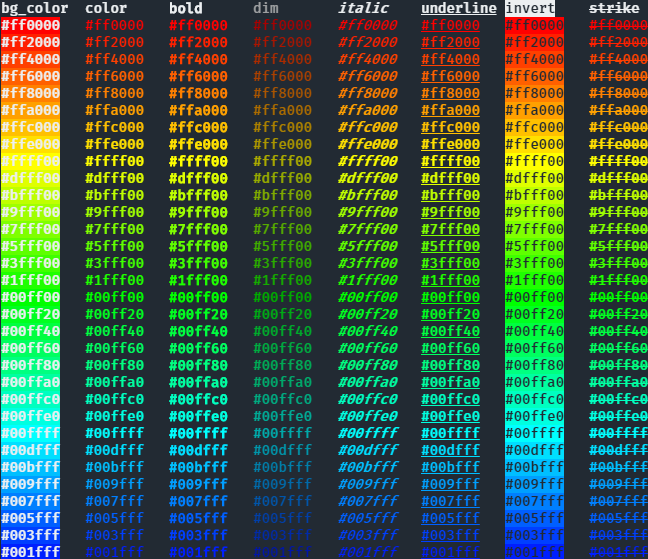
- color/bg_color
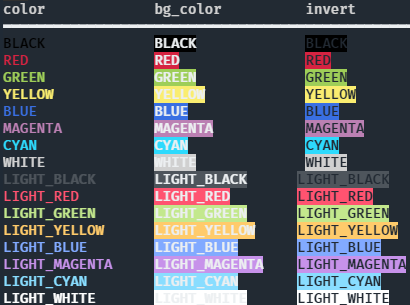
color names ("red", "green", etc.) or color code ("#RRGGBB")
- styles
"bold", "italic", etc.
Other examples
Apply true color and styles to text:
You can also specify colors by name:
CLI usage
tcolorpy can be used via CLI:
$ python3 -m tcolorpy "tcolopy example" -c "#ee1177" -s bold,italic,underline
Command help
usage: __main__.py [-h] [-c COLOR] [-b BG_COLOR] [-s STYLES] [--encode ENCODE] string

positional arguments:
  string                string to apply styles.

options:
  -h, --help            show this help message and exit
  -c COLOR, --color COLOR
                        specify a color code (#XXXXXX) or a name. valid names are: black, red, green, yellow, blue, magenta, cyan, white, lightblack, lightred, lightgreen, lightyellow, lightblue, lightmagenta, lightcyan, lightwhite
  -b BG_COLOR, --bg-color BG_COLOR
                        specify a background color code (#XXXXXX) or a name. valid names are: black, red, green, yellow, blue, magenta, cyan, white, lightblack, lightred, lightgreen, lightyellow, lightblue, lightmagenta, lightcyan, lightwhite
  -s STYLES, --styles STYLES
                        specify a comma-separated style. valid values are: bold, dim, italic, underline, blink, invert, strike
  --encode ENCODE       output a text encoded with the specified encoding
Dependencies
Python 3.9+ no external dependencies.
1 maintainer

Metadata
1 maintainer
Release files for tcolorpy 0.1.7
For a detailed explanation of source distributions (sdists) and built distributions (wheels), please see the package formats documentation.
Source distribution (sdist)
| File | Size | Uploaded | |
|---|---|---|---|
| tcolorpy-0.1.7.tar.gz | 299.4 kB | Details |
Built distribution (wheel)
| File | Interpreter | ABI | Platform | Reset |
|---|---|---|---|---|
| tcolorpy-0.1.7-py3-none-any.whl | Python 3 | none | any | Details |
Total release size: 307.5 kB
Release files / tcolorpy-0.1.7.tar.gz
| Download URL | tcolorpy-0.1.7.tar.gz |
|---|---|
| Size | 299.4 kB |
| Tags | Source |
|
SHA-256 checksum How to use checksums |
0fbf6bf238890bbc2e32662aa25736769a29bf6d880328f310c910a327632614
|
|
BLAKE2b-256 checksum How to use checksums |
80cc44f2d81d8f9093aad81c3467a5bf5718d2b5f786e887b6e4adcfc17ec6b9
|
| Upload date | |
|
Uploaded using Trusted Publishing? What is trusted publishing? |
Yes |
| Uploaded via |
twine/6.0.1 CPython/3.12.8
|
Provenance
Provenance describes where a file came from. On PyPI, provenance is shared via attestations, which provide a verifiable record of the build or publishing details. View details, limitations and caveats.


PyPI Publish Attestation
PyPI verified that this artifact, at this checksum, originated from the publisher listed below.
Signed by GitHub Actions, verified by PyPI on Dec 29, 2024.
Transparency logRelease files / tcolorpy-0.1.7-py3-none-any.whl
| Download URL | tcolorpy-0.1.7-py3-none-any.whl |
|---|---|
| Size | 8.1 kB |
| Tags | Python 3 |
|
SHA-256 checksum How to use checksums |
26a59d52027e175a37e0aba72efc99dda43f074db71f55b316d3de37d3251378
|
|
BLAKE2b-256 checksum How to use checksums |
05a2ed023f2edd1e011b4d99b6727bce8253842d66c3fbf9ed0a26fc09a92571
|
| Upload date | |
|
Uploaded using Trusted Publishing? What is trusted publishing? |
Yes |
| Uploaded via |
twine/6.0.1 CPython/3.12.8
|
Provenance
Provenance describes where a file came from. On PyPI, provenance is shared via attestations, which provide a verifiable record of the build or publishing details. View details, limitations and caveats.
PyPI Publish Attestation
PyPI verified that this artifact, at this checksum, originated from the publisher listed below.
Signed by GitHub Actions, verified by PyPI on Dec 29, 2024.
Transparency log













