
No project description provided

Project description
TCP Traffic Generator
A simple Python script with no dependencies for generating quick TCP traffic to test a port on an endpoint.
Prerequisites
- Install Python.
- Ensure Python is in your
PATH. In Windows, this option may need to be selected during the installation process. - In Windows, ensure that
.pyfiles are associated with Python. This option may need to be selected during the installation process.
Installation
From PyPI
It is recommended to use pipx for user-installed non-system Python applications:
pipx install tcpgen
If you want to install the program globally (not recommended), you can simply use pip:
pip install tcpgen
Manual Install
To install the script manually from Github, follow these instructions:
Windows
- Create the
%USERPROFILE%\.local\and%USERPROFILE%\.local\bin\directories - Add
%USERPROFILE%\.local\binto yourPATHand.PYto yourPATHTEXT- Open
File Explorer> Right clickThis PC> ClickProperties> ClickAdvanced System Settings> ClickEnvironment Variables - Select
Pathfor your user (not your system), clickEdit, and add%USERPROFILE%\.local\bin - Select
PATHTEXTfor your system, clickEdit, and add.PYto the end of the list
- Open
- Move the
tcpgen/main.pyfile to the%USERPROFILE%\.local\bin\directory and rename it totcpgen.py - Add the
#!/usr/bin/env pythonshebang to the top oftcpgen.pyfile - Open a new CMD instance and run
tcpgen
Linux/MacOS
- Move the
tcpgen/main.pyfile to~/.local/bin/with the nametcpgen(extension not necessary) - Some distros use the
pythoncommand, and others usepython3. Add the#!/usr/bin/env pythonshebang to the top of thetcpgenfile. If it doesn't work, change it to#!/usr/bin/env python3 chmod u+x ~/.local/bin/tcpgento make the file executable.- Open a new terminal session and run
tcpgen
Note: The requirements.txt file contains dev dependencies only. You do not need to pip install the requirements.
Usage
No CLI Args
You can use the script without any arguments passed. For example, if using Windows, you might do this:
>tcpgen
Hostname/IP: localhost
Resolved localhost to 127.0.0.1
Ports (separated by space, e.g. 22 80 443): 22 80 443 3389
[output omitted]
Hostname/IP:
Exiting...

>
This will prompt you for a host and a list of ports until Ctrl-C is detected.
One CLI Arg
If there is only one argument, the script expects a hostname or IP address. For example:
>tcpgen localhost
Resolved localhost to 127.0.0.1
[output omitted]

>
By default, port 22 will be used. If you installed manually, you can change this by setting the DEFAULT_PORTS variable. For example:
DEFAULT_PORTS = [22, 80, 443]
More Than One CLI Arg
If there are multiple arguments, the first must be the hostname or IP address. The rest are expected to be ports. For example:
>tcpgen localhost 22 80 443 3389
Resolved localhost to 127.0.0.1
[output omitted]

>
Example
Here's what it looks like:
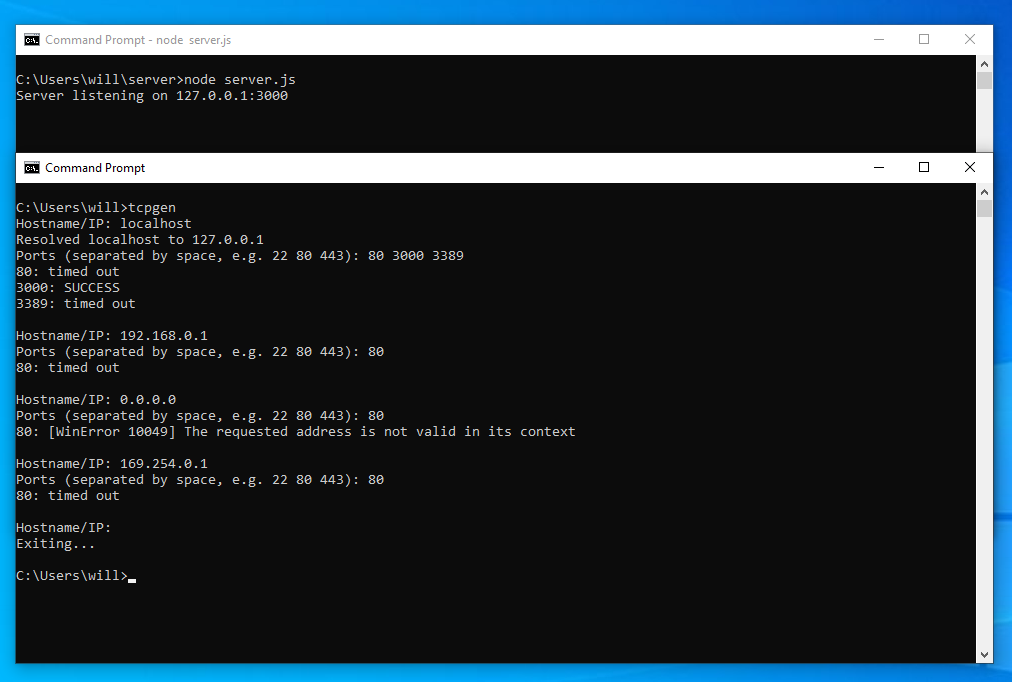
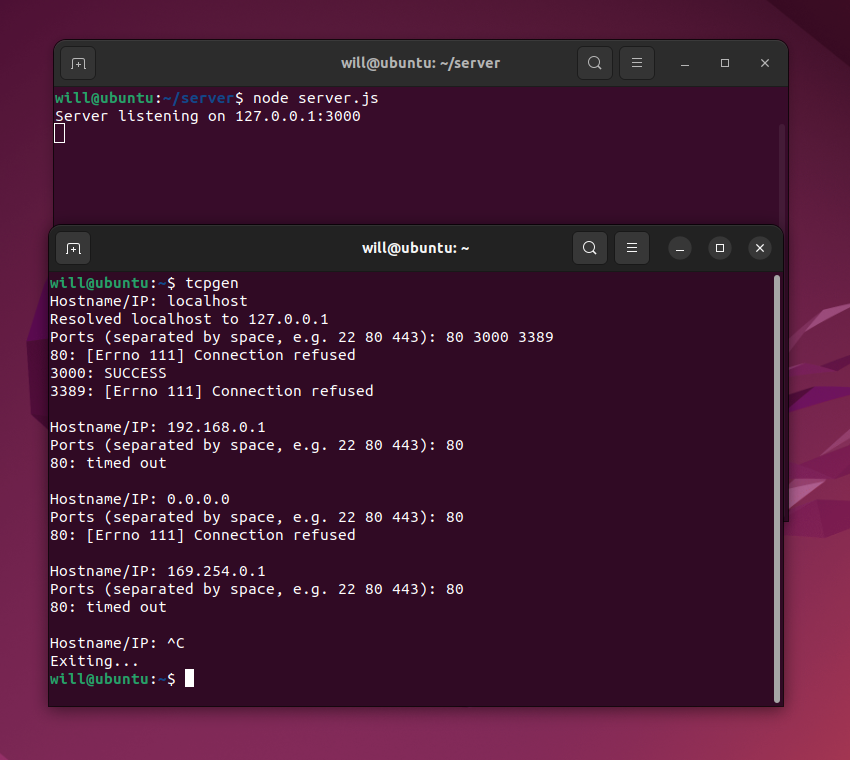
Note that the error messages in Windows are different than Linux. In Windows, if the traffic reaches the destination but the traffic is rejected, the traffic will appear to be timed out or dropped (even with Defender Firewall turned off). Ubuntu, however, more accurately displays the error message "Connection refused". This is not a bug, but rather a difference in how the operating systems display rejected traffic. This isn't to say that Ubuntu's error messages are necessarily better, however.
Release history Release notifications | RSS feed


Download files
Download the file for your platform. If you're not sure which to choose, learn more about installing packages.
Source Distribution
Built Distribution
Filter files by name, interpreter, ABI, and platform.
If you're not sure about the file name format, learn more about wheel file names.
Copy a direct link to the current filters
File details
Details for the file tcpgen-0.1.0.tar.gz.
File metadata
- Download URL: tcpgen-0.1.0.tar.gz
- Upload date:
- Size: 4.2 kB
- Tags: Source
- Uploaded using Trusted Publishing? No
- Uploaded via: twine/4.0.2 CPython/3.11.6
File hashes
| Algorithm | Hash digest | |
|---|---|---|
| SHA256 |
0d30eb45e30688fd635e042a881a99f15ce02551f3c50e10429586250c8944bc
|
|
| MD5 |
619a629b3df08ad14588d2662d4b0e88
|
|
| BLAKE2b-256 |
74490365a579871b2c1222684b86e93fe934b9a3b9165c0290baf7ba3d05ea4c
|
File details
Details for the file tcpgen-0.1.0-py3-none-any.whl.
File metadata
- Download URL: tcpgen-0.1.0-py3-none-any.whl
- Upload date:
- Size: 4.8 kB
- Tags: Python 3
- Uploaded using Trusted Publishing? No
- Uploaded via: twine/4.0.2 CPython/3.11.6
File hashes
| Algorithm | Hash digest | |
|---|---|---|
| SHA256 |
bd4e149e192b991e79c62ef48bf91e6a02254ee48788b3a41bfa72d83661c07f
|
|
| MD5 |
125b2aba724f74a3517111f63a830376
|
|
| BLAKE2b-256 |
c2b7165302eb6cb330f42c0db2774ed42804c015f865b8975f8f3e1398de9341
|






