
3D simulation environment

Project description
ThreeDWorld (TDW)
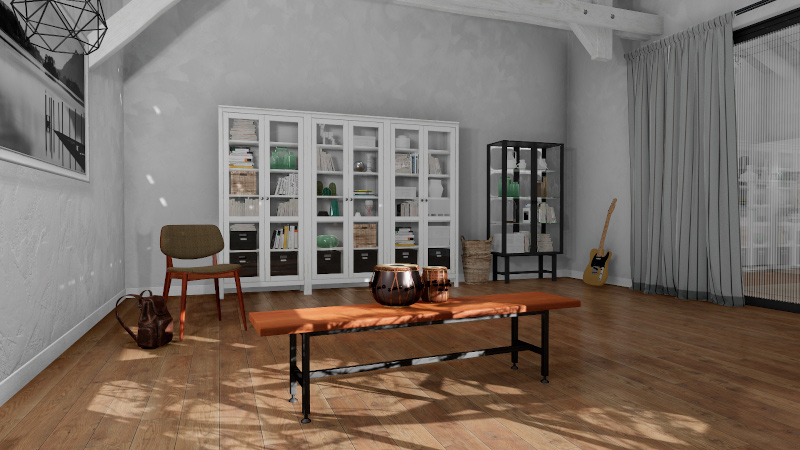
ThreeDWorld (TDW) is a platform for interactive multi-modal physical simulation. With TDW, users can simulate high-fidelity sensory data and physical interactions between mobile agents and objects in a wide variety of rich 3D environments.
General guide to TDW
Setup
Core Concepts
- The controller
- Auto-launching the TDW build
- Commands
- Design philosophy of TDW
- Scenes
- Avatars and cameras
- Add-ons and the
ThirdPersonCamera - Objects
- Output data
- Images
Troubleshooting
Tutorials
1. Scene Setup
1.1 Scene Setup (High-Level APIs)
- Overview
- Procedural generation (the
ProcGenKitchenadd-on) - Regions, interior regions, and rooms
- Procedural object arrangements
- Scripted object placement (floorplan layouts)
- Reset a scene
High-level APs: Floorplan and ProcGenKitchen
1.2 Scene Setup (Low-Level APIs)
- Overview
- Units and data formats
Boundsoutput data- Visual materials, textures, and colors
- ProcGenRoom
2. 3D Models
2.1 Other model libraries
2.2 Custom models
2.3 Composite (articulated) objects
- Overview
- Composite objects in TDW
- Create a composite object from a prefab
- Create a composite object from a .urdf file
3. Read/Write to Disk
- Overview
- The
LoggerandLogPlaybackadd-ons - The
JsonWriteradd-on - The
OutputDataWriteradd-on - Create a custom data writer
- Import .sdf and .lisdf files
- Images (Cross-referenced with "Core Concepts")
- Audio (Cross-referenced with "Audio")
- Video (Cross-referenced with "Video Recording")
4. Semantic States
- Overview
- Line of sight (
Raycastoutput data) - Proximity to region (
Overlapoutput data) - Proximity to other objects (the
TriggerCollisionManageradd-on) - Containment (the
ContainerManageradd-on) - Open and closed states
- Grasped objects
5. Visual Perception
- Overview
- Instance ID segmentation colors (
_idpass) - Semantic category segmentation colors (
_categorypass) - Depth maps (
_depthand_depth_simplepasses) - Motion perception (
_flowpass) - Other image passes (
_mask,_normals, and_albedopasses) Occlusionoutput data
6. Camera Controls
7. Photorealism
- Overview
- Lighting (HDRI skyboxes)
- Post-processing
- Interior lighting (the
InteriorSceneLightingadd-on) - Depth of field
High-level API: tdw_image_dataset
8. Physics
8.1 Physics (PhysX)
- PhysX
- Object physics parameters
Rigidbodiesoutput dataCollisionoutput data- Apply forces to objects
- Skip physics frames
- Disable physics
High-level API: tdw_physics
8.2 Physics (Obi)
- Obi
- Fluids
- Cloth
ObiParticlesoutput data- Colliders and collision materials
- Solvers
- Obi and robots
- Obi and Flex
8.3 Physics (Flex)
- Flex
- Solid and soft actors
- Cloth actors
- Fluid and source actors
- Move, rotate, and scale Flex objects
FlexParticlesoutput data- Apply forces to Flex objects
- Reset a Flex scene
- Other Flex commands
High-level API: tdw_physics
9. Audio
- Overview
- Initialize audio and play .wav files
- Resonance Audio
PyImpact(dynamic impact sounds)- Recording audio
PyImpact(advanced API)- Audio perception
10. Video Recording
11. Agents
11.1 Robots
- Overview
- The
Robotadd-on - Robot arm add-ons
- Robot collision detection
- Select a robot
- Add your own robots to TDW
- Robotics API (low-level)
- Add a camera to a robot
11.2 Magnebots
11.3 Replicants
- Overview
- Actions
- Output data
- Collision detection
- Movement
- Animations
- Arm articulation
- Grasp and drop objects
- Head rotation
- Navigation
- Custom actions
- Multiple Replicants
- Reset
11.4 Virtual Reality (VR)
11.5 Keyboard and Mouse
11.6 Embodied avatars
12. Multi-agent simulations
13. Navigation
14. Non-physics objects
14.1 Non-physics humanoids
14.2 Misc. non-physics objects
15. Misc. remote server topics
16. Misc. other topics
API Documentation
Command API
tdw module API
tdw
- AudioConstants
- AudioUtils
- CardinalDirection
- Controller
- IntPair
- OrdinalDirection
- QuaternionUtils
- RemoteBuildLauncher
- TDWUtils
tdw.add_ons
- AddOn
- AudioInitializer
- AudioInitializerBase
- AvatarBody
- Benchmark
- CinematicCamera
- CollisionManager
- CompositeObjectManager
- ContainerManager
- EmbodiedAvatar
- FirstPersonAvatar
- Floorplan
- ImageCapture
- InteriorSceneLighting
- JsonWriter
- Keyboard
- LisdfReader
- Logger
- LogPlayback
- ModelVerifier
- Mouse
- NavMesh
- Obi
- ObjectManager
- OccupancyMap
- OculusTouch
- OutputDataWriter
- PhysicsAudioRecorder
- ProcGenKitchen
- PyImpact
- Replicant
- ResonanceAudioInitializer
- Robot
- RobotArm
- RobotBase
- StepPhysics
- ThirdPersonCamera
- ThirdPersonCameraBase
- TriggerCollisionManager
- UI
- VR
- Writer
tdw.asset_bundle_creator
- AnimationCreator
- AssetBundleCreator
- CompositeObjectCreator
- HumanoidCreator
- HumanoidCreatorBase
- ModelCreator
- RobotCreator
tdw.collision_data
tdw.container_data
tdw.flex_data
tdw.librarian
- HdriSkyboxLibrarian
- HumanoidAnimationLibrarian
- HumanoidLibrarian
- MaterialLibrarian
- ModelLibrarian
- RobotLibrarian
- SceneLibrarian
tdw.lisdf_data
tdw.model_tests
tdw.obi_data
tdw.obi_data.cloth
tdw.obi_data.collision_materials
tdw.obi_data.fluids
- CubeEmitter
- DiskEmitter
- EdgeEmitter
- EmitterSamplingMethod
- EmitterShape
- Fluid
- FluidBase
- GranularFluid
- SphereEmitter
tdw.object_data
tdw.object_data.composite_object
tdw.object_data.composite_object.sub_object
- HingeDynamic
- HingeStatic
- HingeStaticBase
- LightDynamic
- LightStatic
- MotorStatic
- NonMachineStatic
- PrismaticJointStatic
- SpringStatic
- SubObjectDynamic
- SubObjectStatic
tdw.physics_audio
- AudioMaterial
- Base64Sound
- CollisionAudioEvent
- CollisionAudioInfo
- CollisionAudioType
- Modes
- ObjectAudioStatic
- ScrapeMaterial
- ScrapeModel
- ScrapeSubObject
tdw.proc_gen.arrangements
- Arrangement
- ArrangementAlongWall
- ArrangementWithRootObject
- Basket
- CupAndCoaster
- Dishwasher
- KitchenCabinet
- KitchenCounter
- KitchenCounterTop
- KitchenTable
- Microwave
- Painting
- Plate
- Radiator
- Refrigerator
- Shelf
- SideTable
- Sink
- StackOfPlates
- Stool
- Stove
- Suitcase
- TableAndChairs
- TableSetting
- Void
- WallCabinet
tdw.proc_gen.arrangements.cabinetry
tdw.release
tdw.replicant
- ActionStatus
- Arm
- CollisionDetection
- ImageFrequency
- ReplicantBodyPart
- ReplicantDynamic
- ReplicantStatic
tdw.replicant.actions
- Action
- Animate
- ArmMotion
- DoNothing
- Drop
- Grasp
- HeadMotion
- IkMotion
- LookAt
- MoveBy
- MoveTo
- ReachFor
- ResetArm
- ResetHead
- RotateHead
- TurnBy
- TurnTo
tdw.robot_data
tdw.scene_data
tdw.vr_data
Performance benchmarks
Release history Release notifications | RSS feed


Download files
Download the file for your platform. If you're not sure which to choose, learn more about installing packages.
Source Distribution
File details
Details for the file tdw-1.11.6.0.tar.gz.
File metadata
- Download URL: tdw-1.11.6.0.tar.gz
- Upload date:
- Size: 21.3 MB
- Tags: Source
- Uploaded using Trusted Publishing? No
- Uploaded via: twine/3.1.1 pkginfo/1.5.0.1 requests/2.26.0 setuptools/58.1.0 requests-toolbelt/0.9.1 tqdm/4.48.0 CPython/3.7.5
File hashes
| Algorithm | Hash digest | |
|---|---|---|
| SHA256 |
b4b55904baf359009f1b9dc5f9255f6215efcc63833d586cee8da09a0dccecfe
|
|
| MD5 |
62574e0f2ab7ea5b28d83a608774d4dc
|
|
| BLAKE2b-256 |
6c90ccfce3abb99d05861ae7be762e9fbd8c8b2a7abc90a95b404c5b3cc5657d
|






