
Encrypted audio tunnel for secure chat, file transfer and remote shell on Linux.

Project description
tea2adt
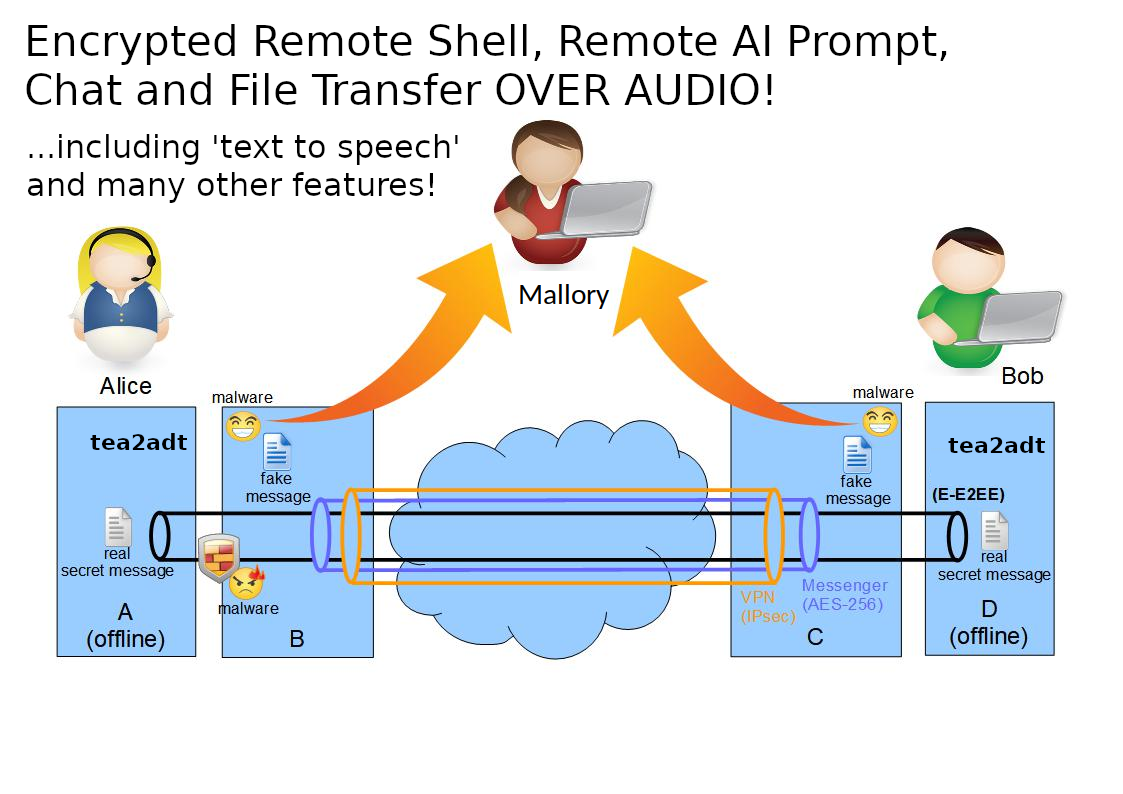
tea2adt is a command-line utility for Chat, Remote Shell and File Transfer, that reads and writes encrypted data across peer-to-peer or broadcast audio connections, using minimodem and gpg.
It is a powerful tool that can be combined with any audio infrastructure (like PSTN, cellular network, internet, radio, walkie-talkies) to provide a secure communication channel through an audio tunnel.
The audio interfaces behave like data-diodes, each allowing unidirectional data transmission only, thus preventing data-leaks and malware-injection.
This enables an "enhanced"-end-to-end encryption (E-E2EE) which notably increases security and privacy, especially when the end devices are completely offline (air-gapped-system), thus providing an effective barrier against "legal or illegal" client-side-scanning!
See also https://www.codeproject.com/Articles/5295970/Audio-Chat-for-Quite-Good-Privacy-AC4QGP
Installation
pip install tea2adt
or with git:
  git clone https://github.com/ClarkFieseln/tea2adt.git

  cd tea2adt_source

  chmod +x tea2adt

  chmod +x *.sh
during first execution you will be asked to install dependencies: minimodem, gpg, bc, tmux, ...
but you can also install them yourself with:
  sudo apt install minimodem
  sudo apt install gpg
  sudo apt install bc
  sudo apt install tmux
  ...
How to use (pip installation)
Chat/Messenger
tea2adt -c
enter and confirm password
On the other device a chat or a remote shell can be started.
Remote Shell
tea2adt -s
then enter and confirm password
On the other device a chat shall be started to command the remote shell.
Note that this is technically a "reverse shell" which gives access to your system!
File Transfer
tea2adt -f
enter and confirm password
On the other device a file transfer shall be started.
Probe
To check connectivity and adjust volumes if required.
tea2adt -p
In addition, a separate terminal will be opened to read unencrypted probe messages being sent by the other side.
Configuration
Adapt the configuration as required using the 'terminal GUI' with:
tea2adt -g
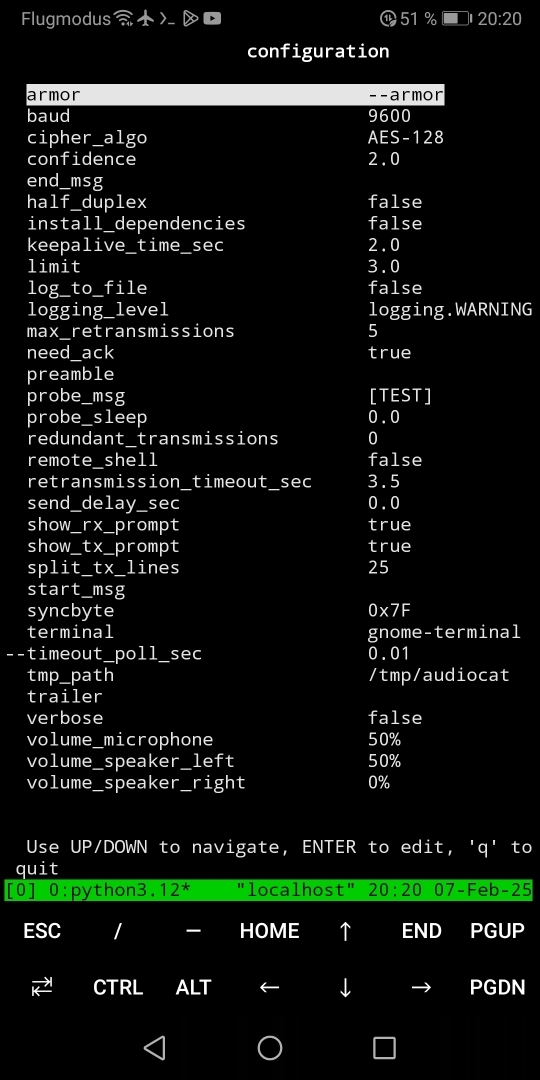
Alternatively, you may change the configuration by editing the files in the cfg folder directly. The 'Location' can be found with:
tea2adt -d
The most important settings are:
- baud
- keepalive_time_sec
- retransmission_timeout_sec
- split_tx_lines
- volume_microphone
- volume_speaker_left
- volume_speaker_right
How to use (git installation)
When installed with git, tea2adt may be called with:
  python3 tea2adt.py -c
  # or
  ./tea2adt -c
This is an example to start a chat, but this is the same for any other option.
For more information check the documentation.
Features
on top of the audio modem provided by minimodem and encryption provided by GPG, tea2adt offers a reliable transport layer and many other features:
-
modes: chat, remote-shell, file transfer (future: sniffer)
-
text-to-speech (TTS): synthesize speech from the text received in the chat
-
full-duplex communication
-
retransmit messages automatically after communication errors
-
split big messages into smaller data chunks in order to increase the probability of reception, thus reducing retransmissions
-
[keepalive] messages
-
redundant transmission of "data-messages"
-
composition of piped commands hidden to the user
-
tmp folder located in a configurable path beneath $HOME, independent of the current path.
-
probe, to check volume on receiver and adjust manually if needed
(very high and very low volumes may produce signal distortions)
-
"braodcast" transmissions also possible, e.g. when ACKs are deactivated
use-case: walkie-talkie, Radio station, ...
-
several configuration options: preamble, trailer, delays, cipher algorithm, confidence, log to file, verbose, etc.
Possible Abuses
please don't do the following if you are not allowed (it might be illegal!):
-
exfiltrate data over the air or cable to a nearby or remote computer
-
remote control over the air or cable from a nearby or remote computer
-
exfiltrate data from a computer evading classical auditing
(be aware that if you do this on your employer's computer you might be infringing the law!)
-
use the tool as a "side-channel" for covert communication e.g. to spread or inject malware,
even worse when combined with steganography (e.g. low volumes, data hidden in noise)
Typical Configuration
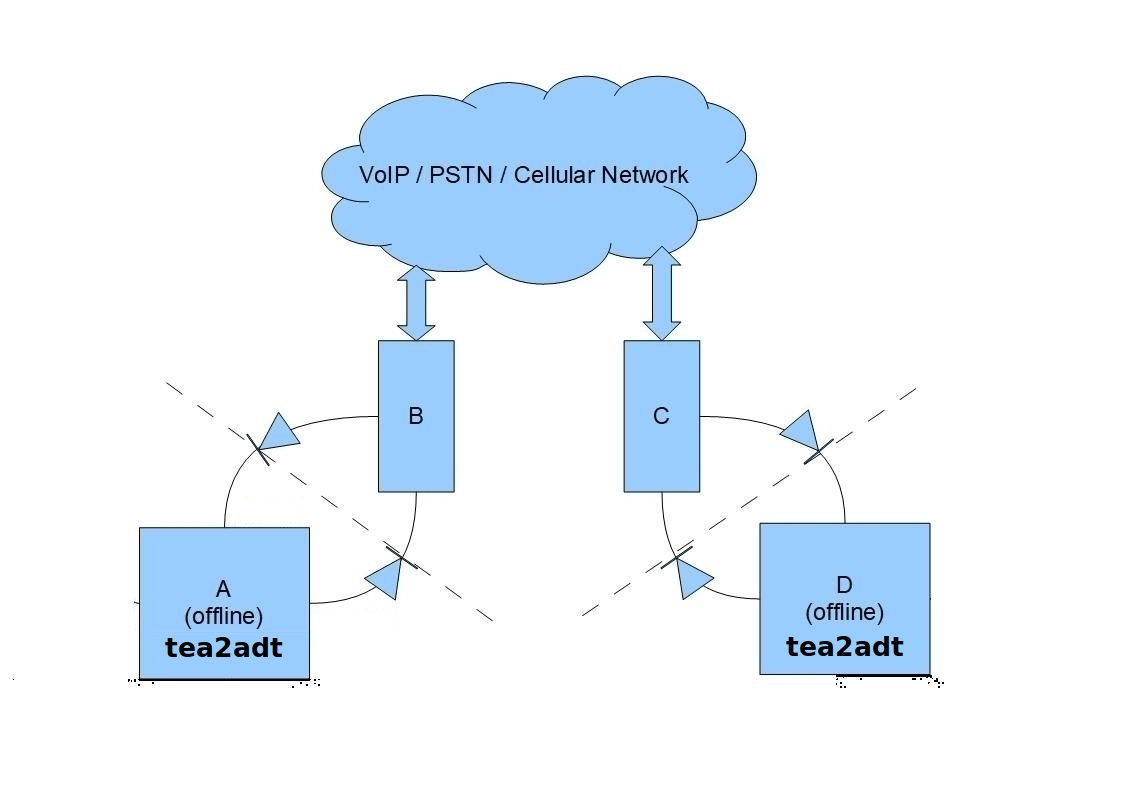
D: tea2adt in offline PC (Bob)
B, C: smartphone with call session (mobile, messenger app, etc.)
diodes: audio connections (sink/speaker -> source/microphone)
Communication in Linux over Linphone
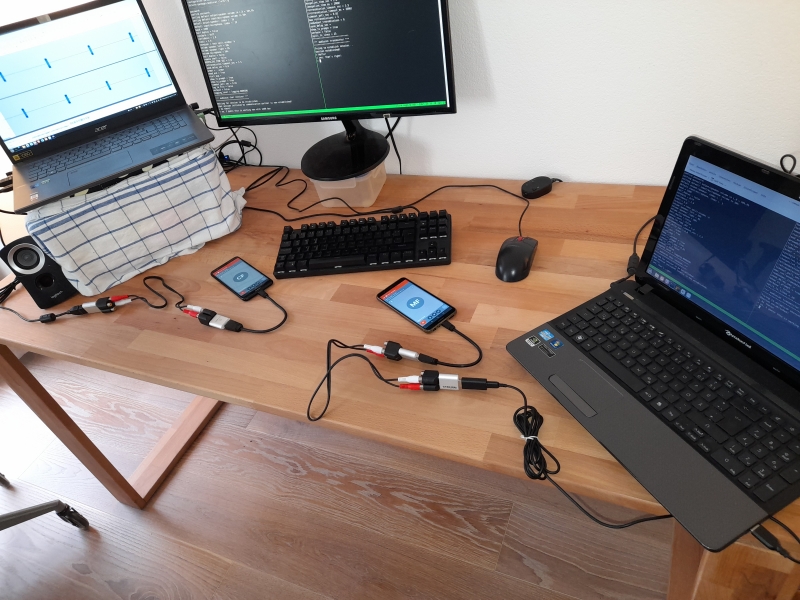
A: tea2adt in offline PC (Alice)
D: tea2adt in offline PC (Bob)
B, C: smartphone with Linphone call session
Communication in Termux over qTox
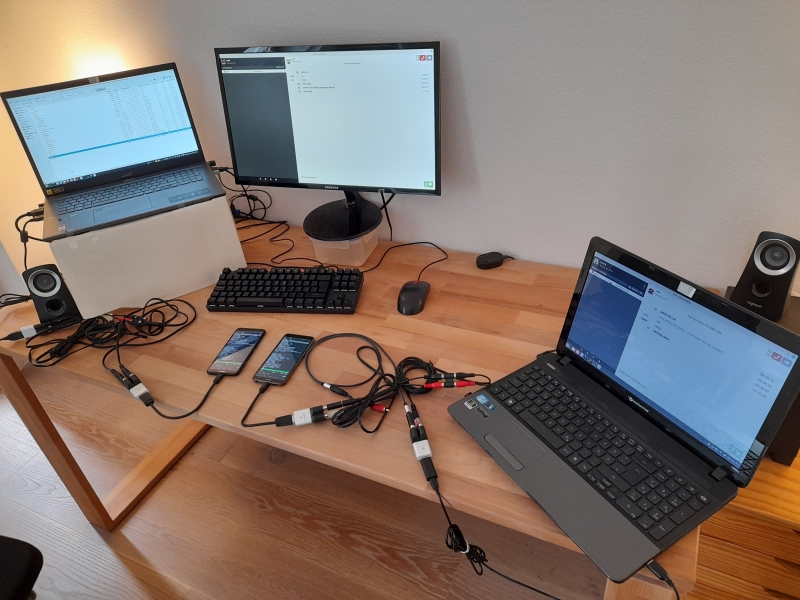
A: tea2adt in offline smartphone with Termux (Alice)
D: tea2adt in offline smartphone with Termux (Bob)
B, C: PC with qTox call session
Communication in Linux over Walkie Talkies
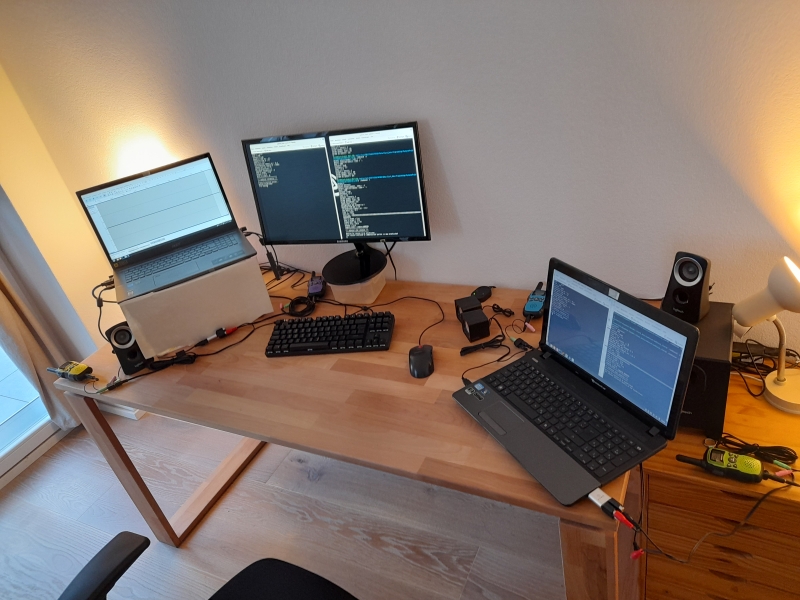
Split Configuration
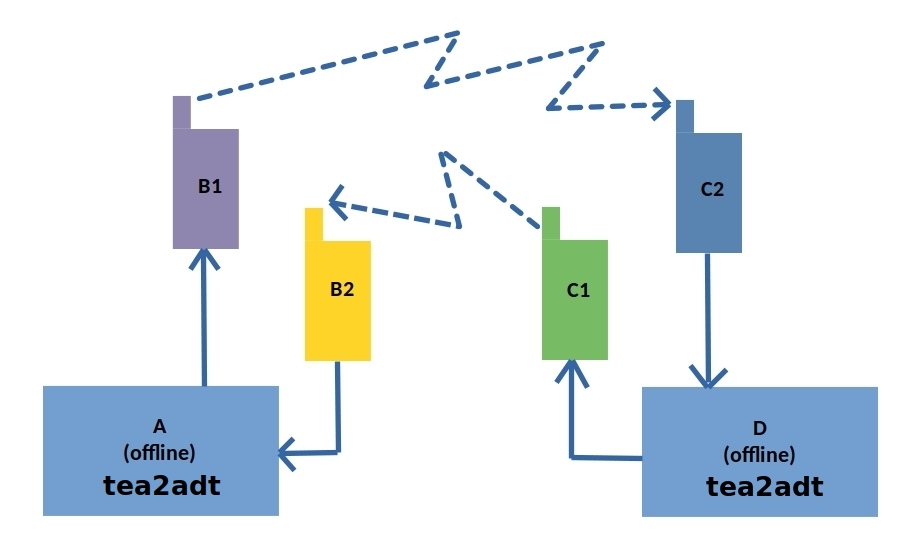
A: tea2adt in offline PC (Alice)
D: tea2adt in offline PC (Bob)
B1, B2, C1, C2: waklie-talkie
Text-to-speech (TTS)
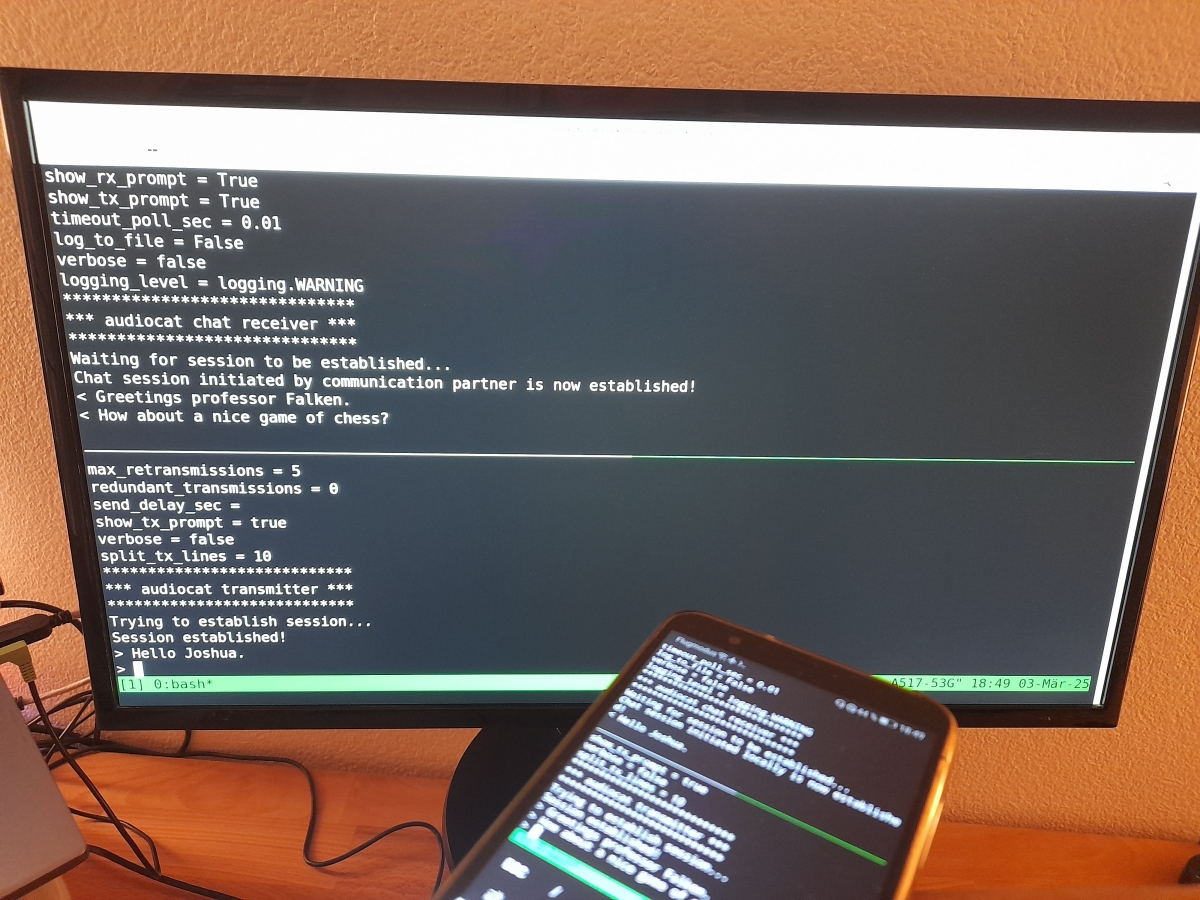
The text received in the chat is synthesized to speech and output to a separate audio interface.
Text-to-speech demo video: https://www.youtube.com/watch?v=-ikTdBzhCSw&list=PLX24fhcibpHUx7ej_Tp4neobJUqOkqliN&index=10
Limitations
The data transfer is usually done at low rates, typical of audio systems. Therefore, this tool is not adequate to transmit big files which may take a long time to complete.
Hints
Avoid using tools like PulseEffects, they may produce glitches!
In PuseEffects you may check the 'Add to Block List' option for minimodem and qtox.
PyPi Project
https://pypi.org/project/tea2adt
GitHub Project
https://github.com/ClarkFieseln/tea2adt
Documentation
https://github.com/ClarkFieseln/tea2adt/blob/main/doc/documentation.md
Screenshots
https://github.com/ClarkFieseln/tea2adt/tree/main/screenshots
Videos
https://www.youtube.com/playlist?list=PLX24fhcibpHXllvUgFUw6Ly9cwQcTcKac
License
(c) 2025 Clark Fieseln
This repository is licensed under the MIT license. See LICENSE for details.


Download files
Download the file for your platform. If you're not sure which to choose, learn more about installing packages.
Source Distribution
Built Distribution
Filter files by name, interpreter, ABI, and platform.
If you're not sure about the file name format, learn more about wheel file names.
Copy a direct link to the current filters
File details
Details for the file tea2adt-0.1.3.tar.gz.
File metadata
- Download URL: tea2adt-0.1.3.tar.gz
- Upload date:
- Size: 426.7 kB
- Tags: Source
- Uploaded using Trusted Publishing? No
- Uploaded via: twine/4.0.2 CPython/3.10.12
File hashes
| Algorithm | Hash digest | |
|---|---|---|
| SHA256 |
ea10ad70e8ee826590e0459a3aa76f617bad5f5fc024c8b30afd3b7e14fc7982
|
|
| MD5 |
a894296dfd4395dad0690fd960a2eff6
|
|
| BLAKE2b-256 |
c1ced8a2956478707c6fea174d8b4f9f3fbbfcd26cad7243b9008cf5fe1a5a80
|
File details
Details for the file tea2adt-0.1.3-py3-none-any.whl.
File metadata
- Download URL: tea2adt-0.1.3-py3-none-any.whl
- Upload date:
- Size: 868.3 kB
- Tags: Python 3
- Uploaded using Trusted Publishing? No
- Uploaded via: twine/4.0.2 CPython/3.10.12
File hashes
| Algorithm | Hash digest | |
|---|---|---|
| SHA256 |
86912ba1fba9cd4083f4034c9a4240c5658de7c621ebc2f21b1e1938531bfc01
|
|
| MD5 |
0ef1d98c318d53717a9209a7b177270f
|
|
| BLAKE2b-256 |
88ff63069a9799434f716ee504a85fe3464a49196b7819386e80ddd20b267ab1
|






