
team-photo-sorter
Sort a team photographer's photos by player and share them with team families as a private, password-protected website that costs nothing to host.
Volunteer photographers at youth and high school games often shoot thousands of
frames a game. Families then scroll through all of them looking for their own
kid. team-photo-sorter finds and groups the faces in every photo on your own
computer, then builds a static site where each family picks their player and
gets that player's photos, game by game.
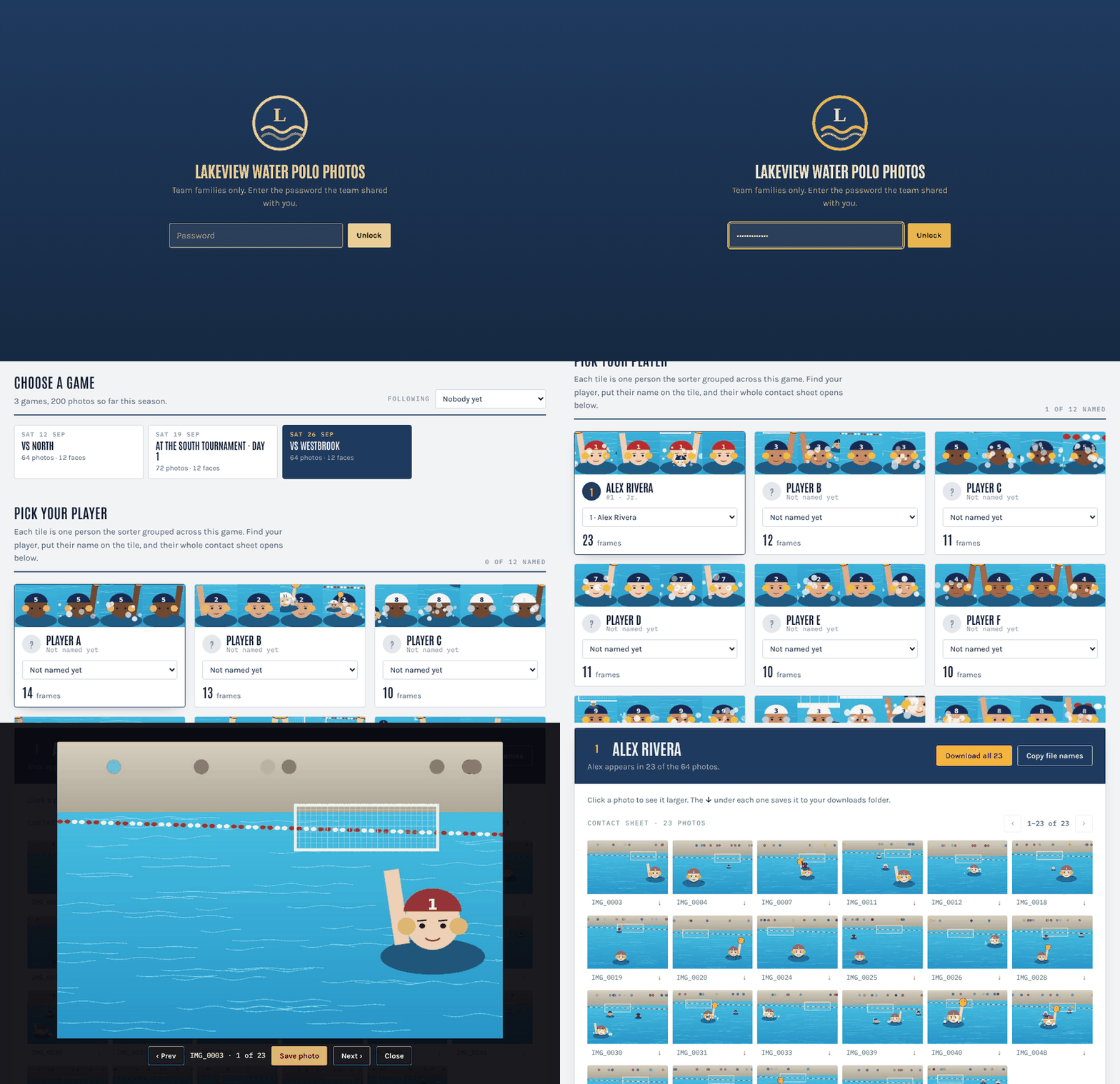
Try the demo site (password lakeview-demo).
The demo team's players are illustrations, not real people. It's built by
examples/demo/make_demo.py on every push.
- Runs locally. Face detection and grouping happen on your machine. No photo or face data is sent to a face-recognition service.
- No server. The output is a folder of static files. Host it free on Firebase Hosting, Netlify, Cloudflare Pages or GitHub Pages.
- Private by default. Everything except the page shell is encrypted (AES-256-GCM, key from a shared password). Player names, game names and photos are unreadable without the password, and file names reveal nothing.
- People confirm, the computer suggests. Families put a name on a face group once. The site then offers "Could these also be Sam?" for the same player's other groups, and "Same face as Sam in another game" across games. Nothing is merged automatically. In team sports, two teammates in matching caps can look as similar to the model as one player's sharp and blurry shots do.
- Scales to a season. Each thumbnail and viewer image is its own encrypted file, fetched only when someone looks at it. Rebuilds are byte-identical for anything unchanged, so hosts only re-upload what's new. It grew out of a tool used for a full season: about 53,000 photos across 17 games.
Read docs/privacy.md before using this with photos of minors. This tool creates face embeddings, which many jurisdictions treat as biometric data. It is meant for a team photographer sharing with that team's families, with the team's knowledge.
Quick start
Requires Python 3.10+ and 4 GB of RAM. The biggest games, around 20,000 detected faces, need most of that.
python -m venv .venv && source .venv/bin/activate
pip install team-photo-sorter            # HEIC photos from iPhones: "team-photo-sorter[heic]"

mkdir my-team && cd my-team
tps init                                 # writes team.toml and a .gitignore
Put each game's photos in its own folder, then edit team.toml: team name,
colours, roster, and one [[event]] per game pointing at its folder. The
comments in the example config explain every setting.
tps all # scan faces, group them, make thumbnails, build the site
tps all asks for the site password the first time. Use a long, random one
(16+ characters), because anyone who gets a copy of the site can try passwords
offline. To skip the prompt, set the TPS_PASSWORD environment variable.
The site is in site/public/. Deploy that folder to any static host; see
docs/hosting.md. Share the link and the password with families.
The first run downloads InsightFace's face models (a few hundred MB) into
~/.insightface. Check their licence; see NOTICE.
Tested with InsightFace 1.0.1. InsightFace 2.x reworked its API and isn't supported yet.
Working on the code
git clone https://github.com/andyknosp1/team-photo-sorter.git
cd team-photo-sorter
python -m venv .venv && source .venv/bin/activate
pip install -e ".[dev]" && pytest
Adding a game
Add an [[event]] to team.toml and run tps all again. Everything is
resumable: photos already scanned are skipped, and unchanged files are rebuilt
byte for byte, so a redeploy uploads only the new game.
Commands
| Command | What it does |
|---|---|
tps init |
Write an example team.toml and .gitignore in the current folder |
tps scan [--event ID] [--workers N] |
Detect and embed faces in new photos (resumable) |
tps cluster [--event ID] |
Group each game's faces into player tiles |
tps images [--event ID] |
Make face crops, contact-sheet thumbnails and viewer copies |
tps build |
Build the encrypted site into site/public/ |
tps all |
scan, cluster, images, then build |
tps labels import FILE |
Add labels that families shared from the site (see below) |
tps labels list |
Show the organiser labels in use |
tps export --player N --to DIR |
Copy one player's full-resolution photos into a folder per game |
Use -c path/to/team.toml to point at a config somewhere else.
Sharing names across families
Names a family picks are saved only in their browser. To make them visible to everyone:
- A family clicks Share my labels at the bottom of the site and sends you the copied text.
- You save it to a file and run
tps labels import shared.txt, thentps build. Labels are stored by face group, so they survive re-clustering as long as the group's best face stays in it.
You can also pre-name a player in every game from a few reference photos of
their face. Add a [[seed]] to the config and see
docs/how-it-works.md.
Linking to photos hosted elsewhere
By default the site includes a viewer-size copy of each photo (1280 px on the
long side, about 200 KB). If the originals are already in a shared album
somewhere, give the event a links CSV with columns
filename,view_url,download_url. The site then links each photo there, and
you can set full_size = 0 to keep the site small. See
examples/links.csv.
Documentation
- How it works: the pipeline and the decisions behind it
- Hosting: Firebase, Netlify, Cloudflare Pages and GitHub Pages, plus free-tier sizing
- Security: what the password protects and what it doesn't
- Privacy: photos of minors, consent and biometric data
- Configuration reference
Limitations
- One shared password for everyone. It's not user accounts, and it can't be revoked per family; change the password and rebuild to cut off access.
- Grouping works on faces only, so backs of heads and fully covered faces are missed. Expect each player to be split across a few groups per game, and expect some groups that aren't on the team (opponents, referees, parents); families can hide those.
- CPU only. Scanning runs at roughly 0.2–0.5 s per photo per core.
- Very large single events (over ~20,000 faces) need splitting, for example one event per tournament day.
License
Apache License 2.0. Copyright 2026 Andy Knosp. The face models are not part of this project and have their own licence; see NOTICE.
1 maintainer

Metadata
1 maintainer
Release files for team-photo-sorter 0.1.1
For a detailed explanation of source distributions (sdists) and built distributions (wheels), please see the package formats documentation.
Source distribution (sdist)
| File | Size | Uploaded | Provenance | Actions |
|---|---|---|---|---|
| team_photo_sorter-0.1.1.tar.gz | 42.9 kB | With provenance | Details for team_photo_sorter-0.1.1.tar.gz |
Built distribution (wheel)
| File | Interpreter | ABI | Platform | Actions Reset |
|---|---|---|---|---|
| team_photo_sorter-0.1.1-py3-none-any.whl | Python 3 | none | any | Details for team_photo_sorter-0.1.1-py3-none-any.whl |
Total release size: 84.8 kB
Release files / team_photo_sorter-0.1.1.tar.gz
| Download URL | team_photo_sorter-0.1.1.tar.gz |
|---|---|
| Size | 42.9 kB |
| Tags | Source |
|
SHA-256 checksum How to use checksums |
ea5f5cf8ca23fa1d666e698525ce272ac68b51f43bbf9f55a2f6e328f8b57804
|
|
BLAKE2b-256 checksum How to use checksums |
27991ed61eb479e49df0781610496bd525d6776023dc303aa2da19fdf3363603
|
| Upload date | |
|
Uploaded using Trusted Publishing? What is trusted publishing? |
Yes |
| Uploaded via |
twine/7.0.0 CPython/3.13.16
|
Provenance
Provenance describes where a file came from. On PyPI, provenance is shared via attestations, which provide a verifiable record of the build or publishing details. View details, limitations and caveats.


PyPI Publish Attestation
PyPI verified that this artifact, at this checksum, originated from the publisher listed below.
Signed by GitHub Actions, verified by PyPI on Nov 2, 2026.
Transparency logRelease files / team_photo_sorter-0.1.1-py3-none-any.whl
| Download URL | team_photo_sorter-0.1.1-py3-none-any.whl |
|---|---|
| Size | 41.9 kB |
| Tags | Python 3 |
|
SHA-256 checksum How to use checksums |
61c5003ff5804a2194e49428bdca85b13bfc1d407f9472a8c5927547178d8f26
|
|
BLAKE2b-256 checksum How to use checksums |
a95fffe94a47a87b2fdc12e765c8808b5a717199a194a3ba9e0e4cd953076dea
|
| Upload date | |
|
Uploaded using Trusted Publishing? What is trusted publishing? |
Yes |
| Uploaded via |
twine/7.0.0 CPython/3.13.16
|
Provenance
Provenance describes where a file came from. On PyPI, provenance is shared via attestations, which provide a verifiable record of the build or publishing details. View details, limitations and caveats.
PyPI Publish Attestation
PyPI verified that this artifact, at this checksum, originated from the publisher listed below.
Signed by GitHub Actions, verified by PyPI on Nov 2, 2026.
Transparency logSecurity for team-photo-sorter 0.1.1
Provenance
Provenance describes where a file came from. On PyPI, provenance is shared via attestations, which provide a verifiable record of the build or publishing details. View details, limitations and caveats.
Full provenance
All 2 files in this release have been uploaded with provenance metadata.
Attestation for team_photo_sorter-0.1.1.tar.gz
PyPI Publish Attestation
PyPI verified that this artifact, at this checksum, originated from the publisher listed below.
Signed by GitHub Actions, verified by PyPI on Nov 2, 2026.
Transparency logA note on package security
PyPI is a repository for distributing packages, not a service for auditing them. While third-party security researchers and our staff do their best to detect and remove malicious packages, PyPI cannot guarantee the quality, security or suitability of any given package.
To learn more about protecting yourself from malicious actors, visit our package security documentation.














