
Teardown


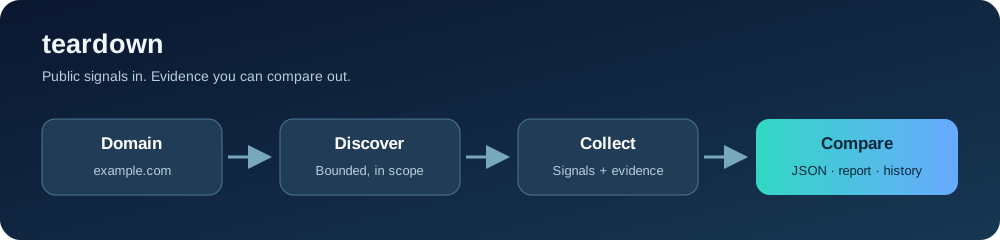
Understand what a public web app reveals about its architecture. Teardown discovers in-scope hosts, collects frontend and network evidence, and writes a versioned JSON record for agents alongside a readable Markdown report. It is a deterministic collector: its findings cite observations, and the reader decides what those observations mean.
Quick start
Teardown requires Python 3.10 or newer. The package name on PyPI is
tech-teardown; it provides both tech-teardown and teardown CLI commands.
# One host, no subdomain discovery
uvx tech-teardown example.com --single

# Passive discovery, liveness checks, and host scans
uvx tech-teardown example.com

# JSON on stdout for a script or agent; progress goes to stderr
uvx tech-teardown example.com --single --json-only > scan.json
uvx runs the package in an isolated environment. To install it persistently,
use python -m pip install tech-teardown and run teardown. The complete
command reference is in the CLI guide.
What Teardown collects
| Area | Public evidence recorded |
|---|---|
| Host discovery | crt.sh, CertSpotter, and Wayback results; optional installed subfinder sources |
| Liveness and HTTP | Reachable URL, status and redirect chain, title, TLS details, headers, CSP, and CDN response signals |
| Technology | Framework, CMS, and other fingerprints with evidence and a deterministic confidence score |
| Frontend code | First-party JS bundles, valid exposed source maps, source paths, and referenced API paths |
| API surface | Bounded REST, GraphQL, OpenAPI, and WordPress observations supported by responses |
| Network | DNS A/AAAA and CNAME chain, routed prefix, ASN, registered holder, provider evidence, and approximate Geo-IP |
| Findings | Mechanical security observations with severity, confidence, detail, and evidence URL |
| Changes | Normalized differences between two saved scans or history runs |
Teardown requests publicly accessible material only. It does not authenticate,
exploit, evade defenses, or visit every route found in frontend code. DNS
wordlist enumeration requires explicit --active-dns. A referenced API path
is an inventory item, an observed CDN IP can be an edge, and Geo-IP is an
estimate for that IP. The collection guide explains these
limits in detail.
Run a scan
teardown example.com --single                 # just the given host
teardown example.com --max-probes 40 --max-hosts 10
teardown example.com --subfinder              # add installed passive sources
teardown example.com --active-dns --wordlist words.txt
teardown example.com -v                       # host progress
teardown example.com -vv                      # module and probe progress
teardown example.com --no-history --no-artifacts --no-cache
The default cap is 100 liveness probes and 25 live hosts torn down. The HTTP
client limits concurrency and request rate, and identifies itself. --single
skips enumeration. Ordinary scans produce two files under
~/.teardown/reports/<domain>/:
<timestamped-name>-teardown.json    versioned ScanResult for programs and agents
<timestamped-name>-teardown.md      human-readable evidence and task list
The Markdown report starts with a deterministic summary, then shows host
evidence, findings, and a bounded source-map appendix. Local first-party
bundle and map copies are sanitized and size-limited. The JSON contract is
defined in teardown/models.py (currently schema 1.6). See
output and storage for the field and privacy guidance.
Compare scans over time
teardown history example.com
teardown compare example.com --days 7
teardown diff last-month.json this-month.json
Completed scans and host checkpoints are saved in SQLite under ~/.teardown
by default, including scans run with --json-only. The same data home holds a
sanitized daily response cache and optional first-party artifacts. Set
TEARDOWN_HOME or --data-dir to use another directory, or disable individual
stores with --no-history, --no-cache, and --no-artifacts.
MCP: run with uvx
The teardown-mcp executable is provided by tech-teardown; the [mcp]
extra installs FastMCP. Start the stdio server without a persistent install:
uvx --from 'tech-teardown[mcp]' teardown-mcp
Use that full command when an MCP client asks for a command and arguments.
The distribution and executable have different names, so uvx teardown-mcp
by itself will not select the right package. Pin a package version when you
want repeatable client setups, for example
uvx --from 'tech-teardown[mcp]==0.6.0' teardown-mcp.
Add it to common clients
# Codex CLI and IDE extension
codex mcp add teardown -- uvx --from 'tech-teardown[mcp]' teardown-mcp
codex mcp list

# Claude Code, available across your projects
claude mcp add --scope user --transport stdio teardown -- uvx --from 'tech-teardown[mcp]' teardown-mcp
claude mcp list
For Cursor, Gemini CLI, or Claude Desktop, add this server entry
under mcpServers in the client's JSON configuration. Use
~/.cursor/mcp.json, ~/.gemini/settings.json, or Claude Desktop's local
claude_desktop_config.json, respectively:
{
  "mcpServers": {
    "teardown": {
      "command": "uvx",
      "args": ["--from", "tech-teardown[mcp]", "teardown-mcp"]
    }
  }
}
For VS Code with GitHub Copilot, add a stdio MCP server in Chat: Open
Customizations → MCP Servers, or place a portable mcpServers entry in
~/.copilot/mcp-config.json. Include "type": "stdio" and
"tools": ["*"] in its server entry. The MCP guide has complete,
client-specific steps, configuration locations, status checks, and a
ready-to-copy JSON example.
MCP scans save SQLite history and sanitized artifacts by default. Append
--no-history --no-artifacts after teardown-mcp in the startup command to
turn those stores off. The same server also supports Streamable HTTP on
http://127.0.0.1:8000/mcp:
uvx --from 'tech-teardown[mcp]' teardown-mcp --transport http --host 127.0.0.1 --port 8000
The tools are teardown_host, teardown_domain, enumerate_subdomains,
scan_domain, and diff_scans. Domain scans can take longer; use their host
and probe caps for client timeouts. Keep the HTTP endpoint on loopback unless
you provide authentication and transport security.
Extend and contribute
Scan modules can add deterministic, redacted data under
hosts[].extensions. Technology detection uses a bundled MIT fingerprint
database; an optional local community import adds breadth under its own
license. See extensions and data licensing.
Start with the documentation index. Contributions follow CONTRIBUTING.md and the Code of Conduct. Report vulnerabilities in Teardown through private security reporting. Changes are recorded in the changelog. The code is MIT licensed.
1 maintainer

Metadata
1 maintainer
Release files for tech-teardown 0.6.1
For a detailed explanation of source distributions (sdists) and built distributions (wheels), please see the package formats documentation.
Source distribution (sdist)
| File | Size | Uploaded | Provenance | Actions |
|---|---|---|---|---|
| tech_teardown-0.6.1.tar.gz | 138.9 kB | Without provenance | Details for tech_teardown-0.6.1.tar.gz |
Built distribution (wheel)
| File | Interpreter | ABI | Platform | Actions Reset |
|---|---|---|---|---|
| tech_teardown-0.6.1-py3-none-any.whl | Python 3 | none | any | Details for tech_teardown-0.6.1-py3-none-any.whl |
Total release size: 232.1 kB
Release files / tech_teardown-0.6.1.tar.gz
| Download URL | tech_teardown-0.6.1.tar.gz |
|---|---|
| Size | 138.9 kB |
| Tags | Source |
|
SHA-256 checksum How to use checksums |
52c45a2bdaa70f963adedeb94c475d98f4427499edeaaa93e2f75d0c1f215957
|
|
BLAKE2b-256 checksum How to use checksums |
3e7f8b7b1153a6a90e50fd6e29479f510c815fe7c71bece12b7b772ff7e828e1
|
| Upload date | |
|
Uploaded using Trusted Publishing? What is trusted publishing? |
Yes |
| Uploaded via |
uv/0.13.9 {"installer":{"name":"uv","version":"0.13.9","subcommand":["publish"]},"python":null,"implementation":{"name":null,"version":null},"distro":{"name":"Ubuntu","version":"26.04","id":"resolute","libc":null},"system":{"name":null,"release":null},"cpu":null,"openssl_version":null,"setuptools_version":null,"rustc_version":null,"ci":true}
|
Release files / tech_teardown-0.6.1-py3-none-any.whl
| Download URL | tech_teardown-0.6.1-py3-none-any.whl |
|---|---|
| Size | 93.2 kB |
| Tags | Python 3 |
|
SHA-256 checksum How to use checksums |
1a2be915a348d37d98826cd03788bfe482cf0b3f016132ed65580f8a59295bfe
|
|
BLAKE2b-256 checksum How to use checksums |
6e570f6bec484e4db256047e6cf57161767e2a60333d1bac6517ef6112af2a77
|
| Upload date | |
|
Uploaded using Trusted Publishing? What is trusted publishing? |
Yes |
| Uploaded via |
uv/0.13.9 {"installer":{"name":"uv","version":"0.13.9","subcommand":["publish"]},"python":null,"implementation":{"name":null,"version":null},"distro":{"name":"Ubuntu","version":"26.04","id":"resolute","libc":null},"system":{"name":null,"release":null},"cpu":null,"openssl_version":null,"setuptools_version":null,"rustc_version":null,"ci":true}
|
Security for tech-teardown 0.6.1
Provenance
Provenance describes where a file came from. On PyPI, provenance is shared via attestations, which provide a verifiable record of the build or publishing details. View details, limitations and caveats.
No provenance found
None of the files in this release were uploaded with provenance metadata.
A note on package security
PyPI is a repository for distributing packages, not a service for auditing them. While third-party security researchers and our staff do their best to detect and remove malicious packages, PyPI cannot guarantee the quality, security or suitability of any given package.
To learn more about protecting yourself from malicious actors, visit our package security documentation.














