





🤔 What is botkit?
botkit is a Python library that adds an AI agent to your project in a few lines.
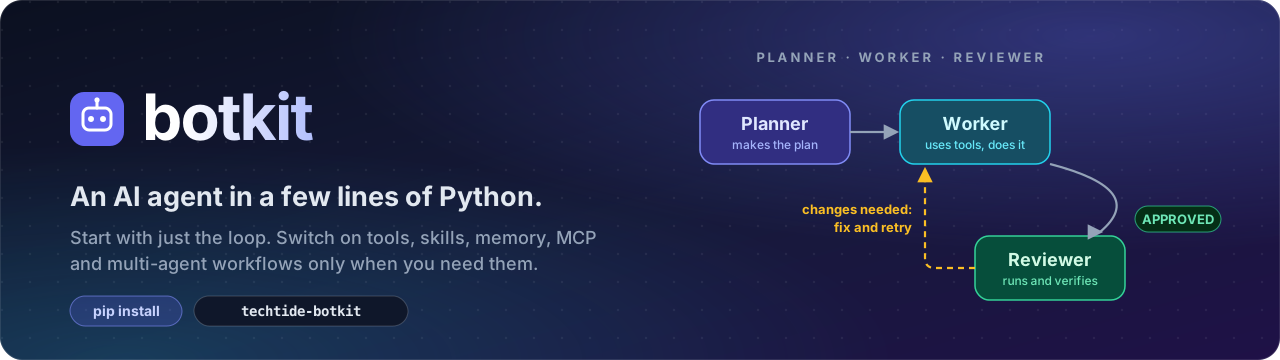
A normal chatbot only answers with text. An agent can also do things: read and write files, make Word / Excel / PowerPoint / PDF documents, search the web, do exact maths, run code and check the result, remember the user between sessions, and even work as a team (a planner, a worker and a reviewer who sends the work back until it is right).
botkit gives you all of that behind one simple idea:
Simple outside, complicated inside. By default you get only the loop. Everything else is a flag you switch on when you need it.
from botkit import BotKit

bot = BotKit("groq:openai/gpt-oss-120b")     # your model, your API key (from the environment)
print(bot.chat("Hello!"))
That is a complete chatbot: model calls, retries, error handling, conversation history. No setup, no config files.
Who is it for?
- Developers who want an assistant inside their Flask / Django / FastAPI / Node app without learning a big framework.
- Students and builders who want to understand and control every part (the whole library is small and readable).
- Teams who need to choose their own model provider, their own database, and their own security rules.
What can I build with it?
| Idea | Switch on |
|---|---|
| A support or FAQ chatbot for your website | BotKit(model, rules=[...], memory="chat.db") + bot.serve() |
| An assistant that writes reports, decks and spreadsheets | tools=True |
| A coding helper that writes code, runs it and checks the output | tools=True, shell="docker" |
| A research team (several researchers at once, then one writer) | mode="parallel" |
| A "does it right" workflow where work is reviewed and fixed | multi_agent=True |
| A bot that remembers each user | memory=SupabaseStorage(), one session per user |
✨ Why botkit?
| 🧩 Loop only by default | Nothing you did not ask for is switched on. Easy to understand, easy to debug. |
| 🎛️ Everything is a flag | tools=, skills=, memory=, mcp=, shell=, rules=, multi_agent= ... |
| 🛠️ 17 ready tools | Files, Word/Excel/PowerPoint/PDF, web, calculator, shell. Grouped by purpose. |
| 🧠 10 ready skills | Research, planning, coding, debugging, writing... Loaded by the model only when needed. |
| 💾 Your database | SQLite out of the box, Supabase, or any database you write in one small class. |
| 👥 Multi-agent | Sequential, parallel or custom graphs. A reviewer that verifies, not just reads. |
| 🔌 Any model | Groq, OpenAI, DeepSeek, Claude, Gemini, OpenRouter, Mistral, Together, Ollama, or your own server. Mix models per agent. |
| 🔒 Security in code | Workspace confinement, secret redaction, blocked internal URLs, and rules that can never loosen security. |
| 🔍 See what happened | Built-in trace of every model call, tool call and graph step. |
| 🧪 Testable | FakeLLM lets you test agents and whole workflows without a real model. |
| 🚀 Deployable | botkit init writes a Dockerfile, compose file and an app. One command to serve an HTTP API. |
📦 Install
pip install techtide-botkit              # the loop only (needs just `openai`)
pip install "techtide-botkit[docs]"      # + Word / Excel / PowerPoint / PDF tools
pip install "techtide-botkit[mcp]"       # + MCP servers
pip install "techtide-botkit[all]"       # everything
The package is named
techtide-botkiton PyPI; you import it asbotkit.
Set the key of the provider you use (or pass api_key="..." in code):
export GROQ_API_KEY="..." # or OPENAI_API_KEY, DEEPSEEK_API_KEY, ANTHROPIC_API_KEY, GEMINI_API_KEY, OPENROUTER_API_KEY
On Windows PowerShell use $env:GROQ_API_KEY="...".
🚀 Quick start in 60 seconds
from botkit import BotKit

MODEL = "groq:openai/gpt-oss-120b"        # "provider:model". Model names change, check your provider's list.

bot = BotKit(MODEL)                        # 1. just the loop
print(bot.chat("Explain recursion in one sentence"))

bot = BotKit(MODEL, tools=True, memory="bot.db")      # 2. + tools + memory that survives restarts
bot.run()                                  # chat in the terminal (type exit to quit)

team = BotKit(MODEL, multi_agent=True, tools=True)    # 3. a planner -> worker -> reviewer team
print(team.chat("Write a one-page launch plan and save it as plan.docx"))
Files the bot creates are saved in the workspace/ folder next to your script (change it with workdir="...").
Choose your level
single agent  ->  + tools  ->  + memory  ->  sequential team  ->  parallel team  ->  your own graph
 BotKit(m)      tools=True    memory="x.db"   multi_agent=True    mode="parallel"    graph=my_graph
You decide how far to go. botkit never switches on a multi-agent graph unless you ask for one.
🧭 Which loop do I get?
| You write | You get |
|---|---|
BotKit(model) |
one agent loop (default) |
BotKit(model, multi_agent=True) |
planner → worker → reviewer; the reviewer sends work back until approved |
BotKit(model, review=True) |
worker + reviewer correction loop |
BotKit(model, mode="sequential", agents=[...]) |
agents one after another |
BotKit(model, mode="parallel", agents=[...], merge="synthesizer") |
agents at the same time, results merged |
BotKit(graph=g) |
your own graph (branching, loops) |
BotKit(...) returns an Agent (single mode) or a Graph (multi-agent modes). Both are used the same way: chat, stream, achat, astream, run, serve, fork, close. The older Agent(...) still works.
👥 Multi-agent workflows
from botkit import Agent, BotKit, Graph, chain, parallel, END

# 1) A chain, with a different model per agent
planner  = Agent("openai:gpt-4o-mini",      name="planner",  system="Make a short plan.")
worker   = Agent("deepseek:deepseek-chat",  name="worker",   tools=True)
reviewer = Agent("claude:claude-sonnet-4-5", name="reviewer")
team = chain(planner, worker, reviewer, review=True)      # same as planner | worker | reviewer, plus a correction loop
print(team.chat("Write a short report on electric scooters"))

# 2) Parallel: all at once, then merged
research = BotKit(MODEL, mode="parallel", agents=["researcher", "researcher", "critic"], merge="synthesizer", tools=["web"])

# 3) Custom graph: nodes are agents, functions or other graphs; edges can be conditional
g = Graph(max_steps=25)
g.add(lambda s: "code" if "bug" in s.task else "text", name="router")
g.add(coder); g.add(writer)
g.edge("router", coder, when=lambda s: s.last == "code")   # first matching condition wins
g.edge("router", writer)                                    # default branch
g.edge(coder, END)
agents=[...] accepts Agent objects, role names ("planner", "worker", "reviewer", "researcher", "writer", "critic", "synthesizer"), "provider:model" strings, or dicts such as {"role": "worker", "model": "deepseek:deepseek-chat", "tools": True}.
How the engine works: nodes of the same level run at the same time; a node receives the task plus the outputs of the nodes feeding it; a node with conditional edges branches (first match wins, unconditional edges are the default); a node with no edge to follow ends the run and its output is the answer.
Loops are always bounded: max_steps node runs per run (default 25), max_visits per node (default 10), and a node that repeats its previous output without using any tool stops the loop.
Who gets which tools?
Tools come from the app's tools= / skills= / shell= flags, narrowed by role:
| Role | Tool categories | Skills |
|---|---|---|
| planner | inspect, web, compute (looks, never changes anything) | planning |
| worker | everything the app enabled | all |
| reviewer | inspect, compute, web, run (if you gave a shell). Never edits | verify-work |
| researcher | inspect, web, compute | research |
| writer | inspect, edit, documents | writing-documents |
| critic | inspect, compute | none |
| synthesizer | none (it only merges text) | none |
The reviewer verifies instead of trusting: it opens the real files, recomputes numbers and, if you gave shell=, runs the code or tests and reads the output before saying APPROVED or CHANGES NEEDED.
BotKit(..., role_tools=False) gives every agent everything instead. Agents added as a plain model (agents=["groq:other-model"]) or as a dict inherit the app's tools; keys in the dict win.
Good to know:
- Agents in a graph start every visit with a clean slate. The graph itself keeps the conversation (
memory=). - Agents running side by side in the same workspace automatically get their own sub-folders.
on_error="continue"(default for parallel) turns a failed branch into error text instead of stopping the run.- A
Graphis served, forked per user, streamed and closed exactly like anAgent. - A team makes several model calls per task. For small jobs, a single agent is faster and cheaper.
🛠️ Bundled tools (17)
| Category | Tools | For |
|---|---|---|
🔎 inspect |
list_files read_file (also .docx/.xlsx/.pptx; can read a slice with start/lines) search_files tree file_info |
look at what exists (read-only) |
✏️ edit |
write_file edit_file |
create and change files |
📄 documents |
create_docx create_xlsx create_pptx create_pdf |
office and PDF files |
🌐 web |
fetch_url web_search (DuckDuckGo scraping, may be rate-limited) |
read the internet |
🧮 compute |
calculate current_time |
exact maths, the date |
💻 run |
run_command run_python (only with shell=) |
run programs and tests, read their output |
BotKit(model, tools=True)                          # all (the `run` tools also need shell=)
BotKit(model, tools=["inspect", "web"])            # whole categories
BotKit(model, tools=["read_file", "calculate"])    # single tools
BotKit(model, tools=["inspect", my_function])      # mix with your own
Each agent's prompt lists its tools by purpose, so the model picks the right kind of tool. The older group names (files, docs, util, shell) still work.
Your own tool: put @tool on a function. Type hints and the docstring become the schema.
from botkit import BotKit, tool

@tool
def order_status(order_id: str) -> str:
    """Look up an order.

    Args:
        order_id: The order number.
    """
    return "shipped"

bot = BotKit(MODEL, tools=["files", "calculate", order_status])
🧠 Bundled skills (10)
research · planning · verify-work · writing-documents · presentations · spreadsheets · data-analysis · coding · debugging · summarizing
Only each skill's name and one-line description go into the prompt; the model loads the full text with load_skill when a task matches, so skills cost almost no context. Your own skills are folders with a SKILL.md (frontmatter name and description, then the instructions): BotKit(model, skills=[True, "my_skills/"]).
💾 Memory
Memory is the conversation history (survives restarts) plus long-term facts (remember / recall / forget tools). It sits on a Storage backend, so the database is your choice.
BotKit(model, memory="bot.db")                        # SQLite (zero setup)
BotKit(model, memory=SupabaseStorage())               # Supabase
BotKit(model, memory=MyStorage())                     # anything you write
BotKit(model, memory="bot.db", session="user42")      # one session per user, same database
Without memory=, the bot still remembers the conversation while the program runs; it just forgets on restart.
Supabase setup
Run this once in the Supabase SQL editor (botkit sql prints it too, grants included), then set SUPABASE_URL and SUPABASE_KEY to your project URL and the secret / service_role key (server side only, never the anon or publishable key, never in a browser):
create table if not exists botkit_messages (
  id bigint generated always as identity primary key,
  session text not null, data jsonb not null, created_at timestamptz not null default now());
create index if not exists botkit_messages_session_idx on botkit_messages (session, id);
create table if not exists botkit_facts (
  id bigint generated always as identity primary key,
  session text not null, text text not null, created_at timestamptz not null default now());
create index if not exists botkit_facts_session_idx on botkit_facts (session, id);
alter table botkit_messages enable row level security;
alter table botkit_facts enable row level security;
grant usage on schema public to service_role;
grant all on table public.botkit_messages to service_role;
grant all on table public.botkit_facts to service_role;
grant usage, select on all sequences in schema public to service_role;
from botkit import BotKit, SupabaseStorage
store = SupabaseStorage(url="https://YOUR-PROJECT.supabase.co", key="...")   # or read from the environment
bot = BotKit(MODEL, memory=store, session="ahmed")
Your own tables, and any other database
db = SQLiteStorage("bot.db", extra_schema="CREATE TABLE IF NOT EXISTS orders(id INTEGER PRIMARY KEY, item TEXT)")
db.execute("INSERT INTO orders(item) VALUES(?)", ("tea",));  db.query("SELECT * FROM orders")

store = SupabaseStorage()
store.table("orders").insert({"item": "tea"});  store.table("orders").select({"item": "tea"}, order="id.desc")
Wrap these calls in @tool functions to let the bot use them (examples/memory_backends.py).
Any other database (MongoDB, Postgres, Redis...): subclass Storage and implement 6 methods: add_messages, get_messages, clear_messages, add_fact, list_facts, delete_fact. examples/custom_storage.py is a complete template.
🔌 MCP
BotKit(model, mcp="npx -y @modelcontextprotocol/server-filesystem .")    # local server
BotKit(model, mcp="https://example.com/mcp")                              # remote server
BotKit(model, mcp="mcp.json")                                             # Claude-Desktop style config
Needs pip install "techtide-botkit[mcp]". A server that fails to start is skipped with a warning instead of crashing the bot. In a team, MCP servers are shared and started once.
🔒 Rules and security
BotKit(model, rules=["Reply in Urdu", "Never discuss pricing"])           # or rules="rules.txt"
BotKit(model, tools=True, shell="docker", deny=[r"git push", r"pip install"])
BotKit(model, tools=True, shell="local", approve=lambda name, args: input(f"Run {args['command']}? ") == "y")
Your rules go into the prompt, but the security rules always come last and cannot be loosened. The real enforcement is in code, not in the prompt:
- 📁 File tools and the shell are confined to the workspace folder (
.., absolute paths and symlinks are refused). - 💻 There is no shell unless you choose one in code:
"local"(workspace only, API keys hidden, dangerous commands blocked; a speed bump, not a jail) or"docker"(throwaway container: no network, read-only root, memory and CPU limits). Use Docker for anyone you do not fully trust. - 🔑 API keys and tokens are redacted from anything a tool returns to the model.
- 🌐
fetch_urlandweb_searchrefuse private and internal addresses, also after redirects. - 🧱 Tool output and web pages are marked as untrusted data (prompt-injection defence).
- ♻️ Tool errors, bad JSON, timeouts and repeated calls are fed back to the model so it can recover. API errors (429, 5xx) are retried with backoff.
🔌 Providers
"provider:model" works for any OpenAI-compatible API: groq, openai, openrouter, gemini, deepseek, claude (Anthropic's OpenAI-compatible endpoint), mistral, together, ollama, local (LM Studio / vLLM). Different agents can use different providers.
BotKit("my-model", base_url="http://127.0.0.1:8000/v1", api_key="anything")     # your own server
register_provider("mycorp", "https://llm.corp/v1", "CORP_KEY")                  # add a provider name
botkit providers lists them with their key variables. A server that cannot stream falls back to normal replies automatically.
⚡ Streaming, async and the HTTP server
for piece in bot.stream("tell me a story"): print(piece, end="")     # sync generator
async for piece in bot.astream("..."): ...                           # async generator
answer = await bot.achat("...")                                      # async call
bot.chat("...", on_token=print)                                      # or a callback

bot.serve(host="0.0.0.0", port=8000, token="change-me", cors_origins=["https://myapp.com"])
POST /chat   {"message": "make a budget sheet", "session": "user42"}
GET  /files/<session>/<path>       download a file the bot created
GET  /health                       {"ok": true, "version": "..."}
Each session is a separate user with its own history, facts and workspace folder. Listening on a public address without a token is refused. Any language (JavaScript, mobile, ...) can use botkit through this API.
🔍 Watching and testing
bot = BotKit(model, multi_agent=True)        # graphs keep a trace; for a single agent use trace=True
bot.chat("...")
bot.trace.print()          # timeline: model calls, tool calls, nodes, edges, errors
bot.trace.summary()        # counts, seconds, tokens, tool errors
bot.trace.flow()           # ['planner', 'worker', 'reviewer']
The same events go to Python's logging (logger name "botkit"). Test without a real model:
from botkit import Agent, chain
from botkit.testing import FakeLLM, say, call, assert_flow, assert_tools_called

planner = Agent(name="planner", llm=FakeLLM(say("plan")))
worker  = Agent(name="worker",  llm=FakeLLM(say("done")))
g = chain(planner, worker)
assert g.chat("go") == "done"
assert_flow(g, ["planner", "worker"])
🚀 Deploying
botkit init              # writes app.py, Dockerfile, docker-compose.yml, .env.example, requirements.txt, .gitignore
cp .env.example .env     # add your key and BOTKIT_TOKEN
docker compose up --build
The server reads BOTKIT_HOST, PORT, BOTKIT_TOKEN and BOTKIT_CORS from the environment, shuts down cleanly on docker stop, and GET /health returns the version. Put memory (./data) on a volume, or use Supabase.
Other commands: botkit chat (terminal chat), botkit sql (Supabase SQL), botkit providers, botkit version.
🎛️ All flags
| Flag | Default | What it does |
|---|---|---|
tools= |
off | True, categories, tool names, your own functions, or a mix |
skills= |
off | True, one by name, a folder of your own, Skill(...), or a mix |
memory= |
off (RAM only) | "bot.db", SupabaseStorage(), your own Storage, Memory(...) |
session= |
"default" |
one conversation per user inside the same memory |
mcp= |
off | command string, URL, MCP(...), list, or an mcpServers JSON file |
shell= |
off | "local", "docker", a dict, or a Sandbox. Turns on run_command and run_python |
rules= |
none | string, list, or a text file added to the prompt |
workdir= |
workspace/ |
the only folder the file tools and shell can touch |
multi_agent= mode= agents= graph= review= |
off | multi-agent workflows |
role_tools= |
True |
False gives every agent in a team all tools |
trace= |
off (graphs: on) | record every model call, tool call and error |
max_steps= |
12 | model calls per turn (a final answer is forced at the limit) |
max_context_tokens= |
24000 | estimated token budget for old turns |
approve= deny= policy= |
none | control which shell commands may run |
api_key= base_url= llm= |
from environment | provider key, endpoint, or your own client object |
❓ FAQ
Do I need an API key? Yes, from the provider of the model you pick (Groq has a free tier). Local models through Ollama or LM Studio need none.
Which models work? Any model behind an OpenAI-compatible API. It has been tested with Groq and with a local OpenAI-compatible server; other providers use the same protocol but are less tested. For tools to work, the model must support function calling.
Is it safe to let the bot run commands? Only if you choose to. There is no shell by default. shell="local" is for your own machine and a trusted user; for anyone else use shell="docker" or no shell.
Does it work from JavaScript or other languages? The library is Python. Other languages talk to it through the built-in HTTP server (bot.serve()).
Why did my team take 30 seconds? Each agent makes its own model calls, and review loops repeat work. Use a single agent for simple tasks, a faster model for planner and reviewer, or review=True without the planner.
Is it free? Yes, MIT licensed. You only pay your model provider.
📁 Project structure
botkit/
├── pyproject.toml  README.md  CHANGELOG.md
├── assets/banner.svg
├── botkit/
│   ├── kit.py          BotKit: one entry point, picks single or graph mode from flags
│   ├── agent.py        the loop (Agent)
│   ├── graph.py        multi-agent engine: Graph, chain, parallel, roles
│   ├── llm.py          providers, streaming, retries
│   ├── trace.py        events, timings, logging
│   ├── testing.py      FakeLLM and assertions
│   ├── cli.py          botkit init | chat | sql | providers
│   ├── tool.py  skill.py  mcp.py  security.py  sandbox.py  server.py  errors.py
│   ├── memory/         Storage base, SQLite, Supabase, Memory
│   ├── tools/          files.py docs.py web.py shell.py util.py
│   └── skills/         10 folders, each with a SKILL.md
├── examples/
└── tests/
🗺️ Roadmap
- Postgres / Neon and MongoDB backends in the box
- File storage backends (S3, Supabase Storage)
- Image input
- Exact token counting (counts are estimates today)
- Scheduled tasks
🧪 Development
git clone https://github.com/life2-byte/botkit.git
cd botkit
pip install -e ".[dev]"
pytest
📄 License
MIT. See the LICENSE file.
Built by Ahmed at Techtide · If botkit helped you, give it a ⭐
1 maintainer

Metadata
1 maintainer
Release files for techtide-botkit 0.4.1
For a detailed explanation of source distributions (sdists) and built distributions (wheels), please see the package formats documentation.
Source distribution (sdist)
| File | Size | Uploaded | Provenance | Actions |
|---|---|---|---|---|
| techtide_botkit-0.4.1.tar.gz | 102.1 kB | Without provenance | Details for techtide_botkit-0.4.1.tar.gz |
Built distribution (wheel)
| File | Interpreter | ABI | Platform | Actions Reset |
|---|---|---|---|---|
| techtide_botkit-0.4.1-py3-none-any.whl | Python 3 | none | any | Details for techtide_botkit-0.4.1-py3-none-any.whl |
Total release size: 189.6 kB
Release files / techtide_botkit-0.4.1.tar.gz
| Download URL | techtide_botkit-0.4.1.tar.gz |
|---|---|
| Size | 102.1 kB |
| Tags | Source |
|
SHA-256 checksum How to use checksums |
98a5a89eac9cfa370fdd02f65914d946fa05ce1fa8b9826755467e70188d48c0
|
|
BLAKE2b-256 checksum How to use checksums |
fd3ec79255369081d3db19a528f4bbd445879638f0589fdc70f2058eb932690a
|
| Upload date | |
|
Uploaded using Trusted Publishing? What is trusted publishing? |
No |
| Uploaded via |
twine/7.0.0 CPython/3.12.3
|
Release files / techtide_botkit-0.4.1-py3-none-any.whl
| Download URL | techtide_botkit-0.4.1-py3-none-any.whl |
|---|---|
| Size | 87.5 kB |
| Tags | Python 3 |
|
SHA-256 checksum How to use checksums |
300db80a8744b53131d7ce85b7627d07a0aa1c5fd5e83cb5e038c23ad78303b8
|
|
BLAKE2b-256 checksum How to use checksums |
de51a1028ff8e18541c0595fa5bc8280e4fcd2637b8b21ee750e12580e45b415
|
| Upload date | |
|
Uploaded using Trusted Publishing? What is trusted publishing? |
No |
| Uploaded via |
twine/7.0.0 CPython/3.12.3
|
Security for techtide-botkit 0.4.1
Provenance
Provenance describes where a file came from. On PyPI, provenance is shared via attestations, which provide a verifiable record of the build or publishing details. View details, limitations and caveats.
No provenance found
None of the files in this release were uploaded with provenance metadata.
A note on package security
PyPI is a repository for distributing packages, not a service for auditing them. While third-party security researchers and our staff do their best to detect and remove malicious packages, PyPI cannot guarantee the quality, security or suitability of any given package.
To learn more about protecting yourself from malicious actors, visit our package security documentation.














