
Tectonic - An Academic Cyber Range

Overview
Tectonic is a cyber range designed to provide realistic cybersecurity scenarios for education and training through the deployment of networks, systems and applications that can be used to train users on cybersecurity topics. Key functionalities include customizable network configurations, real-time monitoring and automated attack simulations.
It incorporates existing tools from the infrastructure as code (IaC) approach, which allows for the specification of all the components of a cybersecurity scenario in a declarative manner. This specification is made in a high-level language that can be interpreted and allows for the automatic generation of scenarios on the laboratory underlying platform. Declarative descriptions of the scenarios make them easily versioned, maintained, and shared, facilitating collaboration with other institutions and laboratories of this type.
The following figure illustrates various components of the cyber range solution, the technologies used in the implementation, and the different use cases carried out by student users and instructors. The components are organized in five layers, each fulfilling a particular function in the platform's operation.
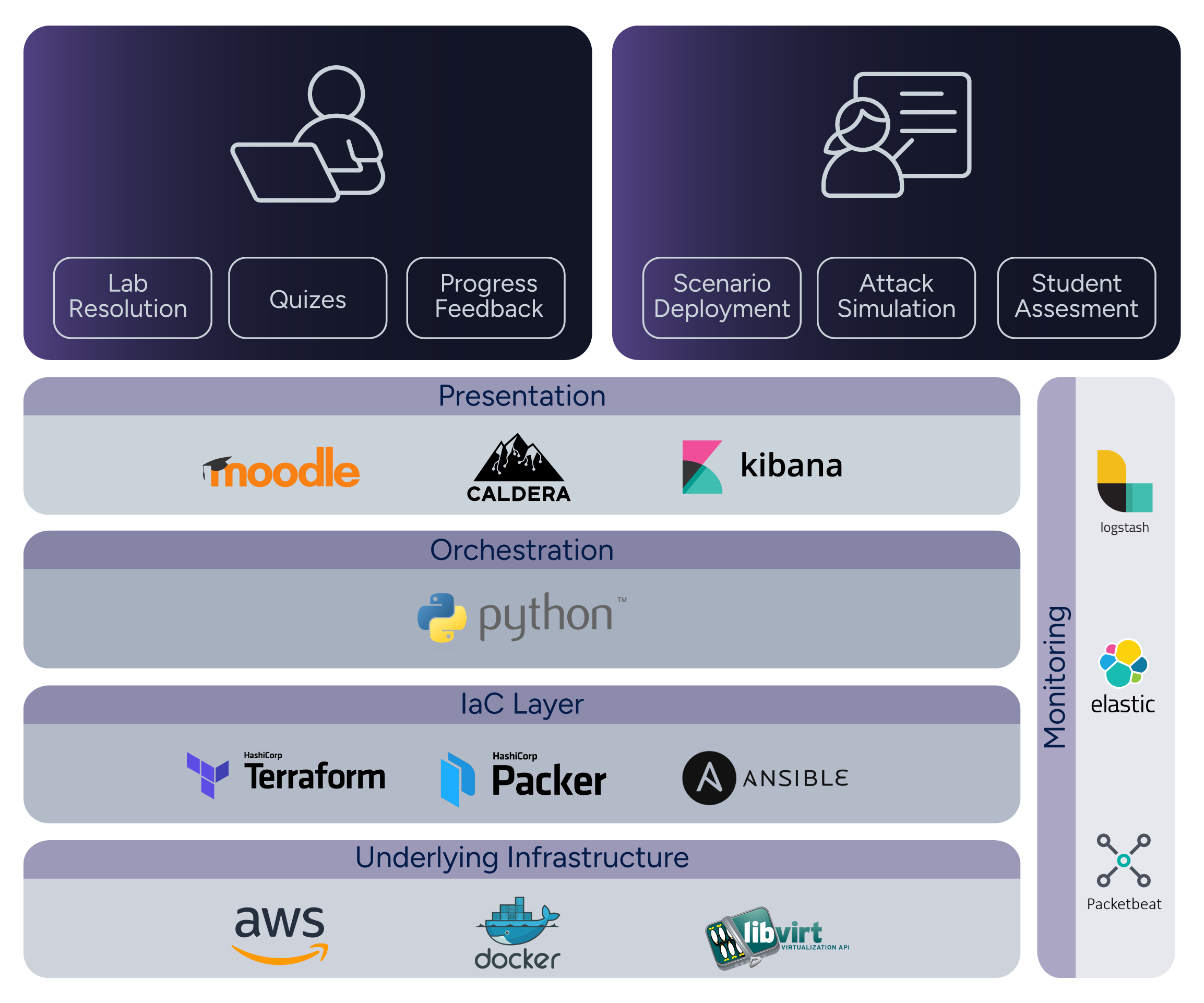
The underlying infrastructure constitutes the real-world infrastructure on which the systems and networks that form the basis of a particular scenario are deployed. Currently deployments on the AWS cloud or on-premises using Libvirt are supported, with more planned.
To achieve the deployment of the infrastructure in an automated manner, \textit{Infrastructrue as Code} (IaC) tools are used, such as Packer, Terraform and Ansible. These tools manage the resources to be deployed and the configurations to be applied to them. Ansible playbooks, in particular, are extensively used for configuration.
A Python component orchestrates these tools and manages the life cycle of the scenarios, including their deployment, elimination, powering on, powering off, and listing information. The scenarios themselves are described by a specification that allows users to declare various aspects, such as the machines to be deployed, the networks used to connect them, and the configurations to be applied to the machines, among others.
Installation Instructions
The following are the requirements to run Tectonic:
- SO: Linux or Mac OS
- Python and pip: version 3.12 or newer.
- IaC Tools: Terraform and Packer
- Base platforms: Libvirt or Docker
- AWS credentials and AWS CLI (for AWS deployment)
Please see the detailed instructions for more information.
Tectonic python module
You can install this module using the following command (preferably inside a virtual environment):
python3 -m pip install tectonic-cyberrange
Tectonic Configuration File
Tectonic behavior can be configured using an ini file with a
config section. You can find an example configuration file with the
default values here. Please see the ini
file documentation for details on the available
options.
Lab Configuration
The lab configuration is divided in two: a scenario specification that holds a static description of the lab that can be shared and reused, and information specific to a particular lab edition that defines things such as number of instances to deploy, public SSH keys for the teachers, etc.
The scenario specification consists of the following resources:
- A scenario description file in YAML syntax (required).
- Ansible playbooks for base image installation and after-clone
configurations, and optional files in the
ansibledirectory. - Elastic and Kibana policies and resources, in the
elasticdirectory, if using elastic for evaluation. - SSH public keys for admin access to the machines in the
sshdirectory.
The lab edition file
Please check the description documentation for more details. The examples directory contains some example scenarios.
Terraform state syncronization
Terraform states are stored locally by default. It is possible to
store them in a Gitlab repo (see gitlab_backend_url option in the
ini file configuration). It is necessary to have
Maintainer privileges on this repo and a GitLab access token. There
are two types of access token: personal or project-based. If the
latter is used, it must be associated with the project where the
states are stored.
Running Tectonic
To deploy a scenario run:
tectonic -c <ini_conf_file> <lab_edition_file> create-images

tectonic -c <ini_conf_file> <lab_edition_file> deploy
To destroy a scenario use the destroy command.
See tectonic --help for a full list of options, and tectonic <command> -h for help on individual commands.
Access the Cyber Range
Access is via SSH and will depend on the type of platform used. See the remote access documentation for more details.
Disclaimer About Platforms
Tectonic provides support for scenario deployments using Docker as the base platform. However, it is important to note that using Docker as base platform in production environments is not recommended since Tectonic deploys containers in privileged mode. This means that when a user has root access within a container, they can also gain root access to the host system, which can create significant security issues. Therefore, caution is crucial when using Docker as a base platform, especially in scenarios involving attacks. It is advisable to utilize Docker primarily for the generation and testing of new scenarios. For production environments, we recommend to utilize Libvirt or AWS as base platform, both of which are fully supported by Tectonic.
The Elastic and Caldera services on the Docker platform for Windows and macOS are not supported.
Authors
Tectonic was created by Grupo de Seguridad Informática of Universidad de la República Uruguay.
Please contact us at tectonic@fing.edu.uy.
See more of our project at Tectonic: An Academic Cyber Range.
License
Tectonic is licensed under the GNU General Public License v3.0 or later. See LICENSE to see the full text.
1 maintainer

Metadata
1 maintainer
Release files for tectonic-cyberrange 3.0.0
For a detailed explanation of source distributions (sdists) and built distributions (wheels), please see the package formats documentation.
Source distribution (sdist)
| File | Size | Uploaded | |
|---|---|---|---|
| tectonic_cyberrange-3.0.0.tar.gz | 191.1 kB | Details |
Built distribution (wheel)
| File | Interpreter | ABI | Platform | Reset |
|---|---|---|---|---|
| tectonic_cyberrange-3.0.0-py3-none-any.whl | Python 3 | none | any | Details |
Total release size: 477.0 kB
Release files / tectonic_cyberrange-3.0.0.tar.gz
| Download URL | tectonic_cyberrange-3.0.0.tar.gz |
|---|---|
| Size | 191.1 kB |
| Tags | Source |
|
SHA-256 checksum How to use checksums |
0fdf7fec17160108441016659022ba5548fe1f01f43d3c903ee4eccb1105ec8d
|
|
BLAKE2b-256 checksum How to use checksums |
59d9ce16dfe13836d6f87ae241f39f038142fe450d0b784bad7c4fe255d804d9
|
| Upload date | |
|
Uploaded using Trusted Publishing? What is trusted publishing? |
Yes |
| Uploaded via |
poetry/2.3.2 CPython/3.14.3 Linux/6.14.0-1017-azure
|
Release files / tectonic_cyberrange-3.0.0-py3-none-any.whl
| Download URL | tectonic_cyberrange-3.0.0-py3-none-any.whl |
|---|---|
| Size | 285.8 kB |
| Tags | Python 3 |
|
SHA-256 checksum How to use checksums |
dc250978605dbd54ca2b86360e7dd120f3054b8928dbccbb856dda2fe304d4e0
|
|
BLAKE2b-256 checksum How to use checksums |
afe6b9bd025c6c1468b677b2da9827c8020d1deb1adf249e4aa826475f8416a9
|
| Upload date | |
|
Uploaded using Trusted Publishing? What is trusted publishing? |
Yes |
| Uploaded via |
poetry/2.3.2 CPython/3.14.3 Linux/6.14.0-1017-azure
|














