
This release is a pre-release and may not be stable for production use.



uv tool install teddy-cli

Why TeDDy? • TeDDy's SDLC • Owning Your SDLC • Quickstart • Usage • FAQ • Support
Motivation
The 2025 DORA report found that AI adoption raises delivery throughput and product performance, but remains negatively related to delivery stability: code moves faster, but disproportionately more of it breaks. Any gains in raw speed are counterbalanced by increased effort needed for reviewing and reworking slop code to avoid technical defects and misalignment from compounding. Teams with fast feedback loops and loosely coupled systems see the most gain, while teams with inefficient processes and tight coupling see little or no benefit.
Bain's 2026 Technology Report reaches the same conclusion: AI has sped up coding, but that has shifted bottlenecks to review, governance, and software delivery. The limiting factor has shifted from the model to the connective architecture around it. Orchestrating and supervising AI agents is becoming an increasing part of software development at the expense of problem solving and critical thinking, which are being delegated to the machines. Better models will not by themselves fix the root causes of these structural issues.
TeDDy addresses them instead by embedding proven engineering practices like Test-Driven Development, Hexagonal Architecture, and Iterative & Incremental Delivery directly into the agentic workflow, using only local plain text files that you can read, review, and change, with nothing hidden in a proprietary database or cloud service.
Video Walkthrough

Why Not Just Use...
...Skill.md files?
Skills are designed for task-specific procedures, but stretching them to manage the entire software delivery lifecycle quickly becomes unmaintainable. Commercial coding harnesses often inject 15,000–25,000+ tokens of hidden base instructions, tool definitions, and environment state before reading your prompt. Layering procedural skill files on top causes prompt dilution, conflicting directives, and high input token costs. Because skills sit on top of a vendor's built-in system prompt, upstream updates will also alter that base prompt without warning, introducing subtle conflicts or workflow drift over time. TeDDy instead organizes the full SDLC across specialized agents, where each follows a process structured into phases and concrete steps via lean, dedicated system prompts that you fully control. You can also use TeDDy's prompts and templates inside other coding harnesses.
...Spec-driven development?
Spec-driven development requires you to define everything upfront before writing code. This is essentially the waterfall model under a new name, relying on the assumption that initial requirements will be completely accurate. That assumption rarely holds, as non-trivial systems always uncover edge cases and evolving requirements during development. TeDDy still uses specifications, but treats them as living documents within an iterative process more akin to Agile, allowing the design to adapt as you build.
...Automation?
TeDDy integrates automated pre-commit hooks, local test suites, and CI/CD pipelines directly into the agent workflow. Even so, automated tests alone cannot prevent misalignment or verify intent. As Bain's report notes, speeding up code generation without redesigning the surrounding process does not compound gains; it just redistributes the pain to the slowest human checkpoint. TeDDy pairs these automated quality gates with a human-in-the-loop workflow mediated through specific Markdown documents across each phase of the software delivery lifecycle.
What Makes TeDDy Special
- Markdown as the interface. Inspired by Obsidian, living documents such as specs, architecture contracts, and vertical slices mediate every part of the SDLC. All agent responses and tool calls are also plain Markdown, fully controllable via the built-in TUI while leveraging your native editor instead of restricting the means of development to a chat window.
- Local-first architecture. Inspired by the UNIX philosophy of small, sharp tools, TeDDy runs entirely inside your existing workspace with no cloud dependencies, proprietary databases, or background telemetry. It integrates cleanly with standard developer environments, allowing your terminal, local Git hooks, and preferred editor to drive the workflow.
- Auditable by design. Inspired by Git's ledger model, every session maintains an immutable history of what the agent intended and what actually executed. Each plan enforces a structured rationale covering a summary, the expected outcome, progress, and notes, making agent reasoning fully traceable, searchable, and easy to parse with your own scripts for analysis.
Why Working Code Is Not Enough
LLMs are pre-trained on next-token prediction and fine-tuned with reinforcement learning to solve discrete and well-defined tasks, making them effective at writing code that works in isolation, but poorly equipped to navigate uncertainty or keep code and intent aligned over time. LLMs are also evaluated and trained on generating the final solution in one shot instead of working iteratively and incrementally, which, if left unchecked, leads to defects compounding on top of each other over time.
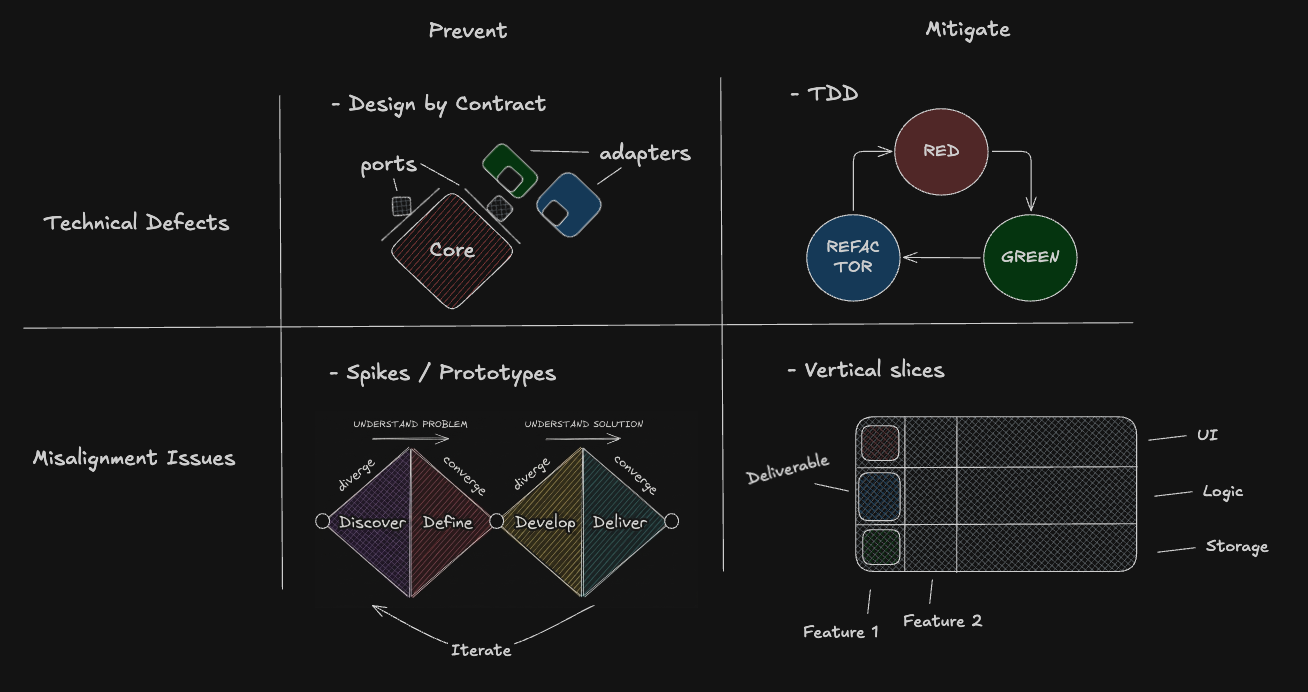
Defects in software come in two kinds: technical defects, where code matches your intent but breaks on edge cases or introduces bugs, and misalignment, where the code technically works but is not what you actually wanted. Most coding harnesses do little to address either one, forcing teams to patch extra tools and components into their software development lifecycle just to keep code on track. TeDDy instead tackles both types of defects directly within the harness, preventing them before they happen and mitigating them as early as possible when they do.
For technical defects, TeDDy prevents structural failures through Design by Contract, enforcing Hexagonal Architecture through ports and adapters. To mitigate bugs during development, it uses a strict Test-Driven (Red-Green-Refactor) cycle to write tests first and commit code in small units to surface errors early.
For misalignment, TeDDy prevents building the wrong thing by using spikes and prototypes to de-risk uncertain solutions before committing to an architecture. During implementation, it mitigates drift by delivering features through small vertical slices. Specific Markdown documents mediate every phase transition, anchoring the agents and providing a high-level steering interface to keep humans in the loop.
TeDDy's Software Delivery Lifecycle
Instead of winging the process on the go or taking the shortest path to generate code, agents follow a structured delivery process mediated by plain Markdown documents:
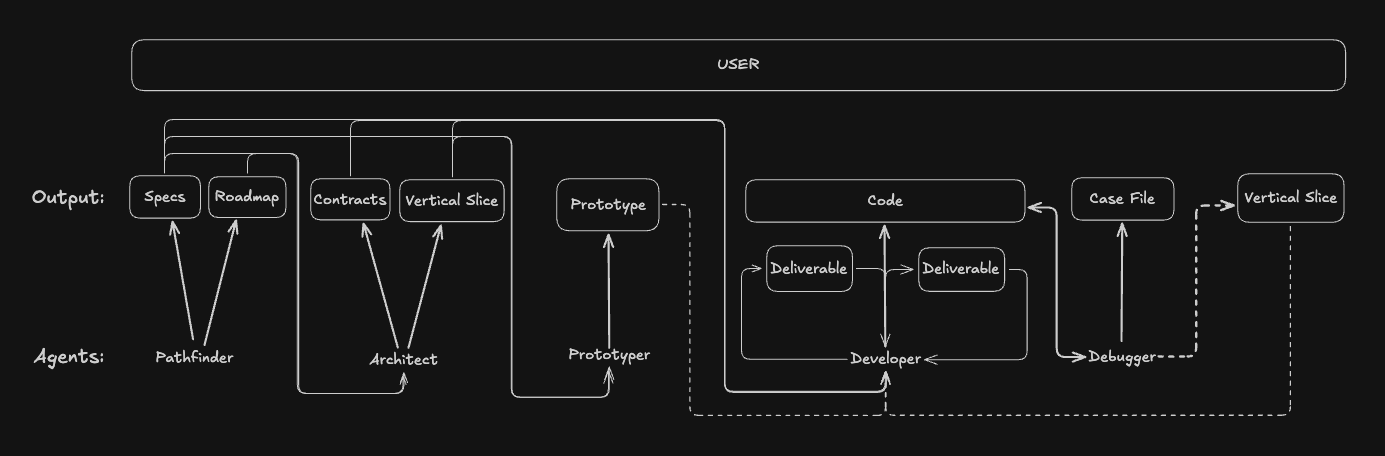
- Strategic Alignment & Roadmapping: The Pathfinder aligns incoming requests with the product vision, roadmap, and permanent system invariant specifications.
- Contract-First Architecture: The Architect enforces Ports & Adapters boundaries, drafts component contracts, and decomposes milestones into vertical slices that deliver complete end-to-end functionality across all layers.
- Sandbox De-Risking: The Prototyper conducts isolated spikes to de-risk technical and functional unknowns before any production code is touched.
- Atomic Test-Driven Delivery: The Developer implements vertical slices through test-driven (Red-Green-Refactor) cycles, committing one atomic deliverable at a time to maintain a continuous green state.
- Empirical Diagnostics: When bugs or regressions occur, the Debugger isolates root causes using Minimal Reproducible Examples (MREs) and validates fixes against isolated replicas before touching production code.
- Automated Quality Gates & CI/CD: Local pre-commit hooks catch formatting, secret, and merge issues on staged files, while continuous integration automatically validates test suites and quality checks across platforms.
- Tactical Chores: The Assistant handles one-off scripts, simple refactors, and ad-hoc maintenance through a fast feedback loop without heavy ceremonial overhead.
Owning Your SDLC
TeDDy is built on the belief that you should own your software delivery lifecycle. Even though TeDDy comes with opinionated defaults handcrafted from my own engineering preferences and daily development experience, every part of the process is designed to be easily tailored to your team's workflow without touching any application code:
- High-Level Governance Rules (
PROJECT.md&ARCHITECTURE.md): The simplest way to guide agents. Define product roadmaps, engineering principles, system laws, and component boundaries in living Markdown documents that agents read on every turn. - Artifact Templates (
docs/templates/): Standardize the artifacts produced during development. Customize the Markdown templates for vertical slices, specifications, case files, and milestones to match your documentation standards. - Agent Prompts (
.teddy/prompts/): To change the process itself, customize the agent prompts. Each agent's workflow is broken down into structured phases and individual steps, defined entirely in Markdown. You can tweak instructions, add domain-specific quality gates, or introduce brand-new agent personas to match how your team builds software. TeDDy composes each system prompt from the agent's instructions plus a shared response protocol it appends automatically. The composed prompt is saved in the session folder. You can also runteddy get-prompt <agent>to retrieve it without starting a session. A customized prompt that already includes<response_format>opts out of the shared protocol. - Command Automation (
Makefile): Instead of hardcoding shell commands inside agent prompts, common development and verification operations are routed through the Makefile. When you need to change a flag, runner, or environment setup, you change it once in the Makefile instead of updating instructions across multiple agent prompts. - Context Filtering (
.teddyignore): Control which files TeDDy scans during context generation and tree traversal. A.teddyignorefile in the project root follows standard ignore syntax and takes precedence over.gitignore, allowing you to ignore extra paths or re-include git-ignored files using negation patterns.
Getting Started
Prerequisites
- Python 3.11 or later
uv(recommended) orpip(included with Python)
Install TeDDy
uv tool install teddy-cli
Installing Experimental Versions
To install or upgrade to the latest development pre-release directly from PyPI:
uv tool install teddy-cli --pre --force
Initialize
teddy init
Use subcommands to overwrite specific defaults:
teddy init prompts: Overwrite bundled prompt Markdown files in.teddy/prompts/(useful after upgrades).teddy init config: Overwriteconfig.yaml,.gitignore, andinit.contextwith defaults. Preserves existing.envfiles.teddy init templates: Overwrite bundled Markdown templates indocs/templates/with defaults.
Each subcommand rewrites only the files whose content differs from the bundled default, and reports how many it changed.
Configuration
The first execution of teddy start runs an interactive setup to configure your API key and preferred editor. For deeper customization, edit .teddy/config.yaml. All llm.* settings pass directly through to LiteLLM, allowing you to route to cloud providers or local endpoints (Ollama, llama.cpp, or any OpenAI-compatible server via api_base). The config file also lets you adjust your external editor, command execution timeouts, diff similarity thresholds, and automated context pruning budgets.
Environment Variables
TeDDy checks the following process environment variables at startup and during a session.
| Variable | Purpose |
|---|---|
TEDDY_LLM_API_KEY |
The LLM API key. The bundled config.yaml default references it as llm.api_key: "${TEDDY_LLM_API_KEY}". A shell value wins over the .teddy/.env value. |
EDITOR |
Fallback editor command when editor is unset in .teddy/config.yaml. |
TEDDY_DIFF_TOOL |
Overrides the auto-detected diff viewer. |
TEDDY_MAX_TURNS |
Overrides the maximum number of turns for a yolo run. |
TEDDY_MAX_SESSION_COST |
Overrides the maximum session cost in dollars for a yolo run. |
TeDDy also interpolates any ${VAR} or ${VAR:-default} token in .teddy/config.yaml against .teddy/.env layered under the process environment, so you can reference your own secrets from config values.
Using TeDDy in CI
TeDDy is safe to run in non-interactive environments. When stdin is not a terminal, TeDDy skips the API-key and editor setup prompts automatically, so no command blocks waiting for input.
To run TeDDy in a pipeline, set TEDDY_LLM_API_KEY in the environment and pass --pipeline (-p), which skips the plan review, requires -m, exits after the first message turn, and defaults to the assistant agent.
TEDDY_LLM_API_KEY="$OPENROUTER_API_KEY" teddy start --pipeline -m "do the thing"
Usage
Starting and Resuming Sessions
# Start a session (opens the plan reviewer before executing)
teddy start

# Skip the plan review and run every action (yolo run)
teddy start -y

# Start with a specific agent and prompt
teddy start -a architect -m "Plan the auth module"

# Resume the most recent session
teddy resume

# Resume a specific session by slug or path
teddy resume my-feature-branch
teddy resume .teddy/sessions/20260825_151900-my-feature-branch

# Resume an ongoing session with a different agent persona
teddy resume -a developer
Interrupt a running session with q or Ctrl+C at any time. The action currently in flight will stop immediately, remaining actions will be skipped, and the report will be written to preserve the audit trail.
Resume with additional instructions:
teddy resume -m "your next instruction"
Pass an empty message to be prompted instead, so you can write a multi-line instruction in your editor (press e at the prompt):
teddy resume -m ""
Optional Flags
| Parameters | Short | Description |
|---|---|---|
--message |
-m |
Initial instruction to pass directly to the agent. |
--agent |
-a |
Select agent persona (pathfinder, architect, developer, debugger, assistant). Default: pathfinder (assistant in pipeline mode). |
--context |
-c |
Supply additional context files or directories. Repeatable (-c a.py -c b.md) or comma-separated (-c "a.py,b.md"). |
--pipeline |
-p |
Pipeline mode. Skips the plan review, requires -m, exits immediately after the first message turn, and defaults to the assistant agent. |
--yolo |
-y |
Skip the plan review and execute all actions. To make this the default, set yolo_default: true in .teddy/config.yaml. |
--no-yolo |
-n |
Review the plan in the TUI before executing (default). |
--max-turns |
Maximum turns for a yolo run. Overrides guardrails.max_turns in .teddy/config.yaml. |
|
--max-cost |
Maximum session cost in dollars for a yolo run. Overrides guardrails.max_session_cost in .teddy/config.yaml. |
|
--model |
Override the default configured model. |
Using TeDDy's Prompts & Templates in Other Harnesses
TeDDy's engineering philosophy is harness-agnostic. If your team uses Claude Code, Cursor, Windsurf, or Aider, you can adopt TeDDy's software engineering methodology directly in those tools:
- System Instructions: Copy your desired agent workflow prompt from
.teddy/prompts/(e.g.developer.mdorarchitect.md) into your tool's custom instruction file (such asCLAUDE.mdfor Claude Code or.cursorrulesfor Cursor). - Artifact Standards: Keep
docs/templates/anddocs/project/in your repository. The agent will read these templates to create vertical slices, milestone roadmaps, and architecture documents. - Execution Tooling: Standardize commands through the project
Makefile. When the agent runsmake testormake commit, the host harness executes the command through its native terminal runner.
Chat-Oriented Workflow (CHOP)
You do not need API keys or per-token billing to use TeDDy. If you already have an active subscription (ChatGPT, Claude, Gemini, etc.), you can also use TeDDy to practice Chat-Oriented Programming (CHOP) from your web browser.
TeDDy packages your workspace context into a single clipboard payload, and the agent prompts instruct the model to automatically format its response as an executable, self-contained Markdown plan.
- Set the system instructions: Copy your chosen agent persona's prompt with
teddy get-prompt <agent_name>and paste it into your web interface's system prompt or custom instructions field. - Bundle project context: Export your workspace context to the clipboard with
teddy context(see Exporting Context). This bundles system information, current git status, project structure, and the full verbatim contents of all files listed in.teddy/init.contextinto a single Markdown payload. - Prompt the AI: Paste the context payload into the chat alongside your task request. Guided by the system instructions, the model will automatically structure its response as an executable Markdown plan.
- Apply changes: Copy the full Markdown plan to your clipboard and run
teddy executeto validate, review diffs, and apply approved changes automatically, or copy and run individual snippets manually as you would in standard CHOP. - Report back: When
teddy executefinishes, it automatically copies a concise execution report back to your clipboard to paste into the chat.
Exporting Context
teddy context bundles system information, git status, project structure, and file contents into a single Markdown payload. It copies the payload to the clipboard unless you pass --no-copy.
Pass -c/--context to add ad-hoc values for a single run. The flag is repeatable and accepts comma-separated values. Explicit values extend the default set from .teddy/init.context. They do not replace it.
# Add two files beside the default init.context entries
teddy context -c README.md -c src/app.py

# Comma-separated values expand to separate entries
teddy context -c "README.md,pyproject.toml"

# Export only the chosen files and skip the default set
teddy context --only -c README.md

# Export the payload without any file contents
teddy context --only
A -c value resolves by kind. A directory expands recursively. A URL is fetched instead of resolved on disk. A file named <name>.context is treated as a manifest: the command reads one path per line, skips blank lines and # comments, and expands each entry. Any other file is embedded verbatim.
teddy context -c review.context
--only skips the default set and the session scopes. With no -c value the explicit set is empty, so the payload carries system information, git status, and project structure but no Resource Contents section.
Command Reference
| Subcommand | Description |
|---|---|
init |
Initialize workspace with defaults. Pass prompts, config, or templates to overwrite specific assets. |
start |
Start an agent session. |
resume |
Resume an existing session. |
update |
Check for updates and display upgrade instructions. |
execute |
Execute a Markdown plan (reads from clipboard if no path is provided). |
context |
Export context payload (system info, git status, file tree, init.context). Add ad-hoc files with -c and skip defaults with --only. |
get-prompt |
Output the composed system prompt (agent instructions plus the shared response protocol). |
Frequently Asked Questions
Does TeDDy collect telemetry or phone home?
No. TeDDy collects zero telemetry, zero analytics, and runs no background tracking. All requests go directly to whichever LLM provider or local endpoint you configure in your local config file.
By default, OpenRouter requests include attribution headers (HTTP-Referer and X-OpenRouter-Title) to credit usage to TeDDy on OpenRouter rankings. Set llm.extra_headers: null in .teddy/config.yaml to opt out. Other providers ignore these headers.
Which models and providers are supported?
TeDDy uses LiteLLM under the hood. You can route to any provider supported by LiteLLM, including OpenRouter, Anthropic, OpenAI, and Google Gemini. For local models, it supports Ollama, vLLM, LM Studio, llama.cpp, and any OpenAI-compatible endpoint.
Do I need to migrate my existing codebase to use this?
No. TeDDy is designed to run inside existing repositories. It only creates a .teddy/ directory in your project root to hold prompts, configuration, and session history.
How do teams collaborate with TeDDy?
All strategic artifacts created by agents (roadmaps in docs/project/, component designs, and vertical slices) are saved directly in your repository's docs/ directory and committed to Git like regular code. The internal .teddy/ directory is ignored by default, keeping private session logs and environment credentials local to each developer.
Are there hidden fees? How is TeDDy licensed and monetized?
There are no subscriptions, hidden fees, or token markups. You bring your own API keys or local models and pay providers directly at standard rates with zero middleman.
TeDDy is completely free software under the AGPL-3.0 license. As a copyleft license, if you modify and distribute TeDDy itself, your changes must also be open-sourced under the AGPL. However, using TeDDy as a development harness to write your own software does not affect your codebase; you fully own all code generated by the agents under whatever license you choose.
The tool itself is not monetized. If your team needs custom agent architectures, workflow design, or dedicated onboarding support, professional consulting is available at raphael@atteritano.ch.
Learn More



1 maintainer

Metadata
1 maintainer
Release files for teddy-cli 0.2.3.dev1513
For a detailed explanation of source distributions (sdists) and built distributions (wheels), please see the package formats documentation.
Source distribution (sdist)
| File | Size | Uploaded | Provenance | Actions |
|---|---|---|---|---|
| teddy_cli-0.2.3.dev1513.tar.gz | 291.2 kB | With provenance | Details for teddy_cli-0.2.3.dev1513.tar.gz |
Built distribution (wheel)
| File | Interpreter | ABI | Platform | Actions Reset |
|---|---|---|---|---|
| teddy_cli-0.2.3.dev1513-py3-none-any.whl | Python 3 | none | any | Details for teddy_cli-0.2.3.dev1513-py3-none-any.whl |
Total release size: 657.6 kB
Release files / teddy_cli-0.2.3.dev1513.tar.gz
| Download URL | teddy_cli-0.2.3.dev1513.tar.gz |
|---|---|
| Size | 291.2 kB |
| Tags | Source |
|
SHA-256 checksum How to use checksums |
8065ea5e795d8289cc1ef1fcd89b6bc8487a5f20dcdce047cd5823b465a5c609
|
|
BLAKE2b-256 checksum How to use checksums |
2122eb1d97a8a8abdd1727bcf605350b91e18d0d1a278f4d74e38e45018c8c07
|
| Upload date | |
|
Uploaded using Trusted Publishing? What is trusted publishing? |
Yes |
| Uploaded via |
twine/7.0.0 CPython/3.13.16
|
Provenance
Provenance describes where a file came from. On PyPI, provenance is shared via attestations, which provide a verifiable record of the build or publishing details. View details, limitations and caveats.


PyPI Publish Attestation
PyPI verified that this artifact, at this checksum, originated from the publisher listed below.
Signed by GitHub Actions, verified by PyPI on Nov 19, 2026.
Transparency logRelease files / teddy_cli-0.2.3.dev1513-py3-none-any.whl
| Download URL | teddy_cli-0.2.3.dev1513-py3-none-any.whl |
|---|---|
| Size | 366.4 kB |
| Tags | Python 3 |
|
SHA-256 checksum How to use checksums |
574bfaff052fc8333830d1024d8e6090c95141fc69469400ba99acd46f492d3d
|
|
BLAKE2b-256 checksum How to use checksums |
be7f7fa9eb4f747522be8f2cc04c5e4dce88ac3aa40ffedc103e9624d3cbb7f0
|
| Upload date | |
|
Uploaded using Trusted Publishing? What is trusted publishing? |
Yes |
| Uploaded via |
twine/7.0.0 CPython/3.13.16
|
Provenance
Provenance describes where a file came from. On PyPI, provenance is shared via attestations, which provide a verifiable record of the build or publishing details. View details, limitations and caveats.
PyPI Publish Attestation
PyPI verified that this artifact, at this checksum, originated from the publisher listed below.
Signed by GitHub Actions, verified by PyPI on Nov 19, 2026.
Transparency logSecurity for teddy-cli 0.2.3.dev1513
Provenance
Provenance describes where a file came from. On PyPI, provenance is shared via attestations, which provide a verifiable record of the build or publishing details. View details, limitations and caveats.
Full provenance
Both files in this release have been uploaded with provenance metadata.
Attestation for teddy_cli-0.2.3.dev1513.tar.gz
PyPI Publish Attestation
PyPI verified that this artifact, at this checksum, originated from the publisher listed below.
Signed by GitHub Actions, verified by PyPI on Nov 19, 2026.
Transparency logA note on package security
PyPI is a repository for distributing packages, not a service for auditing them. While third-party security researchers and our staff do their best to detect and remove malicious packages, PyPI cannot guarantee the quality, security or suitability of any given package.
To learn more about protecting yourself from malicious actors, visit our package security documentation.














