
Pageable inline keyboard for pyTelegramBotAPI (telebot)

Project description
Pageable inline keyboard for pyTelegramBotAPI (telebot)
A library for pyTelegramBotAPI that allows you to display data in the format of a pageable inline keyboard.
Installation
You can use pip to install this library.
pip install telebot-inline-pagination
Usage
Step 1. Import necessary libraries and connect Telegram token
from telebot import TeleBot

bot = TeleBot('TOKEN', parse_mode=None) # Use your Telegram token

from telebot.types import CallbackQuery
from telebot_inline_pagination import Keyboard
Step 2. Define the parameters
Required parameters
data: Dataset in "list of tuples" format, without headers: [(a1, b1), (a2, b2), (a3, b3)].
text_message: Message displayed above the keyboard.
data = [
            ('Hartsfield-Jackson Atlanta International Airport', 'ATL/KATL', 'Atlanta, Georgia, United States'),
            ("O'Hare International Airport", 'ORD/KORD', 'Chicago, Illinois, United States'),
            ('Dallas/Fort Worth International Airport', 'DFW/KDFW', 'Coppell, Euless, Grapevine, and Irving, Texas, United States'),
            ('Denver International Airport', 'DEN/KDEN', 'Denver, Colorado, United States'),
            ('Charlotte Douglas International Airport', 'CLT/KCLT', 'Charlotte, North Carolina, United States'),
            ('Los Angeles International Airport', 'LAX/KLAX', 'Los Angeles, California, United States'),
            ('Harry Reid International Airport', 'LAS/KLAS', 'Paradise, Nevada, United States'),
            ('Phoenix International Airport', 'PHX/KPHX', 'Phoenix, Arizona, United States'),
            ('Miami International Airport', 'MIA/KMIA', 'Miami-Dade County, Florida, United States'),
            ('George Bush Intercontinental Airport', 'IAH/KIAH', 'Houston, Texas, United States')
        ]

text_message = 'Demo'
Optional parameters
row_width: The number of buttons per row (from 1 to 3, by default - 1).
rows_per_page: The number of rows of buttons on one page, excluding the navigation bar (by default - 5).
text_index: Column index - data source for button titles (by default - 0).
callback_index: Column index - data source for callback-function (by default - 0).
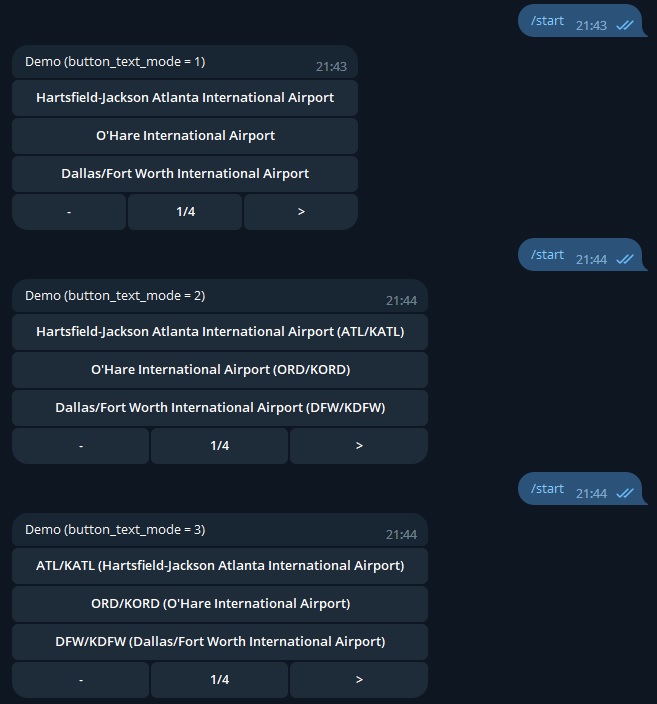
button_text_mode: The number of the mode responsible for the format of the displayed text on the buttons:
- 0 or None (by default) - The button displays data and has callback data from the column index 0
- 1 - The button displays only data from the text_index column
- 2 - The button displays data from the text_index column, and in brackets - data from the callback_index column
- 3 - The button displays data from the callback_index column, and in brackets - data from the text_index column
next_page: Content of the button to go to the next page (by default - '--->').
previous_index: Content of the button to go to the previous page (by default - '<---').
TEXT_INDEX = 0 # in this example, full airport name
CALLBACK_INDEX = 1 # in this example, IATA/ICAO airport code
BUTTON_TEXT_MODE = 2 # in this example, "full airport name (IATA/ICAO airport code)"
ROW_WIDTH = 1
ROWS_PER_PAGE = 3
NEXT_PAGE = '>'
PREVIOUS_PAGE = '<'
Step 3. Creating the pageable keyboard instance
The standard pageable keyboard instance looks like this:
Keyboard(chat_id=message.chat.id, data=data, row_width=ROW_WIDTH, rows_per_page=ROWS_PER_PAGE, button_text_mode=BUTTON_TEXT_MODE, text_index=TEXT_INDEX, callback_index=CALLBACK_INDEX, next_page=NEXT_PAGE, previous_page=PREVIOUS_PAGE)
In this example, the instance is written to the variable keyboards to ensure multithreading:
keyboards = []

...

    json = {"id": message.chat.id, "object": Keyboard(chat_id=message.chat.id, data=data, row_width=ROW_WIDTH, rows_per_page=rows_per_page, button_text_mode=button_text_mode, text_index=text_index, callback_index=callback_index)}
    keyboards.append(json)
Step 4. Creating the message handler for pageable keyboard
The standard message handler for pageable keyboard looks like this:
bot.send_message(message.from_user.id, text_message, reply_markup=Keyboard.send_keyboard())
In this example, the keyboard calls using the /start command. Also, first, when using the /start command, all previously created instances are deleted. Second, a new instance is added to the message handler.
@bot.message_handler(commands=['start'])
def demo_pagination(message):
    for i, j in enumerate(keyboards):
        if j["id"] == message.chat.id:
            del keyboards[i]
    json = {"id": message.chat.id, "object": Keyboard(chat_id=message.chat.id, data=data, row_width=ROW_WIDTH, rows_per_page=ROWS_PER_PAGE, button_text_mode=BUTTON_TEXT_MODE, text_index=TEXT_INDEX, callback_index=CALLBACK_INDEX, next_page=NEXT_PAGE, previous_page=PREVIOUS_PAGE)}
    keyboards.append(json)
    for i in keyboards:
        if i["id"] == message.chat.id:
            bot.send_message(message.from_user.id, text_message, reply_markup=i["object"].send_keyboard())
Step 5. Creating the callback query handler for pageable keyboard
The standard callback query handler for pageable keyboard looks like this:
bot.edit_message_text(text_message, reply_markup = Keyboard.edit_keyboard(call), chat_id = call.message.chat.id, message_id = call.message.message_id)
In this example, we use the current chat id to find the required instance in the keyboards list and launch the callback query handler. Also, we use the send_message command to receive a message with information when the result button is clicked.
@bot.callback_query_handler(func=lambda call: True)
def demo_pagination_handler(call: CallbackQuery):
    if call.data in ('previous_page', 'next_page'):
        for i in keyboards:
            if i["id"] == call.message.chat.id:
                bot.edit_message_text(text_message, reply_markup = i["object"].edit_keyboard(call), chat_id = call.message.chat.id, message_id = call.message.message_id)
    for i in data:
        if call.data == i[CALLBACK_INDEX]:
            bot.send_message(
                        call.message.chat.id,
                        'Airport: ' + i[0] + ' (' + i[1] + ')' + '\n' +
                        'Address: ' + i[2]
                        )
Full example
In this example, the code implements multithreading: the bot can be used by several people at the same time without interfering with each other.
from telebot import TeleBot

bot = TeleBot('TOKEN', parse_mode=None) # Use your Telegram token

from telebot.types import CallbackQuery
from telebot_inline_pagination import Keyboard

data = [
            ('Hartsfield-Jackson Atlanta International Airport', 'ATL/KATL', 'Atlanta, Georgia, United States'),
            ("O'Hare International Airport", 'ORD/KORD', 'Chicago, Illinois, United States'),
            ('Dallas/Fort Worth International Airport', 'DFW/KDFW', 'Coppell, Euless, Grapevine, and Irving, Texas, United States'),
            ('Denver International Airport', 'DEN/KDEN', 'Denver, Colorado, United States'),
            ('Charlotte Douglas International Airport', 'CLT/KCLT', 'Charlotte, North Carolina, United States'),
            ('Los Angeles International Airport', 'LAX/KLAX', 'Los Angeles, California, United States'),
            ('Harry Reid International Airport', 'LAS/KLAS', 'Paradise, Nevada, United States'),
            ('Phoenix International Airport', 'PHX/KPHX', 'Phoenix, Arizona, United States'),
            ('Miami International Airport', 'MIA/KMIA', 'Miami-Dade County, Florida, United States'),
            ('George Bush Intercontinental Airport', 'IAH/KIAH', 'Houston, Texas, United States')
        ]

text_message = 'Demo'

BUTTON_TEXT_MODE = 2
TEXT_INDEX = 0
CALLBACK_INDEX = 1
ROW_WIDTH = 1
ROWS_PER_PAGE = 3
NEXT_PAGE = '>'
PREVIOUS_PAGE = '<'

keyboards = []

@bot.message_handler(commands=['start'])
def demo_pagination(message):
    for i, j in enumerate(keyboards):
        if j["id"] == message.chat.id:
            del keyboards[i]
    json = {"id": message.chat.id, "object": Keyboard(chat_id=message.chat.id, data=data, row_width=ROW_WIDTH, rows_per_page=ROWS_PER_PAGE, button_text_mode=BUTTON_TEXT_MODE, text_index=TEXT_INDEX, callback_index=CALLBACK_INDEX, next_page=NEXT_PAGE, previous_page=PREVIOUS_PAGE)}
    keyboards.append(json)
    for i in keyboards:
        if i["id"] == message.chat.id:
            bot.send_message(message.from_user.id, text_message, reply_markup=i["object"].send_keyboard())

@bot.callback_query_handler(func=lambda call: True)
def demo_pagination_handler(call: CallbackQuery):
    if call.data in ('previous_page', 'next_page'):
        for i in keyboards:
            if i["id"] == call.message.chat.id:
                bot.edit_message_text(text_message, reply_markup = i["object"].edit_keyboard(call), chat_id = call.message.chat.id, message_id = call.message.message_id)
    for i in data:
        if call.data == i[CALLBACK_INDEX]:
            bot.send_message(
                        call.message.chat.id,
                        'Airport: ' + i[0] + ' (' + i[1] + ')' + '\n' +
                        'Address: ' + i[2]
                        )

bot.infinity_polling()
Result
MIT License
Release history Release notifications | RSS feed


Download files
Download the file for your platform. If you're not sure which to choose, learn more about installing packages.
Source Distribution
Built Distribution
Filter files by name, interpreter, ABI, and platform.
If you're not sure about the file name format, learn more about wheel file names.
Copy a direct link to the current filters
File details
Details for the file telebot_inline_pagination-1.2.0.tar.gz.
File metadata
- Download URL: telebot_inline_pagination-1.2.0.tar.gz
- Upload date:
- Size: 5.8 kB
- Tags: Source
- Uploaded using Trusted Publishing? No
- Uploaded via: twine/4.0.2 CPython/3.11.1
File hashes
| Algorithm | Hash digest | |
|---|---|---|
| SHA256 |
6e609e985b3a89262b89b41abfa5c080b03e99aeadea0237d911259205005671
|
|
| MD5 |
bd7d9804492c0bcff401fd7f50aff034
|
|
| BLAKE2b-256 |
c8941256b1406b8b995f7d3dfbdf94e2888d413be91c0ed913a3dd2ad4e5ed32
|
File details
Details for the file telebot_inline_pagination-1.2.0-py3-none-any.whl.
File metadata
- Download URL: telebot_inline_pagination-1.2.0-py3-none-any.whl
- Upload date:
- Size: 6.1 kB
- Tags: Python 3
- Uploaded using Trusted Publishing? No
- Uploaded via: twine/4.0.2 CPython/3.11.1
File hashes
| Algorithm | Hash digest | |
|---|---|---|
| SHA256 |
5b86f363e8aeece2718f6d78affc4b795e40da491a24a42a7a3cff39286081ac
|
|
| MD5 |
92dd6f97e55cf0c71429ff3582176535
|
|
| BLAKE2b-256 |
06b09b40d0e066a6cd994f98f1254932cefa671685c32f4a9a337d1dc35c589e
|






