






Telegram Archive backs up one or more Telegram accounts to a machine you host. It runs in Docker or from pip, and saves messages, media, edits and deletions to SQLite or PostgreSQL on your own disk. A web viewer, which never talks to Telegram, lets you read and search what it saved.
Telegram Desktop's own export is a one-off file with no earlier versions and no deleted messages; this runs on a schedule, keeps earlier versions and deleted messages, and can import that export too.
Features
- Saves new messages, their media, edits and reactions the moment they happen, and runs a daily full pass that fetches only what is new to fill in anything the live connection missed.
- Keeps every edit with its earlier text, and keeps every deleted message, marked as deleted, with its text and media.
- Saves photos, videos, voice notes, stickers, documents and link previews once each, however many chats share them, and skips files over a size you set.
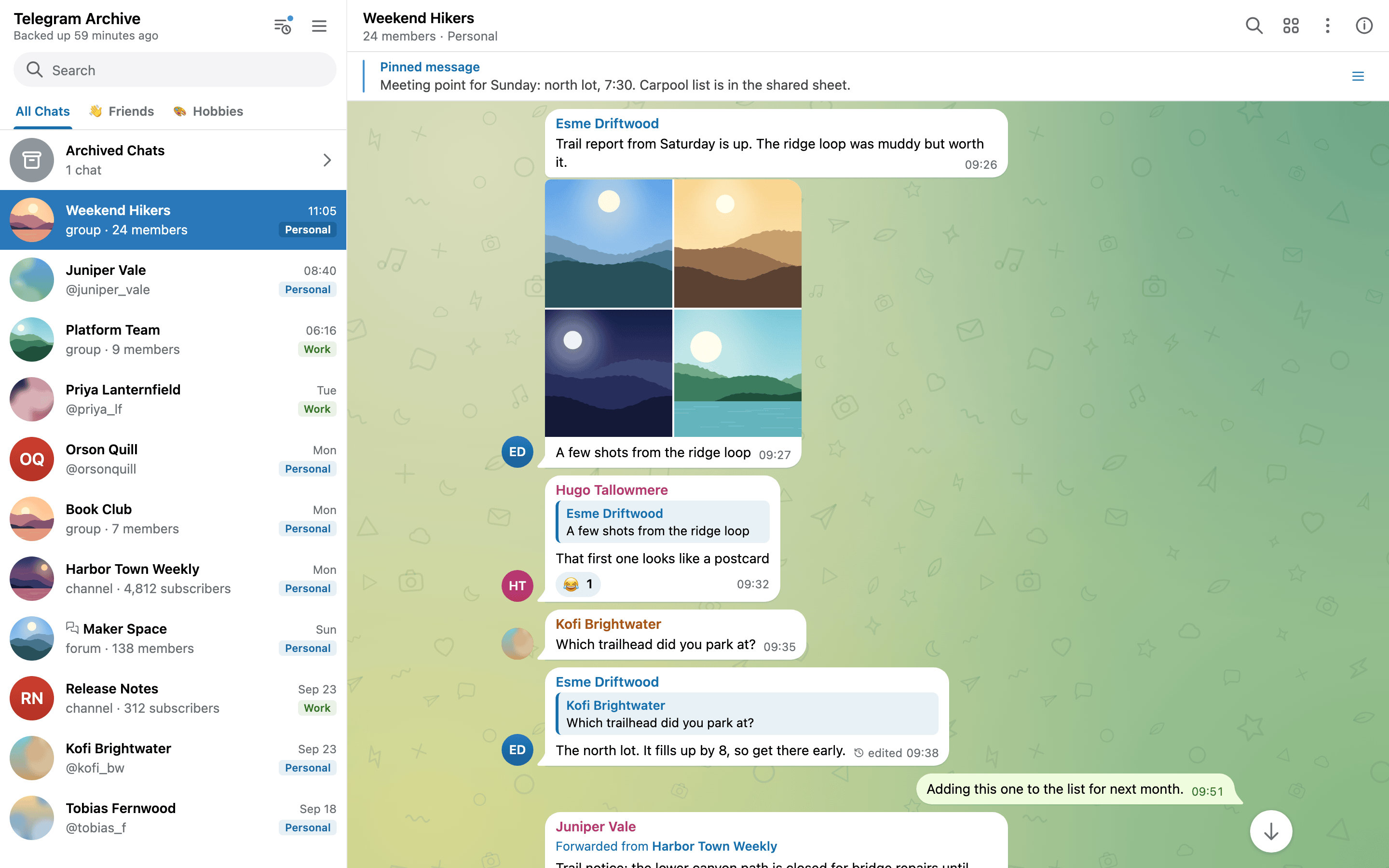
- Reads like Telegram: chats, forum topics, folders, archived chats, reactions, pinned messages, polls and shared media, with search across every chat.
- Shows what Telegram no longer does: a What changed feed of deletions, edits and new transcripts, and the earlier profile photos of every chat.
- Backs up several accounts into one archive, and imports Telegram Desktop exports.
- Turns voice messages into searchable text through a transcription server you run or rent.
- Gives other people a login to chosen chats or a share link that opens one chat, and sends browser notifications for new messages.
- Twelve themes, including one that follows the system light or dark setting, on a viewer that works on a phone.
- Stays yours: SQLite or PostgreSQL on your disk, read-only containers with every capability dropped, for amd64 and arm64, or a plain
pipinstall.
Quick start
You need Docker Compose, and an api_id and api_hash for your account from my.telegram.org/apps.
curl -fsSLO https://raw.githubusercontent.com/GeiserX/Telegram-Archive/main/docker-compose.yml
cat > .env <<'EOF'
TELEGRAM_API_ID=12345678
TELEGRAM_API_HASH=0123456789abcdef0123456789abcdef
TELEGRAM_PHONE=+15551234567
VIEWER_USERNAME=admin
VIEWER_PASSWORD=choose-a-long-password
VIEWER_TIMEZONE=Europe/London
EOF
mkdir -p data && sudo chown -R 1000:1000 data
docker compose run --rm telegram-backup python -m telegram_archive auth
docker compose up -d   # drumsergio/telegram-archive:9.2.0 and drumsergio/telegram-archive-viewer:9.2.0
auth asks for the code Telegram sends you, and for your two-step password if you have one. Then open http://127.0.0.1:8000, sign in with the viewer username and password, and watch the first backup fill the chat list. Run with Docker has every step, with the Podman and Colima notes, and Install from PyPI runs the same thing from pip install telegram-archive.
Documentation
The full documentation is at geiserx.github.io/Telegram-Archive.
- Get started: Run with Docker, Log in to Telegram, Your first backup, Install from PyPI
- Configuration: Choosing chats, Media downloads, Schedule and backup tuning, Multiple accounts, Real-time listener, Event webhook, Voice transcription, SQLite and PostgreSQL
- Viewer: Using the viewer, Logins, viewer accounts and share links, Themes and wallpaper, Live updates and notifications, Exposing the viewer safely
- Operations: Upgrading, Backing up the archive, Import and maintenance tasks, Monitoring and troubleshooting
- Reference: Glossary, Environment variables, Command line and Python API, HTTP API
- Development and the Roadmap
Release notes are in the changelog. Open an issue for bugs and questions; the troubleshooting page says what to include. Report security problems through the security policy, never in a public issue.
License
GPL-3.0-or-later. Built on Telethon.
1 maintainer

Metadata
1 maintainer
Release files for telegram-archive 9.2.0
For a detailed explanation of source distributions (sdists) and built distributions (wheels), please see the package formats documentation.
Source distribution (sdist)
| File | Size | Uploaded | |
|---|---|---|---|
| telegram_archive-9.2.0.tar.gz | 1.3 MB | Details |
Built distribution (wheel)
| File | Interpreter | ABI | Platform | Reset |
|---|---|---|---|---|
| telegram_archive-9.2.0-py3-none-any.whl | Python 3 | none | any | Details |
Total release size: 2.7 MB
Release files / telegram_archive-9.2.0.tar.gz
| Download URL | telegram_archive-9.2.0.tar.gz |
|---|---|
| Size | 1.3 MB |
| Tags | Source |
|
SHA-256 checksum How to use checksums |
873df191700a15cf6a034531294cfb11fe447b62bd40fdf368eed711048b2e52
|
|
BLAKE2b-256 checksum How to use checksums |
10e52b849388e1abd037c7e0fde1d61560c9d06305282dc51166bb2d9936876e
|
| Upload date | |
|
Uploaded using Trusted Publishing? What is trusted publishing? |
Yes |
| Uploaded via |
twine/7.0.0 CPython/3.13.14
|
Provenance
Provenance describes where a file came from. On PyPI, provenance is shared via attestations, which provide a verifiable record of the build or publishing details. View details, limitations and caveats.


PyPI Publish Attestation
PyPI verified that this artifact, at this checksum, originated from the publisher listed below.
Signed by GitHub Actions, verified by PyPI on Oct 3, 2026.
Transparency logRelease files / telegram_archive-9.2.0-py3-none-any.whl
| Download URL | telegram_archive-9.2.0-py3-none-any.whl |
|---|---|
| Size | 1.4 MB |
| Tags | Python 3 |
|
SHA-256 checksum How to use checksums |
a5d17ec2dfdddba5ecee3dc4e848bc863aafd77d86c77d78e08eaad414e223a6
|
|
BLAKE2b-256 checksum How to use checksums |
e3c67921315e834e5f32a0f64fe9ea81f78006eba62e5c63f16aebd8f674a3ea
|
| Upload date | |
|
Uploaded using Trusted Publishing? What is trusted publishing? |
Yes |
| Uploaded via |
twine/7.0.0 CPython/3.13.14
|
Provenance
Provenance describes where a file came from. On PyPI, provenance is shared via attestations, which provide a verifiable record of the build or publishing details. View details, limitations and caveats.
PyPI Publish Attestation
PyPI verified that this artifact, at this checksum, originated from the publisher listed below.
Signed by GitHub Actions, verified by PyPI on Oct 3, 2026.
Transparency log













