
Python package for automatically fetching and pushing news by Telegram.

Project description

Telegram-news
Python package for automatically fetching and pushing news by Telegram.








Introduction
This is a easy-to-learn, flexible and standardized message fetching and pushing framework, especially for Telegram and Telegram Bot.
The target news source can be HTML page, JSON and XML. We also provide customized process for unknown data format.
Push the latest news to your channel or group once it happens!
Install
$ pip install telegram-news
Or, you can install by cloning this repository:
$ git clone https://github.com/ESWZY/telegram-news.git
$ cd telegram-news
$ python setup.py install
Prepare
It does not need much so that you can run your code anywhere.
First, ask @BotFather for a bot and bot token. After that, create a public channel or group, and remember chat id you just named. Do not forget to invite your bot into your channel or group and make it an admin.
You also need a SQL database. Any SQL database is OK. Especially, I recommend PostgreSQL.
Quick deploy on Heroku
Click 👇 button to deploy an example for free. Python environment and PostgreSQL database have been prepared.

After deployment, start the worker in "Resources" tab, and then you can see the effect in your channel/group, which contains both SCMP news and Wiki news at same time.
Also, you can have a look at the quick deployment source code of this project in ESWZY/telegram-news-getting-started.
Usage
Those are 3 examples for you to understand how to use the framework.
Basic Example
import os
from sqlalchemy import create_engine
from sqlalchemy.orm import Session

from telegram_news.template import InfoExtractor, NewsPostman

# Three required fields:
# Your bot token obtained from @BotFather
bot_token = os.getenv("TOKEN")
# Add your bots into a channel as an administrator
channel = os.getenv("CHANNEL")
# Your database to store old messages.
DATABASE_URL = os.getenv("DATABASE_URL")

# Create a database session
engine = create_engine(DATABASE_URL)
db = Session(bind=engine.connect())

# The news source
url = "https://en.wikinews.org/wiki/Main_Page"
tag = "Wiki News"
table_name = "wikinews"

# Info extractor to process data format
ie = InfoExtractor()

# Select select element by CSS-based selector
ie.set_list_selector('#MainPage_latest_news_text > ul > li')
ie.set_title_selector('#firstHeading')
ie.set_paragraph_selector('#mw-content-text > div > p:not(p:nth-child(1))')
ie.set_time_selector('#mw-content-text > div > p:nth-child(1) > strong')
ie.set_source_selector('span.sourceTemplate')

# Set a max length for post, Max is 4096
ie.max_post_length = 2000

# News postman to manage sending affair
np = NewsPostman(listURLs=[url, ], sendList=[channel, ], db=db, tag=tag)
np.set_bot_token(bot_token)
np.set_extractor(ie)
np.set_table_name(table_name)

# Start to work!
np.poll()
Typical results:


Advanced Example
import os
from sqlalchemy import create_engine
from sqlalchemy.orm import Session
from telegram_news.template import InfoExtractor, NewsPostman
bot_token = os.getenv("TOKEN")
channel = os.getenv("CHANNEL")
DATABASE_URL = os.getenv("DATABASE_URL")
engine = create_engine(DATABASE_URL)
db = Session(bind=engine.connect())

# Above code is as same as the basic example, you can reuse those code directly

url_2 = "https://www.cnbeta.com/"
tag_2 = "cnBeta"
table_name_2 = "cnbetanews"

ie_2 = InfoExtractor()
ie_2.set_list_selector('.items-area > div > dl > dt > a')
ie_2.set_title_selector('header > h1')

# Select many target at same time
ie_2.set_paragraph_selector('div.cnbeta-article-body > div.article-summary > p, '  # Summary only
                            'div.cnbeta-article-body > div.article-content > p')   # Content only
ie_2.set_time_selector('header > div > span:nth-child(1)')
ie_2.set_source_selector('header > div > span.source')

# Select image to display, then the max length is down to 1024
ie_2.set_image_selector('div.cnbeta-article-body > div.article-summary > p img, '  # From summary only
                        'div.cnbeta-article-body > div.article-content > p img')   # From content only
ie_2.max_post_length = 1000

np_2 = NewsPostman(listURLs=[url_2, ], sendList=[channel], tag=tag_2, db=db)
np_2.set_extractor(ie_2)
np_2.set_table_name(table_name_2)
np_2.poll()
Typical results:
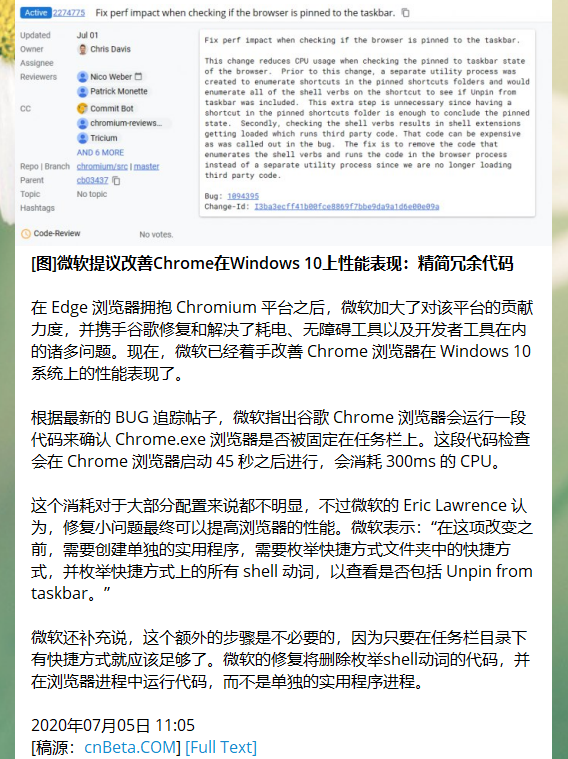
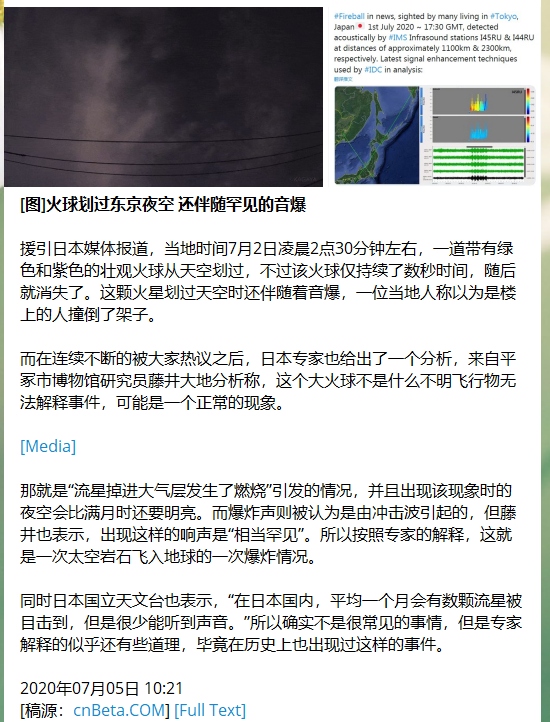
Advanced Example for JSON and XML
The handle for JSON and XML are quite similar. You can convert XML to JSON by function telegram_news.utils.xml_to_json, and use NewsPostmanJSON and InfoExtractorJSON. Or, you can use NewsPostmanXML and InfoExtractorXML directly.
You should use key list to recursively route to the information you want.
import hashlib
import json
import os
from sqlalchemy import create_engine
from sqlalchemy.orm import Session
from telegram_news.template import InfoExtractorJSON, NewsPostmanJSON
from telegram_news.utils import xml_to_json
bot_token = os.getenv("TOKEN")
channel = os.getenv("CHANNEL")
DATABASE_URL = os.getenv("DATABASE_URL")
engine = create_engine(DATABASE_URL)
db = Session(bind=engine.connect())

url_3 = "https://www.scmp.com/rss/91/feed"
tag_3 = "SCMP"
table_name_3 = "scmpnews"

ie_3 = InfoExtractorJSON()

# Pre-process the XML string, convert to JSON string
def list_pre_process(text):
    text = json.loads(xml_to_json(text))
    return json.dumps(text)
ie_3.set_list_pre_process_policy(list_pre_process)

# Route by key list
ie_3.set_list_router(['rss', 'channel', 'item'])
ie_3.set_link_router(['link'])
ie_3.set_title_router(['title'])
ie_3.set_paragraphs_router(['description'])
ie_3.set_time_router(['pubDate'])
ie_3.set_source_router(['author'])
ie_3.set_image_router(['media:thumbnail', '@url'])

# Customize ID for news item
def id_policy(link):
    return hashlib.md5(link.encode("utf-8")).hexdigest()
ie_3.set_id_policy(id_policy)

np_3 = NewsPostmanJSON(listURLs=[url_3], sendList=[channel], db=db, tag=tag_3)
np_3.set_extractor(ie_3)
np_3.set_table_name(table_name_3)
np_3.poll()
Typical results:


Parallel Program
If you use the same database and send to the same channel, you can simply joint each part of code block, and call poll() function simultaneously.
An example you can find in our Heroku deploy template repo:
https://github.com/ESWZY/telegram-news-getting-started/blob/master/main.py
Example Channel
A Telegram channel of basic example for English Wikinews: @wikinews_en (in English)
A Telegram channel for realtime earthquake warning powered by Telegram-news: @earthquake_alert (in Chinese)
TODO
- HTML item list
- JSON item list
- XML item list
- Send Image
- Send Video
- Send media group
- Send file
- Send audio
- File sending retry
- CC as e-mail
- Webhook
- Update message by message ID
- Document
- GUI
Feedback
Feel free to contact with me if you have any question. Also welcome any contribute.
If you build a channel by this, don't forget to share that good news with us!
License
Licensed under the MIT License.
Release history Release notifications | RSS feed


Download files
Download the file for your platform. If you're not sure which to choose, learn more about installing packages.
Source Distribution
Built Distribution
Filter files by name, interpreter, ABI, and platform.
If you're not sure about the file name format, learn more about wheel file names.
Copy a direct link to the current filters
File details
Details for the file telegram-news-0.5.1.tar.gz.
File metadata
- Download URL: telegram-news-0.5.1.tar.gz
- Upload date:
- Size: 26.7 kB
- Tags: Source
- Uploaded using Trusted Publishing? No
- Uploaded via: twine/3.8.0 pkginfo/1.8.2 readme-renderer/34.0 requests/2.27.1 requests-toolbelt/0.9.1 urllib3/1.26.8 tqdm/4.63.0 importlib-metadata/4.11.3 keyring/23.5.0 rfc3986/2.0.0 colorama/0.4.4 CPython/3.8.9
File hashes
| Algorithm | Hash digest | |
|---|---|---|
| SHA256 |
3e05d0a4e52f537329ed15625db3842cd40a59e8fe3b6226fa3c833177632bbb
|
|
| MD5 |
b44eb383d46cb7fa23256a9bc855d78d
|
|
| BLAKE2b-256 |
bf7a3553fb7cfd90112708b596434b25d752c3cb12700e9be413e93cd6528ee6
|
File details
Details for the file telegram_news-0.5.1-py3-none-any.whl.
File metadata
- Download URL: telegram_news-0.5.1-py3-none-any.whl
- Upload date:
- Size: 25.0 kB
- Tags: Python 3
- Uploaded using Trusted Publishing? No
- Uploaded via: twine/3.8.0 pkginfo/1.8.2 readme-renderer/34.0 requests/2.27.1 requests-toolbelt/0.9.1 urllib3/1.26.8 tqdm/4.63.0 importlib-metadata/4.11.3 keyring/23.5.0 rfc3986/2.0.0 colorama/0.4.4 CPython/3.8.9
File hashes
| Algorithm | Hash digest | |
|---|---|---|
| SHA256 |
09e8754b885bcb4696282774d25a5cc5bd3e68608e718e1ae72e7f8ad3cffb53
|
|
| MD5 |
90e8fd5fad01eb2ccabcb8c94e123020
|
|
| BLAKE2b-256 |
c5c3fc8737a588b5b78bfc2e001f2e995350ac9e70ac5f63db87eac93550670a
|






