
Send messages over Telegram and wait for a text reply from the command-line (fork of telegram-send).

Project description
telegram-send-wait

Fork of rahiel/telegram-send (GPL-3.0+), maintained at pablogventura/telegram-send. Adds --wait-reply so shell scripts can read a text reply from Telegram. Install with pip install telegram-send-wait or pipx install telegram-send-wait. Do not install telegram-send and telegram-send-wait in the same virtualenv (both use the telegram_send Python package).
Command-line tool to send messages and files over Telegram to your account, a group or a channel, with an optional wait for incoming text replies.
Based on upstream telegram-send; see the original README and documentation for full feature coverage.
Table of Contents
Wait for reply
Send a message and print the first text reply to stdout (for scripts):
telegram-send-wait "Continue? [y/n]" --wait-reply --timeout 300
echo "exit code: $?"   # 0 = reply, 2 = timeout, 1 = error
Options:
--reply-to-sent— only accept a reply to the message(s) just sent (helpful in busy groups).--quiet— suppress stderr while waiting (timeout is still reported on stderr).--timeout— without--wait-reply: network read timeout (default 30s). With--wait-reply: total wait time (default 300s).
Groups: if the bot must see all messages, disable privacy mode in BotFather or mention the bot. Channels are not supported for receiving replies.
User config is shared with upstream (~/.config/telegram-send/). Global config (-g) uses /etc/telegram-send-wait.conf; an existing /etc/telegram-send.conf is copied once on first use.
Usage
To send a message:
telegram-send-wait "Hello, World!"
There is a maximum message length of 4096 characters, larger messages will be automatically split up into smaller ones and sent separately.
To send a message using Markdown or HTML formatting:
telegram-send-wait --format markdown "Only the *bold* use _italics_"
telegram-send-wait --format html "<pre>fixed-width messages</pre> are <i>also</i> supported"
telegram-send-wait --format markdown "||Do good and find good\!||"  # spoiler
Note that not all Markdown syntax or all HTML tags are supported. For more information on supported formatting, see the formatting options. We use the MarkdownV2 style for Markdown.
The --pre flag formats messages as fixed-width text:
telegram-send-wait --pre "monospace"
To send a message without link previews:
telegram-send-wait --disable-web-page-preview "https://github.com/rahiel/telegram-send"
To send a message from stdin:
printf 'With\nmultiple\nlines' | telegram-send-wait --stdin
With this option you can send the output of any program.
To send a file (maximum file size of 50 MB) with an optional caption:
telegram-send-wait --file quran.pdf --caption "The Noble Qur'an"
To send an image (maximum file size of 10 MB) with an optional caption:
telegram-send-wait --image moon.jpg --caption "The Moon at Night"
To send a sticker:
telegram-send-wait --sticker sticker.webp
To send a GIF or a soundless MP4 video (encoded as H.264/MPEG-4 AVC with a maximum file size of 50 MB) with an optional caption:
telegram-send-wait --animation kitty.gif --caption "🐱"
To send an MP4 video (maximum file size of 50 MB) with an optional caption:
telegram-send-wait --video birds.mp4 --caption "Singing Birds"
To send an audio file with an optional caption:
telegram-send-wait --audio "Pachelbel's Canon.mp3" --caption "Johann Pachelbel - Canon in D"
To send a location via latitude and longitude:
telegram-send-wait --location 35.5398033 -79.7488965
All captions can be optionally formatted with Markdown or html:
telegram-send-wait --image moon.jpg --caption "The __Moon__ at *Night*" --format markdown
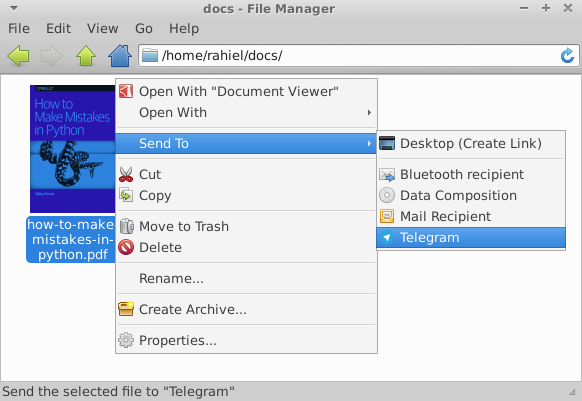
telegram-send-wait integrates into your file manager (Thunar, Nautilus and Nemo):
Installation
macOS
brew install pipx
pipx ensurepath
pipx install telegram-send-wait
Linux
Install pipx, then:
pipx ensurepath
pipx install telegram-send-wait
Configure with telegram-send-wait --configure (DM), telegram-send-wait --configure-group, or telegram-send-wait --configure-channel.
If you already use upstream telegram-send, the same user config usually works without reconfiguring.
Use the --config option to use multiple configurations. For example to set up
sending to a channel in a non-default configuration: telegram-send-wait --config channel.conf --configure-channel. Then always specify the config file to use
it: telegram-send-wait --config channel.conf "Bismillah".
The -g option uses /etc/telegram-send-wait.conf (copied from /etc/telegram-send.conf on first use if that file exists).
Configure it once: sudo telegram-send-wait -g --configure and all users on the
system can send messages with this config: telegram-send-wait -g "GNU".
Install system-wide with pipx:
sudo pipx install telegram-send-wait
Examples
Here are some examples to get a taste of what is possible with telegram-send-wait.
Alert on completion of shell commands
Receive an alert when long-running commands finish with the tg alias, based on
Ubuntu's built-in alert. Put the following in your ~/.bashrc:
alias tg='telegram-send-wait "$([ $? = 0 ] && echo "" || echo "error: ") $(history|tail -n1|sed -e '\''s/^\s*[0-9]\+\s*//;s/[;&|]\s*tg$//'\'')"'
And then use it like sleep 10; tg. This will send you a message with the
completed command, in this case sleep 10.
What if you started a program and forgot to set the alert? Suspend the program
with Ctrl+Z and then enter fg; telegram-send-wait "your message here".
To automatically receive notifications for long running commands, use ntfy with the Telegram backend.
Periodic messages with cron
We can combine telegram-send-wait with cron to periodically send messages. Here we will set up a cron job to send the Astronomy Picture of the Day to the astropod channel.
Create a bot by talking to the BotFather, create a public channel and add
your bot as administrator to the channel. You will need to explicitly search for
your bot's username when adding it. Then run telegram-send-wait --configure-channel --config astropod.conf. We will use the apod.py script that gets the daily
picture and calls telegram-send-wait to post it to the channel.
We create a cron job /etc/cron.d/astropod (as root) with the content:
SHELL=/bin/sh
PATH=/usr/local/sbin:/usr/local/bin:/sbin:/bin:/usr/sbin:/usr/bin

# m h dom mon dow user  command
0 1 * * * telegram ~/apod.py --config ~/astropod.conf
Make sure the file ends with a newline. Cron will then execute the script every
day at 1:00 as the user telegram. Join the astropod channel to see the
result.
Supervisor process state notifications
Supervisor controls and monitors processes. It can start processes at boot,
restart them if they fail and also report on their status. Supervisor-alert
is a simple plugin for Supervisor that sends messages on process state updates
to an arbitrary program. Using it with telegram-send-wait (by using the --telegram
option), you can receive notifications whenever one of your processes exits.
Usage from Python
Because telegram-send-wait is written in Python, you can use its functionality
directly from other Python programs: import telegram_send. Sending matches the
upstream send documentation.
Waiting for a reply:
import asyncio
import telegram_send

async def main():
    ids = await telegram_send.send(messages=["ping"])
    text = await telegram_send.wait_for_reply(sent_message_ids=ids, wait_timeout=120)
    print(text)

asyncio.run(main())
wait_for_reply raises telegram_send.WaitReplyTimeout on timeout.
See examples/wait_reply_example.py.
Cron job output
Cron has a built-in feature to send the output of jobs via mail. In this example we'll send cron output over Telegram. Here is the example cron job:
SHELL=/bin/sh
PATH=/usr/local/sbin:/usr/local/bin:/sbin:/bin:/usr/sbin:/usr/bin

# m h dom mon dow user  command
0 * * * * rahiel chronic ~/script.bash 2>&1 | telegram-send-wait -g --stdin
The command is chronic ~/script.bash 2>&1 | telegram-send-wait -g --stdin. We run
the cron job with chronic, a tool from moreutils. Chronic makes sure that
a command produces no output unless it fails. No news is good news! If our
script fails, chronic passes the output through the pipe (|) to telegram-send-wait.
We also send the output of stderr by redirecting stderr to stdout (2>&1).
Here we've installed telegram-send-wait system-wide and use the global
configuration (-g) so telegram-send-wait is usable in the cron job. Place the
cron job in /etc/cron.d/ and make sure the file ends with a newline. The
filename can't contain a . either.
ASCII pictures
Combining --stdin and --pre, we can send ASCII pictures:
ncal -bh | telegram-send-wait --pre --stdin
apt-get moo | telegram-send-wait --pre --stdin
Questions & Answers
How to use a proxy?
You can set a proxy with an environment variable:
HTTPS_PROXY=https://ip:port telegram-send-wait "hello"
Within Python you can set the environment variable with:
os.environ["HTTPS_PROXY"] = "https://ip:port"
If you have a SOCKS proxy, you need to install support for it:
pip3 install pysocks
If you installed telegram-send-wait with sudo, you also need to install pysocks
with sudo.
How to send the same message to multiple users?
First you configure telegram-send-wait for every recipient you want to send messages to:
telegram-send-wait --config user1.conf --configure
telegram-send-wait --config group1.conf --configure-group
telegram-send-wait --config group2.conf --configure-group
telegram-send-wait --config channel1.conf --configure-channel
You will need all of the above config files. Now to send a message to all of the above configured recipients:
telegram-send-wait --config user1.conf \
              --config group1.conf \
              --config group2.conf \
              --config channel1.conf \
              "Multicasting!"
How to get sticker files?
In Telegram Desktop you right click a sticker and choose "Save Image As...". You
can then send the saved webp file with telegram-send-wait --sticker sticker.webp.
Other Questions
There are many answered questions and answers in the issue tracker: https://github.com/rahiel/telegram-send/issues?q=is%3Aissue%20state%3Aclosed%20label%3Aquestion
Publishing (maintainers)
See CONTRIBUTING.md for the full PyPI checklist (account, token, uv publish, tag v1.0.0, smoke test with pipx).
Uninstallation
telegram-send-wait --clean
pipx uninstall telegram-send-wait
Release history Release notifications | RSS feed


Download files
Download the file for your platform. If you're not sure which to choose, learn more about installing packages.
Source Distribution
Built Distribution
Filter files by name, interpreter, ABI, and platform.
If you're not sure about the file name format, learn more about wheel file names.
Copy a direct link to the current filters
File details
Details for the file telegram_send_wait-1.0.2.tar.gz.
File metadata
- Download URL: telegram_send_wait-1.0.2.tar.gz
- Upload date:
- Size: 60.2 kB
- Tags: Source
- Uploaded using Trusted Publishing? No
- Uploaded via: twine/6.2.0 CPython/3.12.3
File hashes
| Algorithm | Hash digest | |
|---|---|---|
| SHA256 |
8dd5c1e80641d7c302543eaf5512b277770527d26f63e61f2e03d8d3e680735a
|
|
| MD5 |
d9f7f4f50d4b73e0d2dcb523c05b7ce5
|
|
| BLAKE2b-256 |
83c0dfadf60f8e2537c3d82b98506fa4afeab725600b025544c2d15f4b4cfc1f
|
File details
Details for the file telegram_send_wait-1.0.2-py3-none-any.whl.
File metadata
- Download URL: telegram_send_wait-1.0.2-py3-none-any.whl
- Upload date:
- Size: 28.6 kB
- Tags: Python 3
- Uploaded using Trusted Publishing? No
- Uploaded via: twine/6.2.0 CPython/3.12.3
File hashes
| Algorithm | Hash digest | |
|---|---|---|
| SHA256 |
2f23b116266a32f1f1f72144f39283a2688e5c8173d12fff09a7228469c24e5b
|
|
| MD5 |
d1d44a567c278acdaa27beb6ad22f246
|
|
| BLAKE2b-256 |
f1ad9da0a233602875f3d1024bb4449bdbd9a0249c1760302efecd892be532a7
|






