
Send messages and files over Telegram from the command-line.

Project description
telegram-send






Telegram-send is a command-line tool to send messages and files over Telegram to your account, to a group or to a channel. It provides a simple interface that can be easily called from other programs.
Table of Contents
Usage
To send a message:
telegram-send "Hello, World!"
There is a maximum message length of 4096 characters, larger messages will be automatically split up into smaller ones and sent separately.
To send a message using Markdown or HTML formatting:
telegram-send --format markdown "Only the *bold* use _italics_"
telegram-send --format html "<pre>fixed-width messages</pre> are <i>also</i> supported"
telegram-send --format markdown "||Do good and find good\!||"  # spoiler
Note that not all Markdown syntax or all HTML tags are supported. For more information on supported formatting, see the formatting options. We use the MarkdownV2 style for Markdown.
The --pre flag formats messages as fixed-width text:
telegram-send --pre "monospace"
To send a message without link previews:
telegram-send --disable-web-page-preview "https://github.com/rahiel/telegram-send"
To send a message from stdin:
printf 'With\nmultiple\nlines' | telegram-send --stdin
With this option you can send the output of any program.
To send a file (maximum file size of 50 MB) with an optional caption:
telegram-send --file quran.pdf --caption "The Noble Qur'an"
To send an image (maximum file size of 10 MB) with an optional caption:
telegram-send --image moon.jpg --caption "The Moon at Night"
To send a sticker:
telegram-send --sticker sticker.webp
To send a GIF or a soundless MP4 video (encoded as H.264/MPEG-4 AVC with a maximum file size of 50 MB) with an optional caption:
telegram-send --animation kitty.gif --caption "🐱"
To send an MP4 video (maximum file size of 50 MB) with an optional caption:
telegram-send --video birds.mp4 --caption "Singing Birds"
To send an audio file with an optional caption:
telegram-send --audio "Pachelbel's Canon.mp3" --caption "Johann Pachelbel - Canon in D"
To send a location via latitude and longitude:
telegram-send --location 35.5398033 -79.7488965
All captions can be optionally formatted with Markdown or html:
telegram-send --image moon.jpg --caption "The __Moon__ at *Night*" --format markdown
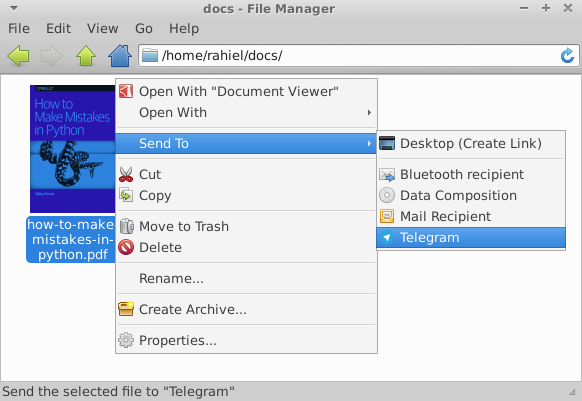
Telegram-send integrates into your file manager (Thunar, Nautilus and Nemo):
Installation
macOS
brew install pipx
pipx ensurepath
pipx install telegram-send
Linux
On Ubuntu/Debian:
sudo apt install telegram-send
On other Linux systems or if you need a newer version:
First Install the pipx package using your package manager.
Then run:
pipx ensurepath
pipx install telegram-send
And finally configure it with telegram-send --configure if you want to send to
your account, telegram-send --configure-group to send to a group or with
telegram-send --configure-channel to send to a channel.
Use the --config option to use multiple configurations. For example to set up
sending to a channel in a non-default configuration: telegram-send --config channel.conf --configure-channel. Then always specify the config file to use
it: telegram-send --config channel.conf "Bismillah".
The -g option uses the global configuration at /etc/telegram-send.conf.
Configure it once: sudo telegram-send -g --configure and all users on the
system can send messages with this config: telegram-send -g "GNU". To use this
option you need to install telegram-send with sudo:
Install telegram-send system-wide with pip:
sudo pip3 install telegram-send
Examples
Here are some examples to get a taste of what is possible with telegram-send.
Alert on completion of shell commands
Receive an alert when long-running commands finish with the tg alias, based on
Ubuntu's built-in alert. Put the following in your ~/.bashrc:
alias tg='telegram-send "$([ $? = 0 ] && echo "" || echo "error: ") $(history|tail -n1|sed -e '\''s/^\s*[0-9]\+\s*//;s/[;&|]\s*tg$//'\'')"'
And then use it like sleep 10; tg. This will send you a message with the
completed command, in this case sleep 10.
What if you started a program and forgot to set the alert? Suspend the program
with Ctrl+Z and then enter fg; telegram-send "your message here".
To automatically receive notifications for long running commands, use ntfy with the Telegram backend.
Periodic messages with cron
We can combine telegram-send with cron to periodically send messages. Here we will set up a cron job to send the Astronomy Picture of the Day to the astropod channel.
Create a bot by talking to the BotFather, create a public channel and add
your bot as administrator to the channel. You will need to explicitly search for
your bot's username when adding it. Then run telegram-send --configure-channel --config astropod.conf. We will use the apod.py script that gets the daily
picture and calls telegram-send to post it to the channel.
We create a cron job /etc/cron.d/astropod (as root) with the content:
SHELL=/bin/sh
PATH=/usr/local/sbin:/usr/local/bin:/sbin:/bin:/usr/sbin:/usr/bin

# m h dom mon dow user  command
0 1 * * * telegram ~/apod.py --config ~/astropod.conf
Make sure the file ends with a newline. Cron will then execute the script every
day at 1:00 as the user telegram. Join the astropod channel to see the
result.
Supervisor process state notifications
Supervisor controls and monitors processes. It can start processes at boot,
restart them if they fail and also report on their status. Supervisor-alert
is a simple plugin for Supervisor that sends messages on process state updates
to an arbitrary program. Using it with telegram-send (by using the --telegram
option), you can receive notifications whenever one of your processes exits.
Usage from Python
Because telegram-send is written in Python, you can use its functionality
directly from other Python programs: import telegram_send. Look at the
documentation.
Cron job output
Cron has a built-in feature to send the output of jobs via mail. In this example we'll send cron output over Telegram. Here is the example cron job:
SHELL=/bin/sh
PATH=/usr/local/sbin:/usr/local/bin:/sbin:/bin:/usr/sbin:/usr/bin

# m h dom mon dow user  command
0 * * * * rahiel chronic ~/script.bash 2>&1 | telegram-send -g --stdin
The command is chronic ~/script.bash 2>&1 | telegram-send -g --stdin. We run
the cron job with chronic, a tool from moreutils. Chronic makes sure that
a command produces no output unless it fails. No news is good news! If our
script fails, chronic passes the output through the pipe (|) to telegram-send.
We also send the output of stderr by redirecting stderr to stdout (2>&1).
Here we've installed telegram-send system-wide with sudo and use the global
configuration (-g) so telegram-send is usable in the cron job. Place the
cron job in /etc/cron.d/ and make sure the file ends with a newline. The
filename can't contain a . either.
ASCII pictures
Combining --stdin and --pre, we can send ASCII pictures:
ncal -bh | telegram-send --pre --stdin
apt-get moo | telegram-send --pre --stdin
Questions & Answers
How to use a proxy?
You can set a proxy with an environment variable:
HTTPS_PROXY=https://ip:port telegram-send "hello"
Within Python you can set the environment variable with:
os.environ["HTTPS_PROXY"] = "https://ip:port"
If you have a SOCKS proxy, you need to install support for it:
pip3 install pysocks
If you installed telegram-send with sudo, you also need to install pysocks
with sudo.
How to send the same message to multiple users?
First you configure telegram-send for every recipient you want to send messages to:
telegram-send --config user1.conf --configure
telegram-send --config group1.conf --configure-group
telegram-send --config group2.conf --configure-group
telegram-send --config channel1.conf --configure-channel
You will need all of the above config files. Now to send a message to all of the above configured recipients:
telegram-send --config user1.conf \
              --config group1.conf \
              --config group2.conf \
              --config channel1.conf \
              "Multicasting!"
How to get sticker files?
In Telegram Desktop you right click a sticker and choose "Save Image As...". You
can then send the saved webp file with telegram-send --sticker sticker.webp.
Other Questions
There are many answered questions and answers in the issue tracker: https://github.com/rahiel/telegram-send/issues?q=is%3Aissue%20state%3Aclosed%20label%3Aquestion
Uninstallation
telegram-send --clean
pipx uninstall telegram-send
Or uninstall with your package manager.
Release history Release notifications | RSS feed


Download files
Download the file for your platform. If you're not sure which to choose, learn more about installing packages.
Source Distribution
Built Distribution
Filter files by name, interpreter, ABI, and platform.
If you're not sure about the file name format, learn more about wheel file names.
Copy a direct link to the current filters
File details
Details for the file telegram_send-0.39.2.tar.gz.
File metadata
- Download URL: telegram_send-0.39.2.tar.gz
- Upload date:
- Size: 55.8 kB
- Tags: Source
- Uploaded using Trusted Publishing? No
- Uploaded via: uv/0.9.24 {"installer":{"name":"uv","version":"0.9.24","subcommand":["publish"]},"python":null,"implementation":{"name":null,"version":null},"distro":{"name":"macOS","version":null,"id":null,"libc":null},"system":{"name":null,"release":null},"cpu":null,"openssl_version":null,"setuptools_version":null,"rustc_version":null,"ci":null}
File hashes
| Algorithm | Hash digest | |
|---|---|---|
| SHA256 |
bb1570fda809a030dfa188ffb30fd92b97de6cde9f1268d57fed6b28c2f4aff5
|
|
| MD5 |
7522000a7601cd4198a23da0b3bc133d
|
|
| BLAKE2b-256 |
1c9d6c59f78b5761d6fe5a3694d83fb8eff7e6cd190d57d4a61d66ef9e8f4c7f
|
File details
Details for the file telegram_send-0.39.2-py3-none-any.whl.
File metadata
- Download URL: telegram_send-0.39.2-py3-none-any.whl
- Upload date:
- Size: 26.1 kB
- Tags: Python 3
- Uploaded using Trusted Publishing? No
- Uploaded via: uv/0.9.24 {"installer":{"name":"uv","version":"0.9.24","subcommand":["publish"]},"python":null,"implementation":{"name":null,"version":null},"distro":{"name":"macOS","version":null,"id":null,"libc":null},"system":{"name":null,"release":null},"cpu":null,"openssl_version":null,"setuptools_version":null,"rustc_version":null,"ci":null}
File hashes
| Algorithm | Hash digest | |
|---|---|---|
| SHA256 |
d5ac1f6b6937631792da20211b72e180f40addd6251c9ccf55a7cddf9a676442
|
|
| MD5 |
653d5e1fe6e6c166495f36fd7c4b11ed
|
|
| BLAKE2b-256 |
46e1ef09ecee4602a15d22c5278c236d84c95f5caa91f1898a154bfb9b7dcee0
|






