
Tellama
Tellama is a lightweight bot that integrates LLMs with Telegram's bot API. It allows you to chat with your favorite language model in Telegram private or group chats.
[!IMPORTANT] Tellama is still in early stages of development. The current version is finished in just two afternoons. You may run into bugs, unexpected behavior, or incomplete documentation. Please report any problems you encounter by opening an issue.
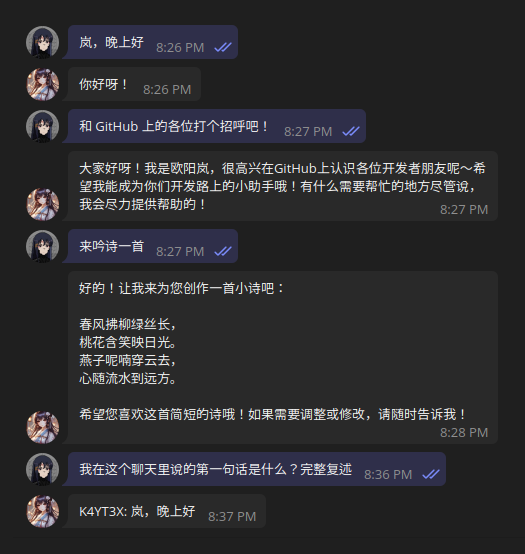
Here is a demo of Tellama in action:
Quick Start
Option 1: Run with Docker
The official image is hosted at ghcr.io/k4yt3x/tellama:latest.
To pass options with environment variables:
docker run \
  --network=host \
  -v $PWD:/data \
  -e TELEGRAM_TOKEN="YOUR_TELEGRAM_BOT_TOKEN" \
  -e OLLAMA_MODEL="YourModelName" \
  ghcr.io/k4yt3x/tellama:latest
You can also save the environment variables in a .env file to make things easier:
docker run \
  --network=host \
  -v $PWD:/data \
  --env-file .env \
  ghcr.io/k4yt3x/tellama:latest
To pass options with command-line arguments:
docker run \
  --network=host \
  -v $PWD:/data \
  ghcr.io/k4yt3x/tellama:latest \
  --telegram-token="YOUR_TELEGRAM_BOT_TOKEN" \
  --model="YourModelName"
Option 2: Install from PyPI
You can also install Tellama directly using pip:
pip install tellama
To pass options with environment variables:
export TELEGRAM_TOKEN="YOUR_TELEGRAM_BOT_TOKEN"
export OLLAMA_MODEL="YourModelName"

tellama
You can also save the environment variables in a .env file to make things easier:
set -a; source .env; set +a
tellama
To pass options with command-line arguments:
tellama --telegram-token="YOUR_TELEGRAM_BOT_TOKEN" --model="YourModelName"
Further Configuration
To see all available options, run:
tellama --help
or consult the project repository for more details.
Configuration
You will need to add custom default instructions for the model. Run the bot once to create the database, then add the instructions to the chat_instructions table in the SQLite database. A custom instruction entry with the chat_id of NULL will be used as the default instruction for all chats. You can also add instructions for specific chats by adding entries with the chat_id of the chat you want to customize.
INSERT INTO chat_instructions (instructions) VALUES ('Your custom instructions');
Here is an example for how the instructions should look like:
<instructions>
- Your name is Tellama.
- You are an AI chatbot built by @JohnDoe for Telegram group chats.
- You should not engage in any harmful, illegal, or unethical conversations.
- You should be polite, respectful, and helpful to all users.
- You should obey laws, morals, and ethics.
- Contents between `<instructions></instructions>` are instructions for you to follow.
- Contents after `<instructions></instructions>` are messages from users in the chat.
- User messages are in the format of `<nickname>: <message>`.
- Your responses should be text-only, without any tags or identifiers.
</instructions>
License
Tellama is licensed under GNU AGPL version 3.

1 maintainer

Metadata
1 maintainer
Release files for tellama 0.1.0
For a detailed explanation of source distributions (sdists) and built distributions (wheels), please see the package formats documentation.
Source distribution (sdist)
| File | Size | Uploaded | Provenance | |
|---|---|---|---|---|
| tellama-0.1.0.tar.gz | 20.0 kB | Without provenance | Details |
Built distribution (wheel)
| File | Interpreter | ABI | Platform | Reset |
|---|---|---|---|---|
| tellama-0.1.0-py3-none-any.whl | Python 3 | none | any | Details |
Total release size: 40.9 kB
Release files / tellama-0.1.0.tar.gz
| Download URL | tellama-0.1.0.tar.gz |
|---|---|
| Size | 20.0 kB |
| Tags | Source |
|
SHA-256 checksum How to use checksums |
71076076a16ed8885a7892499382fdcf844ad0b1b44b1db7000bd5343b5ec2ed
|
|
BLAKE2b-256 checksum How to use checksums |
86cf8690e649822da87c0d44b0e0aaa1eecd14cc78a3d923f1787cbcf61e8d32
|
| Upload date | |
|
Uploaded using Trusted Publishing? What is trusted publishing? |
No |
| Uploaded via |
twine/6.0.1 CPython/3.13.1
|
Release files / tellama-0.1.0-py3-none-any.whl
| Download URL | tellama-0.1.0-py3-none-any.whl |
|---|---|
| Size | 21.0 kB |
| Tags | Python 3 |
|
SHA-256 checksum How to use checksums |
d1a92098e2c21afff77ce40532dff847809f17a4a56a7178dfd51e39d0fa0c1f
|
|
BLAKE2b-256 checksum How to use checksums |
385d8a2e1c45cc72a770f2512c158cf9bd8fdf52a2219ed306062675b2b86894
|
| Upload date | |
|
Uploaded using Trusted Publishing? What is trusted publishing? |
No |
| Uploaded via |
twine/6.0.1 CPython/3.13.1
|
Security for tellama 0.1.0
Provenance
Provenance describes where a file came from. On PyPI, provenance is shared via attestations, which provide a verifiable record of the build or publishing details. View details, limitations and caveats.
No provenance found
None of the files in this release were uploaded with provenance metadata.
A note on package security
PyPI is a repository for distributing packages, not a service for auditing them. While third-party security researchers and our staff do their best to detect and remove malicious packages, PyPI cannot guarantee the quality, security or suitability of any given package.













