
Tema_Q-Agent
Agent for Avant-Garde searching, writing, coding and so on


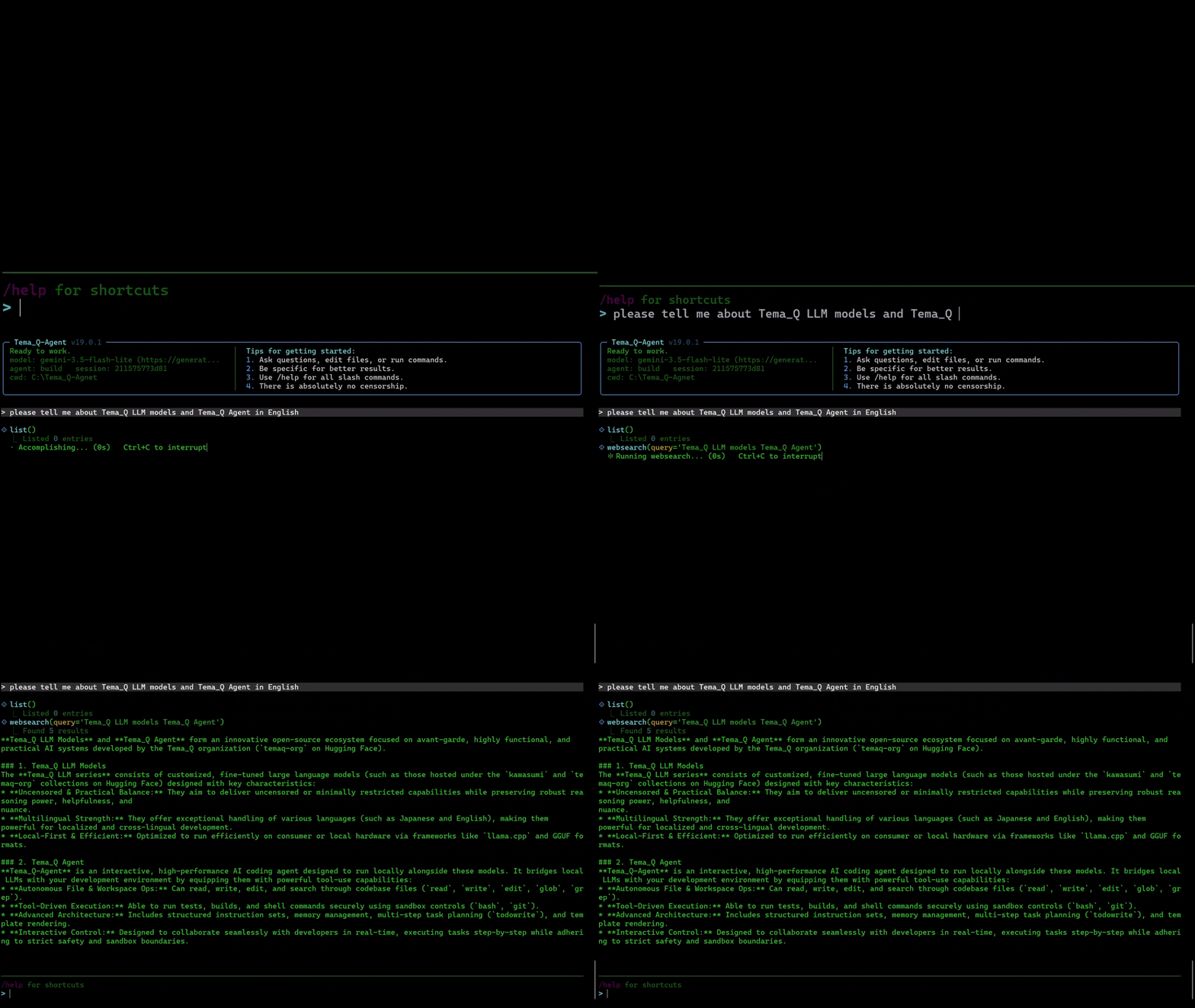
Tema_Q-Agent is a terminal-based coding agent that talks to a local, OpenAI-compatible llama.cpp server instead of a cloud API. It ships with a file-editing/shell tool loop, a permission engine, session persistence, MCP client support, hooks, checkpoints/undo, persistent memory, an optional Playwright-driven browser tool, and an opt-in RAG-backed security mode.
Features • Installation • Quick Start • Usage • Configuration • Slash Commands • Skills • Architecture • Security • Citation • License
Overview
Tema_Q-Agent runs entirely against a local model served by llama.cpp's OpenAI-compatible HTTP endpoint, so your code, prompts, and shell output never leave your machine. It exposes a tool-calling agent loop (read/write/edit files, run shell commands, search the web, manage git, look up symbols, save memory/snippets, spawn sub-agents, and more) behind a minimalist terminal UI, with a three-state permission system (allow / ask / deny) standing between the model and your filesystem. Defaults can be set once in a ~/.temaq/config.yaml file instead of being repeated as CLI flags every time.
Features
- Local-first — talks to any
llama.cppserver (or compatible endpoint) over a minimal OpenAI-style client; no external API keys required. The client backend (llama_cpp,ollama,openai_compat,vllm,google_ai) is configurable. - LLM fallback chain —
llm:inconfig.yamlaccepts either a single endpoint or a list of endpoints (or a primary plus anendpoints:sub-list); if the active endpoint errors, the runtime automatically switches to the next one in order (a console notice is printed). Rate-limit waits are handled by the client's own limiter and never trigger a fallback. Each endpoint can set its ownapi_key(foropenai_compat/google_ai) andrate_limit_per_minute(client-side throttling, e.g. for Google AI Studio's free tier). - Automatic response-language matching — the dominant script (Japanese / Korean / Chinese / English) of each user message is detected, and the model is instructed to answer in that language (code, file paths, and command names stay in English) without any configuration.
- Malformed tool-call recovery — if the model returns empty output or only malformed/unparseable tool calls (e.g. leaked function-call syntax from another framework), the runtime injects a correction message and retries automatically instead of failing the turn.
- Two primary agents —
build(default, makes changes) andplan(read-only planning/analysis). - Rich tool set —
read,write,edit,multiedit,patch,bash,glob,grep,symbol,list,todo,question,webfetch,webgrep,websearch,git,memory,snippet, andtask(sub-agent dispatch), plus any tools exposed by connected MCP servers.readnatively parses.xlsx/.xlsm(viaopenpyxl),.csv, and.tsvfiles into a plain-text/tab-separated representation (sheet names, rows capped at 500 by default) instead of relying on shell one-liners; requires theexcelextra.multieditapplies several edits across one or more files atomically, in a single tool call.symbolperforms AST-aware symbol search (functions/classes/methods) for Python, with a regex-based fallback for JS/TS/Go/Rust/Java.gitwraps common git operations (status, diff, add, commit, log, branch, etc.) with sandboxed, structured JSON output; destructive operations still require permission approval.memoryis a persistent, cross-session key/value fact store backed by a human-readable~/.temaq/memory.mdfile.snippetis a file-backed library of reusable prompt/code snippets under~/.temaq/snippets/.
- MCP client — connect to external Model Context Protocol servers (stdio or SSE/HTTP transport) configured in
config.yaml; their tools become available to the agent alongside the built-in ones. - Hooks — run arbitrary shell commands at
pre_tool/post_tool/pre_llm/post_llmlifecycle points, with event details (tool name, args, file path, session id, etc.) passed in as environment variables. A non-zero exit from apre_toolorpre_llmhook blocks the call. - Checkpoints &
/undo— before any tool call that could modify workspace files, affected files are snapshotted to~/.temaq/checkpoints/;/undorestores the most recent checkpoint (including deleting files that were newly created). - Auto-compaction & session stats — older turns are summarized once estimated context usage crosses a configurable budget, and a running count of LLM calls, tool calls, and estimated input/output tokens is available via
/cost(and an optional footer in the terminal UI). - Repo map — a compact, on-demand file + top-level-symbol tree of the workspace that the agent can consult to navigate a codebase without grepping everything first.
temaq init— writes a fully commented starter~/.temaq/config.yaml, so configuration doesn't require hand-editing YAML from scratch.- Permission engine — every tool call is checked against a three-state (
allow/ask/deny) policy with glob-pattern support, so destructive actions require explicit approval. - Sandboxed shell — the
bashtool is filtered against a deny-list of destructive patterns (rm -rf /, fork bombs,curl | sh, disk-device writes, firewall flushes, etc.) before execution. It's also capped at 8 calls per turn, at most 3 of them consecutive (no other tool call in between) before the next one is blocked, and any singlebashorreadcall is hard-clamped to a 120-second wall-clock timeout even if the model requests a longer one — all three limits are configurable via environment variables (see Usage). - Session persistence — conversations are saved under
~/.temaq/sessionsand can be resumed with--session. - Minimalist or classic TUI — a compact default terminal UI, or
--classicfor the originalrich+prompt_toolkitinterface. - Optional
--securitymode — registers asecurity_searchtool backed by a user-editable, Markdown-based RAG knowledge base (security.md) that the agent consults before generating or reviewing code, so it can recognize and refuse malware-like or phishing-like patterns. - Optional
--browsermode — a private (incognito), Playwright-driven Chromium tool (navigate,snapshot,click,type,close) that shares no cookies, credentials, or history with your main browser profile. - Optional
--servermode — launches a stdlib-only HTTP server that reproduces the terminal UI in a browser, so any device on the LAN can connect and operate the agent (see Usage for--host/--port). - Compatibility flags —
--nomemorydisables thememorytool,--no-mcp/--no-checkpoints/--no-hooksdisable the corresponding subsystem, and--v9.0.0reproduces the pre-config-file, pre-MCP/hooks/checkpoints tool set and behavior exactly, for cases where one of these subsystems needs to be ruled out. - Bundled sample templates — the
read/edit/listtools can browse and copy from a set of read-only starter HTML templates undersample/without ever mutating the originals. - Project rules — drop an
AGENTS.mdinto your workspace (or~/.temaq/AGENTS.mdglobally) to give the agent persistent project-specific instructions. - Skills — Claude-compatible skills stored in a
skill/directory. Each skill is a folder with aSKILL.md(YAML frontmatter + Markdown body). Skills auto-invoke when the model decides a task matches a skill's description, or can be activated explicitly with/<skill_name>. Skills not found locally are fetched automatically from theTema_Q-Agent-skillrepohttps://github.com/ek15072809/Tema_Q-Agent-skill.
Architecture
Tema_Q-Agent/
├── agent.py               # entry point (auto-installs Playwright/Chromium)
├── temaq_agent.py          # thin entry point (no Playwright bootstrap)
├── security.md             # editable RAG knowledge base for --security mode
├── temaq_agent/
│   ├── cli.py               # argparse, workspace bootstrap, runtime wiring
│   ├── config.py             # constants & env-driven configuration
│   ├── user_config.py        # ~/.temaq/config.yaml loader + `temaq init` writer
│   ├── runtime.py            # agent tool-call loop, auto-compaction, session stats
│   ├── agents.py             # built-in agent presets (build / plan)
│   ├── agents_security.py    # security-mode prompt augmentation
│   ├── agents_browser.py     # browser-mode prompt augmentation
│   ├── llm.py                 # minimal OpenAI-compatible llama.cpp client
│   ├── http_util.py           # shared HTTP helpers for the llama.cpp client
│   ├── tokenizer.py           # dependency-free token estimator (tiktoken fallback)
│   ├── permissions.py         # three-state permission engine
│   ├── sandbox.py             # destructive shell-command filter
│   ├── security_rag.py        # security.md indexer / retriever
│   ├── session.py             # session persistence
│   ├── subagent.py            # sub-agent (task tool) dispatch
│   ├── rules.py               # AGENTS.md project-rule loader
│   ├── skills.py              # Claude-compatible skill discovery / fetch
│   ├── thinking.py            # strips model-emitted reasoning from visible output
│   ├── mcp_client.py          # MCP client (stdio / sse / http transports)
│   ├── hooks.py               # pre/post tool & LLM shell-command hooks
│   ├── checkpoint.py          # file snapshotting for /undo
│   ├── repo_map.py            # compact file + symbol tree for context
│   ├── cui.py / cui_fix.py    # terminal UI implementations
│   ├── cui_security.py        # red theme applied in --security mode
│   ├── sample/                 # bundled read-only HTML templates (used by read/edit/list tools)
│   ├── tools/                  # individual tool implementations
│   │   ├── read.py               # file reads; native .xlsx/.xlsm/.csv/.tsv parsing (excel extra)
│   │   ├── multiedit.py          # atomic batch edits across files
│   │   ├── symbol.py             # AST-aware symbol search
│   │   ├── git.py                # sandboxed git operations
│   │   ├── memory.py             # persistent cross-session memory
│   │   ├── snippet.py            # reusable snippet library
│   │   ├── browser.py            # Playwright browser tool (--browser)
│   │   └── security_search.py    # security RAG search (--security)
│   └── web/                    # HTTP server + browser-based CUI for --server mode
├── scripts/                # smoke / visual-check scripts
└── tests/                  # unit tests + mock llama.cpp server
Installation
Prerequisites
- Python 3.9+
- A running
llama.cppserver exposing an OpenAI-compatible endpoint (default:http://127.0.0.1:8080) — or, alternatively, a cloud API endpoint (e.g. OpenRouter, Google AI Studio) configured viabackend: openai_compat/backend: google_aiand anapi_keyinconfig.yaml(see Configuration)
Install with pip (recommended)
Tema_Q-Agent is published on PyPI:
pip install temaq-agent
This installs the temaq and temaq-agent console commands on your PATH — no manual cloning needed.
Optional extras (browser tool, ~/.temaq/config.yaml support, tiktoken-based token counting):
pip install "temaq-agent[all]"      # everything below, in one go
pip install "temaq-agent[browser]"  # Playwright-driven browser tool
pip install "temaq-agent[yaml]"     # ~/.temaq/config.yaml support
pip install "temaq-agent[tokens]"   # tiktoken-based token counting
pip install "temaq-agent[excel]"    # openpyxl-based native .xlsx/.xlsm reading in the `read` tool
If you plan to use --browser, also download Chromium once:
playwright install chromium
To upgrade later:
pip install --upgrade temaq-agent
Install from source (for development)
If you want to modify the code or run the test suite, clone the repo instead and install it in editable mode:
git clone https://github.com/ek15072809/Tema_Q-Agent.git
cd Tema_Q-Agent
pip install -e .
# optional extras, e.g. browser tool + YAML config + tiktoken:
pip install -e ".[all]"
-e (editable) means changes to the source take effect immediately, without reinstalling. This also gives you the temaq / temaq-agent commands, backed by your local checkout, plus python agent.py / python temaq_agent.py as alternate entry points.
Running
agent.pydirectly will attempt to install Playwright and Chromium automatically the first time it starts. This automatic bootstrap only happens viapython agent.py; when using the installedtemaq/temaq-agentcommand (from PyPI or-e .), install Playwright manually first if you plan to use--browser.
Quick Start
-
Start your local
llama.cppserver:./llama-server -m /path/to/your-model.gguf --host 127.0.0.1 --port 8080
-
(Optional) Write a starter config file:
temaq init -
Launch the agent from your project directory:
temaq
-
Or run a single non-interactive prompt:
temaq --prompt "Summarize the structure of this repository"
temaq and temaq-agent are interchangeable and accept the same flags (see Usage below). If you installed from source without pip install, replace temaq with python agent.py in the commands above.
Using a cloud API instead of a local server
After temaq init, edit the generated ~/.temaq/config.yaml and set llm: to a cloud endpoint, e.g.:
llm:
  - url: https://openrouter.ai/api
    model: nvidia/nemotron-3-ultra-550b-a55b:free
    api_key: sk-...
    timeout: 900
    temperature: 0.4
    max_tokens: 20480

  - url: https://generativelanguage.googleapis.com/v1beta/openai
    model: gemini-3.5-flash-lite
    backend: google_ai
    api_key: AQ...
    timeout: 900
    temperature: 0.4
    max_tokens: 20480
    rate_limit_per_minute: 15
With multiple entries, the first is primary and the rest are a fallback chain: if the primary errors out or exhausts its credits, the agent automatically moves to the next entry. rate_limit_per_minute is recommended for providers with a per-minute call cap (e.g. Google AI Studio's free tier).
Usage
usage: Tema_Q-Agent [-h] [--agent {build,plan}] [--model MODEL] [--url URL]
                     [--prompt PROMPT] [--session SESSION] [--auto]
                     [--max-steps MAX_STEPS] [--timeout TIMEOUT]
                     [--workspace WORKSPACE] [--classic] [--security]
                     [--browser] [--server] [--host HOST] [--port PORT]
                     [--nomemory] [--v9.0.0] [--no-mcp] [--no-checkpoints]
                     [--no-hooks] [--config CONFIG] [--version]
                     {init} ...
| Flag | Description |
|---|---|
--agent {build,plan} |
Primary agent to start with (default: build) |
--model MODEL |
Model id sent to the llama.cpp server |
--url URL |
llama.cpp server URL (default: http://127.0.0.1:8080) |
--prompt PROMPT |
Run a single prompt non-interactively |
--session SESSION |
Resume a previous session by id |
--auto |
Auto-approve non-deny permissions |
--max-steps N |
Override the agent's max tool-call steps |
--timeout N |
LLM request timeout in seconds (default: 900) |
--workspace DIR |
Workspace directory (default: ./workspace) |
--classic |
Use the original TemaQCUI instead of the default minimalist TUI |
--security |
Enable security mode (see below) |
--browser |
Enable the sandboxed Playwright browser tool |
--server |
Launch a web server instead of the terminal CUI, so any device on the LAN can operate the agent from a browser |
--host HOST |
Bind address for --server mode (default: 0.0.0.0) |
--port PORT |
TCP port for --server mode (default: 8765) |
--probe |
Log the full conversation (system prompt, user/assistant turns, tool calls and results) as one JSONL line per session, in the SFT schema used by OpenAI / Axolotl / LLaMA-Factory, for building distillation datasets. Written to ~/.temaq/probe.jsonl when pip-installed, or probe.jsonl next to agent.py when running from a cloned repo. |
--nomemory |
Disable the persistent memory tool |
--v9.0.0 |
Disable MCP, hooks, checkpoints, the config file, and the added tools (multiedit, git, symbol, memory, snippet), reproducing the earlier fixed tool set |
--no-mcp |
Don't start any configured MCP servers |
--no-checkpoints |
Disable the checkpoint/undo system |
--no-hooks |
Disable the hooks system |
--config PATH |
Path to a config file (default: ~/.temaq/config.yaml) |
--version |
Print the version and exit |
init |
Write a starter config.yaml to ~/.temaq/ and exit (--force to overwrite) |
Configuration can also be supplied via environment variables, including LLAMA_CPP_URL, TEMAQ_MODEL, TEMAQ_LLM_TIMEOUT, TEMAQ_HOME, TEMAQ_WORKSPACE, TEMAQ_MAX_STEPS, TEMAQ_AUTOMODE, per-tool per-turn call budgets (TEMAQ_MAX_WEBFETCH_PER_TURN, TEMAQ_MAX_WEBSEARCH_PER_TURN, TEMAQ_MAX_WEBGREP_PER_TURN, TEMAQ_MAX_READ_PER_TURN, TEMAQ_MAX_BASH_PER_TURN), TEMAQ_MAX_CONSECUTIVE_BASH (max consecutive bash calls before the next one is blocked), TEMAQ_MAX_TOOL_TIMEOUT (hard per-call wall-clock cap in seconds for bash/read), TEMAQ_SECURITY_MD (override path to the --security knowledge-base file), and TEMAQ_BROWSER_HEADLESS (set to 0 to show the --browser Chromium window instead of running headless).
Configuration
Running temaq init writes a commented starter file to ~/.temaq/config.yaml (or pass --config PATH to use a different location). Priority order, later wins: built-in defaults → config file → environment variables → CLI flags. The config file can set, among other things:
llm:— server URL, model name, timeout, temperature, max tokens, backend type (llama_cpp,ollama,openai_compat,vllm,google_ai), anapi_key(foropenai_compat/google_ai), and an optionalrate_limit_per_minute(client-side request throttling, e.g. for a free-tier cloud API)llm:can also be a list of endpoints (or a single endpoint plus anendpoints:sub-list) to declare a fallback chain: entries are tried top-to-bottom, and the runtime automatically switches to the next endpoint if the active one errors (rate-limit waits don't count as errors and never trigger a fallback)
agent,workspace,max_steps,auto,security,browser,server,host,portweb_search:— provider (duckduckgoby default, orbrave/tavily/serperwith an API key) and result countmcp_servers:— a list of MCP server entries (name,transport,command/args/envfor stdio, orurlfor sse/http)hooks:—pre_tool/post_tool/pre_llm/post_llmshell commandscontext_budget,context_keep_recent,show_token_footer— auto-compaction and token-footer behaviorenable_checkpoints,max_checkpoints— checkpoint/undo behavior
Unknown keys are kept but ignored, so the schema is forward-compatible.
Slash Commands
| Command | Description |
|---|---|
/help |
Show all available slash commands |
/exit, /quit, /q |
Quit the agent |
/new, /clear |
Clear the conversation and start a new session |
/sessions |
List saved sessions |
/resume |
Resume a session by id |
/compact |
Summarize older messages to free context |
/agent |
Switch active agent (build | plan) |
/tools |
List tools available to the current agent |
/rules |
Show loaded project rules |
/save |
Force-save the current session |
/export |
Export the current session to markdown |
/history |
Show this session's conversation history |
/models |
Show configured model + server status |
/workspace |
Show / open the workspace directory |
/auto |
Toggle auto-approve-all mode on/off |
/about |
Print version & config |
/cost |
Show this session's token / call stats |
/undo |
Undo the most recent file-modifying tool call |
/diff |
Show uncommitted changes (git diff) in the workspace |
/mcp |
List connected MCP servers and their tools |
/memory |
List entries in the persistent memory store |
/snippet |
List saved snippets |
/checkpoint |
Show recent checkpoint history |
/repomap |
Print a compact repo map (file + symbol tree) |
/skills |
List installed skills ; type /<skill_name> to use one |
Skills
v14.0.0 introduces Claude-compatible skills — reusable instruction sets the agent loads on demand. Skills are simpler to set up than MCP servers: just drop a folder into the skill/ directory.
The skill is available at https://github.com/ek15072809/Tema_Q-Agent-skill. Please download it and place it in the skill folder, or install it individually using the command.
Main skills
The Tema_Q-Agent-skill repo currently ships the following skills. Each one can be installed individually with /<skill_name> (see On-demand fetch below), or all at once by downloading the whole repo into skill/.
| Skill | What it does |
|---|---|
docx |
Generates Microsoft Word (.docx) files with python-docx — TOC, styles, tables, images, headers/footers. |
pptx |
Generates PowerPoint (.pptx) files with python-pptx — master layouts, tables, charts, shapes. |
xlsx |
Generates Excel (.xlsx) files with openpyxl — multi-sheet, formulas, charts, conditional formatting. |
pdf |
Generates PDFs from HTML (via headless Chromium) or converts Office files to PDF (via LibreOffice). |
mail |
Drafts emails and letters in Japanese or American business/personal style. |
note |
Writes note.com articles, researching trending posts and following note.com's markdown conventions. |
law |
Produces lawyer-level legal analysis and drafting by jurisdiction (JP/US/EU); not formal legal advice. |
stock |
Proposes concrete buy/sell strategies for JP/US equities with entry, take-profit, and stop-loss levels; not investment advice. |
recipe |
Plans nutritionally balanced daily/weekly meals with sourced nutritional data. |
book-writing |
Writes long-form (~80,000-word) novels without quality collapse across chapters. |
brainstorming |
Turns a vague idea into a concrete, decision-ready design through structured questioning. |
art |
Applies design judgment (color, typography, layout, UI/UX) so output doesn't look "AI-made". |
cad |
Builds parametric 3D CAD models with CadQuery, exporting to STEP/STL/OBJ/AMF/SVG/DXF. |
html-game |
Builds single-file, production-quality HTML5 games. |
meeting |
Analyzes meeting transcripts for behavioral patterns (speaking ratio, filler words, conflict avoidance). |
tailored-resume |
Tailors a resume to a specific job posting by matching required keywords and experience. |
target-company |
Finds and scores B2B sales prospects and proposes an outreach strategy. |
video-downloader |
Downloads videos (via yt-dlp) or extracts video URLs from pages (via --browser). |
x-post |
Rewrites X (Twitter) posts for reach/engagement based on the public ranking-algorithm source. |
use-gpts |
Delegates sub-tasks to external LLM web apps (ChatGPT, Claude.ai, Gemini, Perplexity) via --browser mode. |
skill-maker |
Meta-skill that guides designing, authoring, testing, and publishing new SKILL.md-format skills. |
Directory layout
Create a skill/ directory at your project (workspace) root. Each sub-directory is one skill, identified by its folder name:
skill/
  └── pr-review/
        └── SKILL.md
Here pr-review is the skill name. A SKILL.md file has YAML frontmatter and a Markdown body:
---
name: pr-review
description: Use this skill when the user asks to review a pull request or check code quality before merging.
---

# PR Review Skill

1. Read the diff with `git(operation=diff)`.
2. Check for ...
3. Summarize findings ...
The description field is shown to the model in the system prompt so it can decide when a skill is relevant. The body is the full instruction set the model follows once the skill is activated.
Three ways to use a skill
-
Auto-invoke (default). The system prompt lists every installed skill with its description. When the user's task matches, the model reads
skill/<name>/SKILL.mdwith the built-inreadtool and follows the instructions — no command needed. -
Explicit slash command. Type
/<skill_name>in the prompt. The skill content is loaded into the system prompt for the rest of the session. Append a prompt to run it immediately:/pr-review review the latest commit. -
On-demand fetch. If
/<skill_name>refers to a skill not present locally, the agent downloads it automatically from theTema_Q-Agent-skillrepohttps://github.com/ek15072809/Tema_Q-Agent-skillwithin Python, before any LLM call, and installs it intoskill/<skill_name>/.
Claude directory skills
Skill file groups downloaded from https://claude.ai/directory/skills/ can be imported directly — drop the folder into skill/ and it works, as long as the skill does not require Claude account authentication.
/skills command
Typing /skills lists all installed skills (name, description, path) and shows how many are active in the current session.
Security Mode
Passing --security registers an additional security_search tool backed by a user-editable, plain-Markdown knowledge base (~/.temaq/security.md). Unlike a generic secure-coding guide, this file is meant to document what a general-purpose LLM typically lacks context on:
- The structure of real malware, so the agent can recognize and strip virus-like patterns from code it generates or reviews.
- The structure of phishing pages and scam sites, so the agent can detect and refuse to generate them.
- The deep technical mechanism behind vulnerability classes, so the agent understands why a pattern is exploitable rather than following a simple denylist.
The system prompt instructs the agent to consult this knowledge base before writing or modifying code. The file is freely editable — add real cases, environment-specific notes, or preferred code examples, and the built-in indexer will pick them up automatically (it splits content by Markdown headers and fenced code blocks).
Testing
pip install pytest
pytest tests/
tests/mock_llama_server.py provides a lightweight mock of the llama.cpp OpenAI-compatible endpoint for running tests without a real model server.
Contributing
Issues and pull requests are welcome. Please open an issue first to discuss significant changes.
Citation
If you use Tema_Q-Agent in your research or projects, please cite it as:
@software{temaq_agent2026,
  author  = {ek15072809},
  title   = {Tema_Q-Agent: Agent for Avant-Garde searching, writing, coding and so on},
  year    = {2026},
  url     = {https://github.com/ek15072809/Tema_Q-Agent},
  version = {19.1.0}
}
License
This project is licensed under the MIT License.
Disclaimer
Tema_Q-Agent grants a locally running LLM the ability to read, write, and execute commands on your machine. Review the permission engine and sandbox filters before use, run it in an isolated environment when possible, and always inspect model-generated shell commands before approving them.
Author
ek15072809
1 maintainer

Metadata
1 maintainer
Release files for temaq-agent 19.1.0
For a detailed explanation of source distributions (sdists) and built distributions (wheels), please see the package formats documentation.
Source distribution (sdist)
| File | Size | Uploaded | |
|---|---|---|---|
| temaq_agent-19.1.0.tar.gz | 249.1 kB | Details |
Built distribution (wheel)
| File | Interpreter | ABI | Platform | Reset |
|---|---|---|---|---|
| temaq_agent-19.1.0-py3-none-any.whl | Python 3 | none | any | Details |
Total release size: 500.7 kB
Release files / temaq_agent-19.1.0.tar.gz
| Download URL | temaq_agent-19.1.0.tar.gz |
|---|---|
| Size | 249.1 kB |
| Tags | Source |
|
SHA-256 checksum How to use checksums |
b08767fadcaaf1e01cc040bcf7921e9d602ad20c01ae842a1afe716d2adf29f4
|
|
BLAKE2b-256 checksum How to use checksums |
84e6208dba25d9fd77e147b99e06712ad5e904c03d355d10d042fabdad772943
|
| Upload date | |
|
Uploaded using Trusted Publishing? What is trusted publishing? |
No |
| Uploaded via |
twine/7.0.0 CPython/3.11.9
|
Release files / temaq_agent-19.1.0-py3-none-any.whl
| Download URL | temaq_agent-19.1.0-py3-none-any.whl |
|---|---|
| Size | 251.6 kB |
| Tags | Python 3 |
|
SHA-256 checksum How to use checksums |
cf7ff2f6b30a0fb86b58ba5a4df94d8ad9f8d7b8648ce0fdb3af6548b7199741
|
|
BLAKE2b-256 checksum How to use checksums |
0410e89059d57a448d684b7b4d276dd1c161524179b4ebf00ea2c580298dcf63
|
| Upload date | |
|
Uploaded using Trusted Publishing? What is trusted publishing? |
No |
| Uploaded via |
twine/7.0.0 CPython/3.11.9
|














